
Why do I need a Hosting Plan to manage my DNS Zone ?
Let's start by explaining the basic concepts of Domains, Nameservers, Hosting services, and the function performed by DNS zones and records.
-
A Domain is a unique name used to identify a website on the internet. It consists of the name, for example, swmanuales, and an extension .com, .org, .net, .cat, etc.
-
A Nameserver or DNS server is responsible for responding as to which server the website or the mailboxes of a specific domain are hosted on.
This response from the Nameserver is based on a series of DNS records that allow the DNS server (Nameserver) to direct queries about the location of the website to the IP of the web server for that domain.
For example, when we enter the name of a domain in the web browser, it performs a query to the DNS servers of the domain (Nameservers), which respond to the browser by indicating the IP of the server where the website is hosted, so that the browser then makes the request for visualization to the server where the website for that particular domain is hosted.
The same happens with emails; when sending an email, the DNS server will query the location of the mail server assigned to the domain to which the message is destined in order to send the email to the server assigned to that particular domain.
-
Hosting is the container/accommodation where a web page or a web application (files and databases) is hosted. It also hosts emails sent to the domain and, among other things, allows for the management of the domain's DNS Zone.
-
A DNS Zone is the grouping of the DNS records of the same domain. This includes the records of the main domain (swmanuales.com) and the records of the subdomains of the main domain (info.swmanuales.com).
-
DNS records are responsible for indicating on which server each service of a domain is located.
For example, when searching for a website, it indicates which is the associated server. Also, when an email is sent, it indicates which is the mail server assigned to the domain. Without DNS records configured in the domain's DNS zone, it will not work.
As for DNS, domains only have one possible configuration: changing the DNS servers (Nameservers) they point to.
In SWPanel, this can be done from the domain portfolio:
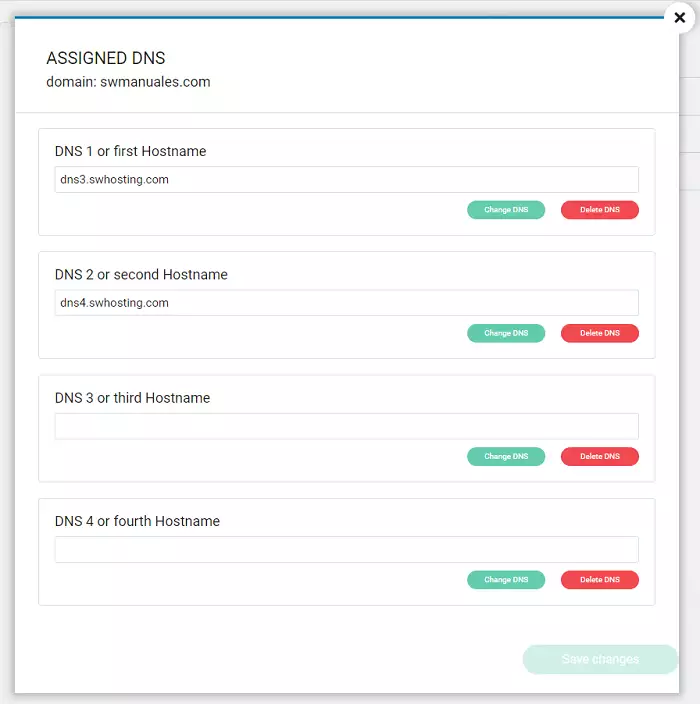
Manuel : How to configure the DNS servers (Nameservers) of my domain.
In this case, the domain swmanuales.com points to the DNS servers dns3.swhosting.com and dns4.swhosting.com. (These, along with the servers dns1.swhosting.com and dns2.swhosting.com, are the servers that are assigned by default when creating a hosting service)
In this way, the DNS servers (Nameservers) dns3.swhosting.com and dns4.swhosting.com will point to the DNS Zone of the domain swmanuales.com.
Therefore, for a website to work, we need a domain configured to point to a DNS server (Nameserver) that will have a DNS zone configured with the DNS records necessary to know the location of the different servers of the domain.
As long as you have a Hosting Service or a DNS Hosting service where the DNS Zone is created, you will be able to manage the different DNS records.
To create a Hosting Service or a DNS Service, you can follow manual Manuel : Create Hosting service for my Website
To manage the DNS records of a DNS zone, you can follow manual Manuel : Manage DNS records