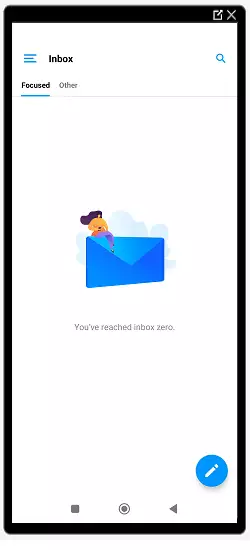
How to set up Edison Mail on Android
In this manual, you will see how to configure your email accounts in the free application 'Edison Mail', available for Android and Apple iOS smartphones.
Edison Email is an elegantly designed email application to manage email accounts from different providers such as Gmail, Yahoo Mail, Mail, Hotmail, Outlook, IMAP, iCloud, etc.
The configuration shown in this manual requires the installation of a TLS security certificate for your Hosting email Manuale: How to Activate TLS for my email via SWPanel.
Data for the email account configuration
- Email account
- Access key
- Incoming mail server: mail.dominio.com
- IMAP Port: 993
- POP3 Port: 995
- Outgoing mail server: mail.dominio.com
- SMTP Port(SSL/TLS): 465
- SMTP Port(STARTTLS): 587
To view the connection data for your email account from SWPanel, you can check this manual Manuale: How to view the connection details of my email account.
Adding an email account in the application
Once Edison Mail is downloaded and installed, available on the Android Play Store and Apple App Store, you will be able to configure your email account.
In this case, the configuration of an IMAP email account will be performed for the first time.
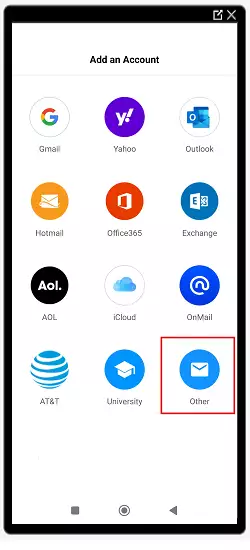
1 . Open the application. Several options to add an account will be presented. Click on Other:
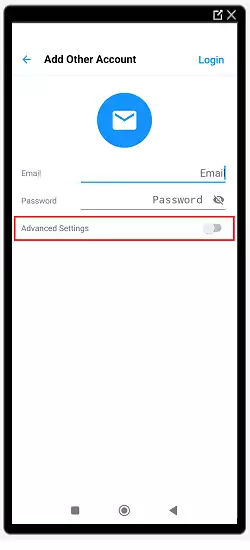
2 . Next, slide the Advanced Settings button:
3 . The account configuration will open; you must fill in the fields with the data collected in the Data for the email account configuration section:
- Email: Email account name
- Hostname(incoming server): mail.dominio.com
- Password: Email account password
- Port: 993(IMAP) or 995(POP)
- Security: SSL/TLS
- Hostname(outgoing server):mail.dominio.com
- Port: 465(SSL/TLS) or 587(STARTTLS)
- Security(outgoing server): SSL/TLS or STARTTLS, depending on the port chosen previously.
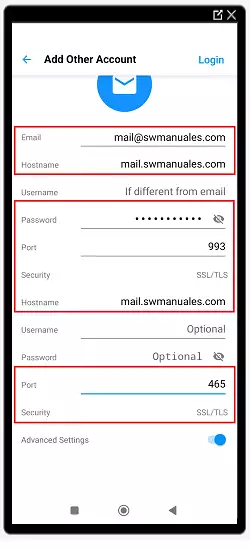
4 . Once the configuration is complete, log in and you will have the email service with your own domain in the Edison Mail email manager: