
Notification email settings
SWPanel allows you to custom configure which notifications you want to receive and to which email address each one will be sent, according to its type and organizational needs.
Configure notifications
From SWPanel, go to the menu with your customer name (top right) and access the Notification email settings option.
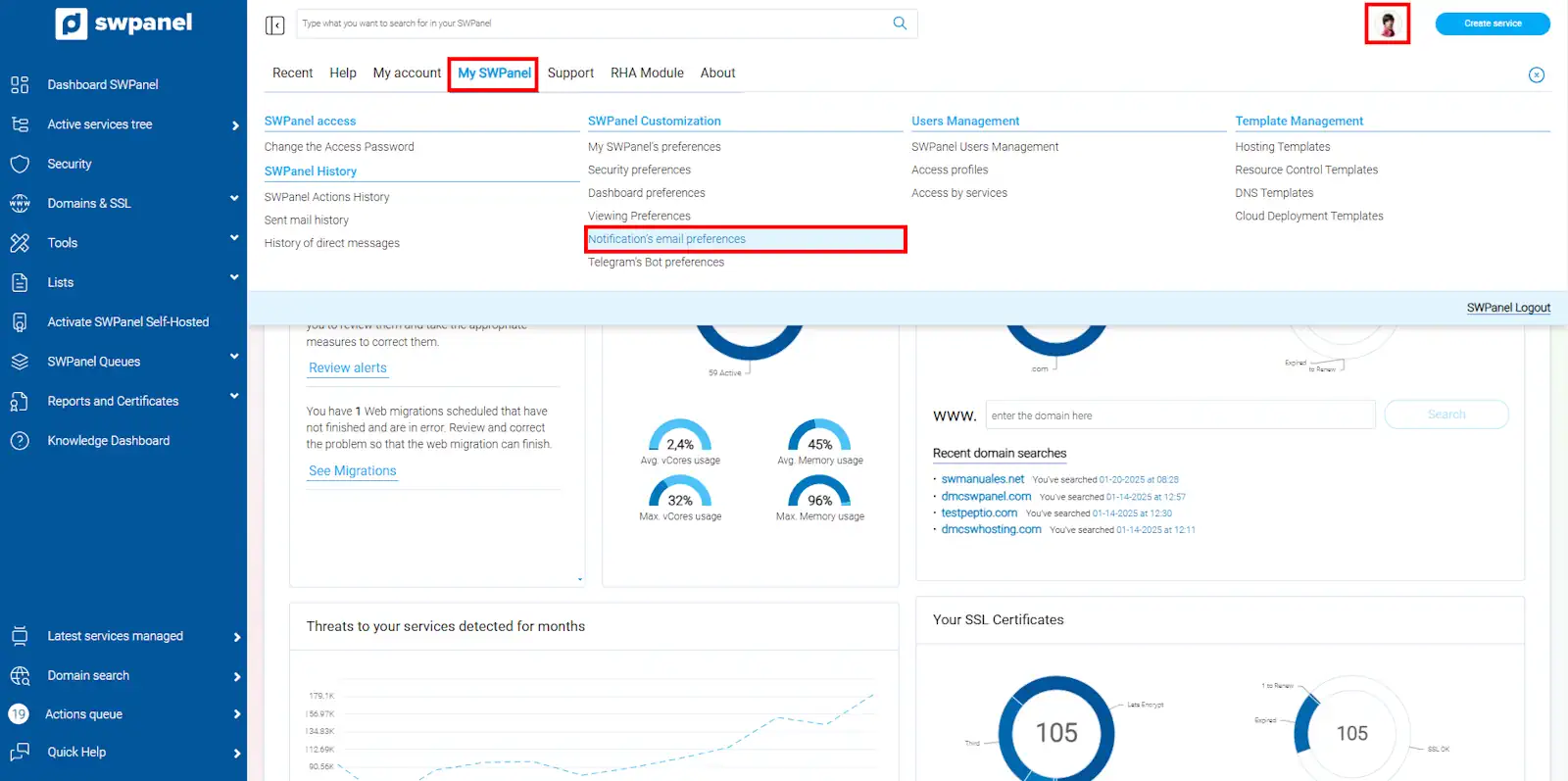
info_capture ℹ️ Note: The screenshot is for guidance purposes, taken from version 2026.001.0026 dated 03/05/2026. It may differ from the current version of SWPanel.
Notifications are displayed organized by typology.
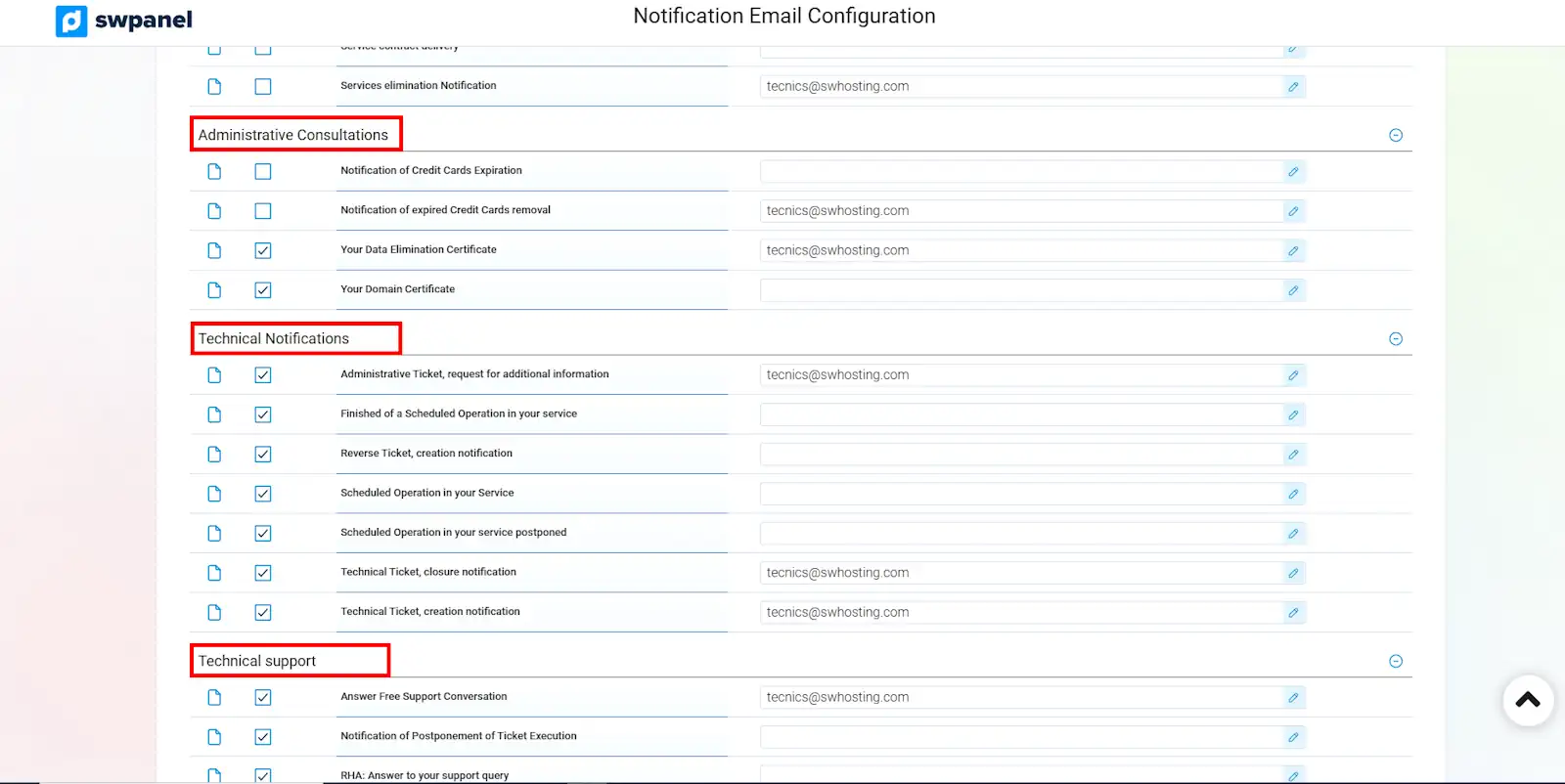
info_capture ℹ️ Note: The screenshot is for guidance purposes, taken from version 2026.001.0026 dated 03/05/2026. It may differ from the current version of SWPanel.
The following section explains the meaning of each type of notification.
Enable or disable notifications
Select the checkboxes for the notifications you wish to receive.
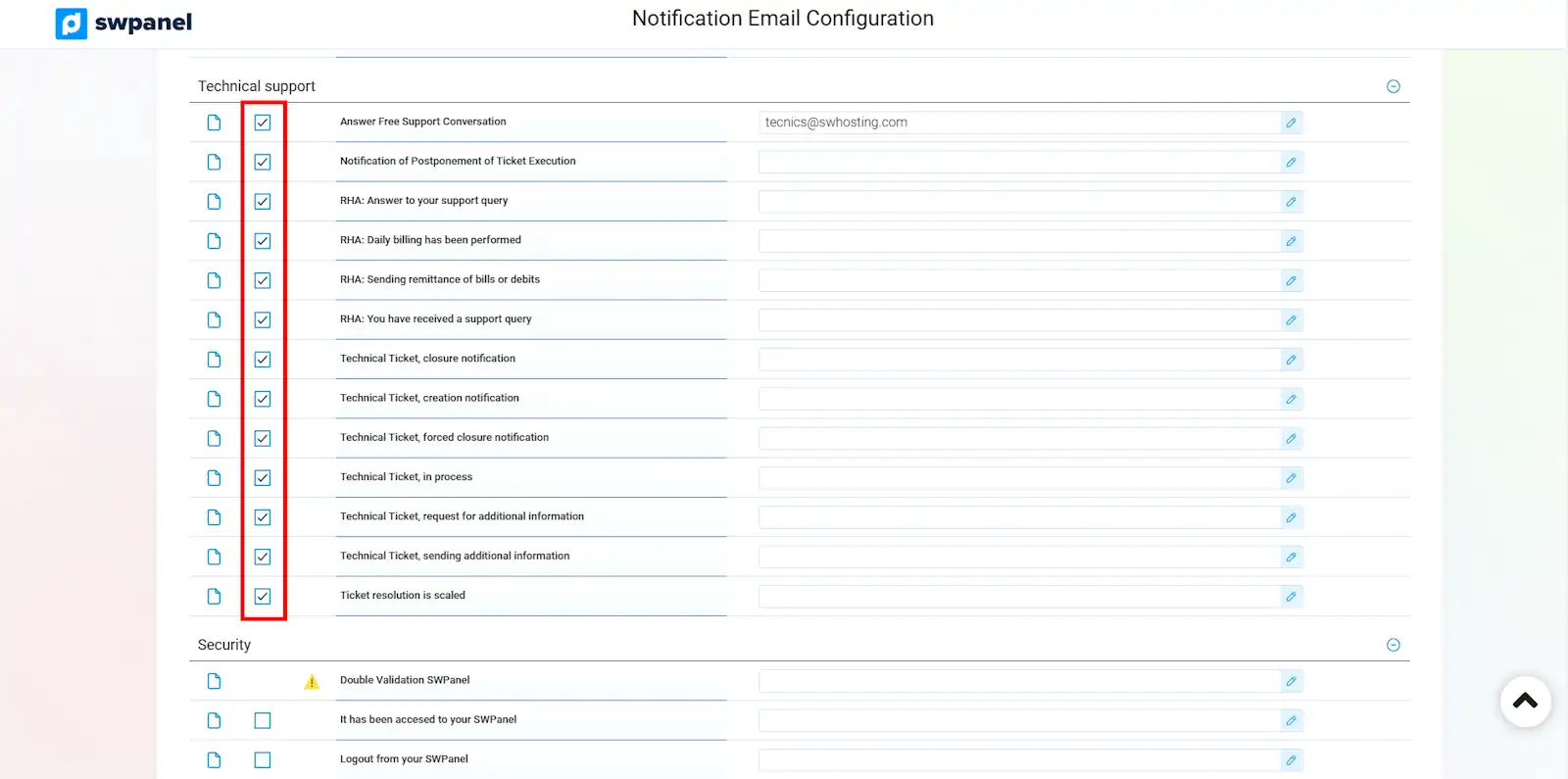
info_capture ℹ️ Note: The screenshot is for guidance purposes, taken from version 2026.001.0026 dated 03/05/2026. It may differ from the current version of SWPanel.
Changes are applied immediately.
If you do not wish to receive any notification emails from SW Hosting, you can use the "Disable all" button, located at the bottom of the page.
Please note that by disabling emails, you will stop receiving all notifications. This does not mean that you should not perform the actions indicated in them. Some notifications are especially important, so it is not recommended to disable them.
Modify sending address
In the field next to the notification, enter the email address to which you want them to be sent and click the "✓" icon.
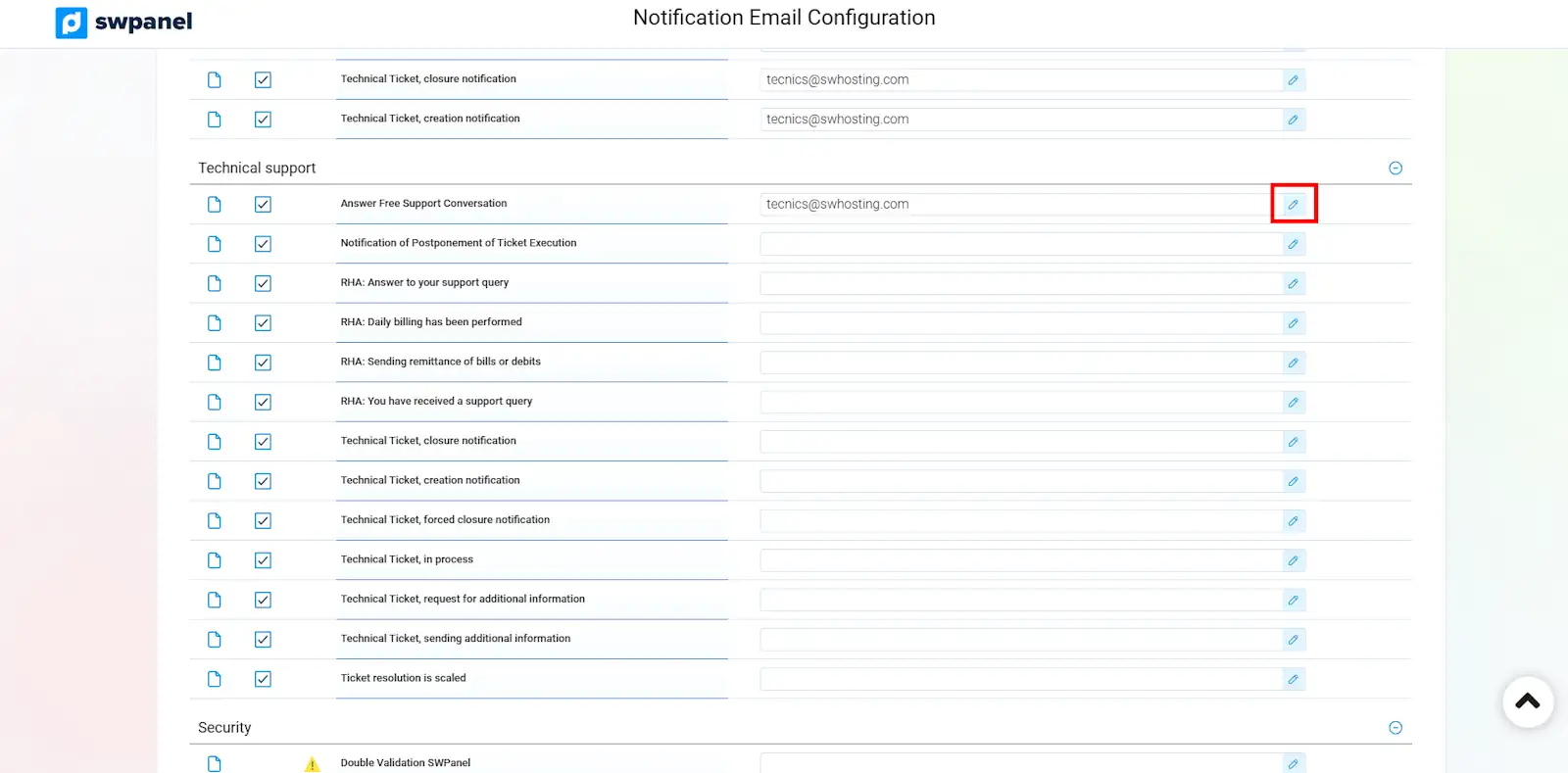
info_capture ℹ️ Note: The screenshot is for guidance purposes, taken from version 2026.001.0026 dated 03/05/2026. It may differ from the current version of SWPanel.
If you leave the field blank, the emails will be sent by default to the general contact of your customer file, or, in some cases (as explained in the next section), also to the general contact.
Notification Glossary
Administrative Notifications
- Service Termination – request cancellation: Generated when a service termination request is cancelled.
- Service Termination – request: Generated when requesting the termination of a service.
- Automatic balance top-up: Confirms that an automatic recharge has been successfully completed.
- Certificate available: Informs that a certificate is ready to be installed.
- Certificate installed: Confirms that the certificate has been successfully installed in the service.
- Service contract delivery: Generated when contracting a service and attaches the contract in PDF format.
- Invoice delivery: Addressed to the general contact. Notification sent when a new invoice is generated.
- Automatic balance top-up failure: Addressed to the general contact. Issued if the automatic recharge fails, indicating the reason.
- Returned receipt notification: Addressed to the contact. If a receipt is returned, the invoice number, amount, deadline, and payment methods are reported.
- Service deletion notification: Addressed to the general contact. If there are unsettled overdue payments, a warning is sent regarding when the services will be deleted.
- Invoice issuance notification: Addressed to the general contact. Advance notice sent 10 days before the invoice, indicating the services that will be billed.
- Error notification – direct invoice charge to card: For payments by direct card charge, a notification is sent if the charge fails after several attempts, detailing the invoice number, amount, and card used.
- Service non-renewal notification: Informs that a service will not be renewed upon the end of its contract.
- Negative balance notification (1st notice / 2nd notice / 3rd notice / 4th notice / 5th notice): Addressed to the general contact. If a negative balance is generated, several notifications are sent with the amount, deadline, and payment methods.
- Negative balance notification – service blocking: If the negative balance is not settled, a final notification is sent indicating the amount, deadline, payment methods, and the precautionary blocking of services.
- Blocked services notification: Reminder after the blocking of services due to unsettled overdue payments.
- Final service non-renewal reminder: Informs that the service will not be renewed at the end of the contract and that auto-renewal will be disabled.
Administrative Queries
- Credit card expiration notification: Notice about the upcoming expiration of one of the registered credit cards.
- Expired credit card deletion notification: Sent when a credit card that has expired is automatically deleted.
- Your domain certificate: Generated when requesting the domain certificate.
- Your data deletion certificate: Generated when requesting the data deletion certificate upon terminating a service.
Technical Notifications
- Scheduled action in your service: Generated when the Systems Engineering Area schedules a technical intervention in your service.
- Completion of scheduled action in your service: Informs about the completion of a scheduled technical action in your service.
- Scheduled action in your service postponed: Sent when a scheduled technical action in your service is postponed.
- Administrative ticket – closure notification: Generated when closing an administrative ticket, including details about its resolution.
- Administrative ticket – creation notification: Generated when creating an administrative ticket, including details of the same.
- Administrative ticket – request for additional information: Sent when the Administrative Department needs extra information to resolve your query.
- Inverse ticket – creation notification: Generated when the Systems Area detects an incident in your services and opens an inverse ticket for its resolution.
Technical Support
- Ticket execution deferral notification: Generated when the Systems Area defers the execution of a ticket, including details about it.
- Free support conversation response: Informs that a response has been received in a free support conversation.
- RHA – sending of receipt or debit batches: Notification about the receipts or debits of your users in RHA.
- RHA – you have received a support query: Informs that a user has sent a support query in RHA.
- RHA – response to your support query: Notification indicating that a user has received a response to their query in RHA customer support.
- RHA – daily billing has been completed: Informs that the daily billing of your users' services in RHA has been completed.
- Ticket resolution escalated: Indicates that a ticket has been transferred to a higher level due to its complexity.
- Technical ticket – in progress: Generated when a ticket moves to the resolution process.
- Technical ticket – sending of additional information: Confirms the receipt of additional information requested by the Systems Engineering Area.
- Technical ticket – closure notification: Generated when closing a technical ticket from the Systems Engineering Area, including resolution details.
- Technical ticket – forced closure notification: Informs that a technical ticket has been closed forcefully and cannot be reopened.
- Technical ticket – creation notification: Generated when creating a ticket for Security Consultancy, including details of the same.
- Technical ticket – request for additional information: Sent when the Systems Engineering Area needs additional information to resolve a technical ticket.
Security
- Unusual access to your SWPanel: Generated upon detecting access from an IP address with unusual or suspicious geolocation.
- SWPanel double validation: Notification generated by two-factor authentication, if enabled.
- Security report delivery: Generated when requesting a security report, attaching the corresponding document.
- Password security report: Informs about the result of the automatic security check of email and FTP passwords.
- Logout from SWPanel: Sent when logging out of SWPanel.
- Access to your SWPanel: Generated when logging into SWPanel.
Delivery of access passwords
- 2-step authentication: Generated when enabling or confirming two-factor authentication to protect your account.
- Moodle access delivery: Notification sent when contracting SW Cloud Storage, including the access credentials for Moodle.
- SSH/CHRoot access delivery to a hosting: Provides the credentials to securely access the hosting via SSH or CHRoot.
- SW EasyWeb access delivery: Sent when creating an SW EasyWeb service, including the access credentials for it.
- Linux access user delivery: Notification sent when creating a Cloud Linux, with the corresponding access credentials.
Informative messages to customers
- SWPanel direct message: Generated upon receiving a direct message through SWPanel.
Service Quality
- Annual service quality control survey: Sent once a year to evaluate the quality of the service offered.
- Satisfaction survey due to service termination: Sent after the termination of a service to collect your opinion and improve the service.
- Quality surveys – conversations with Level 1 support: Allow for the evaluation of the quality of service received in interactions with Level 1 Support.
- Quality surveys – Level 2 support: Allow for the evaluation of the quality of service received in technical tickets managed by Level 2 Support.
Service Usage Alerts
- CaaS Intelligence action: Generated when there is a resource modification performed by the CaaS Intelligence service.
- Cloud resource usage alert: Notification sent when excessive resource usage is detected in your Cloud.
- Usage alert – backup space: Generated when little backup space remains available.
- Usage alert – disk space: Notification sent when low disk space is detected.
- Usage alert – traffic: Generated when low or excessive traffic usage is detected.
- Resource control for SWPanel: Notification about the usage and availability of resources in SWPanel.
- Email space report: Sent when an email mailbox is full or exceeds the maximum allowed size.
- Database size report: Notification generated when a database reaches or exceeds the maximum allowed size.
Backup Processes
- Scheduled backup failure: Generated when a scheduled backup fails, including details of the affected service, date, and last correct backup.
- Backup recovery completed: Notification sent upon successfully completing a backup recovery.
- Backup recovery completed with errors: Generated when completing a backup recovery, but detecting errors during the process.
- Backup recovery request: Sent when requesting a backup recovery, including details of the same.
- Backup recovery request for domains/services: Notification generated when requesting the recovery of a specific backup within a hosting.
Actions on services
- SWPanel license update: Generated when performing a license expansion or reduction in a Cloud with SWPanel.
- Error updating service: Notification sent when a problem occurs while updating a Cloud service, including details of the errors found.
- Cloud Parking notification: Informs that a server has been parked correctly.
- Service updated: Notification confirming that a server has been updated correctly.
- Service updated automatically: Sent upon completion of an automatic server update, detailing the updated packages.
- Service redefined: Notification informing that a Hosting service has been redefined correctly.
Domain Management
- Action on domains cancelled: Notification informing that a requested action for a domain (such as renewal or transfer) has been cancelled.
- Domain NON auto-renewal notice: Notification generated in case of insufficient balance to execute an auto-renewal, leaving it cancelled and requiring manual execution.
- Domains, Auto-renewal report: Notification informing of the domains that will be renewed due to auto-renewal.
- Domains, status change report: Notification generated after a change in the status/situation of a domain. For example: A non-renewed domain that moves into a grace period.
- Domains, extensions protection report: Notification informing about the protection status of a domain, indicating if protection is enabled or disabled to prevent unauthorized transfers.
- Domains, Renewal report: Notification warning about the upcoming expiration of a domain which, to be maintained, must be renewed.
- Domain Vigilance report: Notification of an available domain, among the domains monitored from Domain Vigilance.
- Authcode request - Quality info reason: Notification generated when an Authcode request is made for a domain, requesting information and the reason for the request.
- Your domain is pending: Notification indicating that the action on your domain is still pending transfer/registration.
Domain Management - WAP (Whois Accuracy Program)
- WAP Owner mail verification: Notification generated to verify domain ownership. The verification link must be clicked to perform the confirmation.
- WAP Owner mail verification - domain cancelled: Notification generated 15 days after a owner verification mail was issued and not performed. Informs of the upcoming deactivation of the domain.
- WAP Owner mail verification - domain cancelled to SW client: Notification reminding that the domain is deactivated.
- WAP Owner mail verification to SW client: Notification generated confirming the correct verification of the domain (once the verification link has been followed).
Domain Management - IRTP (Inter Registrar Transfer Policy)
- IRTP completed: Notification generated confirming to both parties the correct transfer of a domain.
- IRTP current: Addressed to the domain recipient. Notification informing about the transfer process. Instructions to accept or reject the transfer are included.
- IRTP current cancelled: Addressed to the domain recipient. Notification informing that the transfer has not been completed correctly.
- IRTP new: Addressed to the domain transferor. Notification informing about the transfer process. Instructions to accept or reject the transfer are included.
- IRTP new cancelled: Addressed to the domain transferor. Notification informing that the transfer has not been completed correctly.
SSL Certificate Management
- SSL Certificates NON auto-renewal notice: Notification informing that the auto-renewal of an SSL certificate will not be carried out, which will require manual renewal to maintain the validity of the certificate.
- SSL Certificates, Auto-renewal report: Notification informing about the upcoming Auto-renewal of an SSL certificate; it also indicates the period during which it is cancellable.
- SSL Certificate Renewal report: Notification generated when the upcoming expiration of SSL Certificates is detected, which must be renewed to be maintained.
- SSL Certificate Validation notification: Notification informing about the validation status of an SSL certificate.
Affiliate Network
- Affiliate service renewal notification: Notification informing about the renewal of services contracted through your affiliates.
- Affiliate sale notification: Notification informing about a sale made through an affiliate link.