
What are SPF, DKIM, and DMARC records
SPF, DKIM, and DMARC records are three email authentication protocols designed to ensure that emails reach their recipients correctly, thus preventing them from ending up in the SPAM folder and preventing emails from being sent spoofing our identity, an activity known as Phishing.
Below we explain how each record works and provide some examples of their use.
SPF
SPF, or Sender Policy Framework, indicates who can send an email from a specific domain, with the purpose of protecting against sender forgery.
It is common for major email service providers (such as Google) to require the presence of this record in order to prevent fraud and unsolicited email. Otherwise, emails sent to them may be rejected or classified as SPAM.
Parameters
SPF rules are evaluated sequentially from left to right based on the included parameters:
- v=spf1 - Indicates the start of the rule and which SPF version will be used.
- mx - Authorizes the servers appearing in the MX records to send email on behalf of 'dominiosw.com'.
- a - Authorizes the IP appearing in the A record to send email on behalf of 'dominiosw.com'.
- ptr - Authorizes any host ending in 'dominiosw.com' to send email.
- ip4:1.2.3.4 - Authorizes the IP '1.2.3.4' to send email on behalf of 'dominiosw.com'.
- all - Depending on the prefix, it indicates how to handle cases where there is no match with any previous parameter. It is included at the end of the SPF rule.
Prefixes
The following prefixes can be used with each of the parameters (except for the first one):
- + Authorized sender. If no prefix is indicated, this is assumed by default.
- - Unauthorized sender, it is rejected.
- ~ Unauthorized sender, it will be marked with a special header, but will not be rejected.
Examples
A characteristic SPF example:
v=spf1 mx a ~all
- mx: The servers in the MX records are authorized (since no prefix is included, + is assumed).
- a: The IP in the A record is authorized.
- ~all: Those that do not match the previous rules are not authorized, but will not be rejected; they will be marked with a special header.
v=spf1 mx -all
- mx: The servers in the MX records are authorized (since no prefix is included, + is assumed).
- -all: Those that do not match the previous rules are not authorized and will be rejected.
v=spf1 -mx a ip4:1.2.3.4 ~all
- -mx: The servers in the MX records are not authorized; they will be rejected.
- a: The IP in the A record is authorized.
- ip4:1.2.3.4: The IP '1.2.3.4' will be marked as neutral.
- ~all: Those that do not match the previous rules are not authorized, but will not be rejected; they will be marked with a special header.
DKIM
DKIM, or DomainKeys Identified Mail, includes a key that allows the recipient of an email to verify that the sender is actually who they claim to be. Like SPF and DMARC records, its objective is to prevent fraud and unsolicited email.
An example of DKIM would be:
DKIM: swmanuales
DKIM Key: v=DKIM1; g=*; k=rsa; p=MIGfMA0GCGGGGGb3DQEBAQUAA4G000BiQKBgQD0000VKvGjmSb4FkI70000e1KqV01eQ70n0000D5bpRfo8ZGcab0000+3+O0mPI7wYblklU0000T0A3LVJk+QTwX00007VA7EiL0utBMW0000iZLJ8Exyzoajql0000RRJmyhngY/0000t0yq21pdlYLrJa0000CfaniL/8gKQGQID0000
DMARC:
DMARC, or Domain-based Message Authentication, Reporting and Conformance, is a complement to the previous methods (SPF and DKIM) aimed at preventing fraud and unsolicited email. It allows establishing:
- Action policy for suspicious emails that have not passed both the SPF and DKIM validation systems.
- Generation of aggregate reports with statistics on SPF and DKIM validation failures, among others.
- Generation of forensic reports with details about emails that fail the validation processes.
Parameters
The parameters of DMARC rules allow configuring their behavior; these are the most basic:
- v=DMARC1; - Indicates the start of the rule.
- p=none; - Monitoring and report sending policy. The email will be delivered normally, but receiving servers will monitor the behavior and generate reports. It is used to verify operation and check if someone is attempting to spoof your domain as an email sender.
- p=quarantine; - The recipient will mark as SPAM or quarantine emails that do not pass both validation systems (DKIM/SPF).
- p=reject; - The recipient will reject emails that do not pass both validation systems (DKIM/SPF).
- sp=none;/sp=quarantine;/sp=reject; - [Optional] Different policy for subdomains. If this parameter is not present, the previous parameter ('p=none;/quarantine;/reject;') will take effect over the domain and its subdomains.
- rua=mailto:[email protected]; - [Optional] Email address to which aggregate reports should be sent.
- ruf=mailto:[email protected]; - [Optional] Email address to which forensic reports should be sent.
- aspf=s; - [Optional] Strict SPF validation. The domain must be identical to the one appearing in the SPF rule; subdomains of the same are not accepted.
- adkim=s; - [Optional] Strict DKIM validation. The domain must be identical to the one appearing in the SPF rule; subdomains of the same are not accepted.
Examples
A basic example of DKIM would be:
v=DMARC1; p=none;
- p=none; - Monitoring and report sending policy. No email address for receiving reports is included in the rule, so none will be generated. The email will be delivered normally; nothing is done regarding emails that do not pass the validation systems.
v=DMARC1; p=none; sp=reject; rua=mailto:[email protected];
- p=none; - Monitoring and report sending policy. The email will be delivered normally; nothing is done regarding emails that do not pass the validation systems.
- sp=reject; - Emails coming from subdomains (example: 'correo.dominiosw.com') will be rejected if they do not pass both validation systems (DKIM/SPF).
- rua=mailto:informes@swmanuales; - Aggregate reports will be sent to the indicated email address.
Important: Before creating a DMARC record, you must have the SPF and DKIM records created and functioning.
You can use the following services to generate DMARC rules: https://dmarcian.com/dmarc-record-wizard/ https://mxtoolbox.com/DMARCRecordGenerator.aspx
Automatically create advanced DNS records SPF - DKIM - DMARC
You can create a DKIM key from SWPanel; you must access your service dashboard:
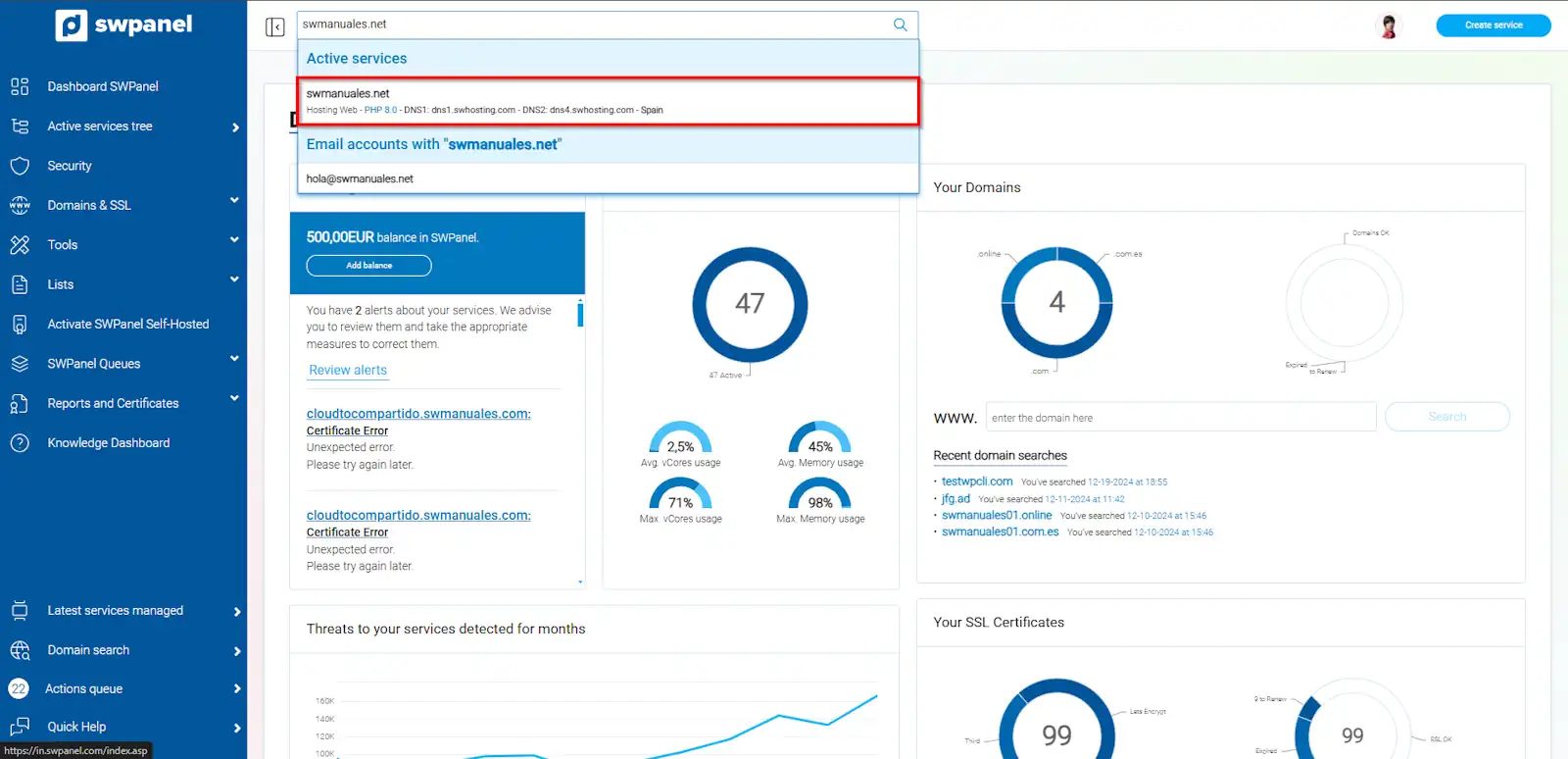
info_capture The screenshot is for guidance purposes. It was taken using version 2025.00.0017 dated 12/31/2024. It may differ from what the current version of SWPanel shows.
Next, access the Service Management > DNS Management section (left menu):
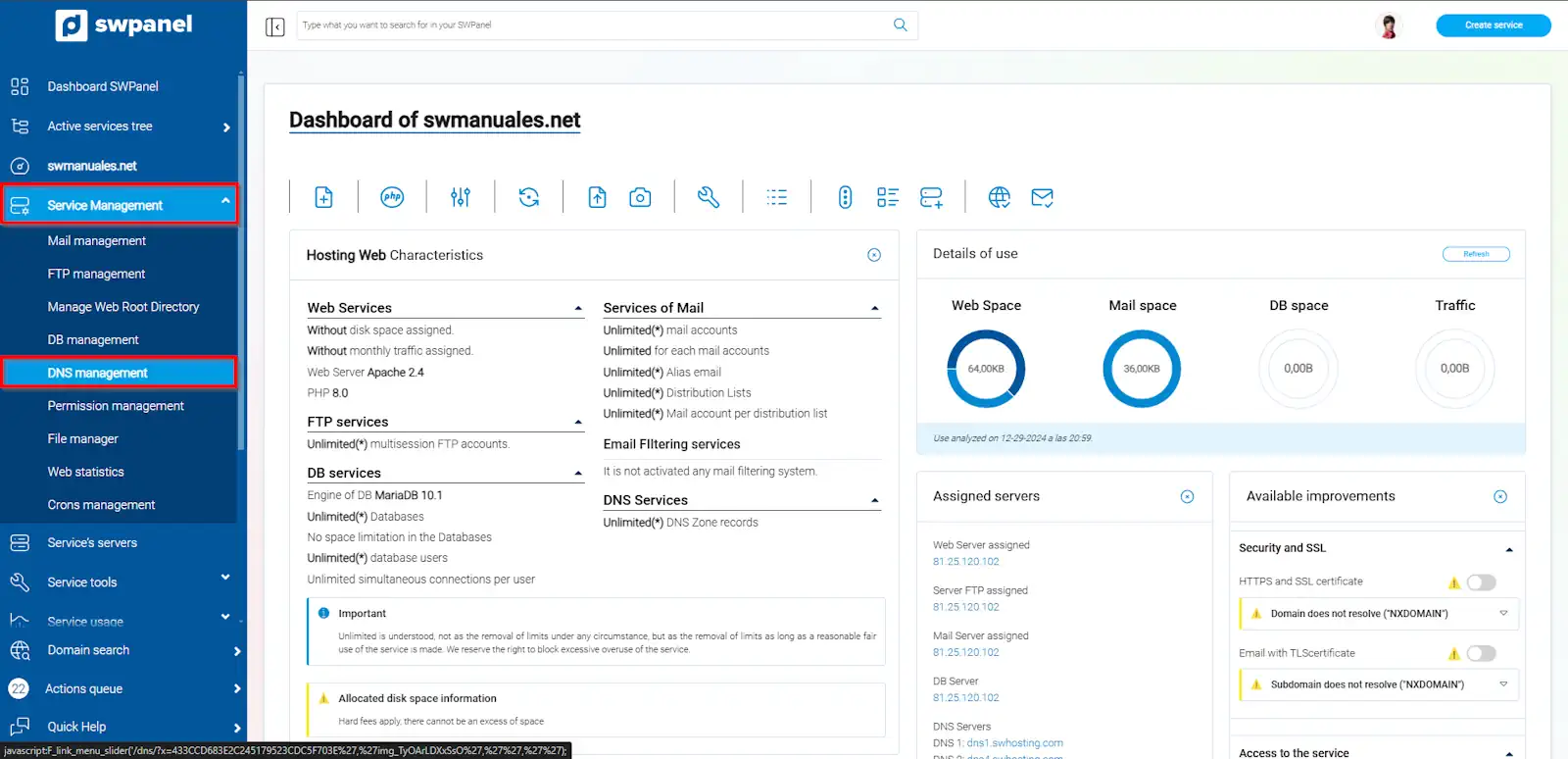
info_capture The screenshot is for guidance purposes. It was taken using version 2025.00.0017 dated 12/31/2024. It may differ from what the current version of SWPanel shows.
- Automatically create advanced DNS records SPF - DKIM - DMARC: This will automatically create the SPF - DKIM - DMARC records.
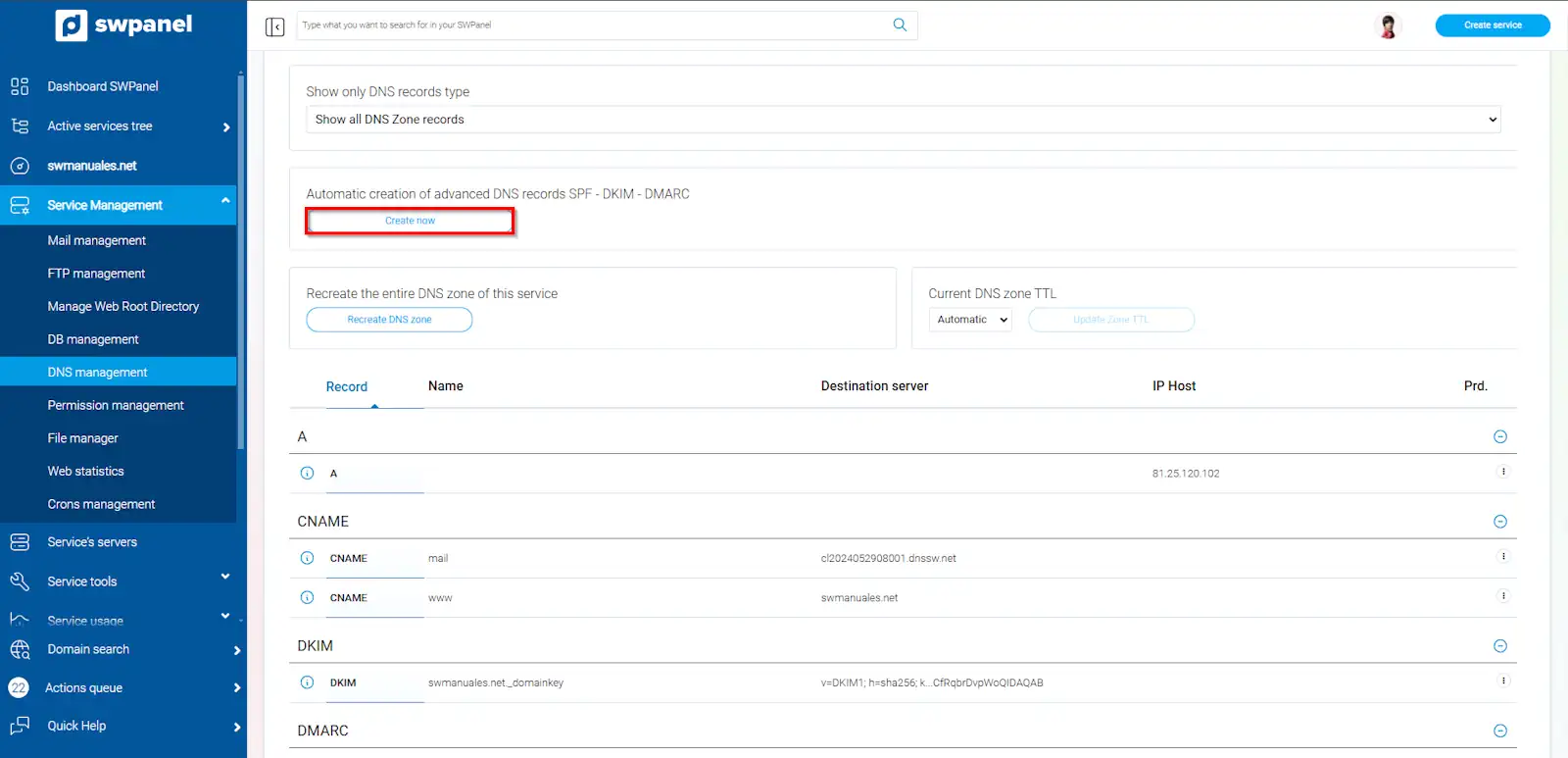
info_capture The screenshot is for guidance purposes. It was taken using version 2025.00.0017 dated 12/31/2024. It may differ from what the current version of SWPanel shows.
These are the records that are automatically created from SWPanel:
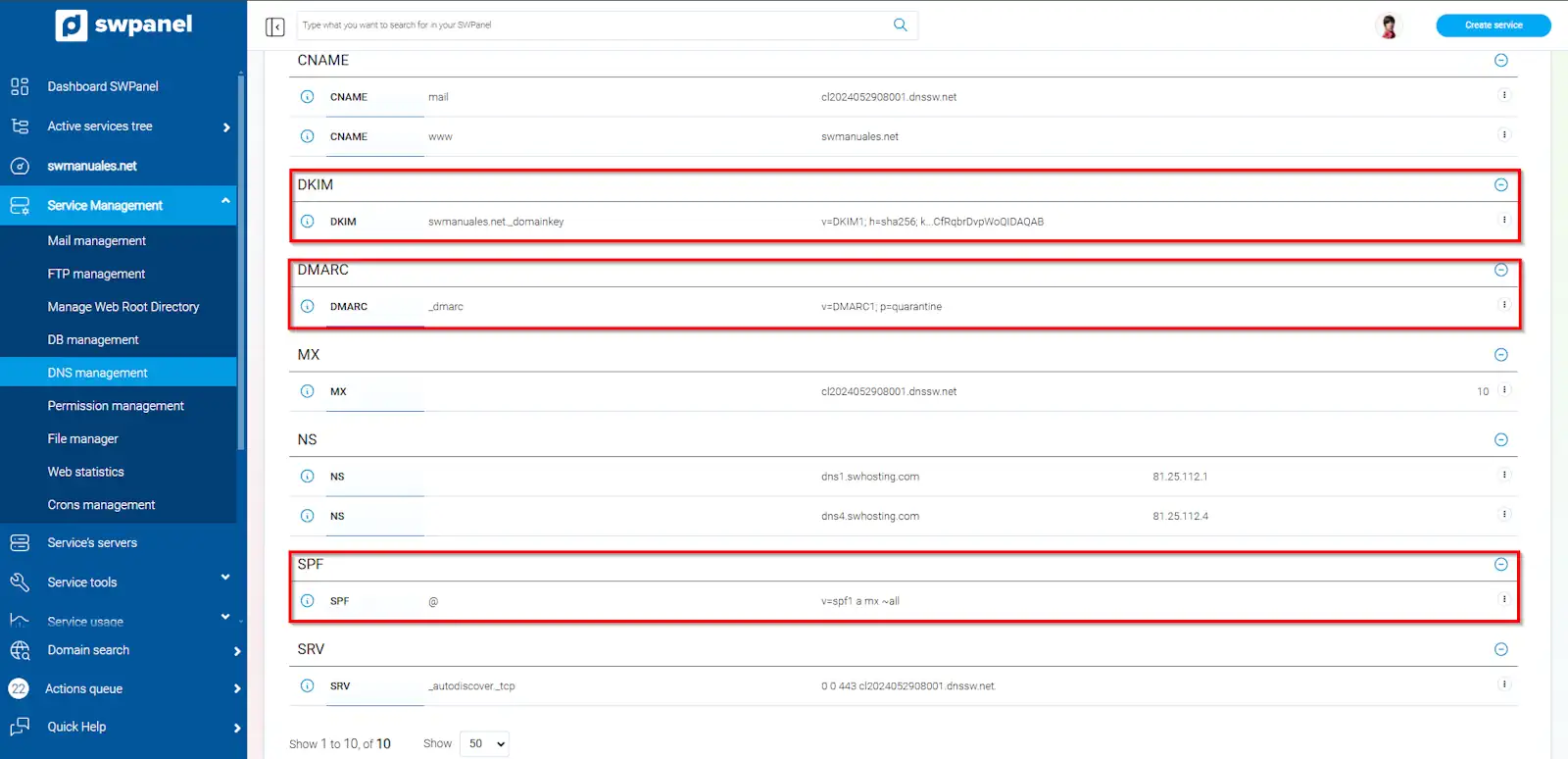
info_capture The screenshot is for guidance purposes. It was taken using version 2025.00.0017 dated 12/31/2024. It may differ from what the current version of SWPanel shows.