SWPanel

RHA · Your IT business

Sell hosting under your brand, end to end

Your website sells, the customer signs up in three steps, pays with the system they prefer, their service goes live, the invoice comes out with Veri*Factu and you give support from SWPanel. With your brand and your prices.

  • 17 payment systems
  • Sign-up in three steps
  • Support included

Illustration. The customers are examples.

  • Sell from your website Each plan has its sign-up link: you put it on the “Order” button of your website and the sign-up carries your brand.
  • Get paid however your customer wants 16 payment gateways, SEPA direct debit and bank transfer, with each one's currencies in view.
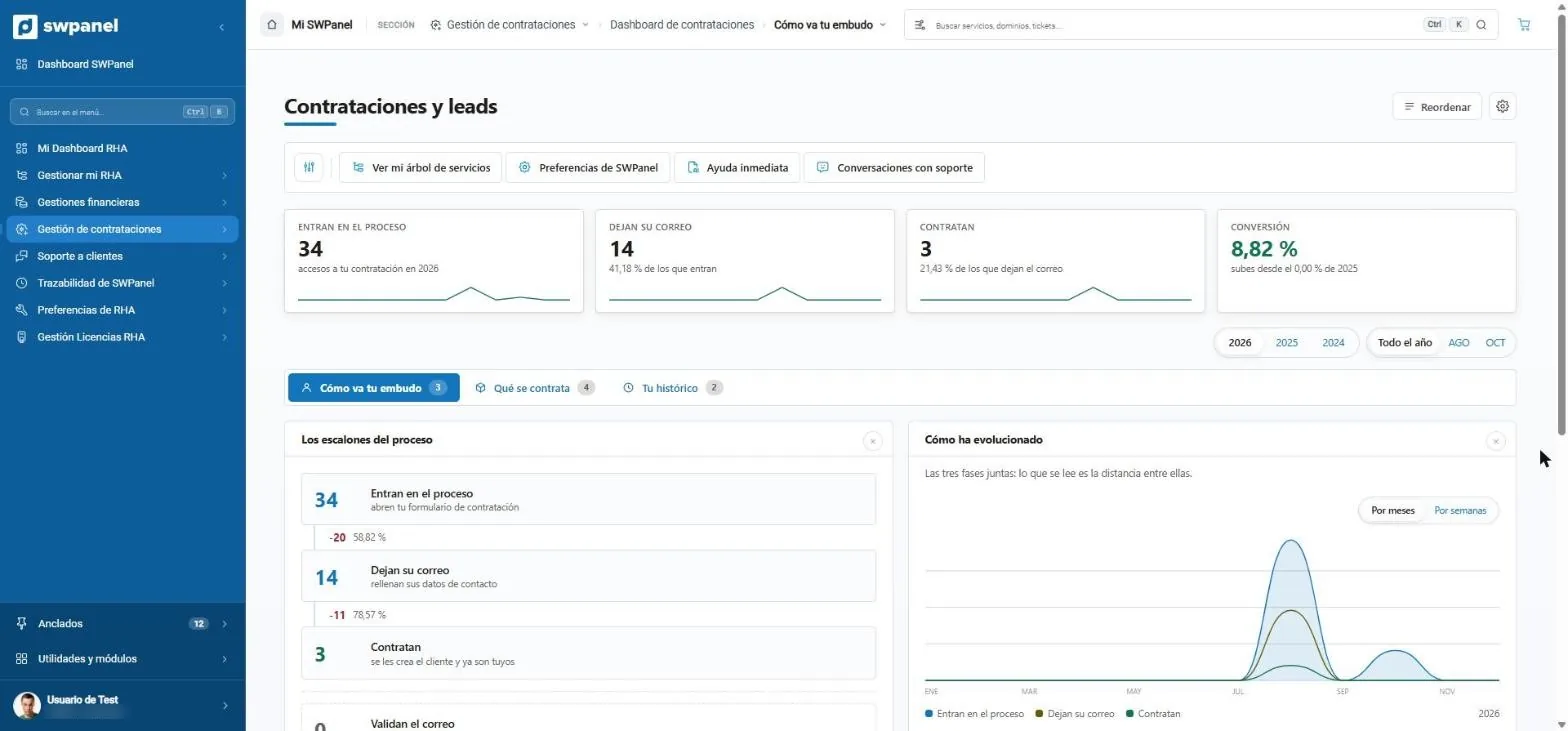
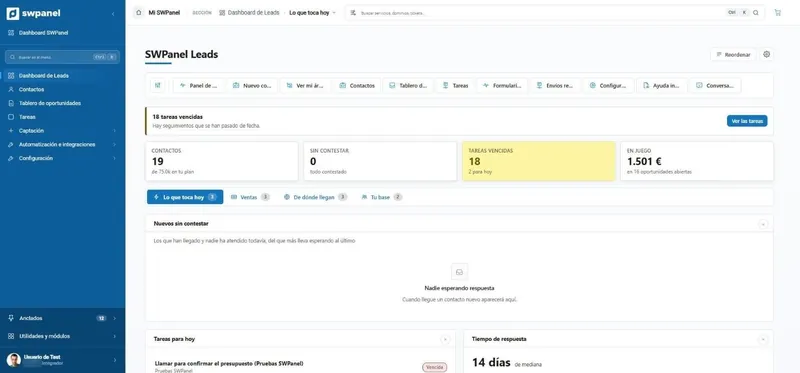
  • Track every sale You know how many come in, how many leave their email and how many order, and who to follow up with.
  • 17 Payment systems 16 gateways and the SEPA receipt
  • 3 steps To sign up plan, details and email
  • 236 Settings to tailor it to you
  • 12 steps From zero to invoicing with Veri*Factu included

Payments

17 payment systems, already integrated

Enable the ones you want to offer. Your customers pay with what they use in their country and you get paid without developing anything.

  • PayPal Global With their PayPal account or with a card
  • Stripe Global Cards and local methods of each country
  • Adyen Global Cards and local methods of each country
  • Worldpay Global Credit and debit cards
  • Checkout.com Global Cards and digital wallets
  • Redsys Spain Cards, with your bank's virtual POS
  • Mollie Europe Cards and European payment methods
  • Viva.com Europe Cards and European payment methods
  • Nexi Europe Cards, with your bank's POS
  • Revolut Europe Payments with your Revolut Business account
  • Mercado Pago Latin America Cards and local methods of each country
  • PayU Latin America Cards and local methods of each country
  • Bold Colombia Colombian cards and payment methods
  • PagBank Brazil Brazilian cards and payment methods
  • Webpay Chile Cards, with Transbank
  • Conekta Mexico Mexican cards and payment methods
  • Recibo SEPA SEPA area Direct debit, with batches from RHA
  • Each gateway supports certain currencies: SWPanel flags the ones that don't support yours.
  • You can add the gateway fee to your customer's charge.
  • SEPA receipt in the SEPA area, with direct-debit batches and bank accounts. And, in addition, bank transfer.

The names and logos of the gateways are trademarks of their respective owners and are shown only to indicate which payment systems RHA integrates with; they imply no sponsorship or business relationship. Logos taken from each brand's public resources, from Simple Icons and from SVG Logos.

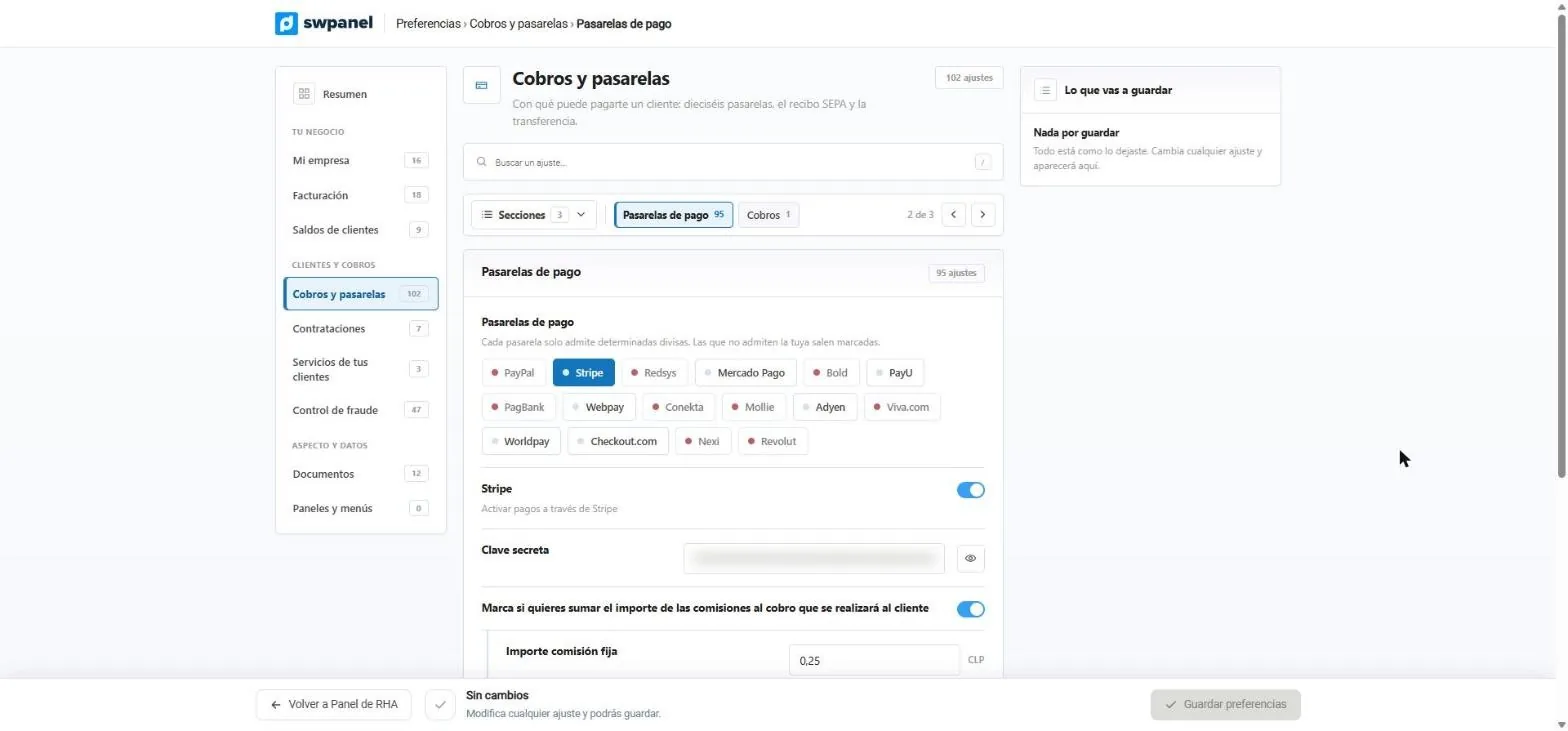
Preferences › Payments and gateways

One switch per gateway

Gateways are enabled in RHA's preferences, with their keys and fees. And if a customer runs out of balance, you decide when they're notified, when their services stop and when they're cancelled.

  1. 16 gateways, flagging those that don't support your currency.
  2. One switch per gateway, with its keys.
  3. If you want, the fee is added to the customer's charge.
  4. 102 payment settings, with the SEPA receipt and bank transfer.
RHA Preferences › Payments and gateways Real screenshot
RHA's sixteen payment gateways with Stripe enabled

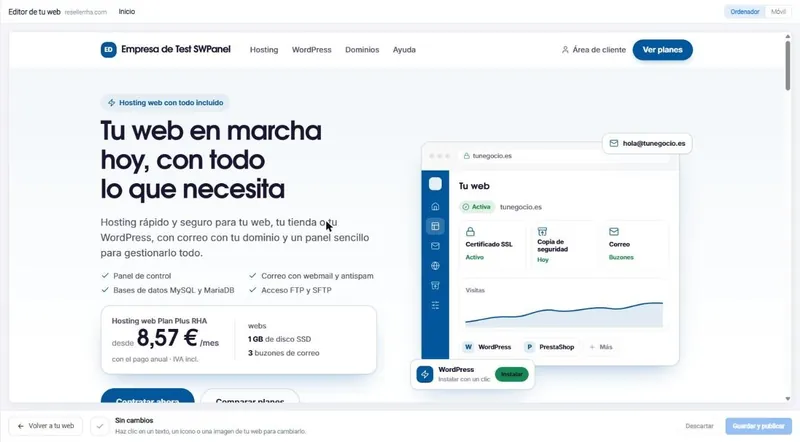
Your corporate website

Your website sells, RHA does the rest

Each plan has its own purchase link. Put it on your website's “Buy” button and the sign-up, payment and customer arrive on their own in your RHA.

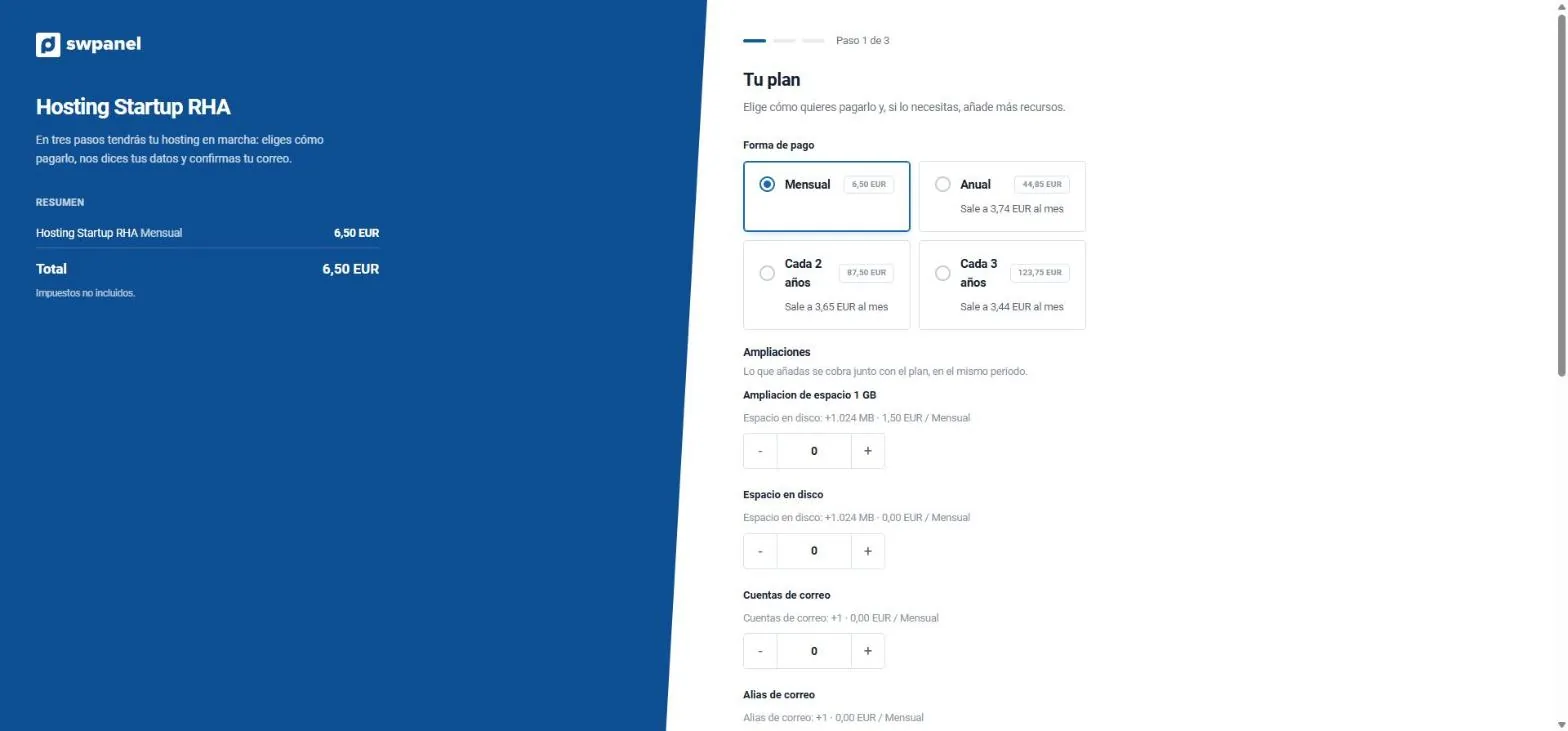
Sign-up in three steps

The plan, their details and their email

The customer chooses how to pay, adds extensions or a promo code, leaves their details and confirms their email. When done, they are your customer and you have them in RHA.

  • Monthly, annual, every two or every three years
  • Extensions charged with the plan
  • Promo codes
  1. Step 1 of 3: the plan. Then, their details and the email confirmation.
  2. How they pay: monthly, annual, every two or every three years.
  3. Extensions: more space, mailboxes or databases, in the same charge.
  4. The summary and the total, always in view.
Your website › Buy › RHA Startup Hosting Real screenshot
Customer sign-up in three steps: payment method and plan extensions

Sign-ups and leads

You know where people drop off

From the first click to the customer: how many enter your sign-up, how many leave their email, how many buy and at which step they are lost.

Sign-ups dashboard

Your funnel, step by step

You see how many left without a trace, who left their email and stopped there —those are the ones you can go after— and how many the anti-fraud stopped. And with SWPanel Leads you run the rest of your sales funnel in the same place.

  • Conversion for the year and for each month
  • Alerts if validation emails don't come back
  • 47 fraud control settings
  1. They enter, leave their email and buy: your conversion, for the year or the month.
  2. The steps of the process, with what is lost at each.
  3. How it has evolved, by months or weeks.
Sign-up management › How your funnel is doing Real screenshot
Sign-ups and leads dashboard: they enter, leave their email and buy

Support included

Your customers, well looked after

Support for your customers comes inside RHA. No other tool to pay for or other place to look.

Your customers' queries

Your customers write to you from their access and you reply from SWPanel. Open or closed, with filters and export.

Direct messages

Write to your customers from RHA and keep the history of what was sent.

Everything is recorded

Actions, emails and direct messages, in RHA's traceability.

And the AI, with you

Instant Help answers about SWPanel's manuals and helps you solve things sooner.

See more

In a few clicks

From zero to selling, guided

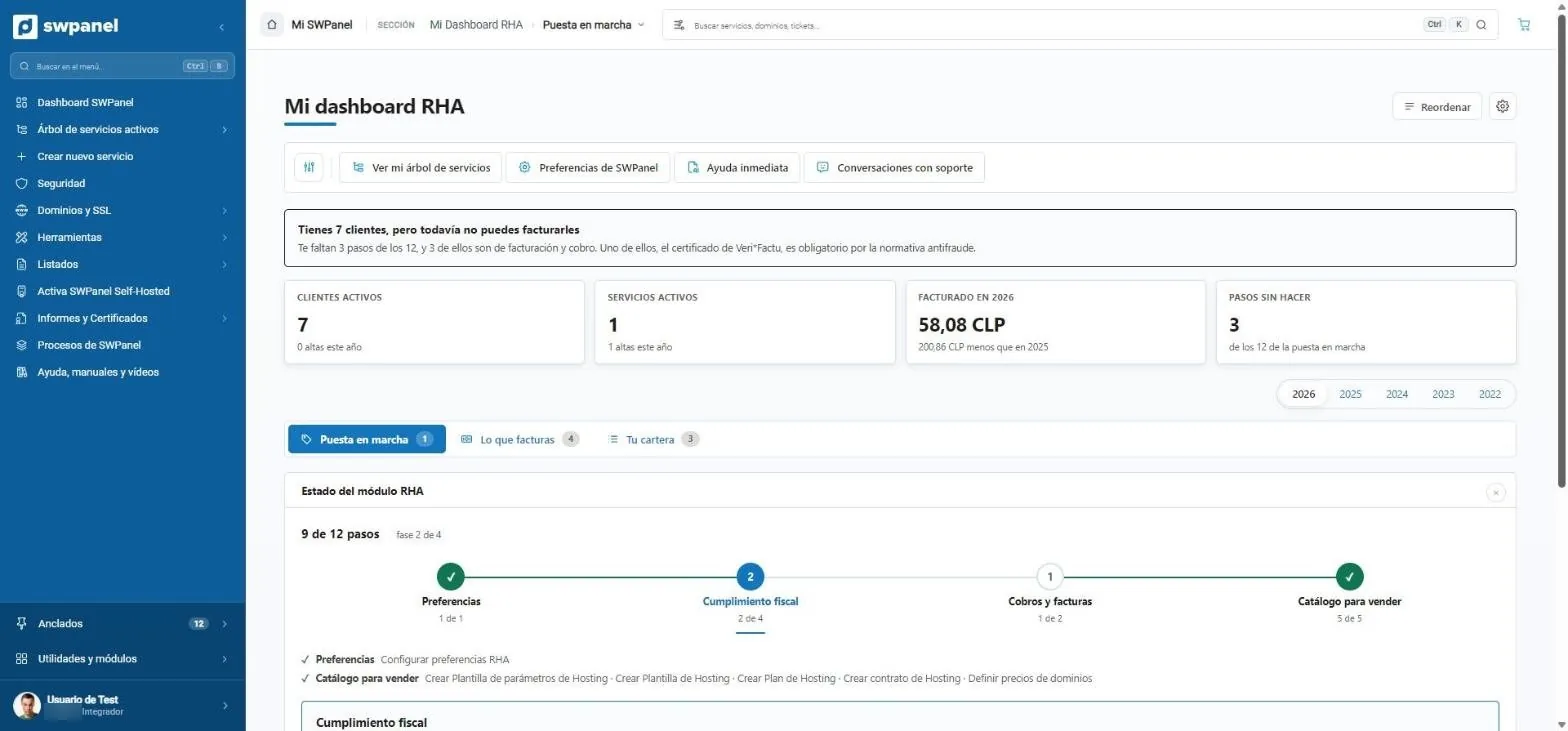
RHA's dashboard takes you step by step. Afterwards it switches to what you invoice and your portfolio.

  1. Your company and your brand

    Tax details, currency, language, logos and colors of your invoices.

  2. Your catalog

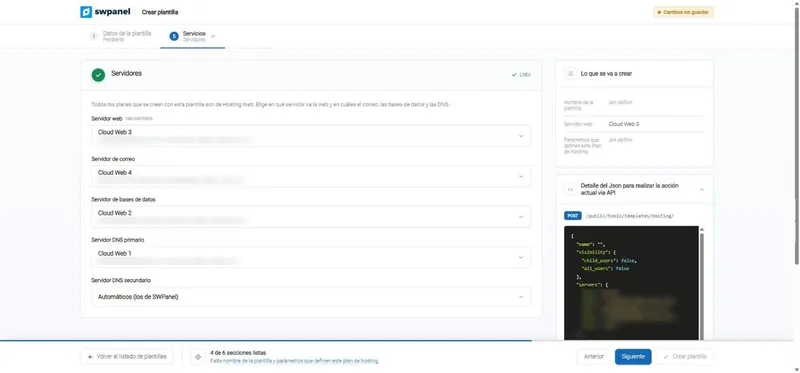
    Hosting and Cloud plans from your templates, contracts, domain prices and promotions.

  3. Tax compliance

    Electronic invoicing and Veri*Factu, taxes and invoice types.

  4. Payments and link

    Enable your payment systems and put each plan's link on your website.

My RHA dashboard › Setup Real screenshot
My RHA dashboard › Setup
  1. What's left to invoice, including the Veri*Factu certificate.
  2. Customers, services, invoicing and pending steps.
  3. Setup, what you invoice and your portfolio.
  4. 12 steps in four phases: preferences, tax compliance, payments and catalog.
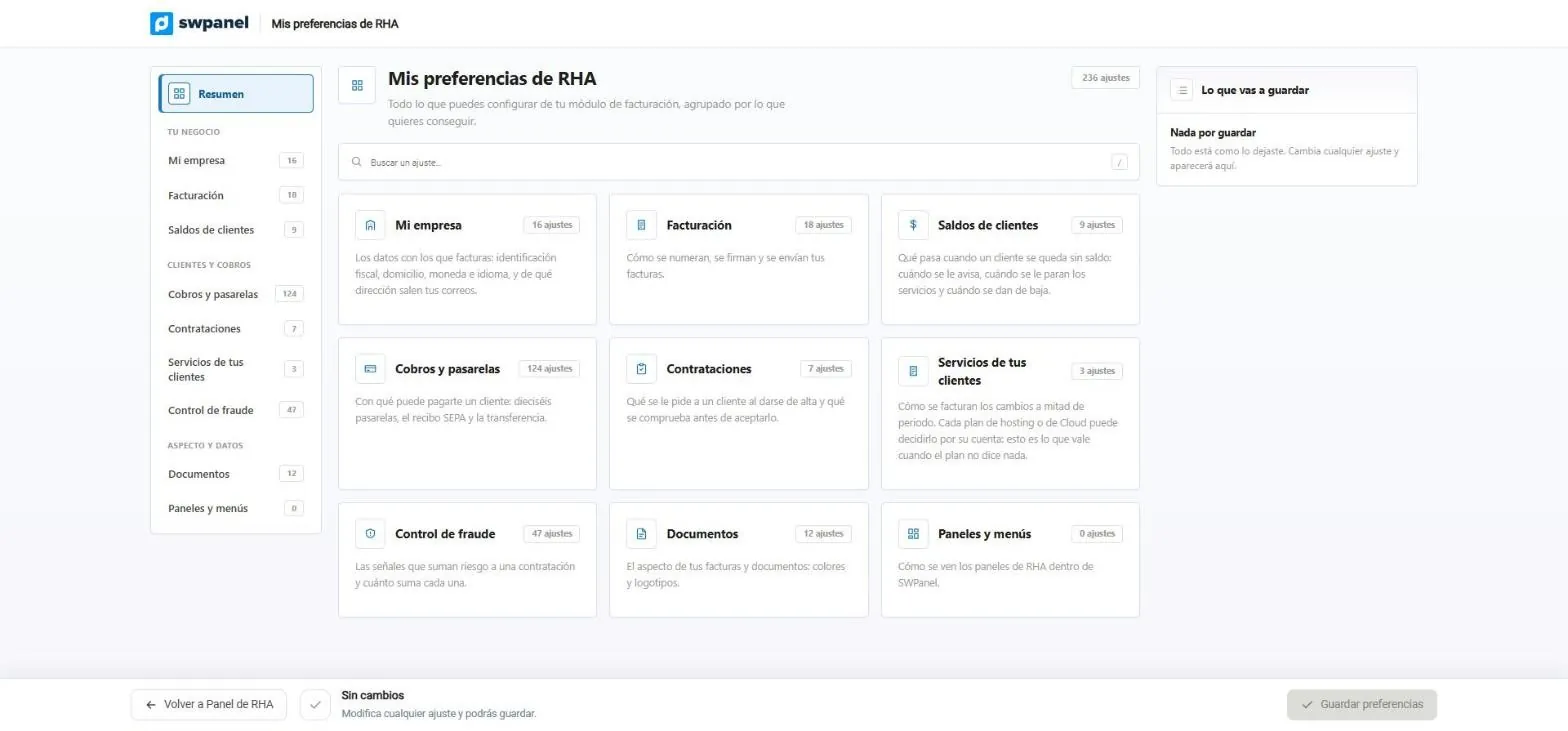
RHA Preferences › Summary Real screenshot
RHA preferences grouped: company, invoicing, balances, payments, sign-ups and fraud
  1. Payments and gateways: sixteen gateways, the SEPA receipt and bank transfer.
  2. Balances: when a service is notified, stopped or cancelled.
  3. Sign-ups: what is asked at registration and what is checked.
  4. Documents: the colors and logos of your invoices.
  5. 236 settings, grouped by what you want to achieve.
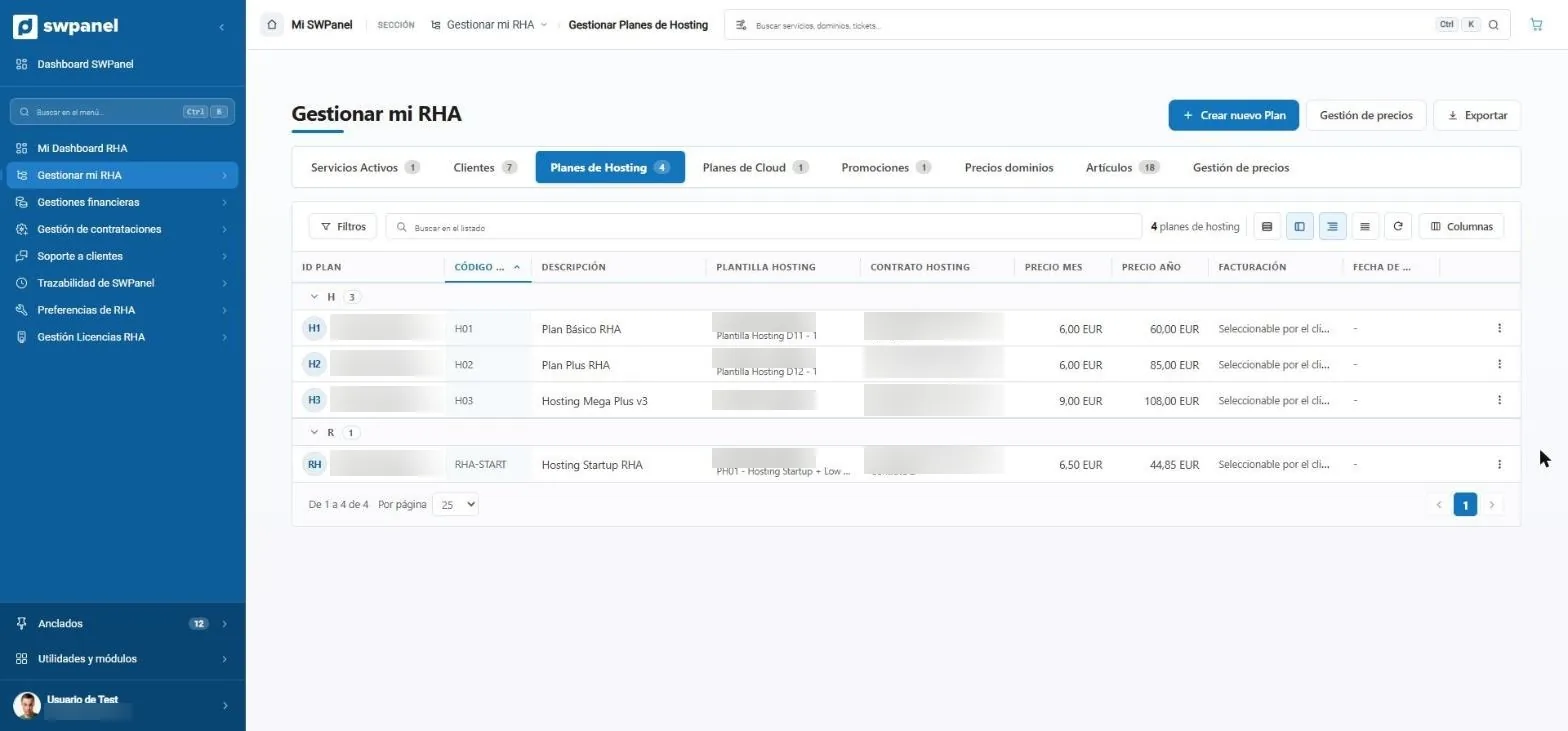
Manage my RHA › Hosting plans Real screenshot
RHA hosting plans with their template, contract and prices
  1. Each plan, with its hosting template and its contract.
  2. Price per month and per year, and the customer chooses the period.
  3. Promotions, domain prices and articles, in the same place.

Certificates under your brand

Ownership and location, with your details

Issue your customers the certificates for their services with your provider details and their verification QR code. They need them, for example, for the Kit Digital.

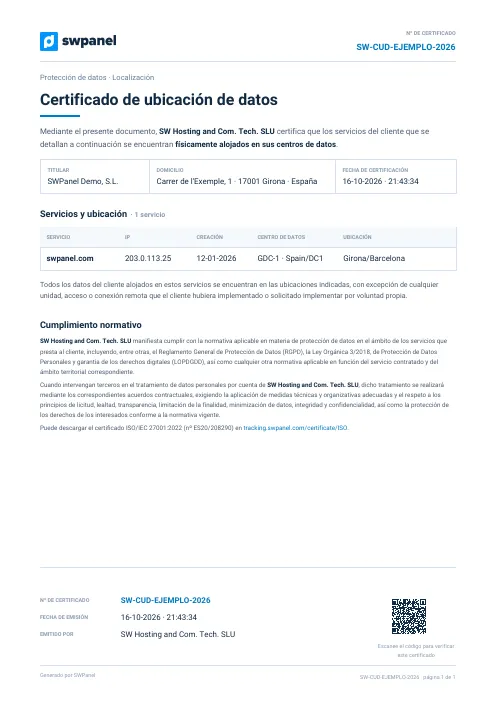
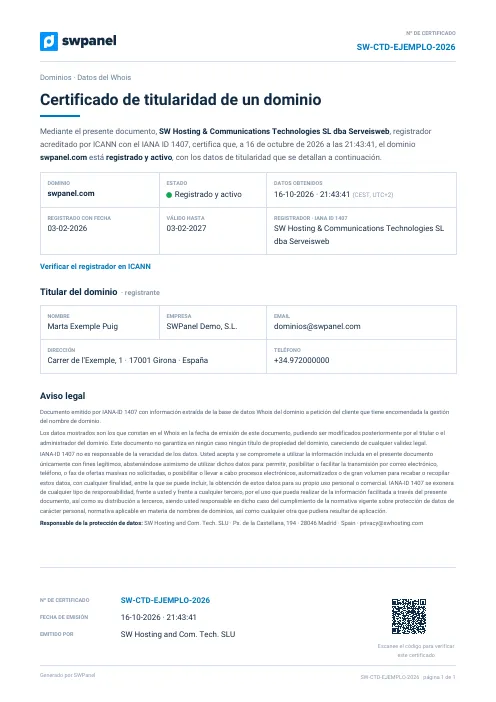
First page of the example: Domain ownership
Certificate

Domain ownership

A domain's Whois data, certified by the ICANN-accredited registrar: holder, status and registration and expiry dates.

SW-CTD-… 1 page

First page of the example: Data location
Certificate

Data location

In which data center and country a service and its data are located. It is requested by Kit Digital, many tenders and data protection officers.

SW-CUD-… 1 page
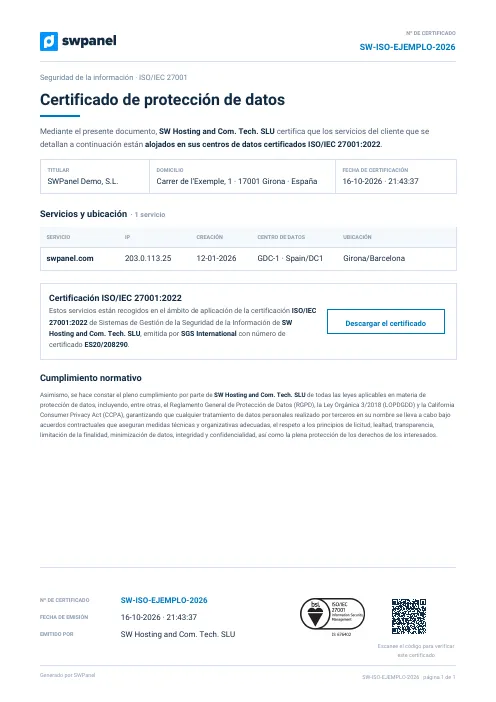
First page of the example: ISO 27001 data protection
Certificate

ISO 27001 data protection

Attests that the service is hosted in ISO/IEC 27001:2022 certified data centers, with the certificate number and the link to download it.

SW-ISO-… 1 page
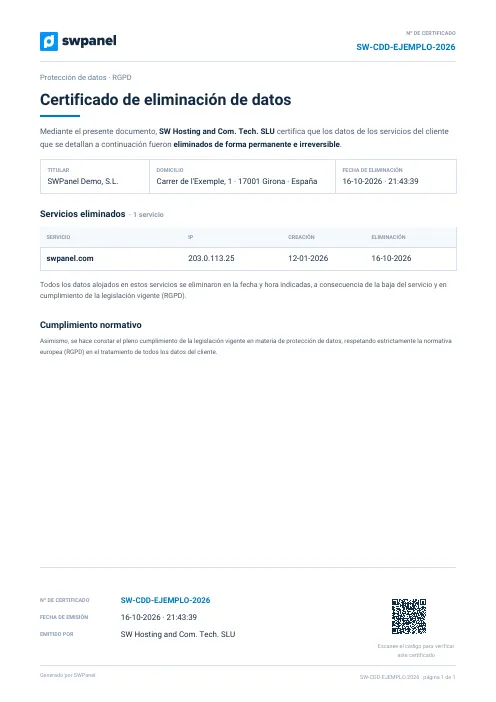
First page of the example: Data deletion
Certificate

Data deletion

When a service is cancelled, it certifies that its data was permanently and irreversibly deleted, in compliance with GDPR.

SW-CDD-… 1 page

Each document carries a unique number and token linking it to the original stored in SWPanel. How it's verified.

Frequently asked questions

Questions about RHA

The SWPanel module for selling hosting, Cloud and domains under your own brand: catalog and plans, customer sign-up, payments, invoicing with Veri*Factu and support.

17: sixteen gateways (PayPal, Stripe, Redsys, Mercado Pago, Bold, PayU, PagBank, Webpay, Conekta, Mollie, Adyen, Viva.com, Worldpay, Checkout.com, Nexi and Revolut) and the SEPA direct debit. Plus bank transfer. You activate the ones you want to offer.

Each plan has its own activation URL. You put it on the button on your website and the customer signs up in three steps: the plan and how to pay for it, their details and email confirmation.

If they left their email, you see them in the orders and leads dashboard: they're the ones you can go after. You also see how many left without a trace and how many were stopped by the anti-fraud.

With RHA support: their inquiries arrive in SWPanel, you reply from there and you can send them direct messages. Everything is kept in the history.

Yes. RHA includes electronic invoicing and Veri*Factu, and the setup asks you for the certificate for each one.

Yes, with RHA Web: you choose one of the 20 templates, add your branding and publish it on your hosting with your plans, your payments and your legal texts. See RHA Web.

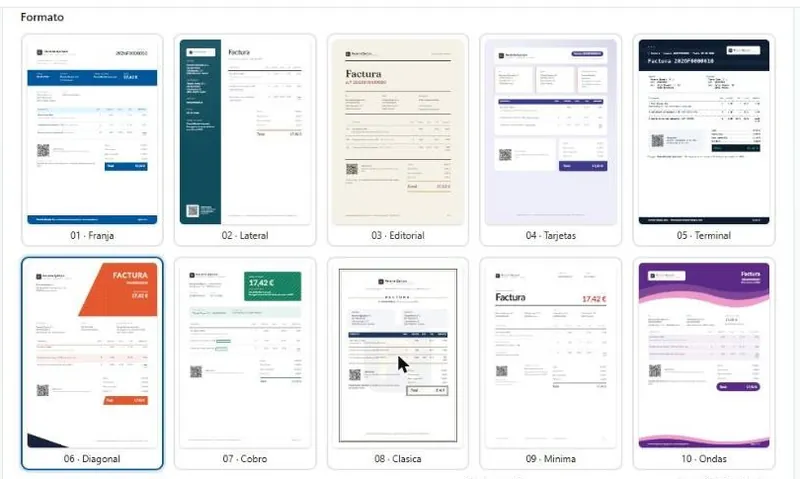
Yes: ten formats, your colors, typeface, your logo and watermark, with a preview of the actual PDF. See the invoices.

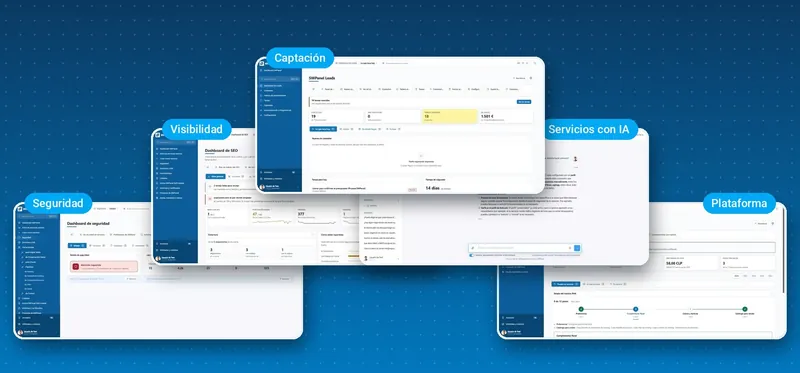
Yes. Customers managed with RHA can purchase upgrades such as 360 Security or an SEO tier from their own access.

Your hosting company, under your brand

Start with RHA: put your link on your website, get paid with the system your customer prefers and invoice with Veri*Factu from the first month.