
Change the WordPress language
The automated WordPress installation will install WordPress according to the language you have configured in SWPanel; for example, if you have SWPanel in Spanish, WordPress will be installed in that language. However, the language can be changed once installed.
Access your WordPress content manager at Settings > General > Site Language and you will see the available site languages.
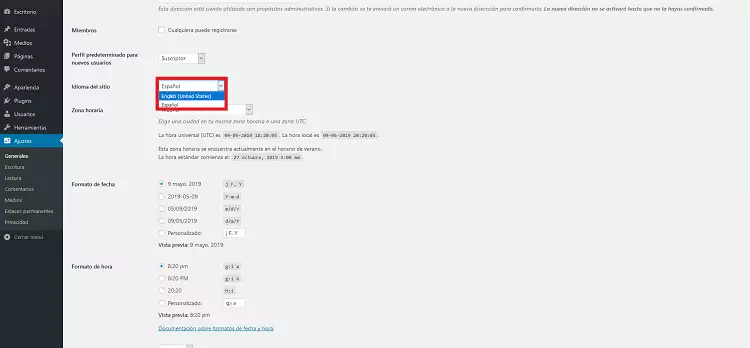
If your preferred language is not on the list, you will need to modify the WordPress code slightly. To do this, we must add the following line to the configuration of our "wp-config.php" file (the file with the basic WordPress configuration).
define('FS_METHOD', 'direct');
You can edit the "wp-config.php" file using an FTP client. You will find it in the folder "datos/web/wp-config.php".
Go back to your WordPress content manager and return to the language settings.
You should notice that you have more languages available for your WordPress:
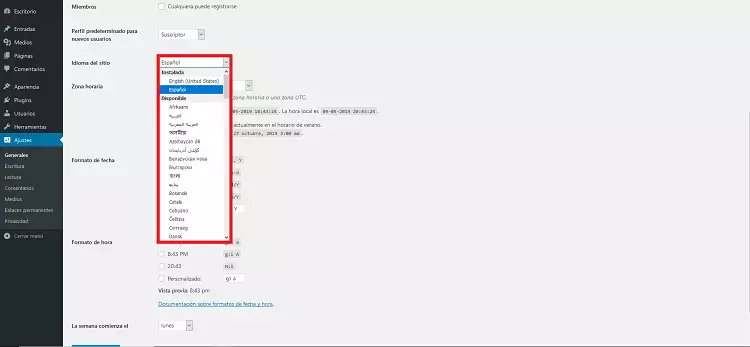
Select the language you want and save the changes. These changes will be reflected immediately, and you will see at once that the language of your WordPress has changed.
Our advice is that you edit the "wp-config.php" file again and remove the added line (" define('FS_METHOD', 'direct'); "), leaving it as it was and, if you do not plan to install any plugin or theme, leave the permissions as read-only (RO) for the "wp-content" folder and write (RW) for the "wp-content/uploads" folder; this way you will keep your WordPress protected.
You can now enjoy WordPress in your favorite language!