
Domains
What is a domain?
Starting with the basic concept of a domain, we could say that a domain is the designation that identifies a site on the network and indicates its membership in a specific category. In short, a domain is basically the unique name used to identify a website, such as "www.swhosting.com".
Up to this point it might seem simple, but behind this nomenclature we can elaborate a bit more on the real meaning of a domain. We all know that a domain is the name of a website that we type into our browser to be able to view its content, but in reality, on the servers, websites are NOT saved directly with the domain name; instead, web browsers actually access each website using the IP address (Internet Protocol), such as 105.25.46.22, which identifies the server where the website is located. That is, the domain name is actually a way to facilitate the search and visualization of web content designed for the user in a more simplified and human way.
In conclusion, we can highlight that thanks to a website's domain, it is much easier to remember than a sequence of numbers, as is the case with IP addresses. At the same time, nowadays the same server is used to host different websites; if domains did not exist, there could only be one website per IP address/server. In addition to all the above, thanks to the domain nomenclature, the movement of web content between servers becomes much more flexible, as the IP can change but the domain will remain the same.
How it works
When viewing the web content of a domain, we must focus on the system our machine uses to "translate" or transcribe the domain name you are viewing into an IP, which is the language that servers understand so that your web browser can communicate with the corresponding server effectively. This "translation" system is called DNS or Domain Name System (domain name system).
Different types of domains
Not all Internet domains follow the same formula. In general, when talking about domains, we refer to the two main types that exist in top-level domains or TLDs. This is a domain located at the top level of the Internet domain system. The most common include .com, .org, .net, and .edu.
· ccTLD: Country Code Top-Level Domains Also called geolocalized or territorial, they use only two letters as the domain extension and are based on international country codes, such as .es for Spain, .jp for Japan, .mx for Mexico, and .co for Colombia. They are usually used by companies that are creating sites dedicated to specific regions.
· gTLD: Generic Top-Level Domain These are basically TLDs that do not depend on a country code. Formerly, they were intended for a specific use case, such as .edu, which is aimed at educational institutions. Currently, most can be used without restrictions. These domains use at least three letters in their extension, as can be seen in the following examples: .mil (military), .gov (government), .org (non-profit organizations), and .net among others.
However, we also find other types of domains:
· Second-level domains
These are domains located directly below a top-level domain. For example, British companies occasionally use .co .uk instead of .com. Other examples would be .gov .uk, used for government institutions, and .ac .uk, for academic institutions and universities.
· Subdomains
These are useful because they do not require webmasters to acquire an additional web domain to create divisions within their site. Instead, they can create a subdomain that points to a specific directory on the server. They are usually used to manage various areas of the same domain, such as www. to go to the domain's website or webmail. to manage the domain's email via the web.
Domain Life Cycle
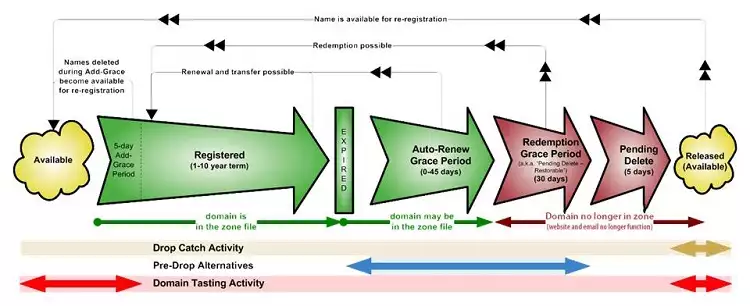
Indeed, domains have a life cycle and, depending on whether they have been registered, expired, etc., they pass through different states. Below, we will break down the most common ones to avoid confusing situations:
· Available or Free The domain is not currently registered by any individual or corporation, so you can register it to make it your property.
· Registered or Occupied The domain is already registered. In this state, you can only transfer it if you own it. Otherwise, you cannot perform any action.
· Active Once the domain is registered, you can already use it and link it, if you wish, to a hosting plan.
· Expired The domain has not been renewed in time and has expired. At this point, first, the domain stops working and also passes through different states:
· Grace Period ( Renew Grace Period ) If it was not renewed while it was active, in this period of time (approximately between 0 and 45 days) the domain stops working, but you can proceed to its recovery for the price of the domain renewal + 20€ + VAT.
· Redemption Grace Period If it was not renewed while it was active or in the grace period, you can still recover the domain, although the price will be much higher due to a penalty. In this state, it usually stays for about 30 days.
· Deletion Period ( Pending Delete ) In this state, the domain can no longer be renewed and, simply, you must wait (about 5 days) for it to become available again.
It is important to know that not all domain extensions are subject to the same number of days of duration in the different states.
Domain Name Regulation
There are 2 organizations that mainly share the management of all Internet domains, IP addresses, DNS servers, etc.
· ICANN (www.icann.org)
· IANA (www.iana.org)
These two international bodies are those that accredit other companies or organizations to be accredited registrars for registering domains. ICANN is the Internet Corporation for Assigned Names and Numbers, a non-profit organization created on September 18, 1998, with the objective of taking over certain tasks previously performed by another organization, IANA.
In the case of ccTLD domains for countries, IANA/ICANN delegate their management to non-profit organizations in each country or territory, and these are the ones that decide who can be "registrar agents" for these domains.
In Spain, for example, the entity responsible for managing its domains and accrediting registrar agents is dominio.es, integrated into the Public Business Entity Red.es and dependent on the Ministry of Industry, Energy, and Tourism of Spain.
· I want to know if a domain is available
You only need to enter it in our domain search engine and, instantly, it will be indicated whether the domain you want is free or not.
· I want to know the owner of the domain
After the implementation of the new European General Data Protection Regulation (GDPR), which entered into force in May 2018, the personal data of the domain contacts are no longer shown publicly. The owners responsible for the domains can deactivate the Whois privacy settings and then all the data of the contacts associated with the domain would be revealed again: the information that was hidden would become public.
Domain Expiration
You can use Whois to find out when a domain will expire. When you access it and indicate the domain, you can check it in the "Important Dates" quadrant under the name Registrar Expiration Date.
Actions on the domain
When the domain is already with SW Hosting, you have various tools at your disposal regarding the domain, such as Whois privacy, blocking... To manage the domain, you must do so directly from your domain portfolio.
Here you will find all the domains you have registered at SW Hosting. We will break down each of the options that SWPanel shows you for each of the domains:

Direct Actions
· Open Note Post-It You can write any comment about the selected domain. These notes work internally, so they are not shown on the Internet.
· Deactivate/Activate Auto-Renewal This option gives you the possibility to activate or deactivate the renewal of your domain so that, in this way, you do not have to worry about renewing it.
· Renew Domain From this option, you can manually renew your domain.
Domain WHOIS
· Show Whois Data Through this button, you can request that the Whois data be public, meaning that data such as the administrative contact or owner be shown publicly. By default, the Whois is hidden.
· View Detailed Whois This option will show you the data currently listed in the Whois of your domain.
Contacts and Hosts
· Owner Data You can view the owner data currently listed for the domain. If you want to make any modification, you must assign a new one through contact management.
· Administrative Contact Data You can view the administrative contact data currently listed for the domain. If you wish to make any modification, you only need to assign a new one through contact management.
· Technical Contact Data You can view the technical contact data currently listed for the domain. If you wish to make any change, you only need to assign a new one through contact management.
Consult this manual to know the details of the ? Manual: Change of contact for a domain.
· DNS Data In this section, you will have the option to assign the DNS you want to be listed for the domain.
Associated Services
· Create a service for this Domain With this option, you can create a Hosting service directly associated with a domain.
· Manage assigned service Here you can manage any hosting service assigned to your domain.
Authcode
· Request Authcode Here you can request the code necessary to transfer your domain. Please be informed that the Authcode is valid for 15 days; after this time, you must request it again.
Block Management
· Block Domain
This option is a security measure so that your domain cannot be transferred.
For more information, consult the following manual
? Manual: How to request the authcode of a domain
Other manuals of interest:
? Manual: How to register a domain from SWPanel