
Artificial intelligence · SWPanel 2027
AI has arrived in SWPanel: it understands, decides and acts
Until today, SWPanel showed you what was happening. Now it helps you understand it and act. AI isn't just another module: it runs through all of SWPanel, on our own infrastructure and with a clear rule: the system provides the figures, the AI only writes.
- AI on our own servers
- Respects permissions
- Anything automatic, reversible
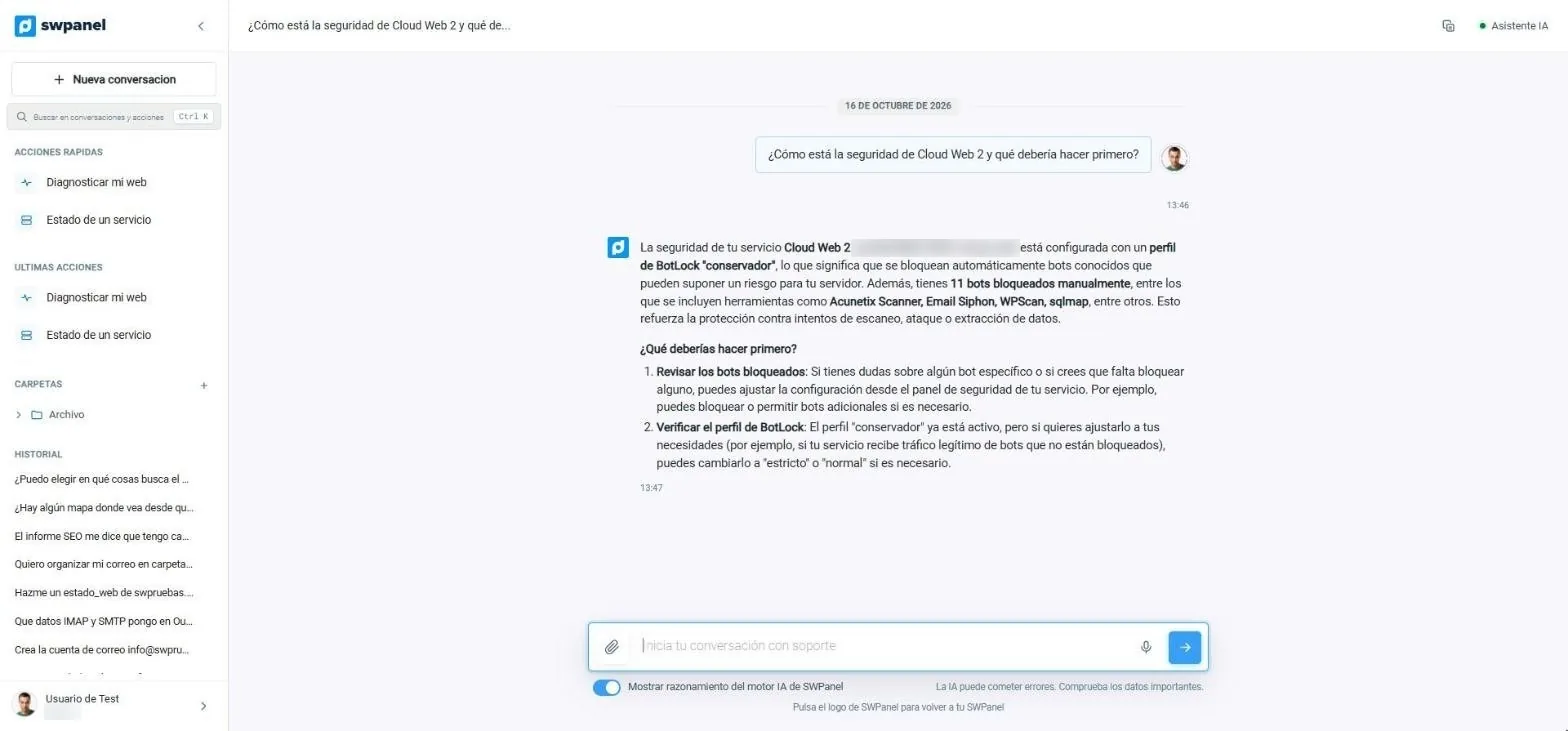
- Ask in your own words “How is Cloud Web 2's security and what should I do first?”
- Answers with your data The BotLock profile the service has active and the 11 bots it blocks, not a generic article.
- Tells you where to start Two concrete steps. And, if you want, the reasoning of SWPanel's AI engine.
What it looks like
You ask SWPanel and it answers with your data
Instant Help is on every screen. It doesn't search an article base: it looks at the state of your services and answers about them. If it makes a mistake, it says so; if it needs more data, it asks for it.
Instant help
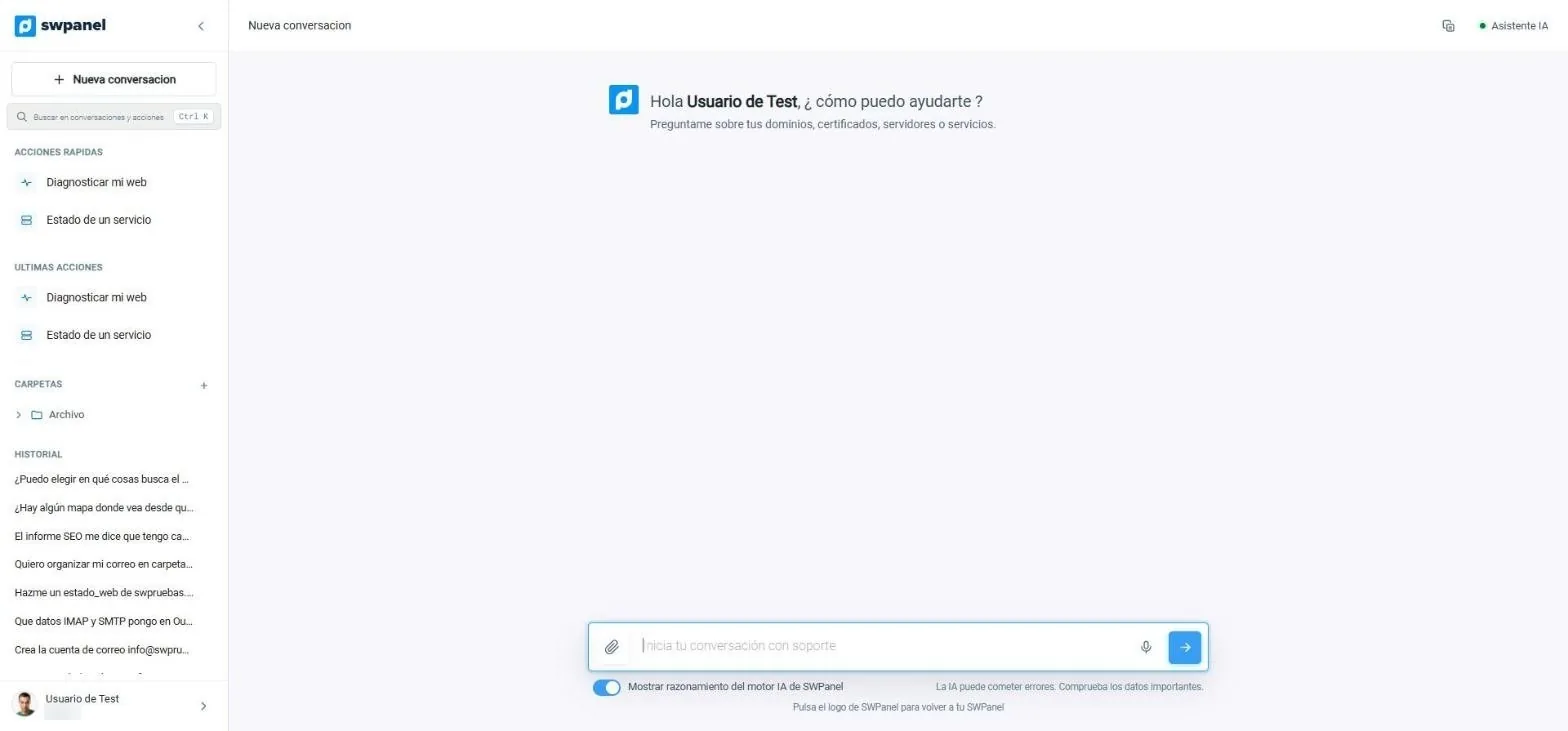
Everything at hand, in the side menu
You start a new conversation or search the previous ones. Quick actions diagnose your website or the status of a service without typing the question, and conversations are organized into folders and kept in the history.
- Quick actions and recent actions
- Folders and conversation history
- AI engine reasoning visible if you want it
- New conversation and a search for your conversations and actions (Ctrl + K).
- Quick actions: diagnose your website or see a service's status without typing the question.
- Recent actions you've launched, to repeat them.
- Folders to organize conversations.
- History: all your conversations, with their question.
- Ask as you would talk to a technician. You can attach a file or dictate.
- Visible reasoning from SWPanel's AI engine, if you want it.
SWPanel's AI engine runs on our own infrastructure. Your data doesn't leave to train third-party models.
On video
Question, analysis and answer, in 16 seconds
- Open Instant help
- Type the question
- The AI engine reviews the service
- Answer with what to do first
AI in every module
Consultants that work with the data of each screen
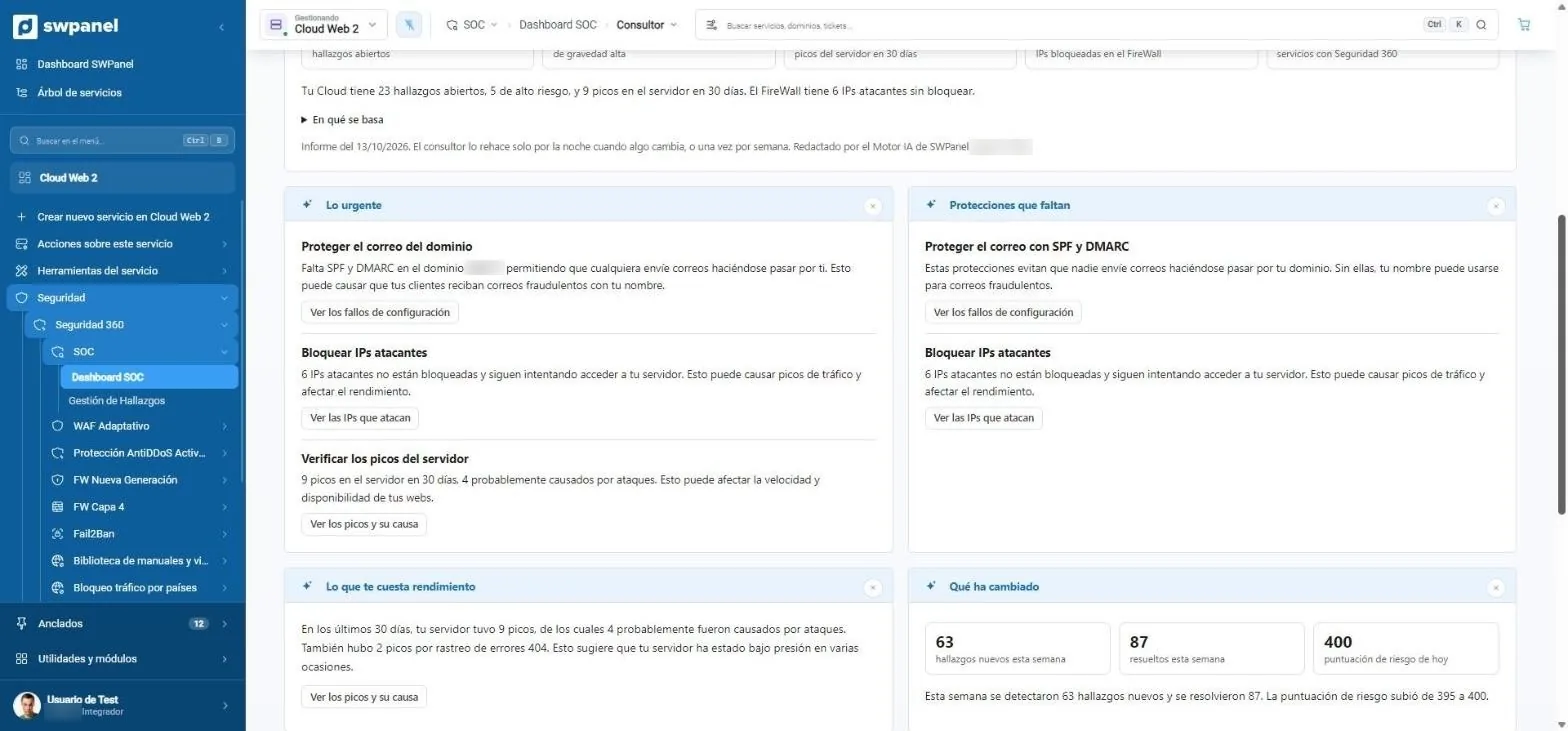
- What's urgent: what's happening, why it matters and what happens if it isn't fixed.
- Missing protections in your services.
- Each item with its button to go straight to fixing it.
- What costs you performance: server spikes caused by attacks.
- What has changed since the last report.
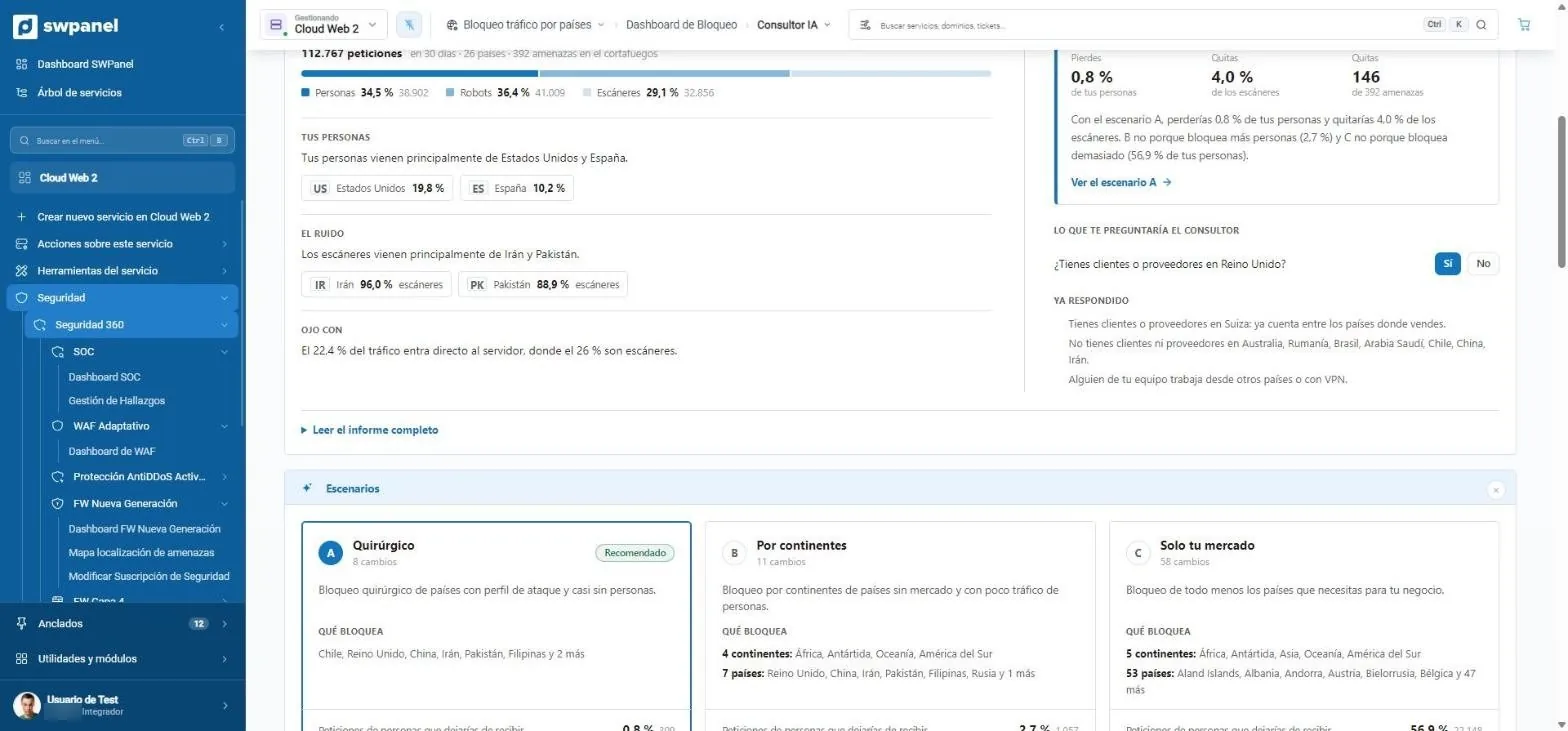
- It asks what it can't know: do you have customers or suppliers in the United Kingdom?
- It remembers what you already answered and takes it into account.
- Scenario A, surgical: only countries with an attack profile.
- Scenario B, by continent.
- Scenario C, only your market.
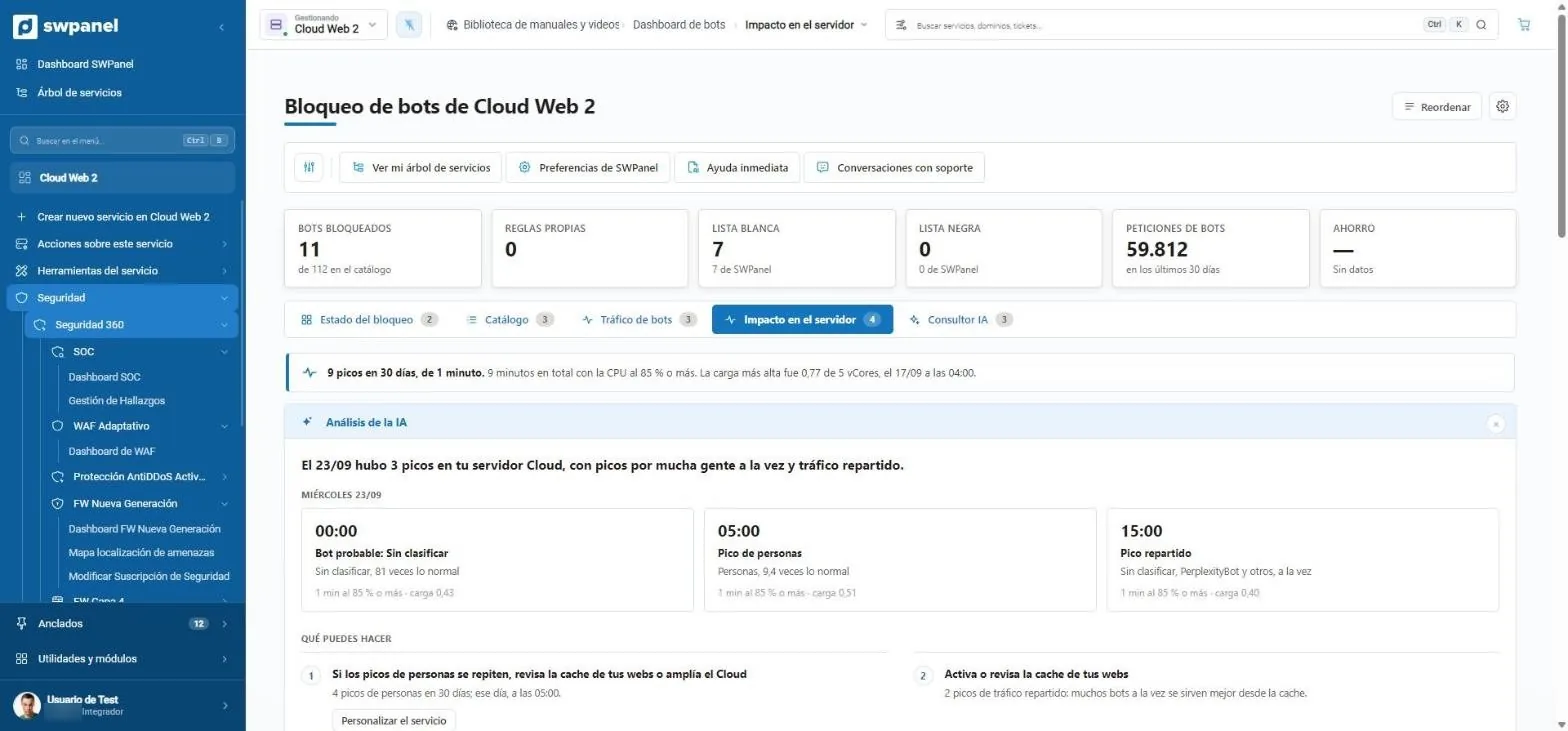
- 9 spikes in 30 days and how long they lasted.
- The AI explains each spike: time, probable cause and load.
- What you can do, with the button to do it.
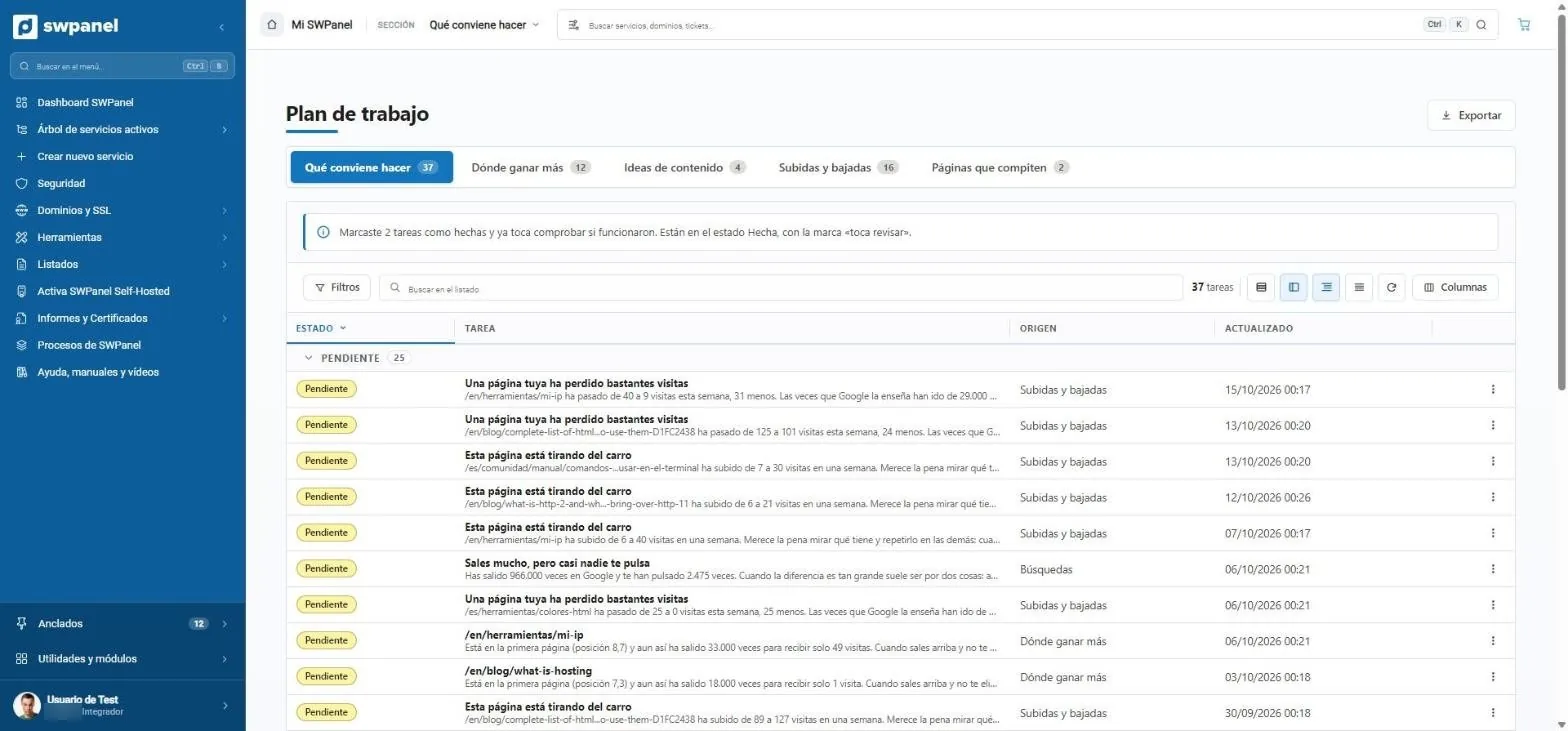
- What to do, where to gain the most, content ideas, rises and drops and competing pages.
- Follow-up: what you marked as done comes back to be checked.
- Tasks in plain language: “one of your pages has lost quite a few visits”.
- “You show up a lot, but almost nobody clicks you”: 966,000 impressions and 2,475 clicks.
- Where each task comes from.
- EU Own Data Centers your data, under GDPR
- +23 AI jobs inside SWPanel
- ~5 s To answer about the manuals (before 3 min)
- 44× Faster translation in internal processes
Where the AI is
Seven places, one criterion
Each conclusion says what it is based on: what was observed, what it means, what remains to be checked and what is recommended.
New Instant Help
Answers questions based on over 1,500 manuals, takes you with a button to 114 SWPanel sections, and executes actions on your service, with confirmation.
- Short answers in ~140 ms
- Actions with confirmation
- Respects your permissions
Settings and customization
A consultant that measures your Cloud, applies 33 rules and lets you apply or undo each change.
- PHP, MySQL and server
- Apply or undo
- Cloud only
Security
About 342,000 scored CVEs, a record for each IP and a consultant that writes a report every night.
- Consultant in six blocks
- Countries and bots with scenarios
- Acts on its own only on what is reversible
Traceability
Eight years of history and, for each change, whether a person or the AI made it. Traceable PDFs.
See moreSWPanel, rethought
Four modes depending on your business, reorganized menus and dashboards with a common standard.
- 11 account blocks
- 9 service blocks and 8 tabs
- 12-column dashboards
Market
SEO Intelligence, AI websites and stores, and Leads with Newsletter.
See moreThe AI module
A single activation improves six modules
The AI module doesn't protect or analyze anything on its own and isn't a requirement of any module: it adds a consultant or an analysis to each module you already have active. Without it, the panels appear veiled with the button to activate it: if it isn't seen, it isn't sold.
| Module | What the AI adds | It also needs |
|---|---|---|
| Security 360 · SOC | Security consultant in six blocks: diagnosis, the urgent, missing protections, performance, changes and actions. | Security 360 |
| Country blocking | Report, three scenarios, country by country and questions about your business that recalculate. | Security 360 |
| Bot blocking | Report, scenarios per profile and bot by bot. On Cloud, daily spike analysis. | Security 360 |
| SEO | Summary of the latest report and content ideas for searches on the second page. | One SEO level; the ideas, Intelligence |
| Newsletter | List analysis, improvement plan, content matrix and type of each campaign. | Newsletter module |
| Leads | Contact summary and next step, with human approval. | SWPanel Leads |
Assistants
A level 2 and 3 technician inside SWPanel
With the AI module come the assistants and the AI Systems Administrator, which reads the logs of the whole server and does the work of a level 2 and 3 technician.
AI Systems Administrator
Reads the logs of the whole server, detects what fails and proposes how to fix it.
Regular expressions for logs
Describe what you're looking for and the assistant writes the expression.
Log analyst
Ask in natural language about your logs.
Security assistant
Guides you step by step to protect a service.
DNS assistant
Configures records and diagnoses resolution.
Server optimization
Tunes the server parameters. Cloud only.
Code audit
A point-by-point report on your website's code, errors, vulnerabilities and logs.
AI websites and stores
Creates a website or an online store from SWPanel.
Until today, SWPanel showed you what was happening. Now it helps you understand it and act.
Frequently asked questions
Questions about SWPanel's AI
AI, throughout SWPanel
Try SWPanel 2027 free and activate the AI module whenever you want to multiply what you already have.