SWPanel

Security 360 · Code analysis

Your websites' code, analyzed and fixed

Every night, the SOC reads each website's logs and code: errors, SQL, insecure code, malware and server errors, file by file. When it finds a flaw, it prepares the exact change and waits for you to approve it. And if the server suffers a load spike, it tells you whether it was an attack or your own code.

  • Security module enabled at no cost
  • Configured from SWPanel
  • Cancels at the end of the paid period
Every night, the SOC reads your website Logs and code, file by file
  • index.php no errors
  • login.php no errors
  • carrito.php line 42 · division by zero
  • pedido.php no errors
  • config.php no errors
12,365 log lines
34 files
carrito.php · the exact change Proposal
- $total = $precio * $_GET['cantidad'];- echo $total / $descuento;+ $cantidad = isset($_GET['cantidad']) ? (int) $_GET['cantidad'] : 0;+ $total = $precio * $cantidad;+ echo $descuento > 0 ? $total / $descuento : $total;
Your website isn't touched until you approve it Dismiss Approve
Load spike? It was an attack It was your code

Every night

File by file, with the line where it fails

The SOC reads the web server logs and each website's code. It scores the risk, counts errors by type and takes you to the file and the line.

SOC › Code

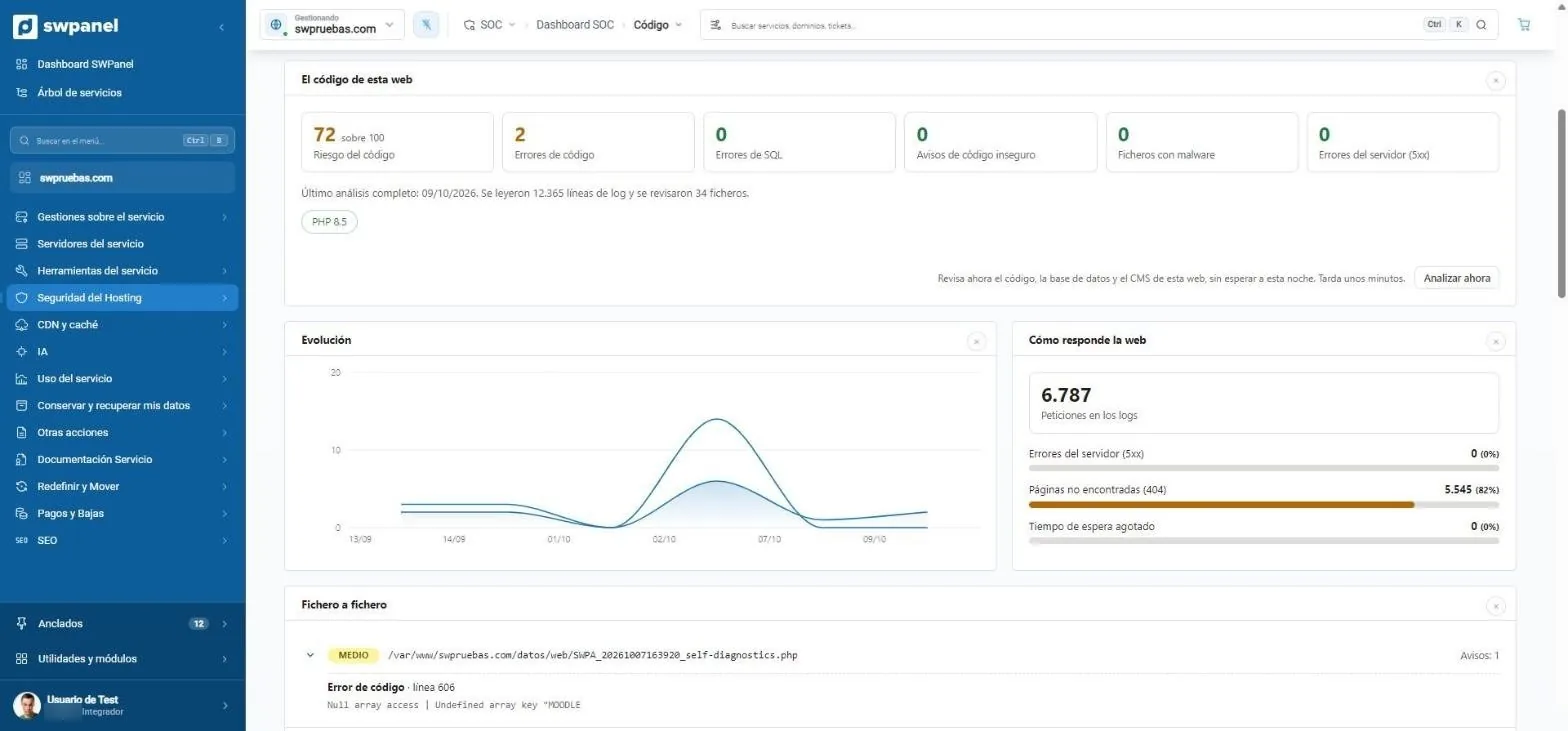
A website's code, on one screen

Risk from 0 to 100, code and SQL errors, insecure code warnings, files with malware and server errors. Beside it, how the website responds and the trend of the latest analyses.

  • 12,365 log lines and 34 files in the latest analysis
  • Analyze now, without waiting for the night
  • Link to the website's findings
  1. Code risk, from 0 to 100.
  2. Code and SQL errors, insecure code, malware and 5xx errors.
  3. What was read: log lines and files reviewed, and the PHP version.
  4. Analyze now, without waiting for the night.
  5. How the website responds: 5xx, 404 and timeouts.
  6. File by file, with the line and the error.
swpruebas.com › SOC › Code Real screenshot
swpruebas.com › SOC › Code

Code fixing

The exact change, awaiting your approval

When the analysis finds an error it knows how to fix, it prepares the change. It shows you which lines change, why and what risk it carries. Until you approve it, your website isn't touched.

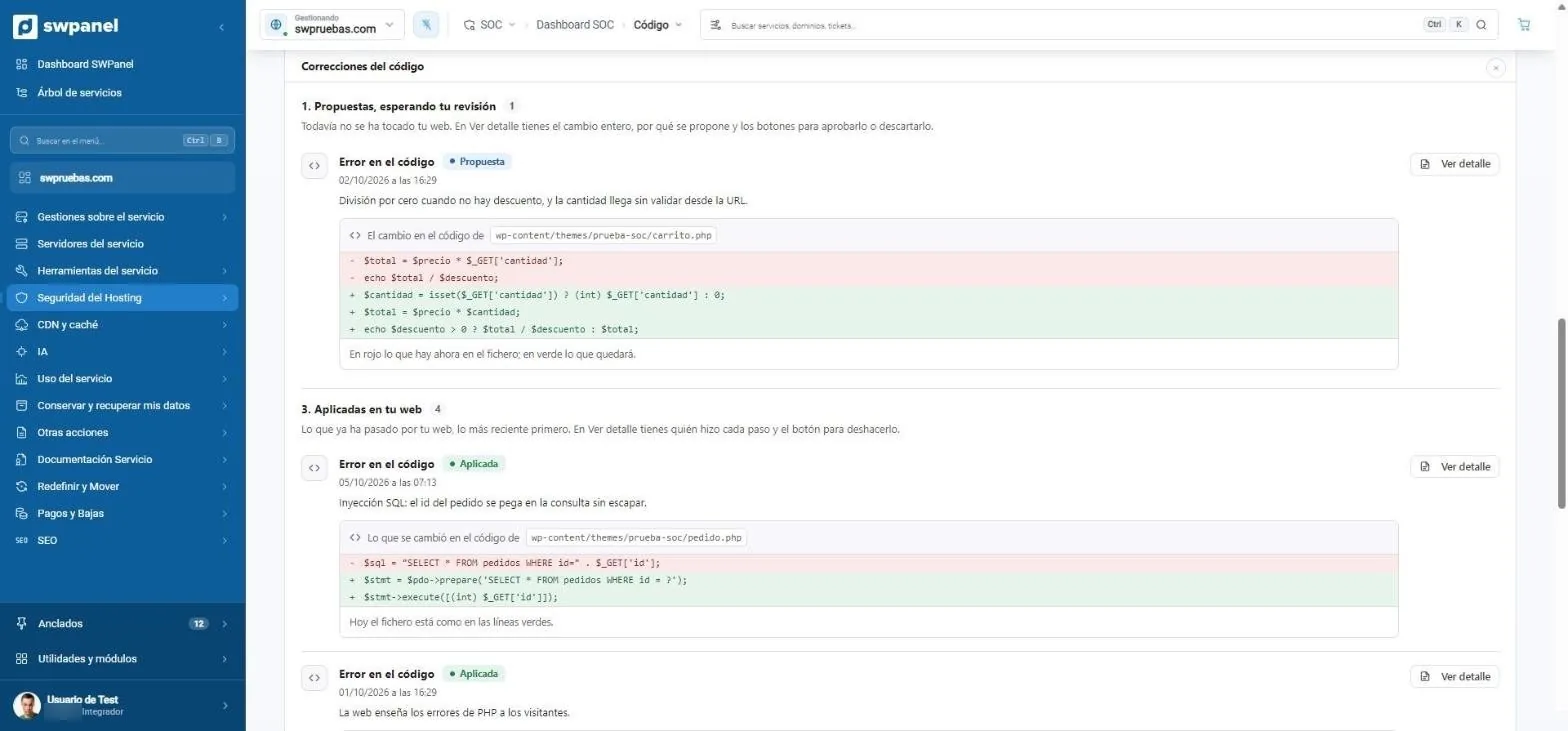
Code fixes

Proposed, applied and undone

A division by zero, an SQL query that pastes the URL's id without escaping it, or a website that shows its PHP errors to visitors. Each fix with its file and its diff, in red and green.

  • The list shows what's proposed and what's already on your website
  • Each applied one can be undone
  1. Proposed: your website isn't touched until you approve it.
  2. The exact change: in red what's there, in green what will remain.
  3. Applied: with who did each step and the button to undo it.
swpruebas.com › SOC › Code › Code fixes Real screenshot
swpruebas.com › SOC › Code › Code fixes

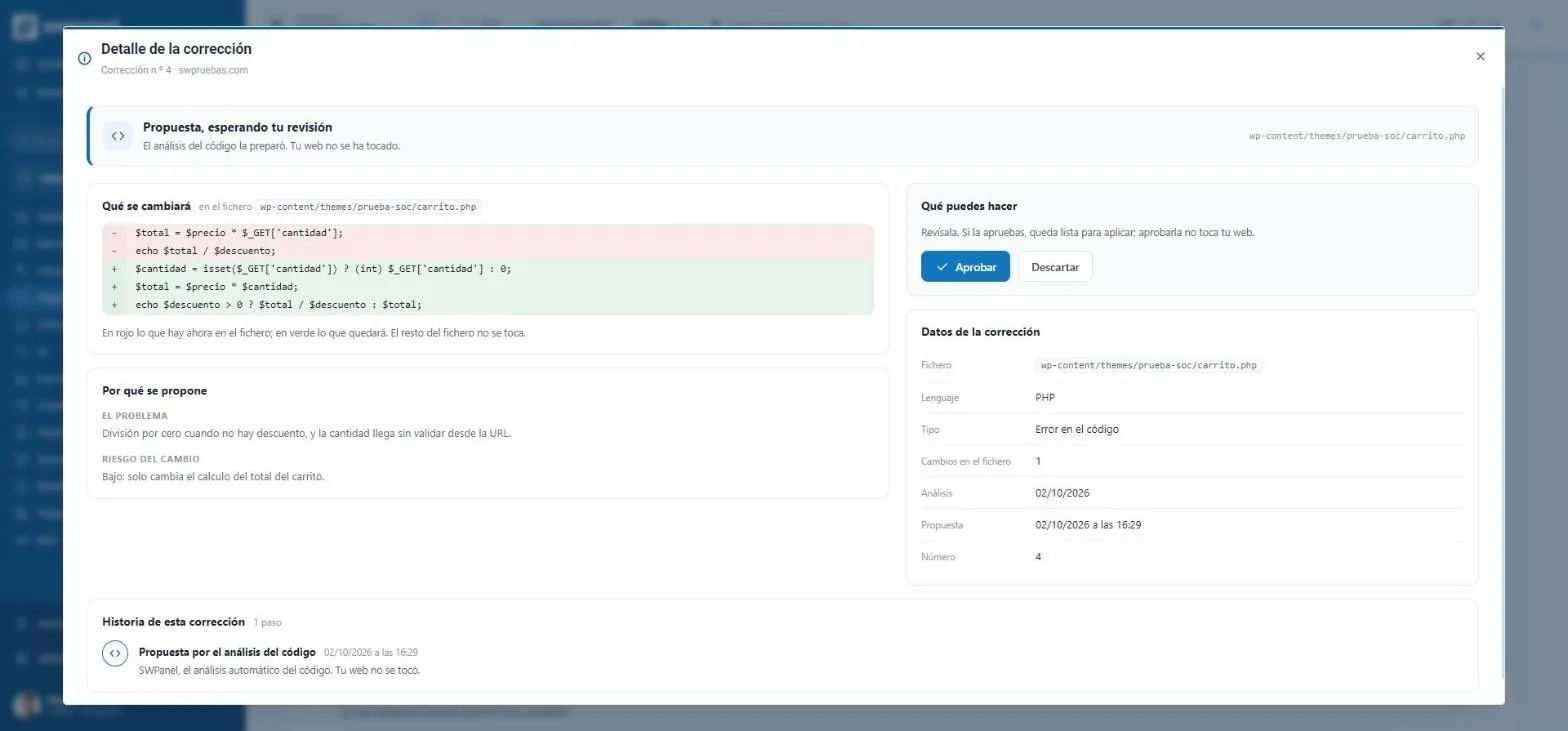
Fix details

Approve, with all the information in front of you

The problem, the change's risk, the language, the file and the fix's history step by step: who proposed it, who approved it and when it was applied.

  • Approving doesn't touch the website: it leaves it ready to apply
  • Dismissing it removes it from the list
  1. Approve or dismiss. Approving doesn't touch the website: it leaves it ready to apply.
  2. The problem and the change's risk, in plain language.
  3. The history of each fix, step by step.
swpruebas.com › Fixes › Fix details Real screenshot
swpruebas.com › Fixes › Fix details
  1. Proposal

    The analysis prepares the change. Your website hasn't been touched.

  2. Approved

    You've reviewed it and it's ready to apply.

  3. Applied

    The file now has the green lines. With who did each step.

  4. Undone

    If something goes wrong, you undo it and the file goes back to the red lines.

Errors versus load spikes

When the server suffers, you know if it's an attack or your code

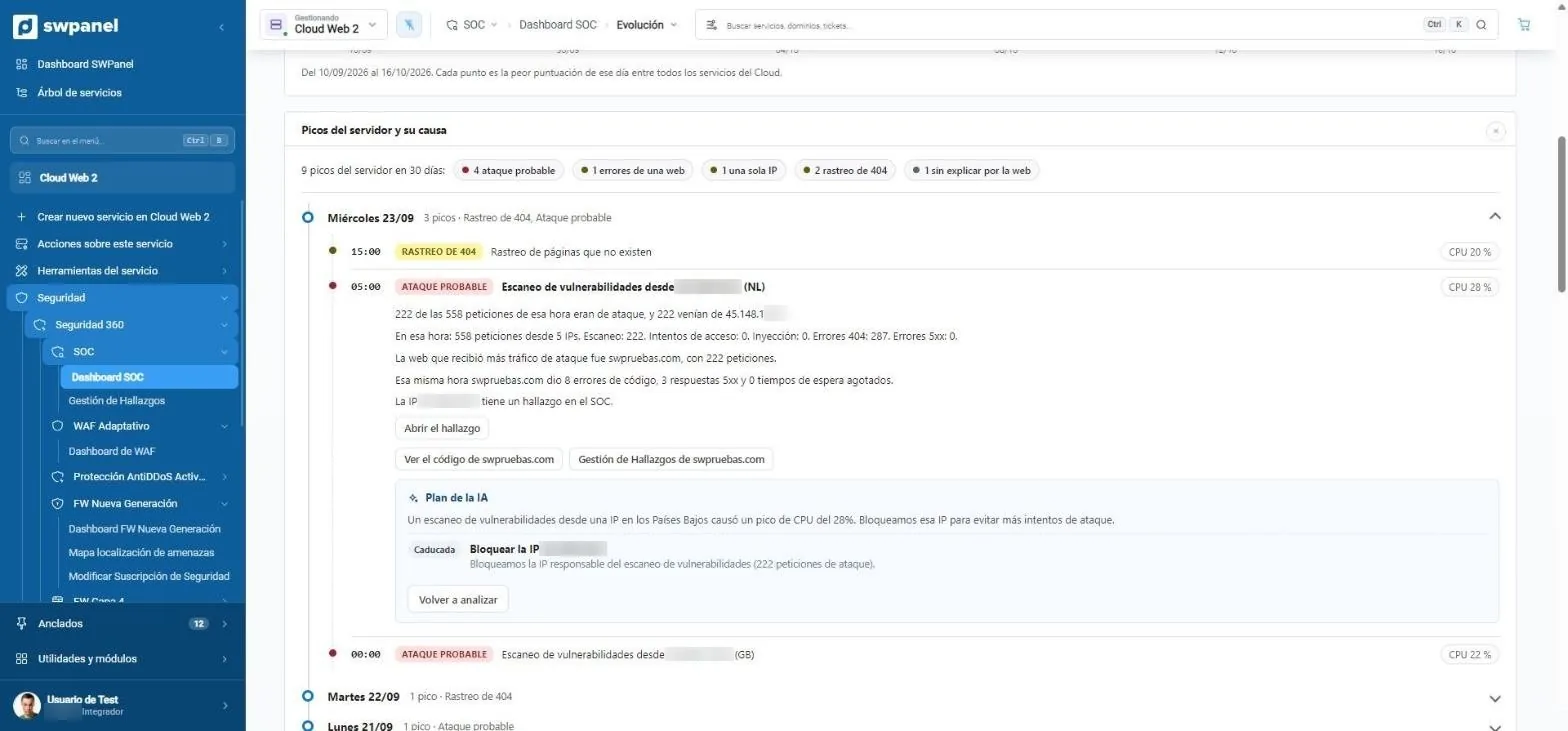
Failing code also burns CPU. The SOC takes each server spike and looks at what was happening that hour: attacks, crawls, a single IP or a website's errors. And it suggests what to do.

SOC › Trends

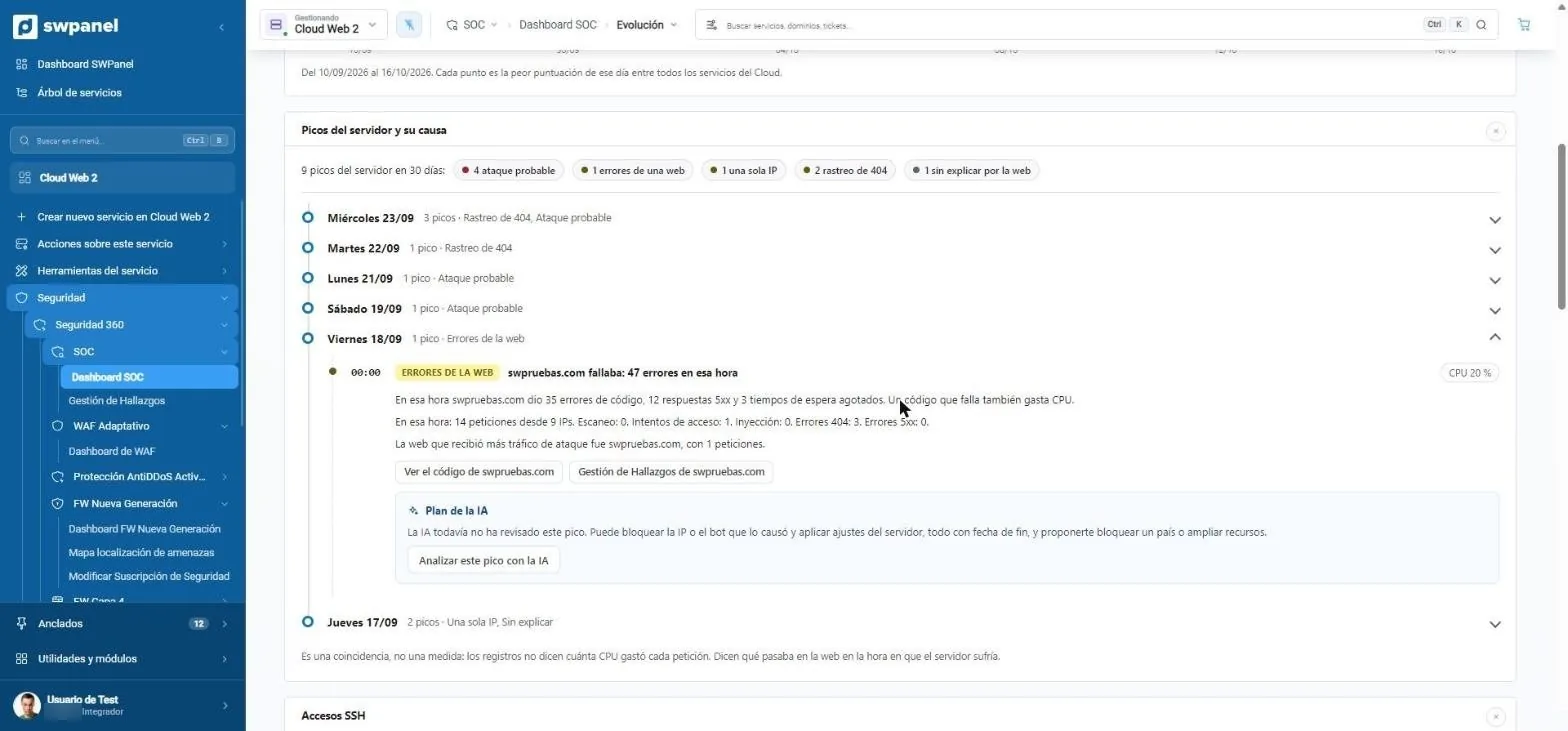
Each spike, with its cause

Nine spikes in 30 days on a test Cloud. One was a website that was failing: 35 code errors, 12 5xx responses and 3 timeouts in that hour. From the spike you go to that website's code.

  • Probable attack, a website's errors, a single IP, 404 crawl or unexplained
  • Requests, scans, access attempts and injections from that hour
  1. Nine spikes in 30 days, by cause: attack, a website's errors, a single IP, 404 crawl or unexplained.
  2. A failing website: 35 code errors, 12 5xx responses and 3 timeouts in that hour.
  3. From the spike, to the code of that website.
  4. The AI proposes what to do, always with an end date.
Cloud Web 2 › SOC › Trends › Server spikes Real screenshot
Cloud Web 2 › SOC › Trends › Server spikes

AI plan

What to do, with an end date

The AI reviews the spike and proposes: block the IP or bot that caused it, apply server adjustments or, if needed, block a country or add resources. Everything it applies expires.

  • Re-analyze whenever you want
  • Cross-checks the spike with that same hour's code errors
  1. At the same hour as the attack, the website gave 8 code errors.
  2. AI plan: block the scan's IP, with expiration.
  3. Re-analyze whenever you want.
Cloud Web 2 › SOC › Trends › AI plan Real screenshot
Cloud Web 2 › SOC › Trends › AI plan

Probable attack

Vulnerability scans or injections from one or several IPs.

A website's errors

Code errors, 5xx responses and timeouts from a specific website.

A single IP

One IP hogs the hour without being flagged as an attack: usually an aggressive crawler.

404 crawl

Many requests to pages that don't exist.

Unexplained

Web traffic doesn't explain it: time to look at processes, backups or scheduled tasks.

It's a coincidence, not a measurement: the logs don't say how much CPU each request used. They say what was happening on the website at the hour the server was suffering.

Reports

What it analyzes, also as PDF

To show a customer or keep for an audit. They're real examples on swpanel.com with fictitious data, in Spanish, Catalan and English.

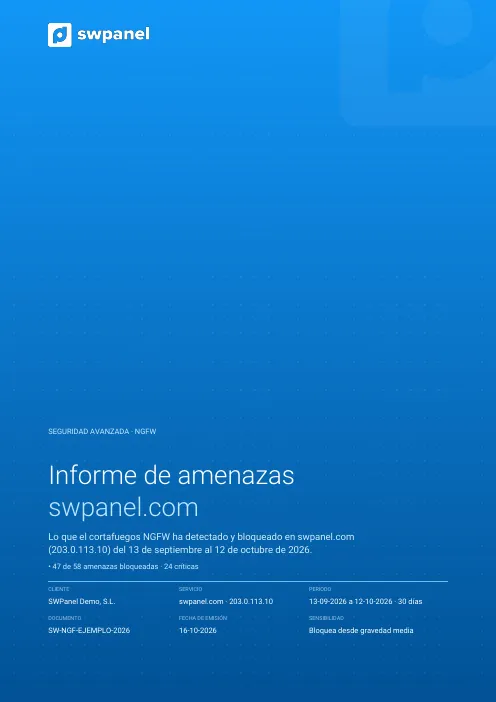
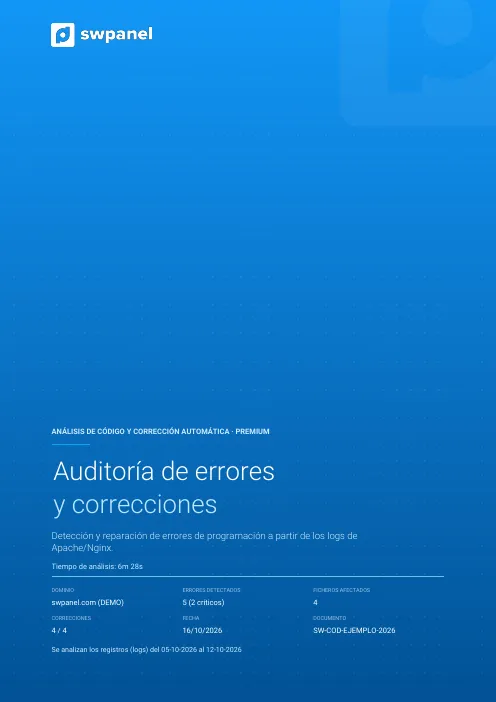
First page of the example: Code analysis and fixing
Report

Code analysis and fixing

The programming errors left in Apache or Nginx logs, file by file, with each fix and the malware analysis. Premium version, with an executive security summary.

SW-COD-… 73 pages
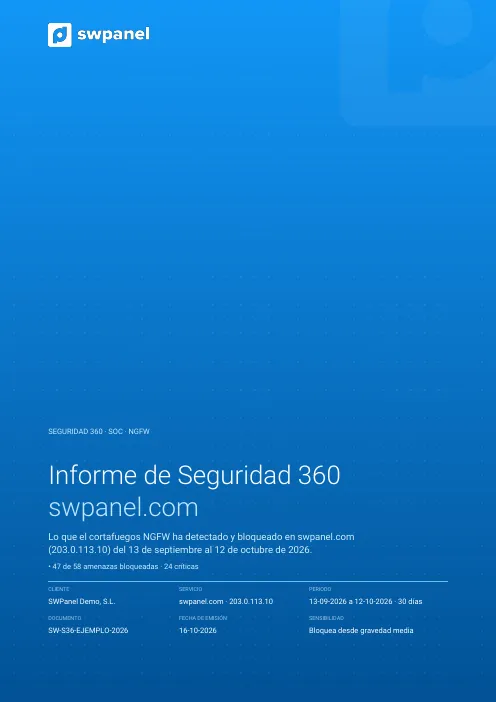
First page of the example: Security 360
Report

Security 360

A service's security month: NGFW threats, SOC findings, blocked countries and bots, code analysis, adaptive WAF, what was done and next month's plan.

SW-S36-… 47 pages

First page of the example: NGFW firewall threats
Report

NGFW firewall threats

What the NGFW detected and blocked in a period: by severity, type and origin, the changes over the last six months and what to do first.

SW-NGF-… 29 pages

Each document carries a unique number and token linking it to the original stored in SWPanel. How it's verified.

All the reports and certificates SWPanel issues, in Reports and certificates. For a complete one-off report of a website, the code audit.

Compared

What you won't find in a classic panel

cPanel or Plesk with security extensions

  • They look for malware and vulnerable versions of installed software.
  • Your website's programming errors, in a log nobody reads.
  • A CPU spike is a CPU spike: you look for the cause yourself.
  • Fixing the code is your developer's job, from scratch.

SWPanel with Security 360

  • It scores each website's code every night, file by file.
  • Code errors, SQL, insecure code, malware and 5xx, with the line.
  • Each spike, cross-checked with that hour's attacks and errors.
  • The exact change prepared, to approve or dismiss, and with undo.

Frequently asked questions

Questions about code analysis

No. A proposed fix does not touch the website. If you approve it, it is ready to apply, and once applied you can undo it: the file goes back to how it was before.

Every night, along with the rest of the SOC. If you have changed something and do not want to wait, “Analyze now” reviews the code, the database and the CMS in a few minutes.

PHP websites, with or without a CMS. The scan reads the web server logs and the website's files, and tells you which PHP version it uses.

It does not measure it: it cross-references it. The logs do not say how much CPU each request used, but they do show what was happening on each website in the hour the server was struggling. That is why the SOC presents it as a coincidence, with the data so you can decide.

The audit is a complete, one-off report, designed for a new customer, a migration or an incident. Code analysis is continuous, is part of 360 Security and proposes the fixes.

Not out of the box. Their security extensions focus on malware and installed software; none of them analyzes the programming errors in your website or suggests the change in the code.

No. The code is read on the server itself, with the SWPanel agent. Over the web it only opens public pages to look for JavaScript errors.

No. The audit analyzes the code, errors, vulnerabilities and logs of the hosted website, but it doesn't manually exploit vulnerabilities like a penetration test does. It is the preliminary step, much faster and more affordable.

No. It is launched from SWPanel on the website as it is hosted, with no repository, no extra access and nothing to install.

The website owner: it has pages in plain language and a dedicated section for their technician, with a fix sheet for each file.

Protect your services with Security 360

The Security module comes already enabled at no cost in your account. Add Security 360 to each hosting, Cloud or server you want to protect.