SWPanel

Bot blocking

Keep bots from eating your server

Catalog of 112 bots, ready-made profiles and one-click blocking. With Security 360, custom rules and server impact; with AI, a bot-by-bot consultant.

  • Security module enabled at no cost
  • Configured from SWPanel
  • Cancels at the end of the paid period
Live · example Cloud Web 2 · Bot blocking

They arrive from the Internet

Balanced profile Catalog of 112 bots
Your website People and search engines
  • Person · browser
  • Googlebot
  • Person · mobile
  • Bingbot
Out, with a 403  
  • Price scraper403
  • WordPress scanner403
  • Unnamed bot403
  • Content copier403
  • Search engines
  • Social networks
  • Monitoring
  • Artificial intelligence
  • SEO tools
  • Copiers and scrapers
  • Scanners
Your server's CPU Example

People and bots you want Surplus bots: they disappear when blocked

What it looks like

Which bots get in, how much they cost you and which to cut

In the last 30 days, this Cloud received 59,812 bot requests. Some are search engines you want; others, scanners and copiers you don't. SWPanel shows you who's who.

Status

Catalog of 112 bots, by family

Artificial intelligence, copiers and scrapers, search engines, scanners, SEO tools, social networks and monitoring. You see how many of each family you have blocked and change it with one click.

  • Whitelist and blacklist
  • Configurable response: 403 or whatever you prefer
  1. 11 bots blocked out of 112 in the catalog.
  2. 59,812 bot requests in 30 days.
  3. Status, catalog, traffic, server impact and AI consultant.
  4. Mode and response: blacklist and 403 error for blocked ones.
  5. Breakdown by family: AI, copiers, search engines, scanners, SEO, social networks and monitoring.
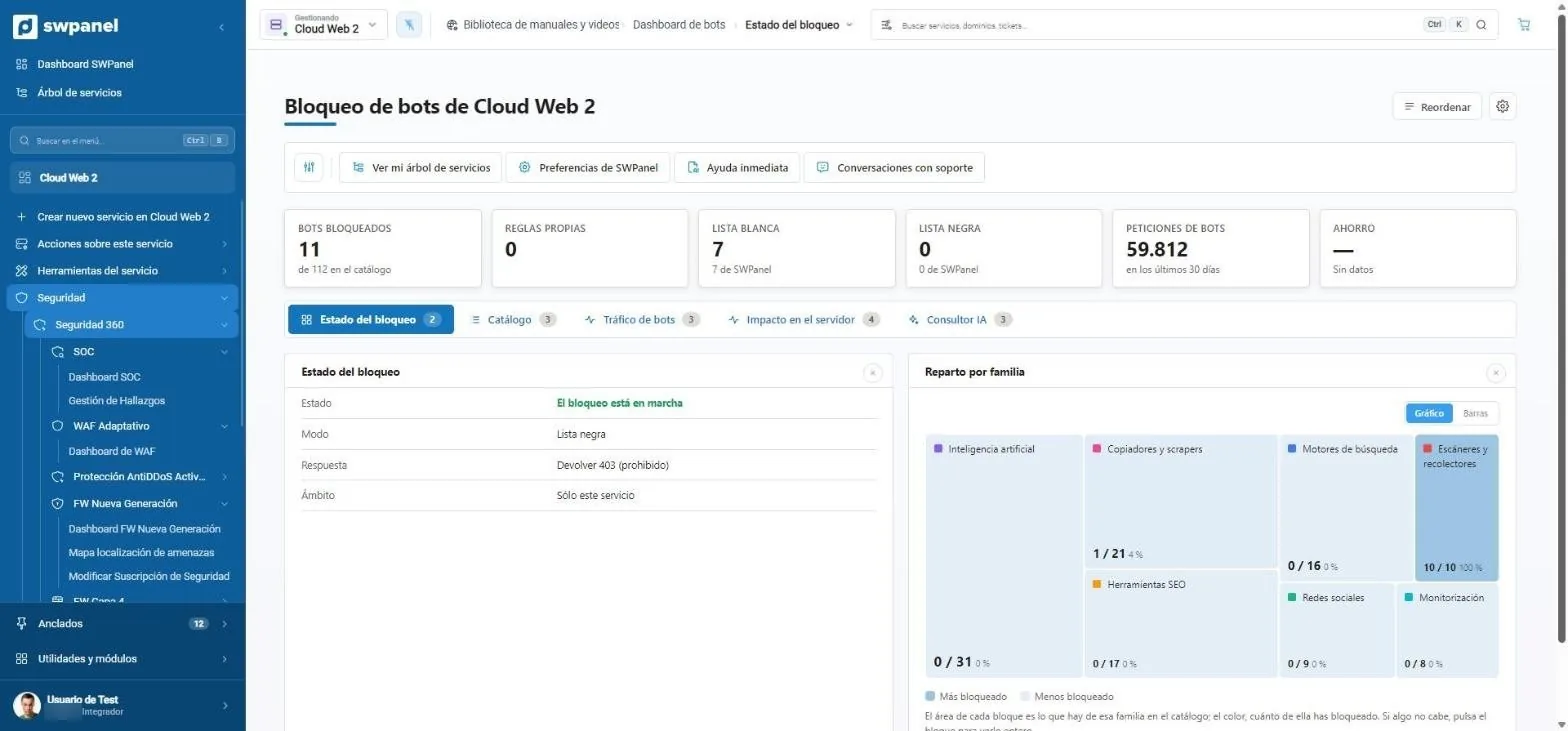
Cloud Web 2 › Bot blocking › Blocking status Real screenshot
Cloud Web 2 › Bot blocking › Blocking status

Traffic

Those that come in most and those with no name

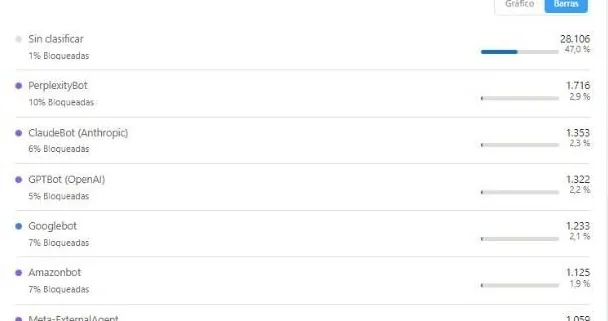
PerplexityBot, ClaudeBot, GPTBot, Googlebot or Amazonbot, with their volume. And uncataloged bots, with their user-agent, so you can decide whether you want them.

  • Volume and blocked percentage of each bot
  1. Who comes in most: PerplexityBot, ClaudeBot, GPTBot, Googlebot, Amazonbot...
  2. Uncataloged bots, with their user-agent and how many times they've come in, so you can decide.
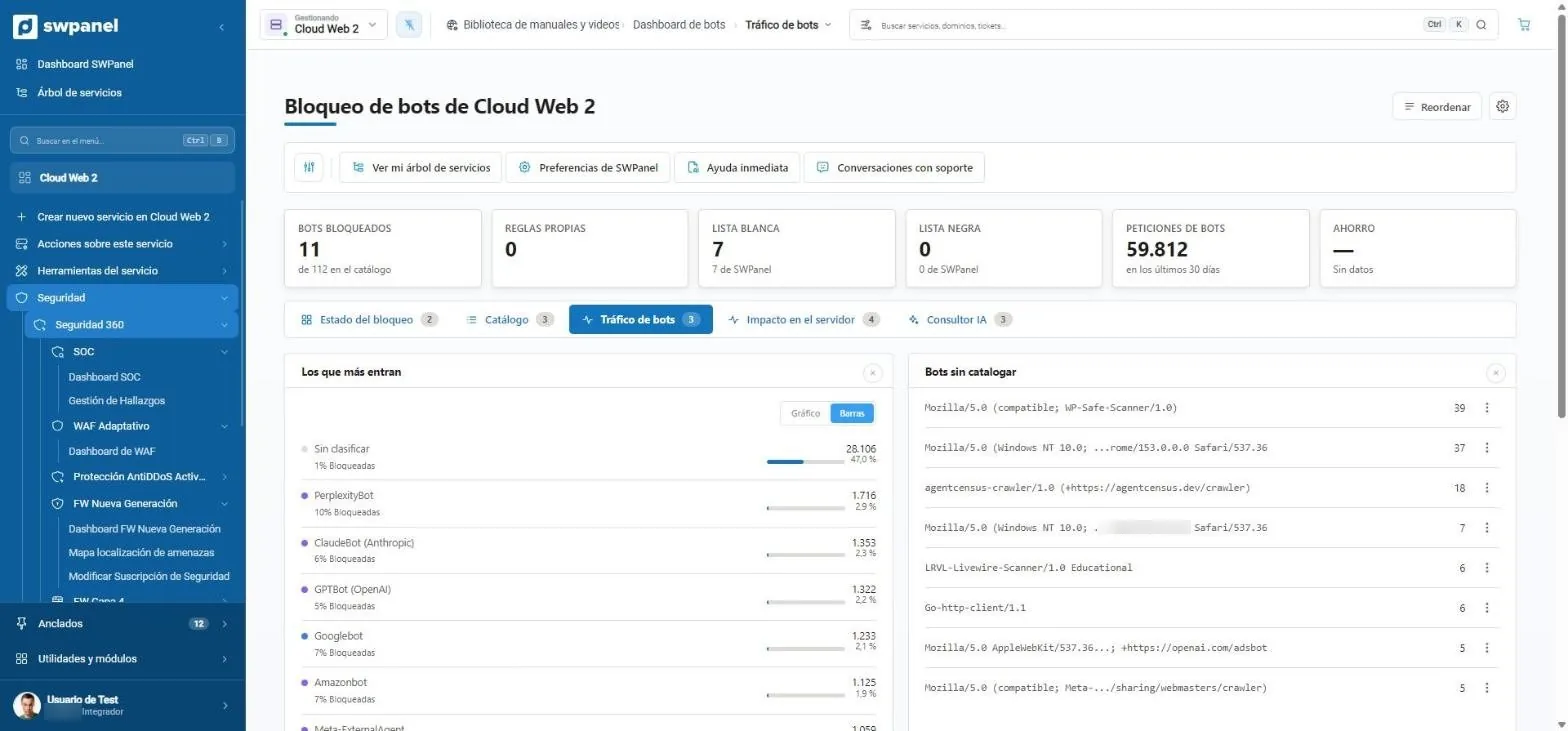
Cloud Web 2 › Bot blocking › Bot traffic Real screenshot
Cloud Web 2 › Bot blocking › Bot traffic

Impact

What bots do to your server

When the CPU spikes, the AI looks at what happened at that hour: an unclassified bot, a spike of people or spread-out traffic. And it suggests what to do, like enabling caching.

  • Spikes from the last 30 days
  • AI analysis per spike
  1. 9 spikes in 30 days and how long they lasted.
  2. The AI explains each spike: time, probable cause and load.
  3. What you can do, with the button to do it.
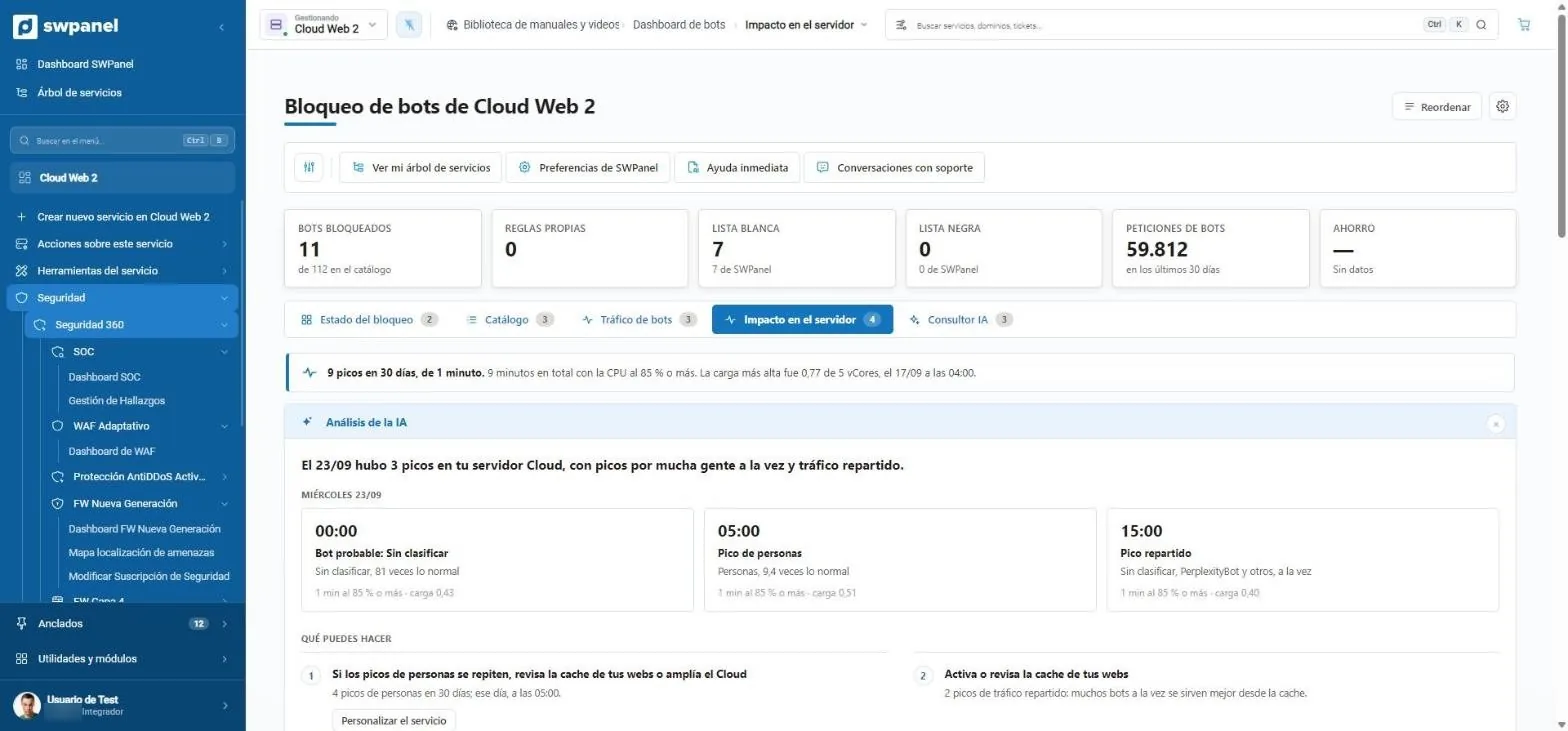
Cloud Web 2 › Bot blocking › Server impact Real screenshot
Cloud Web 2 › Bot blocking › Server impact

What's included

Good bots in, bad bots out

Search engines yes; scrapers, scanners and bots that take down your server, no. SWPanel comes with a catalog of 112 identified bots and ready-to-use blocking profiles.

Feature Base Security 360 + AI module
Catalog of 112 bots Included Included Included
Blocking profiles Included Included Included
Block and allow with one click Included Included Included
Custom rules Not included Included Included
Uncataloged bots Not included Included Included
Bot traffic and server impact Not included Included Included
Bot-by-bot AI consultant Not included Not included Included
Analysis of server spikes (Cloud) Not included Not included Included

Bot consultant

Which profile suits you, with data

01

Recommended profile

The consultant analyzes your service's bot traffic and recommends a profile, with scenarios per profile and a bot-by-bot review.

  • Scenarios per profile
  • Bot-by-bot review
  • Apply with one click
Bot blocking › Bot traffic Real screenshot
The bots that come in most on a Cloud

SWPanel bots

Ours, always allowed

SWPanel's SEO, security, availability, code and AI website robots appear in the catalog as “SWPanel Bots”. They can't be blocked: without them, your reports would come out empty and your website would look down.

What SWPanel bots are

Frequently asked questions

Questions about bot blocking
No, as long as you keep search engines allowed. SWPanel's profiles already tell them apart from harmful bots.

On hosting it can be activated separately and for free. On Cloud and servers it is part of 360 Security.

Yes, with 360 Security: custom rules and control of uncatalogued bots.

Because the service owner has subscribed to a feature that needs it: SEO reports, 360 Security, availability monitoring, code analysis or building a website with AI. It is launched by their own SWPanel, not by a third party.

To check that they can't be read from the Internet. It looks in the response for a specific signature, such as “[core]” in .git/config, and if it finds it, it notifies the owner. It does not store the contents of the file.

Only websites of active SWPanel services, and they stop visiting as soon as the service is cancelled: they check this before every request. The only exception is the SEO report that a user requests manually, which may be for a website that is not on SWPanel; in that case it also respects robots.txt.

SWPanelBot-SEO does: it follows the SWPanelBot-SEO group, then SWPanelBot and, if there is neither, the * group. Uptime, Security and Code don't check it: they run one-off checks requested by the owner. To stop them, the owner turns off the feature in their SWPanel.

It identifies itself with a User-Agent that starts with SWPanelBot, requests only what its profile says, and signs every request with Web Bot Auth, with the key published at www.swpanel.com. If you have doubts about a visit, write to us with the domain, the time, the IP and the log line, and we'll check it.

Not yet. Requests are already signed with Web Bot Auth, which is what Cloudflare checks; we just need to register. In the meantime, if your website is behind Cloudflare and you have bot protection enabled, you can allow SWPanelBot through with a custom rule.

It is used only for the report, the alert or the website of the owner of that service. Some reports use AI models to write the conclusions from that data. It is not used to train AI models, nor is it sold or shared with third parties.

You can, but SWPanel will no longer be able to analyze the website: SEO reports will come out empty, monitoring will treat it as down, and security checks won't be able to confirm anything. That's why the bot blocking in 360 Security does not allow blocking them.

Write to us at [email protected] with the domain, the time and the log line, and we'll look into it.

Yes. It follows the SWPanelBot-SEO group, then SWPanelBot and, if neither exists, the * group.

Yes, with Crawl-delay in the SWPanelBot-SEO or SWPanelBot group of your robots.txt: it waits that many seconds between pages. With more than 60, it looks at a single page per pass. It also slows down if the website responds with 429 or 503.

Scheduled crawling never does: it only visits active services and stops as soon as they are cancelled. A user can, however, manually request a report for any website; in that case it visits once and respects robots.txt.

Because it also starts from the sitemap and from the pages with the most impressions in Google Search Console, if the owner has connected it.

Crawling does not: it doesn't run JavaScript, so it doesn't show up in Google Analytics or similar tools. It only appears in the server logs. The screenshot of the report's cover page does use a browser and may count as a visit.

Because from Barcelona it didn't respond within 8 seconds twice in a row, or it returned a 5xx error. If you have a firewall that blocks by country or by bot, check that it lets SWPanelBot-Uptime through.

Because the website responds. It is usually a firewall blocking the bot, so we mark it as degraded so that you can check it.

It doesn't check it, like other uptime monitors: it is a single request to the home page made at the owner's request. To stop it, the owner turns off monitoring.

No. It is a check requested by the owner of the service: about ten requests to known paths, one after another, under this name. If you are not the owner and weren't expecting it, write to us.

To check that they can't be read from the Internet. If it finds them, it notifies the owner; it does not store their contents.

Because many websites return the home page or an error page with a 200 code. It only counts as exposed if the file's signature appears in the response.

No. The code is read on the server itself, with the SWPanel agent. Over the web it only opens public pages to look for JavaScript errors.

Because someone building their website with SWPanel has entered the address of a logo hosted on your server. It requests that file once and nothing else.

No. It only requests photos and icons from licensed libraries and, if provided, the address of a logo.

Protect your services with Security 360

The Security module comes already enabled at no cost in your account. Add Security 360 to each hosting, Cloud or server you want to protect.