
Product · SWPanel 2027
All your IT infrastructure and all your business tools
It is much more than a control panel, it is an ecosystem: servers and clouds from any provider, websites, domains, email, users, and billing in SWPanel, with integrated and interconnected security, SEO, AI, CRM, and automation.
- More than 100 management tasks
- Multi-provider
- Nothing to install
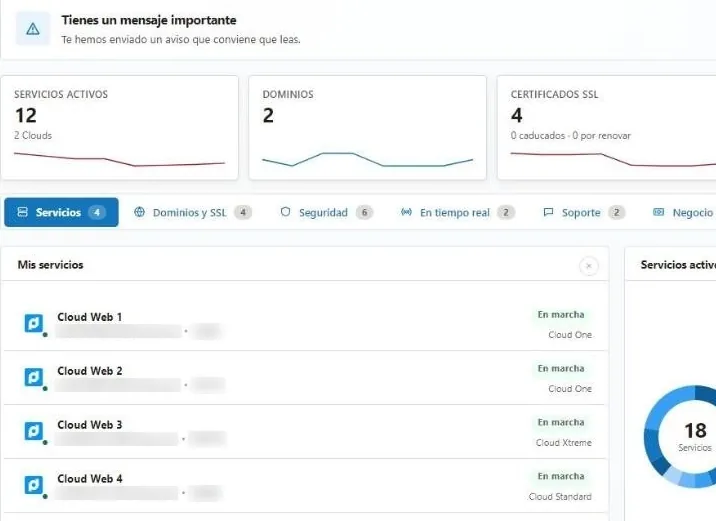
SWPanel, as it is
Eight screens you'll use every day
Screenshots of SWPanel 2027 with a test account.
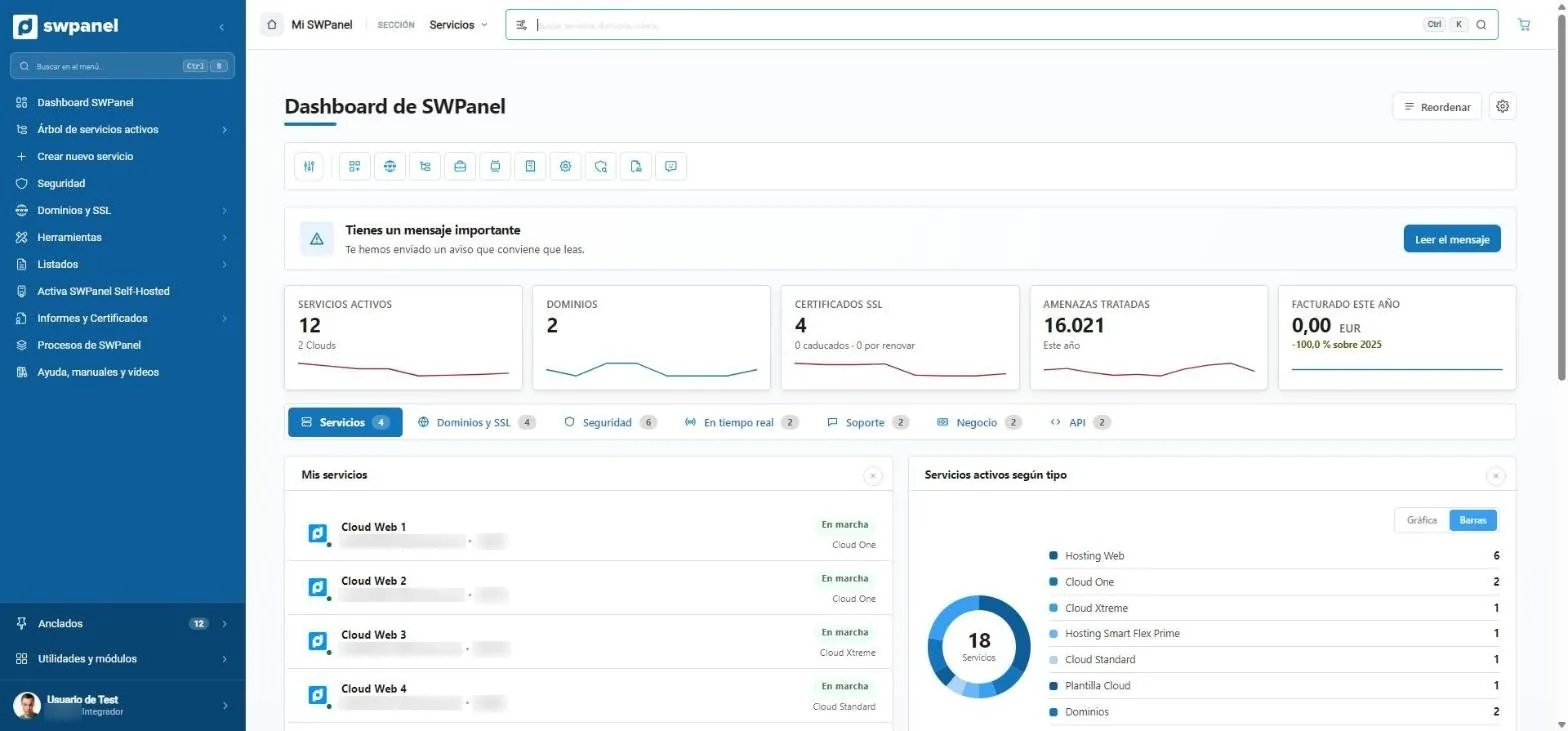
- What matters, on top: a message worth reading.
- Services, domains, SSL, threats handled and billing for the year.
- Tabs by topic: services, domains, security, real time, support, business and API.
- Your services by type.
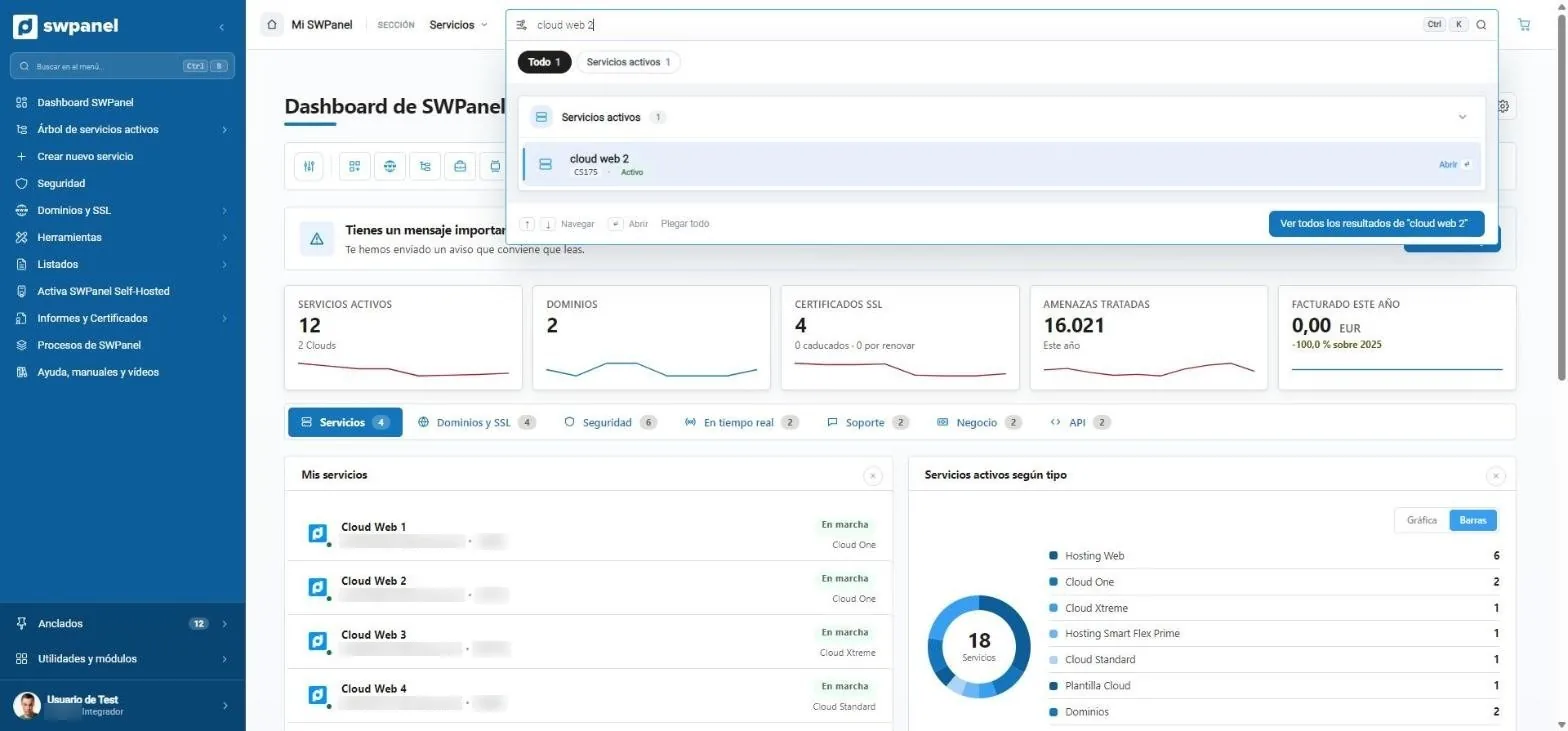
- Ctrl + K from any screen.
- Grouped results: services, domains, tickets, invoices...
- All results on one page, with filters.
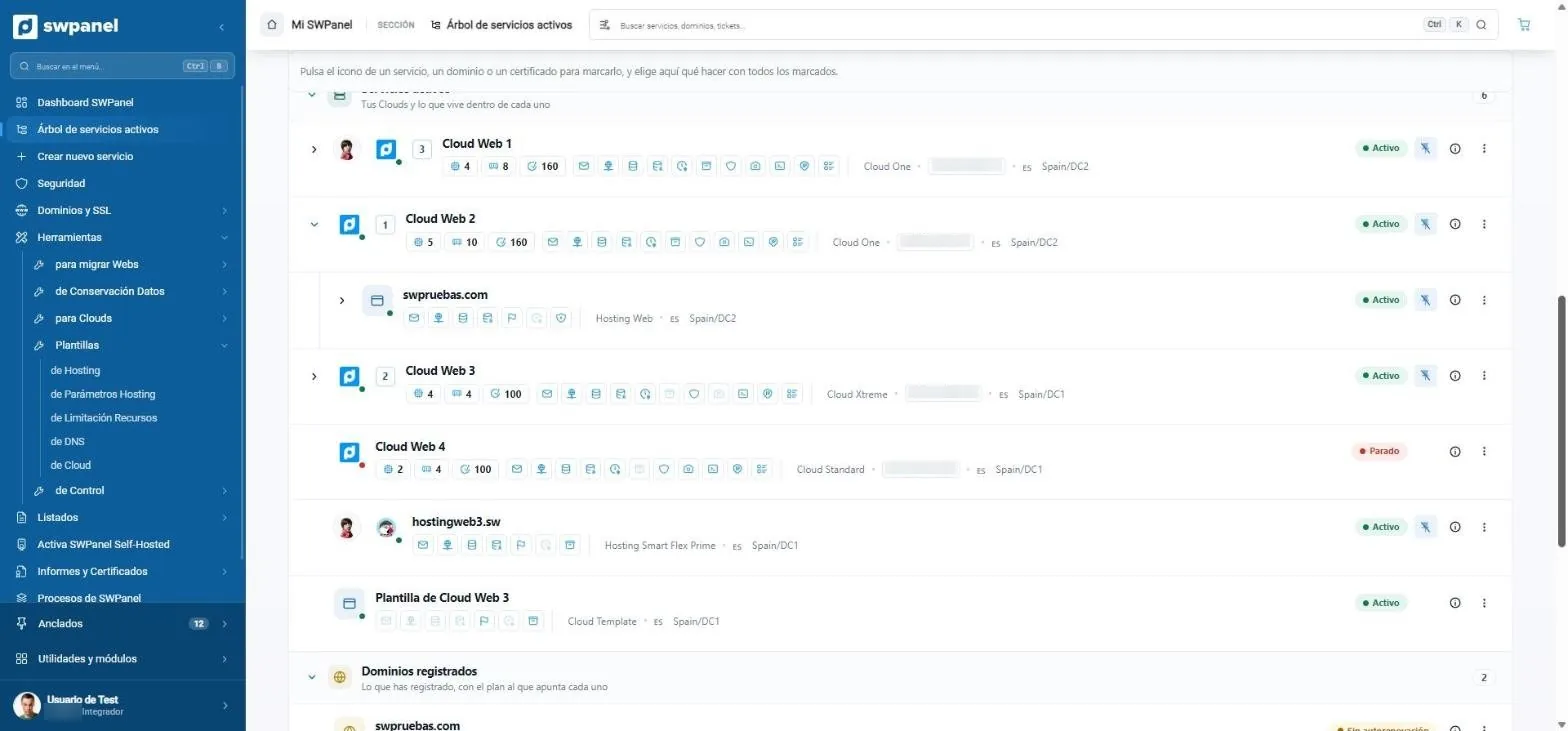
- Each service with its parts: websites, mailboxes, SSL, databases, backups, monitoring...
- What lives inside each Cloud, nested.
- Active or stopped, without opening anything.
- Registered domains and which plan each one points to.
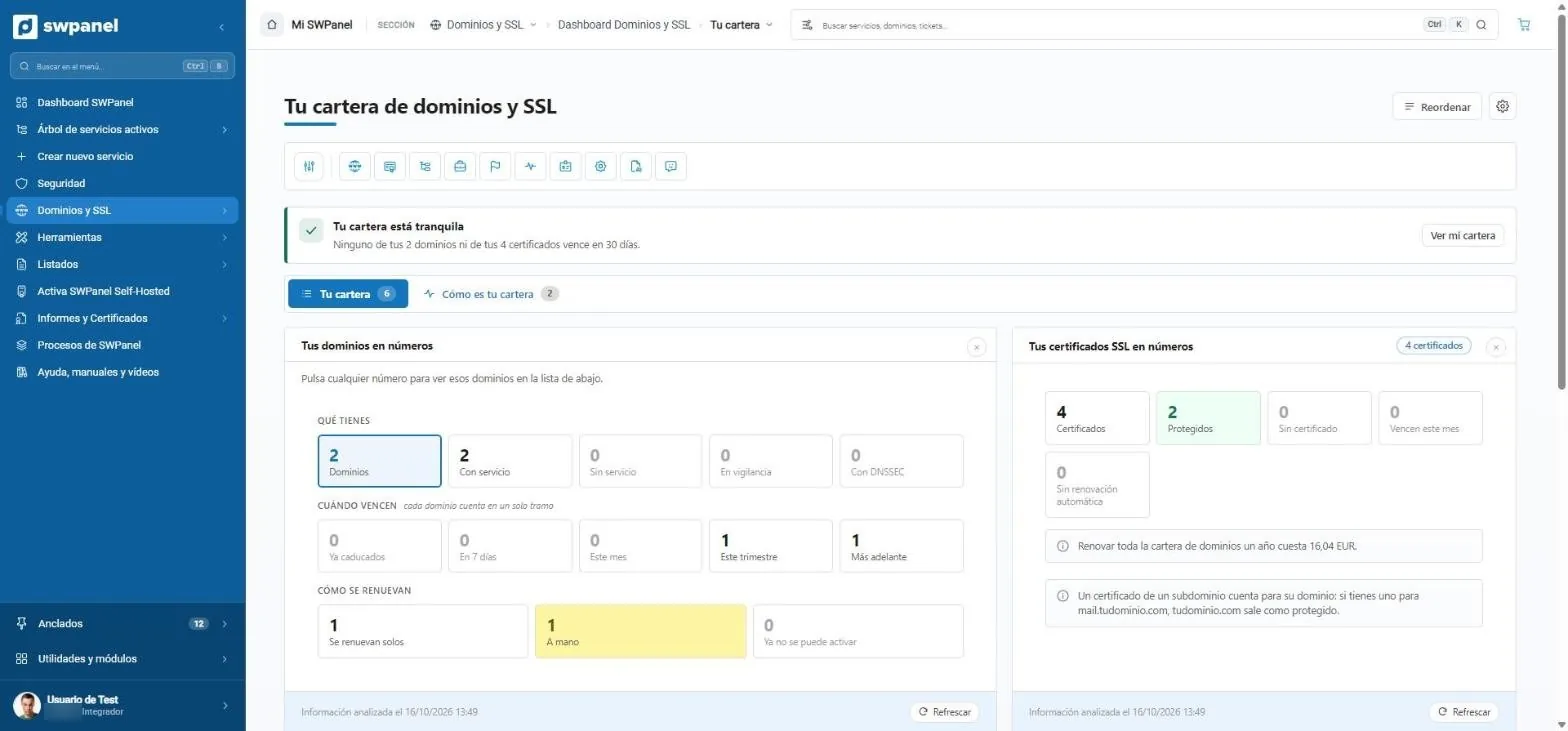
- A one-line summary: nothing expires in 30 days.
- What you have, when it expires and how it renews. Each number filters the list.
- SSL certificates in numbers.
- What it costs to renew the whole portfolio for a year.
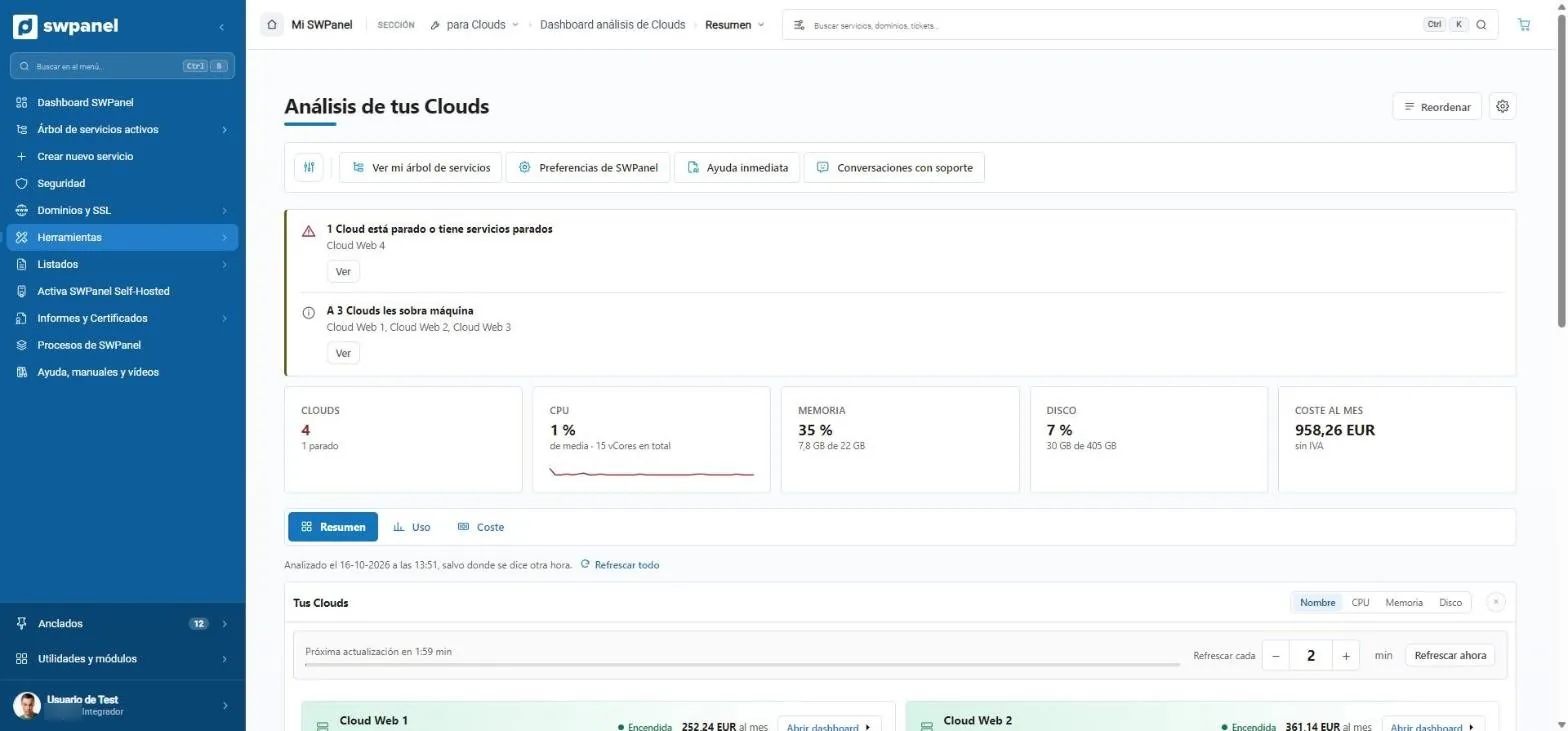
- Notices that matter: one stopped Cloud and three with more machine than they need.
- CPU, memory and disk of all your Clouds.
- What they cost per month, excluding VAT.
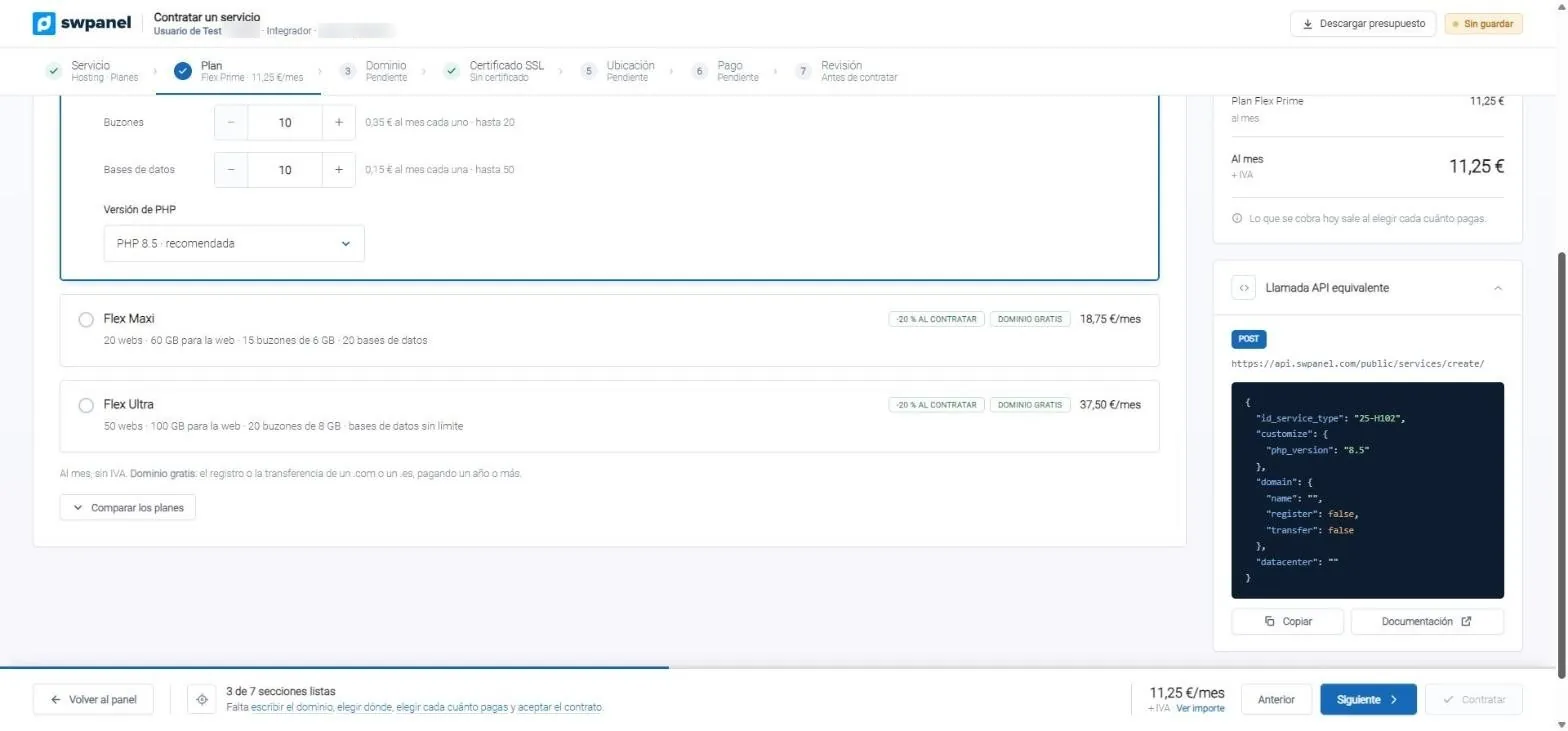
- Seven steps, with completed ones in green.
- The plans with what each one includes.
- The exact JSON to do the same from your code.
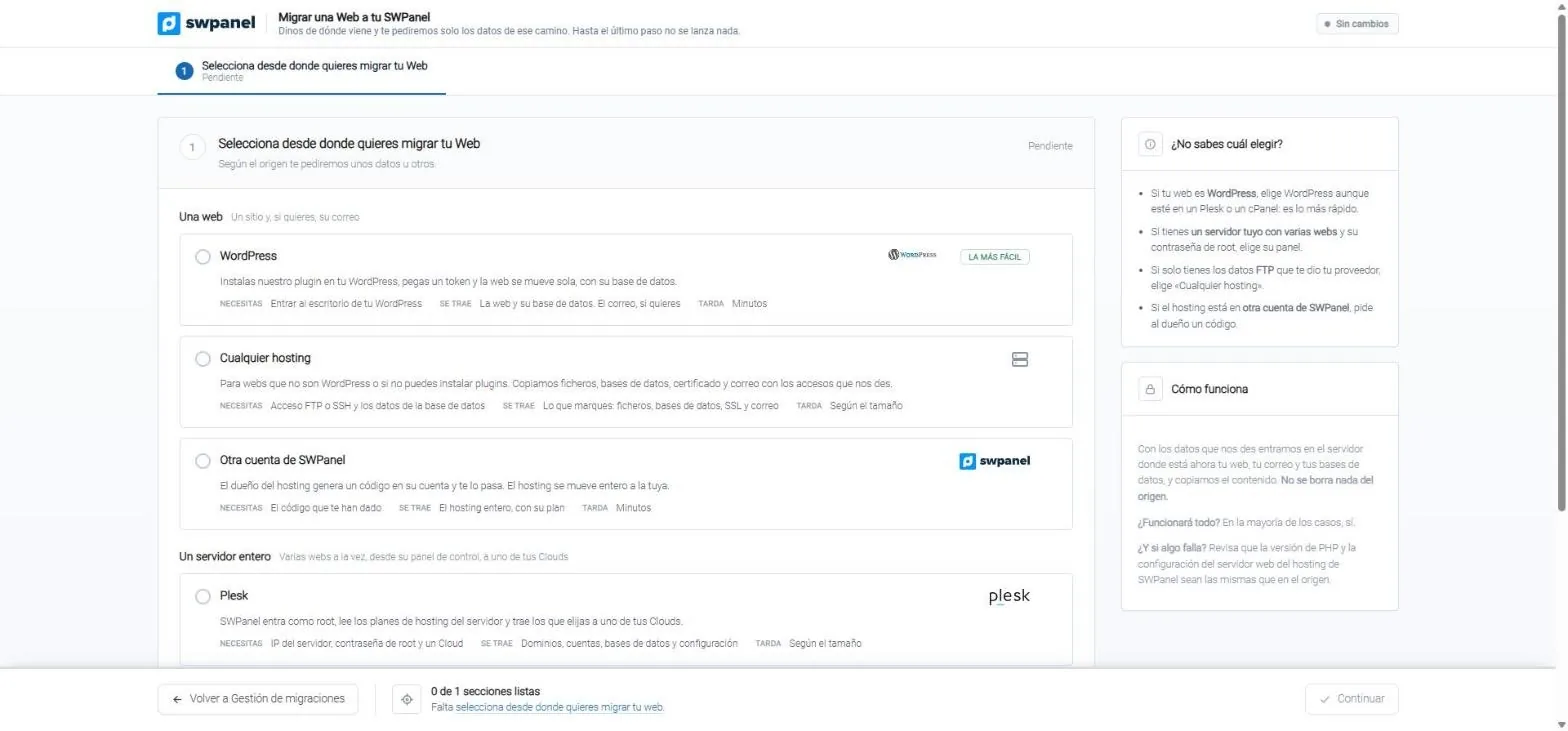
- Two groups: a single website or a whole server, with Plesk, cPanel or DirectAdmin.
- Before choosing: what you need, what comes across and how long it takes.
- Not sure which to choose? Four hints to pick the right path.
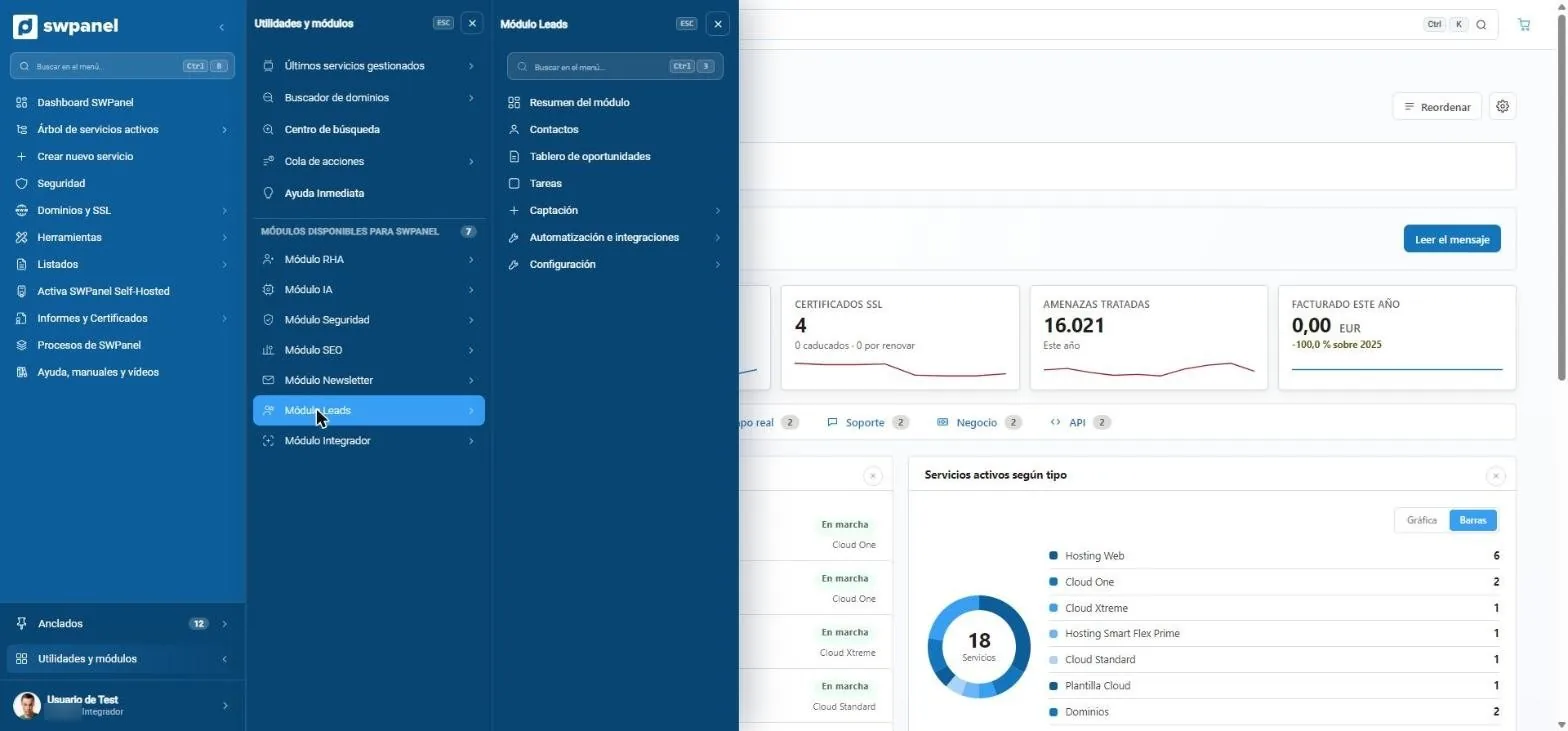
- Instant help, search and action queue, always at hand.
- The seven modules: RHA, AI, Security, SEO, Newsletter, Leads and Integrator.
- Each module, with its menu.
Domains and SSL
Domain and certificate management
Register, renew and transfer domains, manage contacts, DNS and DNSSEC, and issue SSL certificates. Each domain and each certificate shows you its life cycle: when it expires, what happens if it isn't renewed and what depends on it.
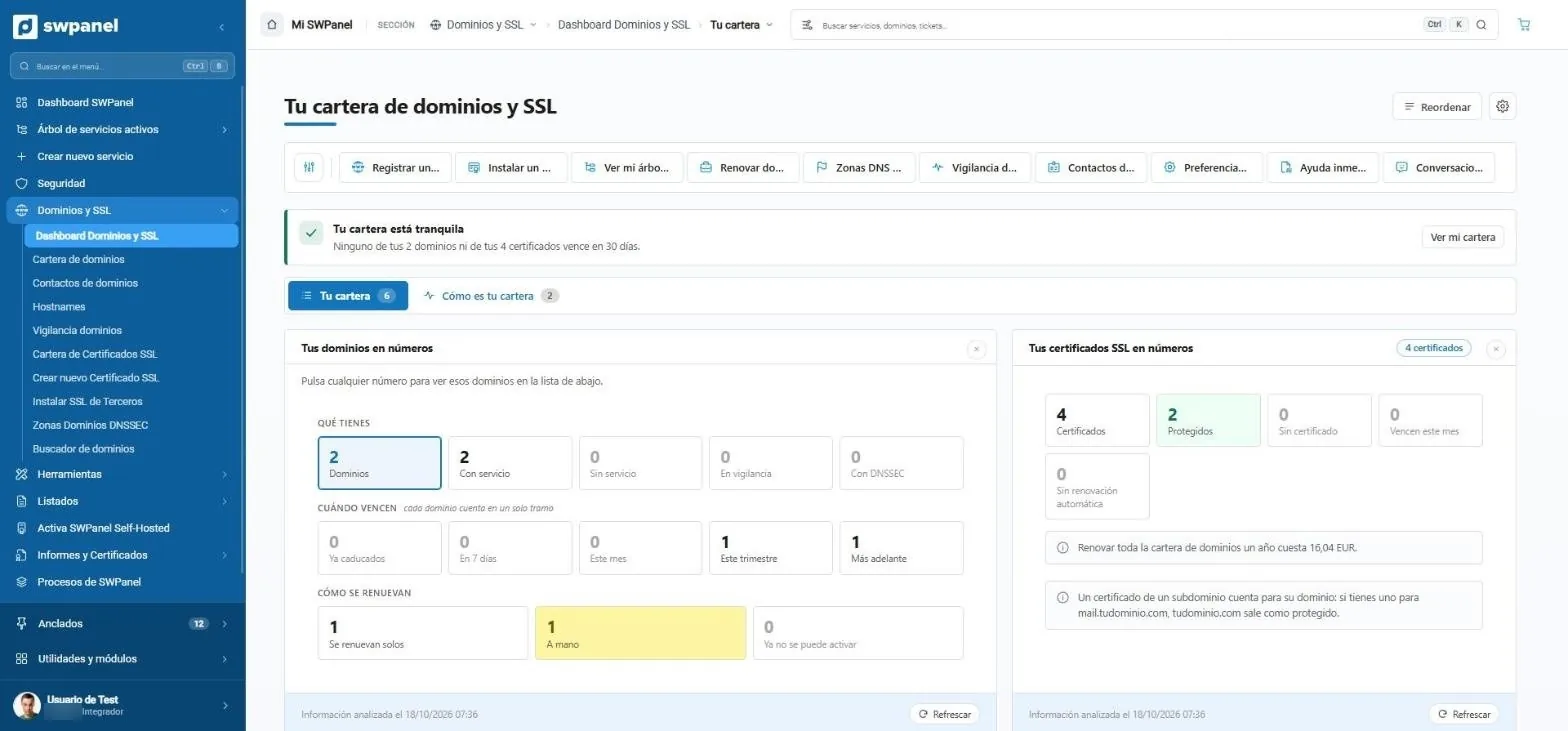
- Shortcuts to everything about domains: register, install an SSL, see your service tree, renew, DNS zones, monitoring and contacts.
- Your portfolio, in one sentence. Here, none of the 2 domains or 4 certificates expires in the next 30 days.
- Two views: today's snapshot and how your portfolio has evolved.
- What you have: domains with and without a service, monitored and with DNSSEC. Each number filters the list.
- When they expire, by range: expired, in 7 days, this month, this quarter and later.
- How they renew: automatically, manually or no longer able to be reactivated. Yellow needs your attention.
- Your SSL certificates: how many you have, how many protect something, which expire this month and which don't renew on their own.
- How much it costs to renew everything for a year, calculated from your portfolio.
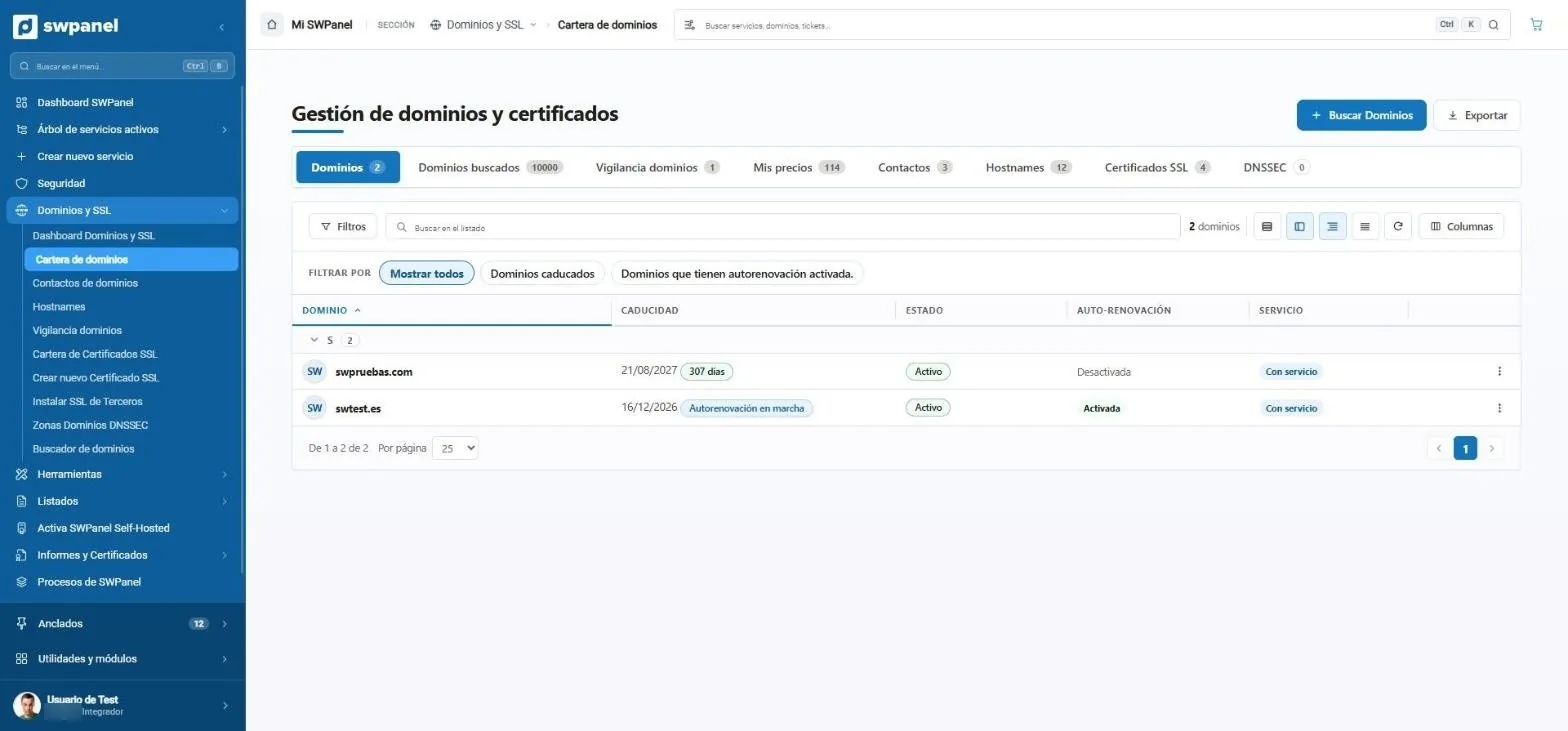
- Everything in tabs: domains, searches, monitoring, your prices, contacts, hostnames, SSL certificates and DNSSEC.
- Search and register a new domain without leaving the portfolio.
- One-click filters: all, expired or with auto-renewal on.
- When each domain expires and how many days it has left.
- What's happening: here, swtest.es's automatic renewal is already under way.
- Auto-renewal of each domain, on or off, in view.
- Whether it has an associated service or is just the domain.
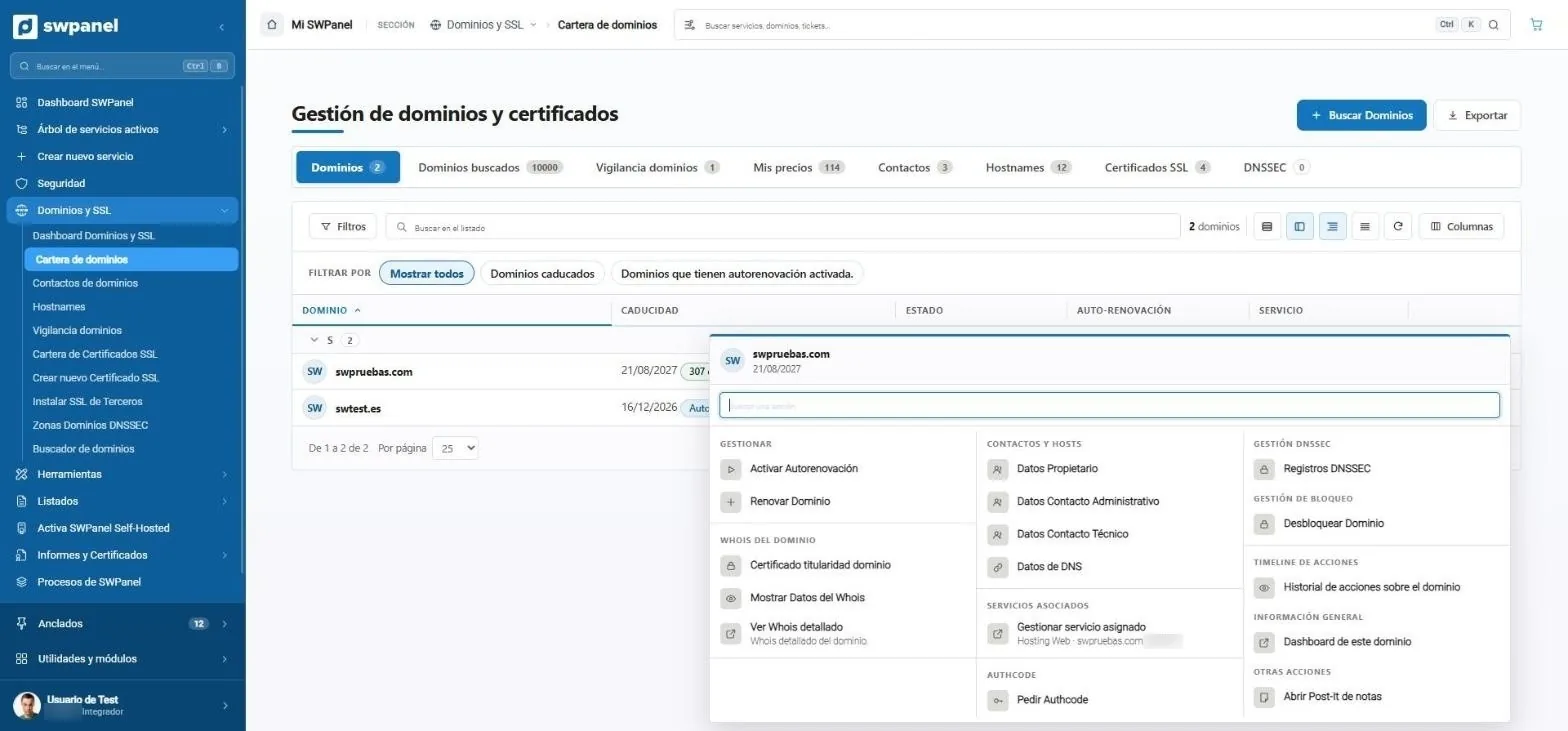
- Find the action by typing, without browsing menus.
- Renew or turn on auto-renewal from the list itself.
- Whois: ownership certificate, public data and detailed whois.
- Contacts and DNS: owner, administrative and technical contact, and name servers.
- The service that uses the domain (here, a web hosting), one click away.
- Request the authcode to take your domain with you.
- DNSSEC: the records that sign your zone.
- Transfer lock, so nobody takes your domain away.
- The history of everything done with the domain, and its dashboard.
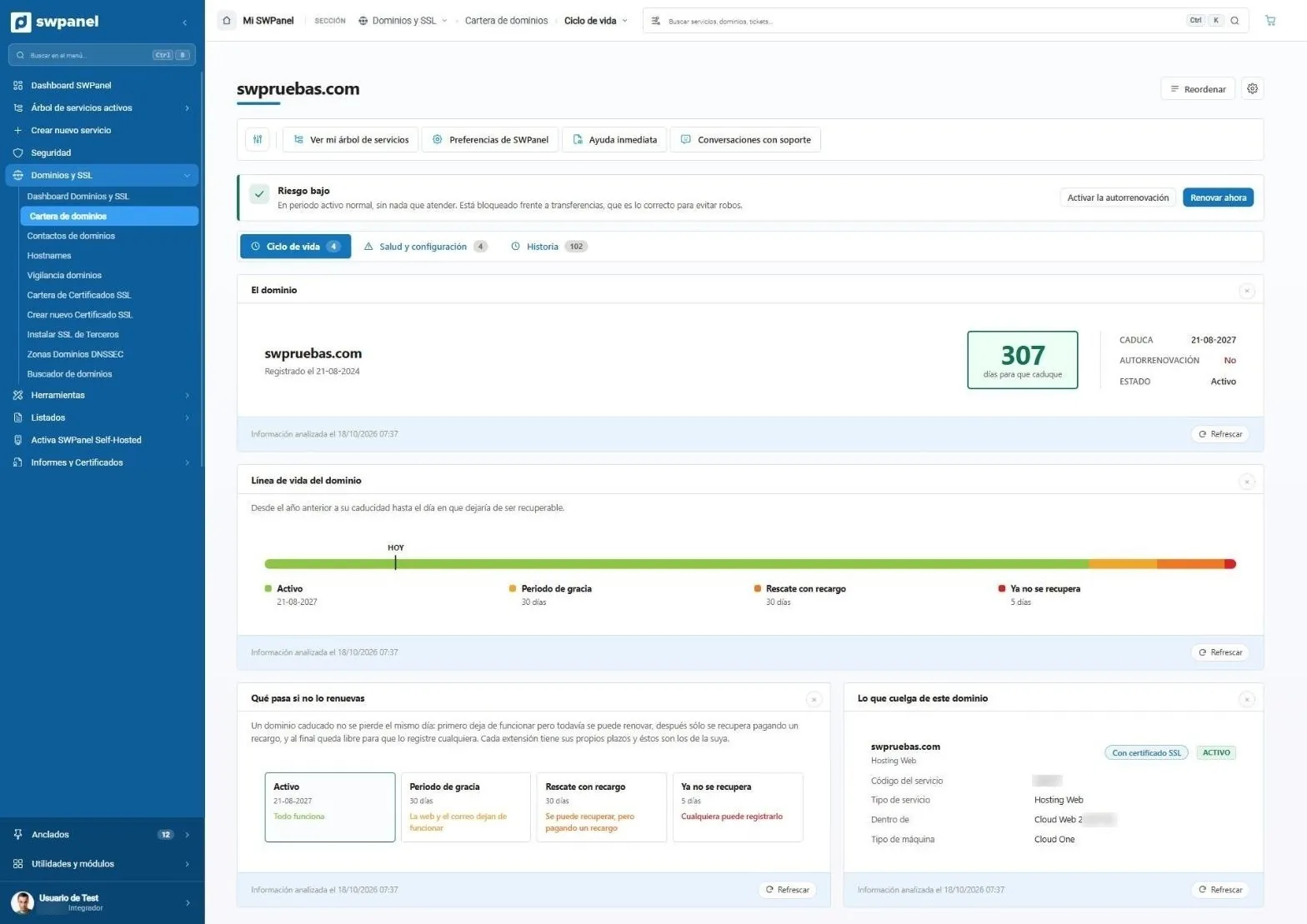
- The risk, in one sentence: low here, because the domain is active and locked against transfers.
- The action to take, one click away: turn on auto-renewal or renew now.
- Three views of the domain: life cycle, health and configuration, and history with every change.
- Days until it expires, with the date, auto-renewal and status next to it.
- Where you are today on its life line: from the year before expiration until it stops being recoverable.
- The phases, with their deadlines: active, grace period, redemption with surcharge and no longer recoverable.
- What happens if you don't renew it, phase by phase: when the website and email stop working and when someone else can register it.
- What depends on the domain: the service, its type and where it runs. If it expires, you know what stops working.
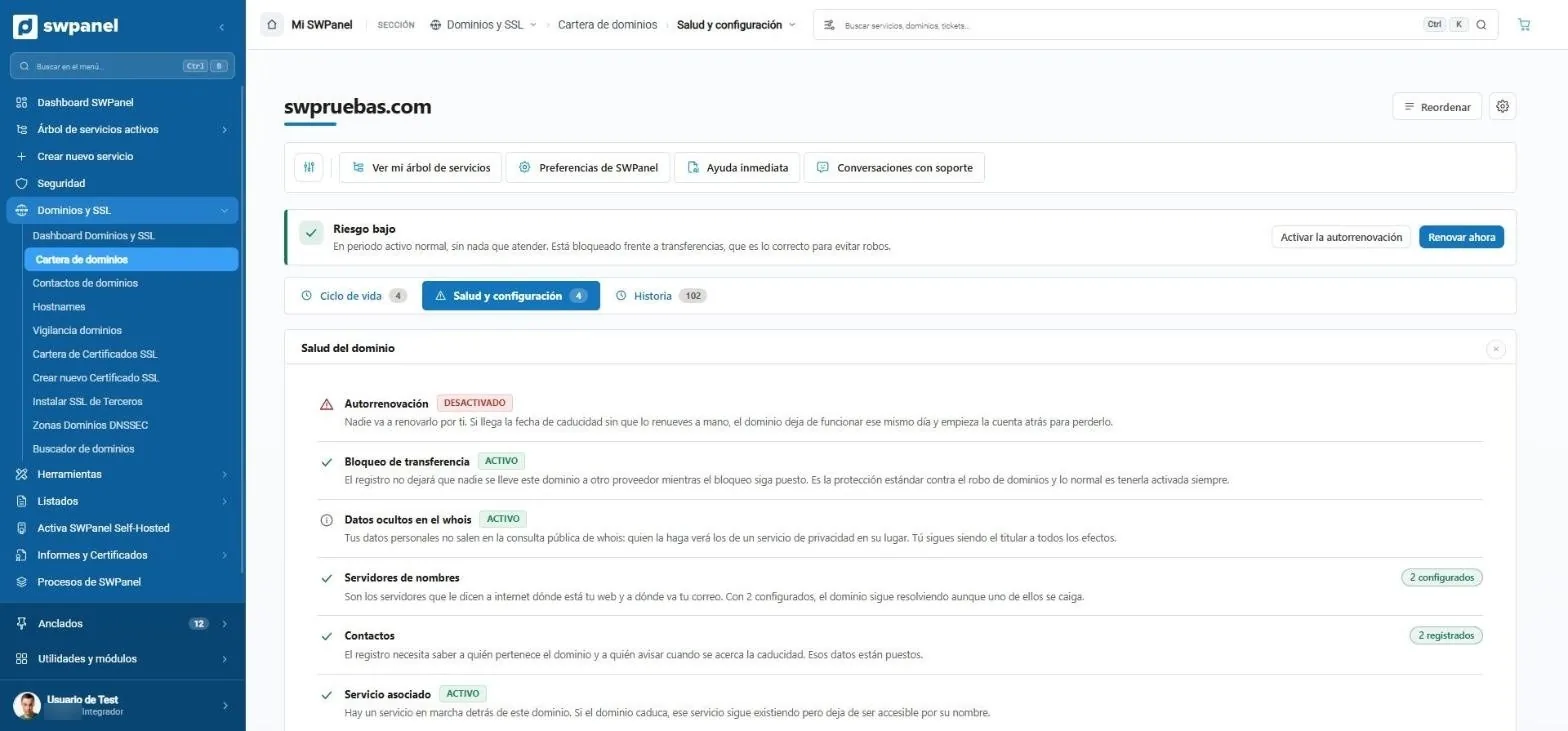
- What needs attention comes first: auto-renewal is off and SWPanel explains what will happen if you don't renew manually.
- Transfer lock active: nobody can take the domain to another provider.
- Whois privacy: your personal data doesn't appear in the public lookup.
- Name servers: with two, the domain keeps resolving even if one goes down.
- Complete contacts, so the registry knows whom to notify before expiration.
- The associated service and what happens to it if the domain expires.
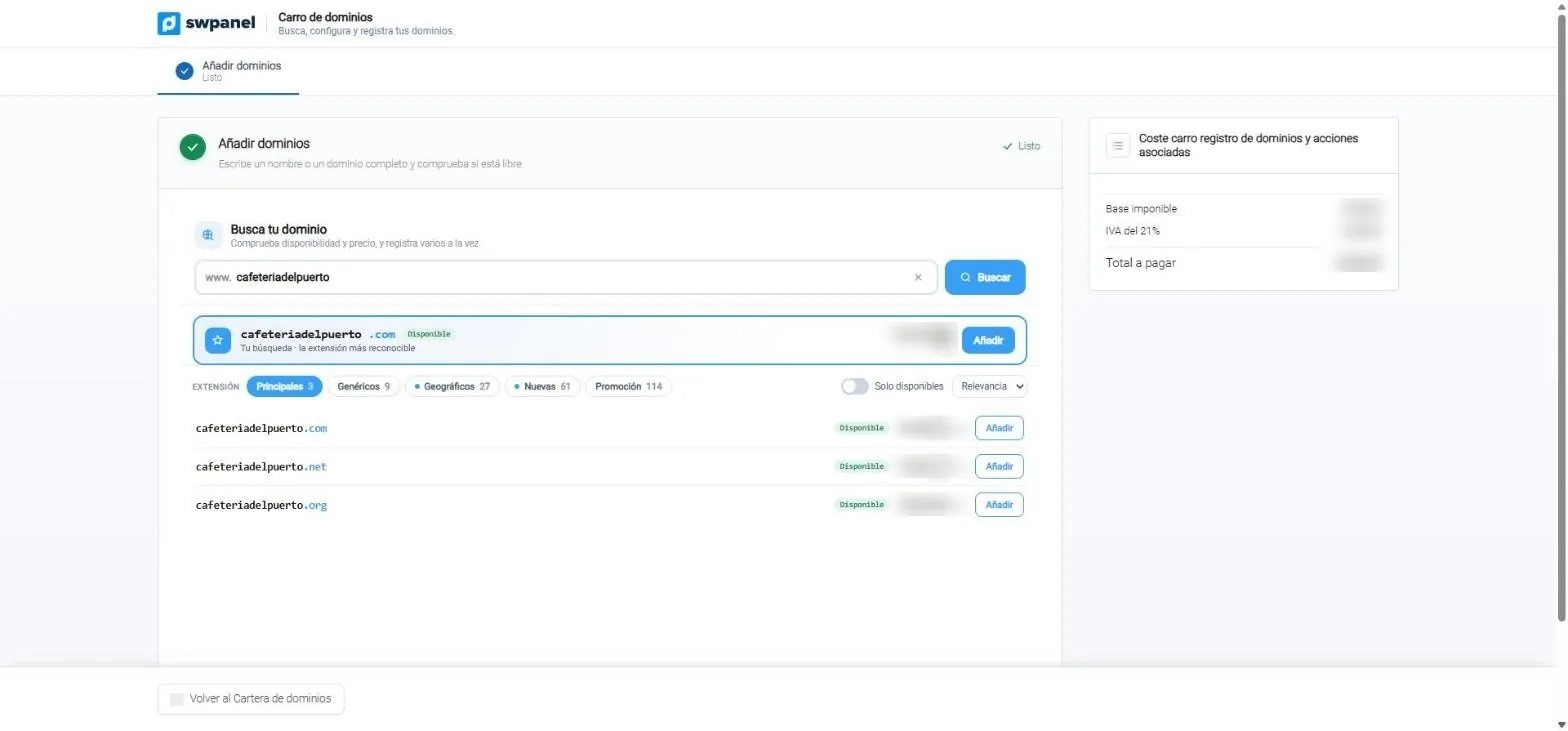
- Type a name or a full domain and check if it's available.
- Your search comes first: the most recognizable extension, with its price and the button to add it.
- By extension families: main, generic, geographic, new and on promotion.
- Only the available ones, in the order you prefer.
- Several extensions at once: you add .com, .net and .org and register them together.
- What you'll pay, with taxes, updated with each domain you add.
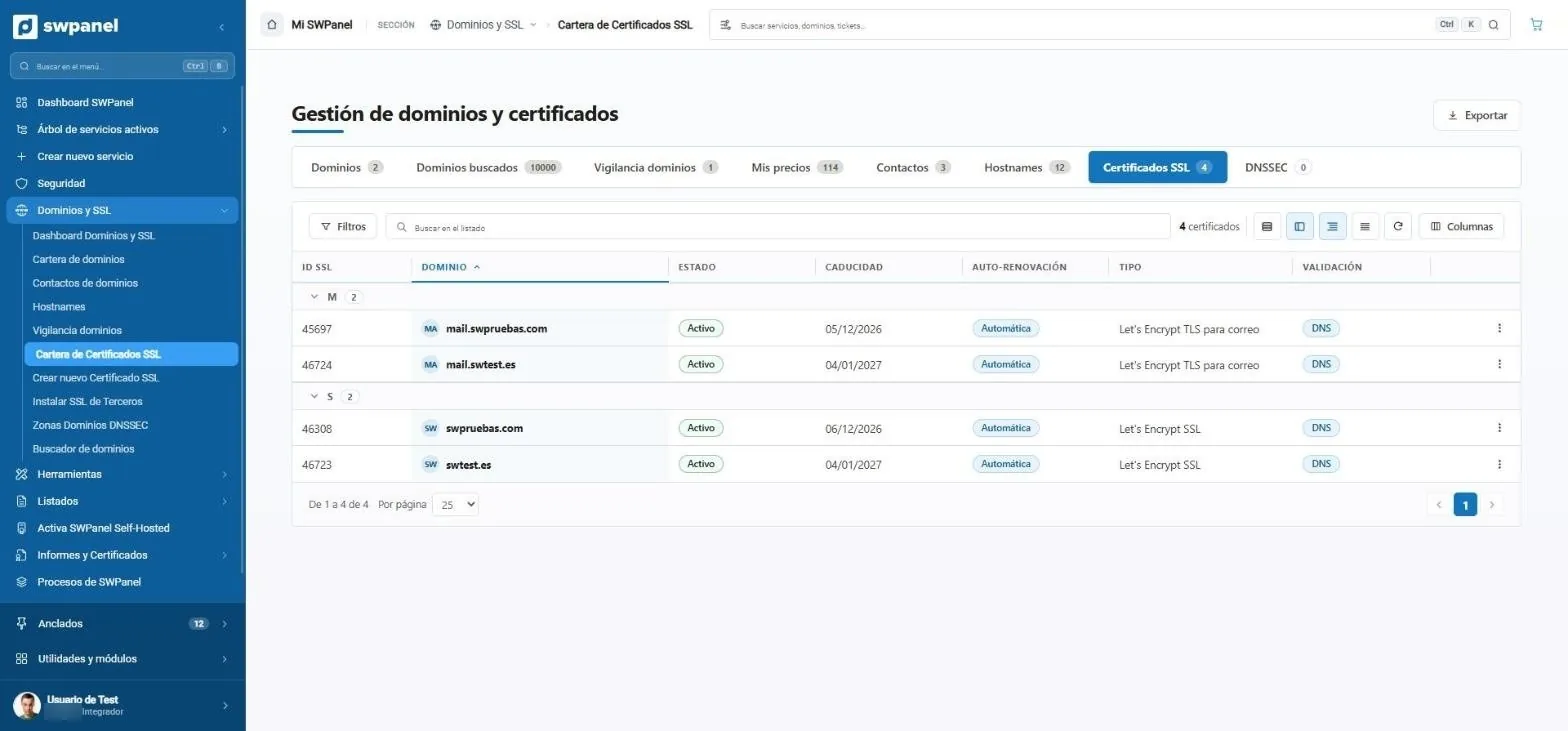
- Certificates next to domains: one more tab of the same management.
- Status of each certificate.
- When each one expires.
- Automatic renewal: Let’s Encrypt ones renew on their own.
- Certificate type: for the website or for email.
- How it's validated: via DNS, without touching the website.
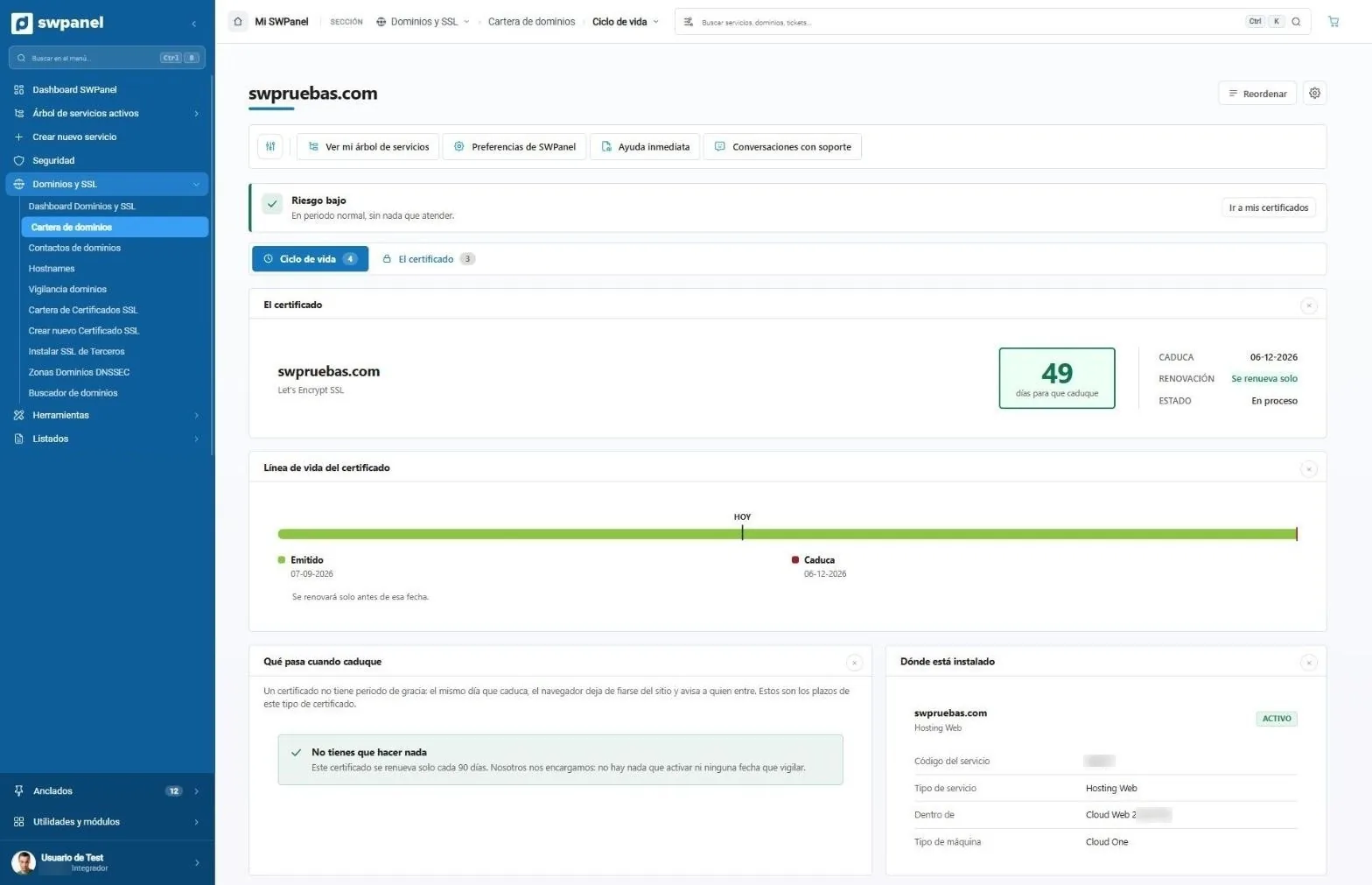
- The risk, in one sentence: low here, normal period and nothing to attend to.
- Two views: the life cycle and the certificate data.
- Days until it expires, with the date, status and renewal: here it renews on its own, before expiring.
- Where you are today, between issuance and expiration.
- What happens when it expires, in plain terms. Here, nothing to do: it renews itself every 90 days.
- Where it's installed: the service it protects, its type and where it runs.
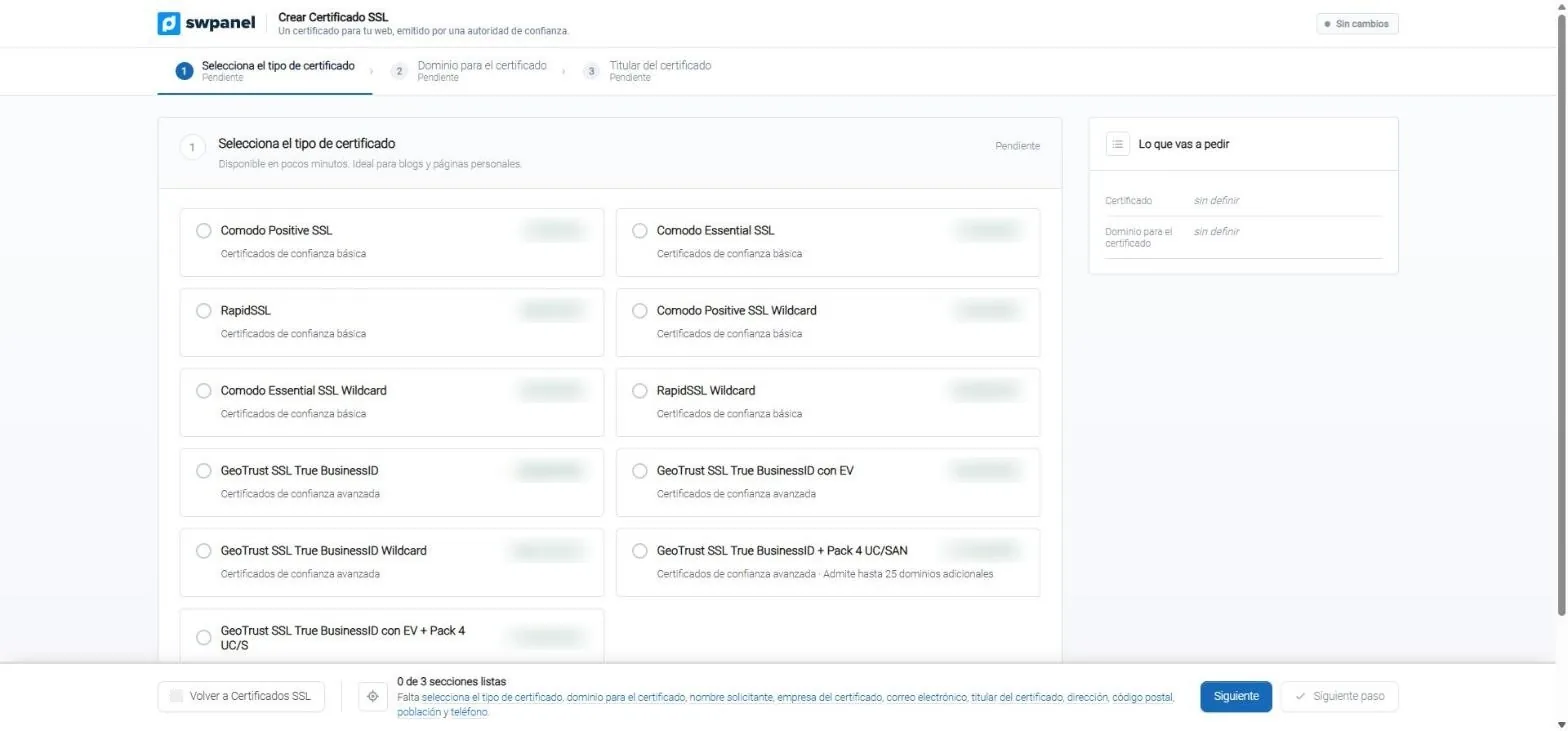
- Three steps: certificate type, domain and holder.
- Basic trust: ready in a few minutes, for blogs and personal websites. Also wildcard.
- Advanced trust: they validate the company. With EV and multi-domain, up to 25 additional domains.
- What you'll request, summarized as you choose.
- Below, what's left to finish, field by field. Nothing is requested until everything is ready.
Hosting
Complete hosting management
From ordering it to managing it: website and WordPress, email, databases, FTP, files and permissions, and what each user on your team can do in each service.
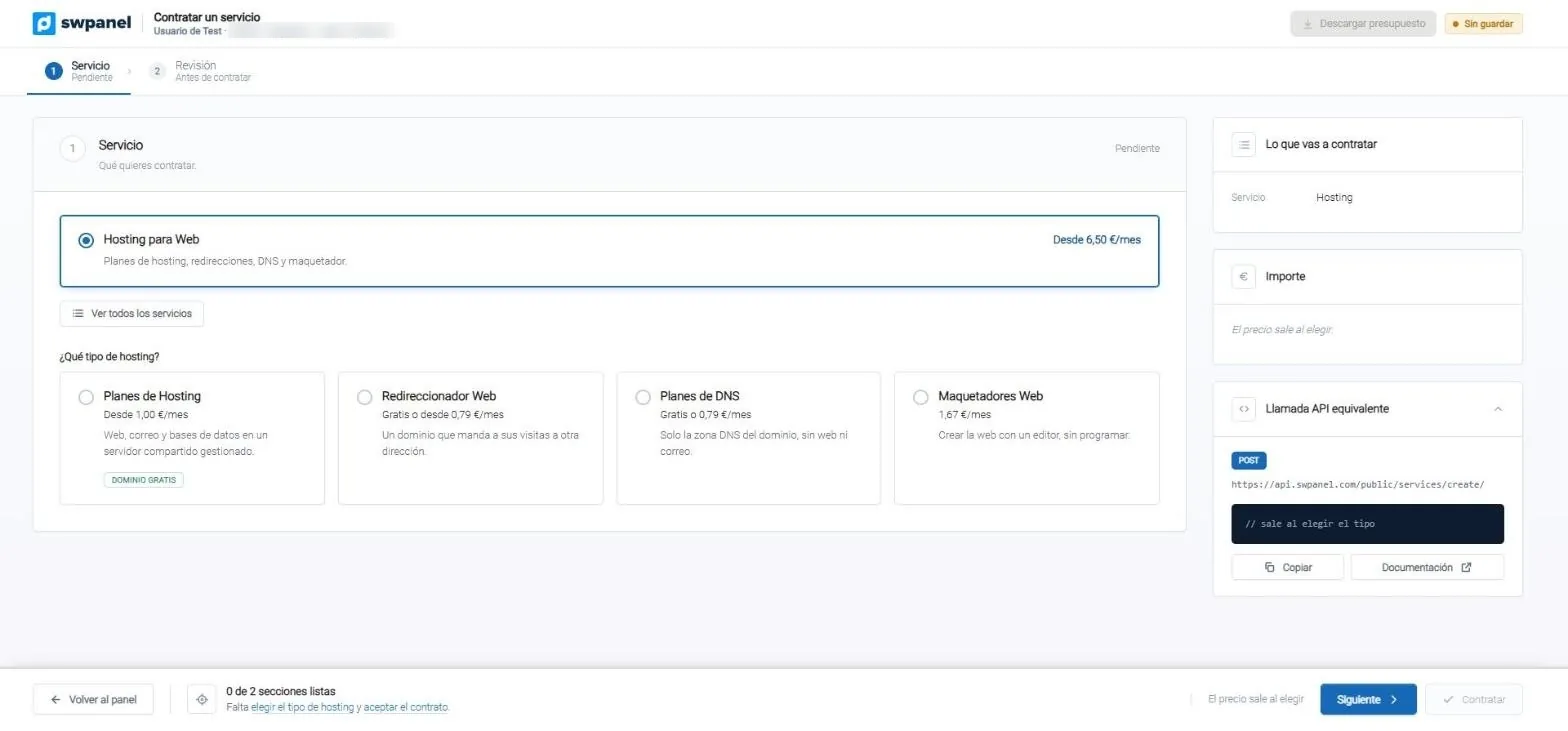
- Two steps: you choose the service and review it before ordering.
- What you want to order. Here, hosting for websites: plans, redirects, DNS and builder.
- Which type of hosting: shared, redirector, DNS only or builder, with its starting price.
- What you'll order and its amount, updated as you choose.
- The equivalent API call: the same thing you do here, automatable from your systems.
- What's left to finish. Nothing is ordered until you review it.
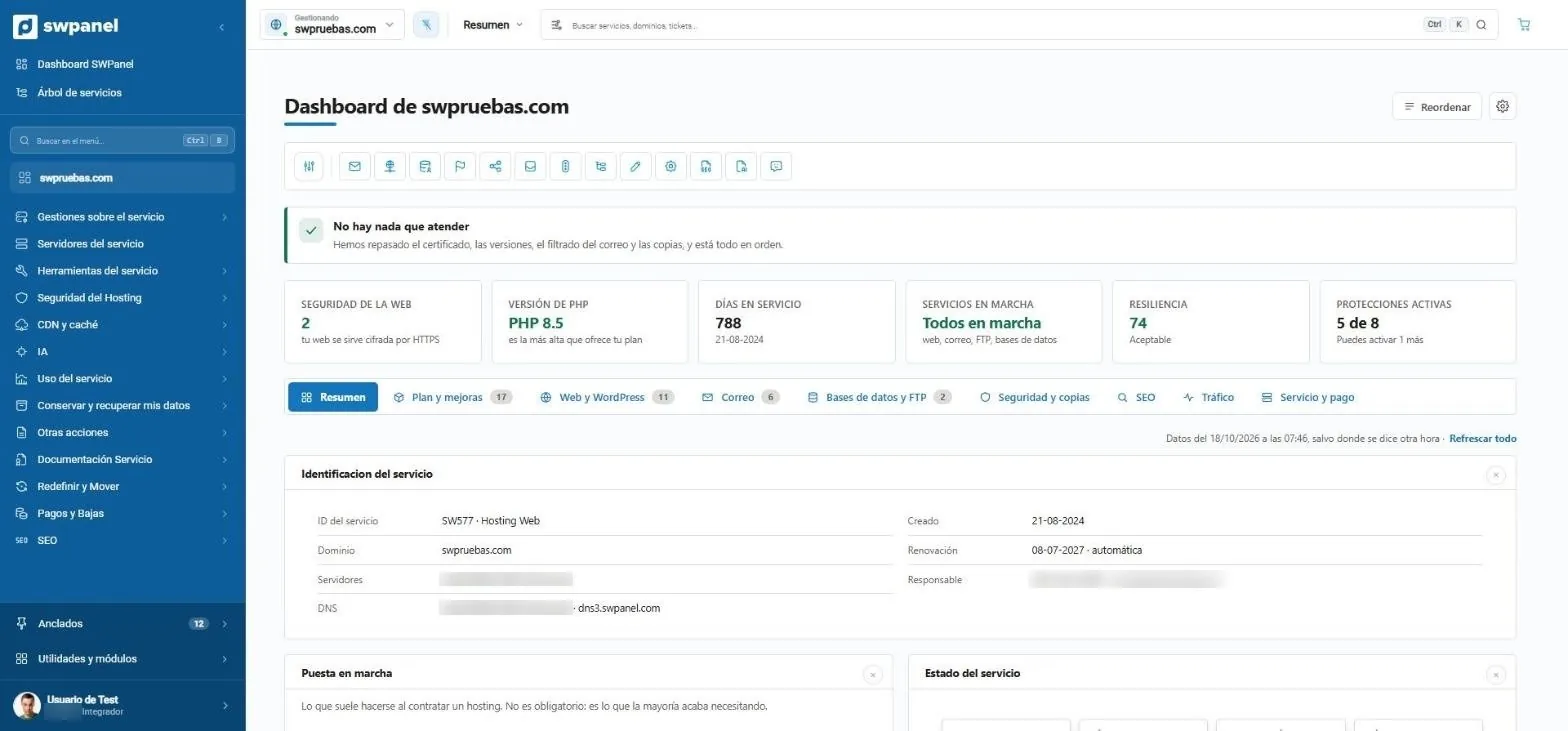
- The whole service in the menu: management, servers, tools, security, CDN, AI, backups, documentation and payments.
- Shortcuts to the hosting's most used management tasks.
- What needs attention, in one sentence. Here, nothing: certificate, versions, email filtering and backups, all in order.
- Six figures at a glance: HTTPS, PHP version, days in service, running services, resilience and active protections.
- One tab per topic: plan and upgrades, website and WordPress, email, databases and FTP, security and backups, SEO, traffic and payments.
- The service record: ID, domain, servers, DNS, sign-up date and automatic renewal.
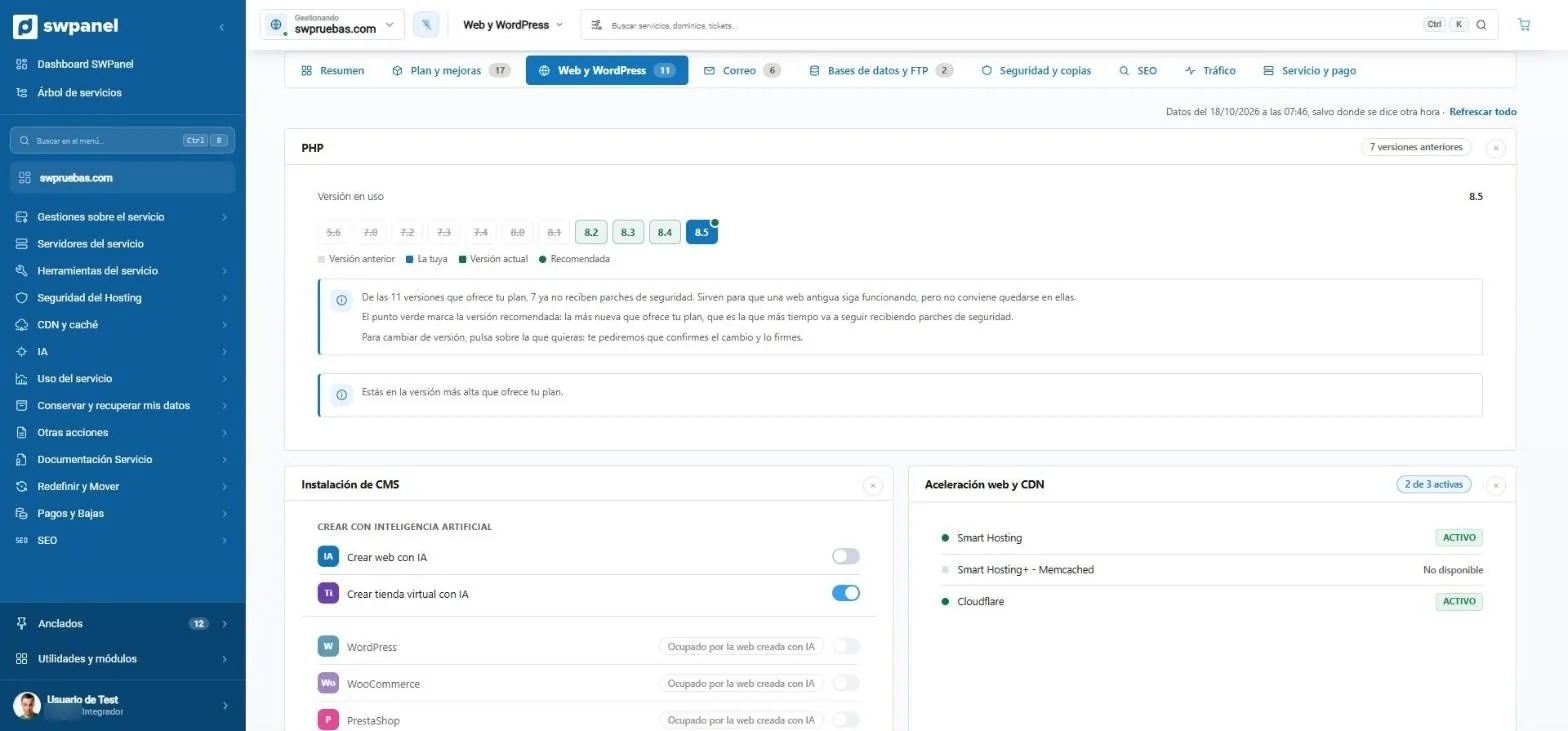
- PHP version, in view: yours, the current one and the recommended one. Crossed-out ones no longer receive patches.
- Why it matters, explained: which versions no longer receive patches and which one suits you. Changing version asks for confirmation.
- Create the website or store with AI, with a switch.
- WordPress, WooCommerce, PrestaShop and more, in one click. SWPanel warns you if that space is already used by another website.
- Acceleration and CDN: Smart Hosting, Memcached and Cloudflare, showing what is active.
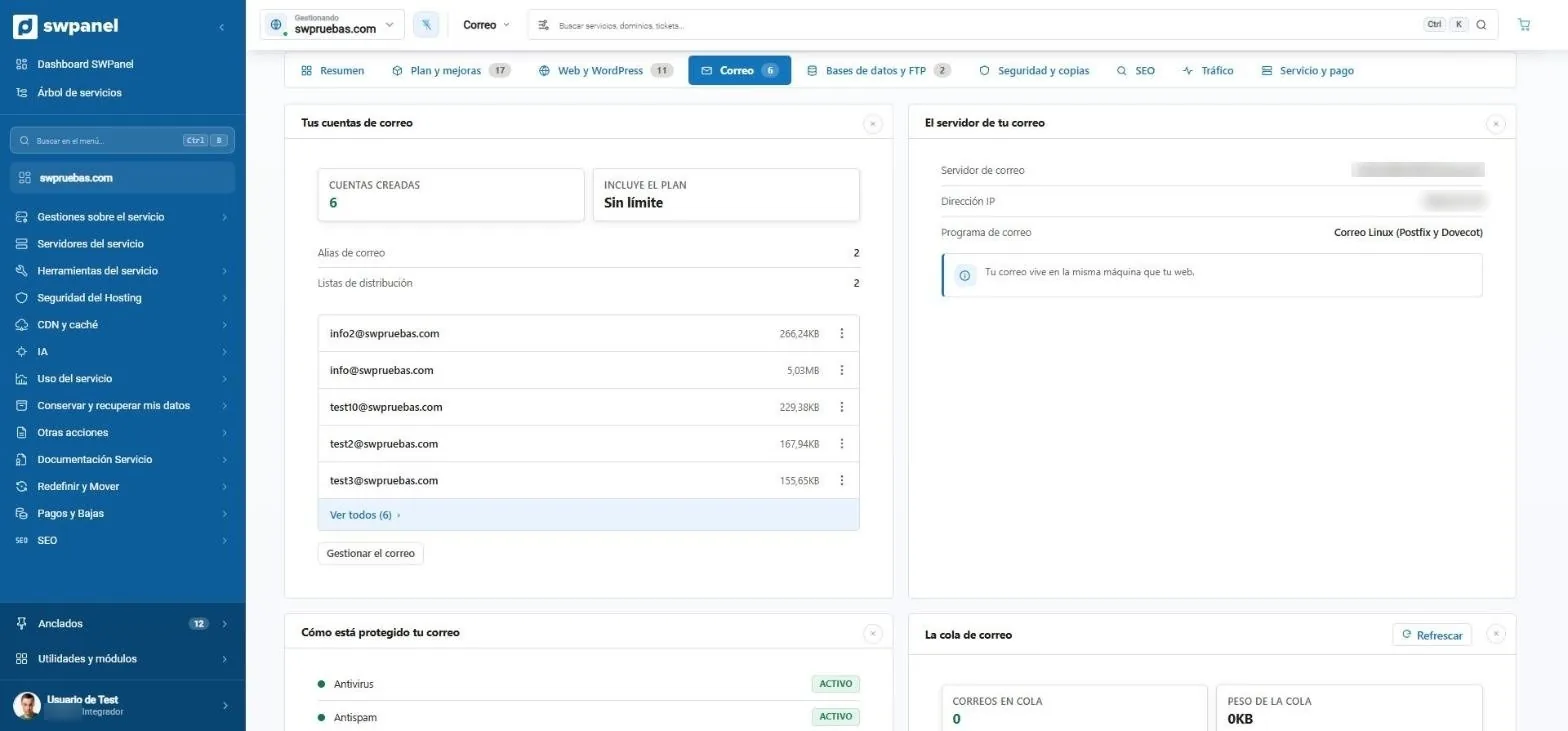
- Accounts created and what the plan includes: here, unlimited.
- Aliases and distribution lists, counted.
- Each account with the space it uses and its actions menu.
- Your email server: machine, IP and software. Here, on the same machine as the website.
- How it's protected: antivirus, antispam and the other filters, with their status.
- The mail queue: how many messages are waiting and how much they weigh. If something gets stuck, you see it here.
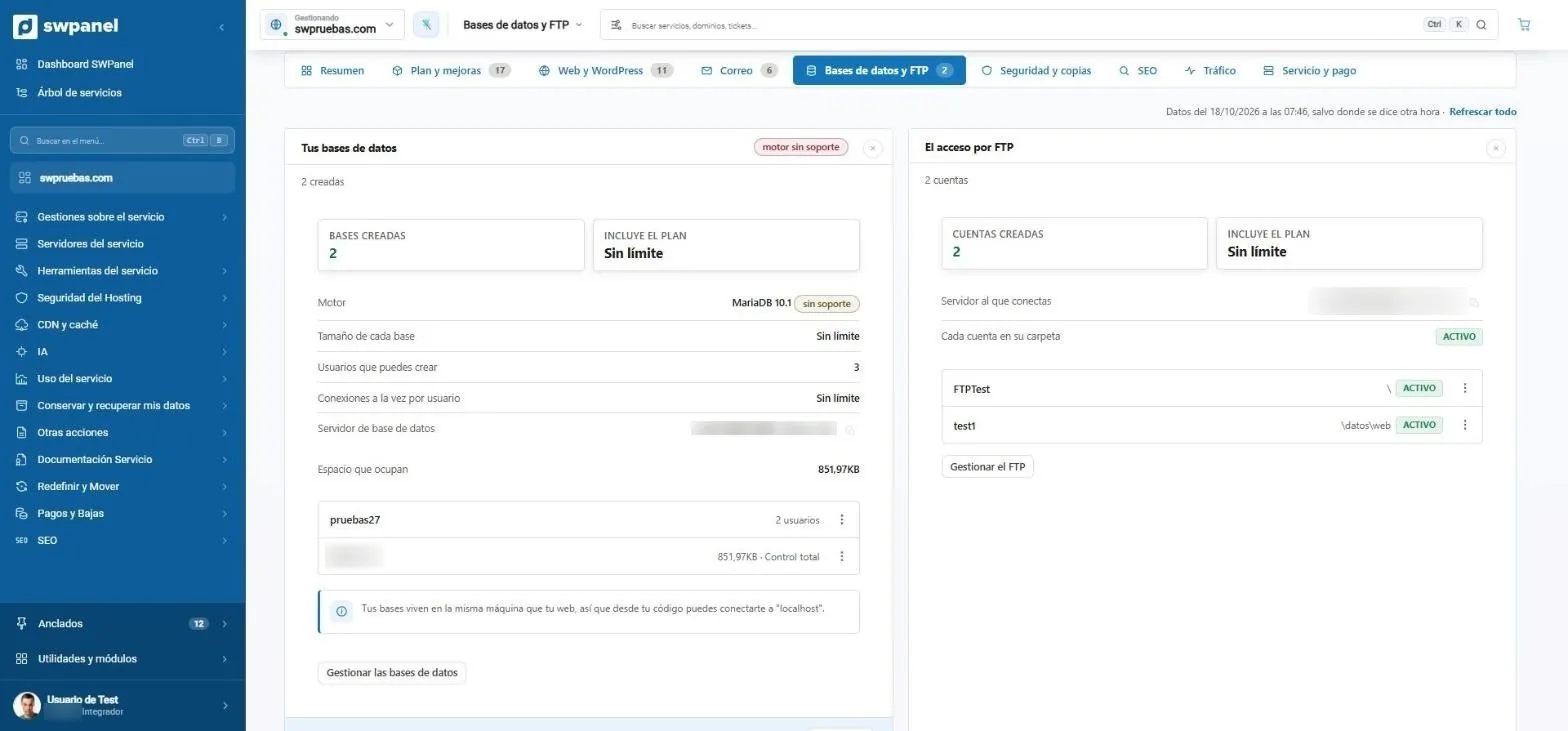
- Notices in the header: here, the database engine is no longer supported.
- Engine, limits and space: size per database, users, connections and how much they take up.
- Each database with its users and its actions menu.
- How to connect from your code, explained. Here, via “localhost”.
- Each FTP account in its own folder: nobody sees more than they should.
- The FTP accounts, with their folder, status and actions.
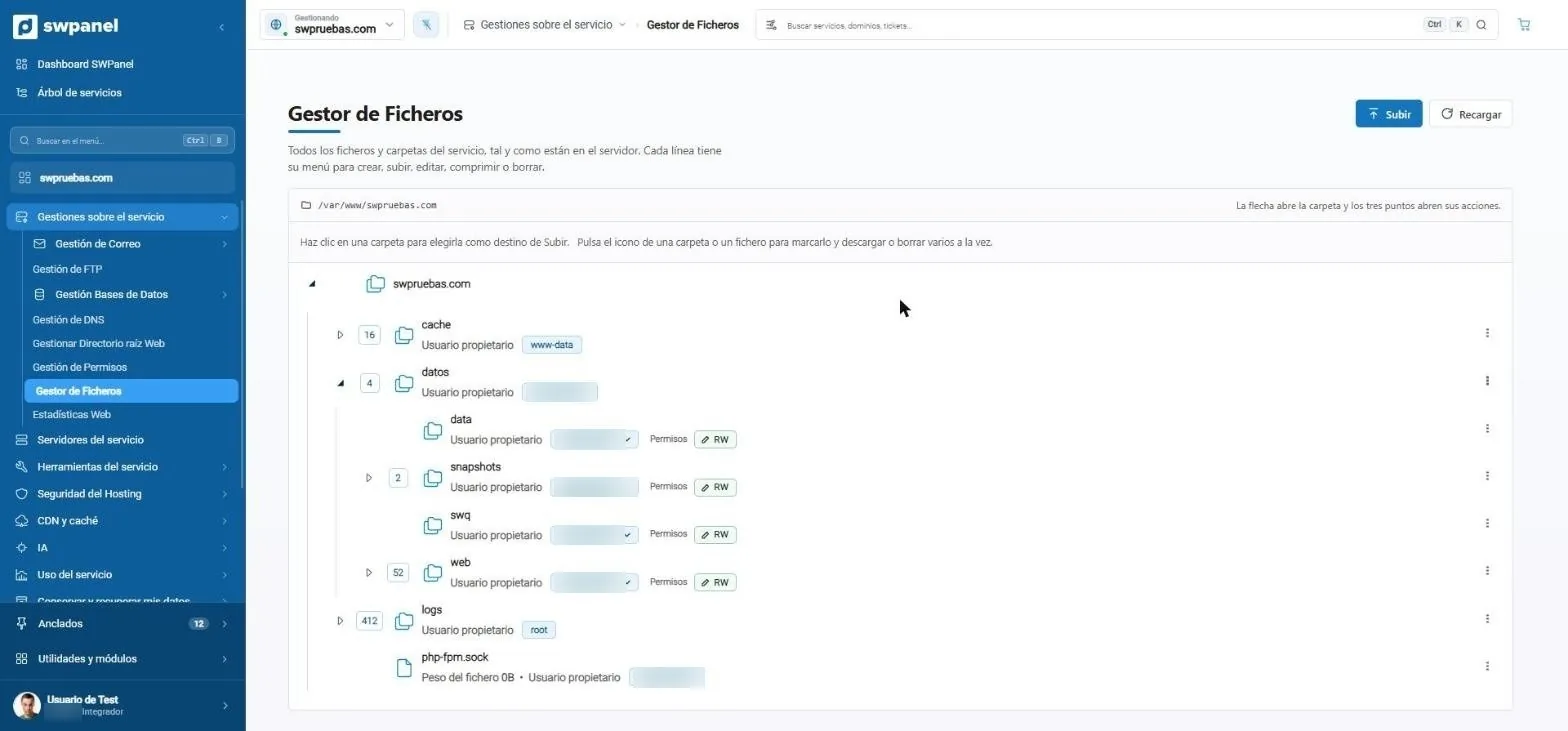
- Where you are: the real path on the server.
- Who owns each folder: the owner user, editable from the dropdown.
- Write permissions (RW) or read-only, folder by folder.
- Upload files to the folder you choose.
- Each line with its menu: create, edit, compress, download or delete.
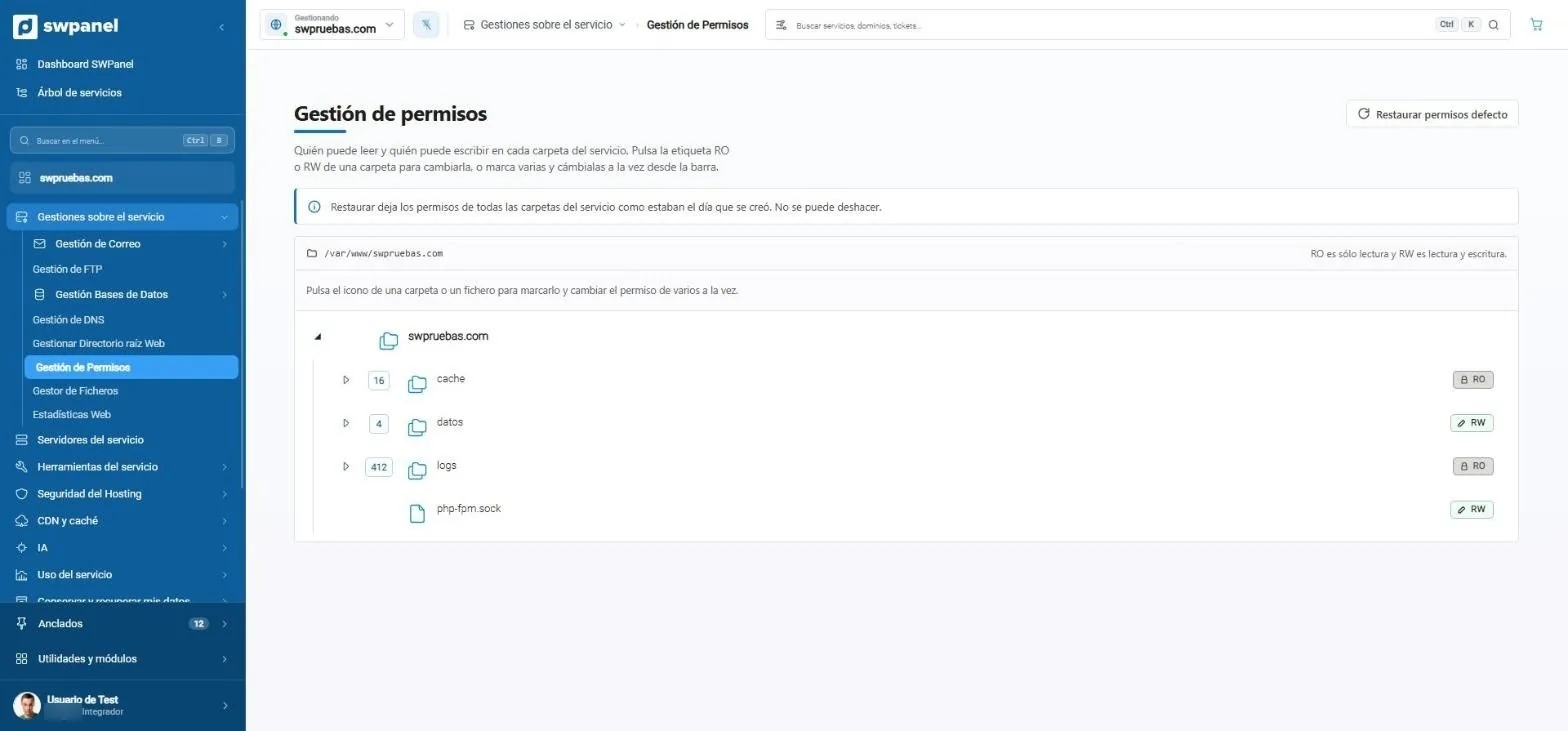
- Go back to the factory permissions in one click.
- It warns you before anything irreversible: restoring can't be undone.
- RO or RW: read-only, or read and write.
- Several at once: select the folders and change them from the bar.
- One click on the label changes that folder's permission. Here, logs are read-only.
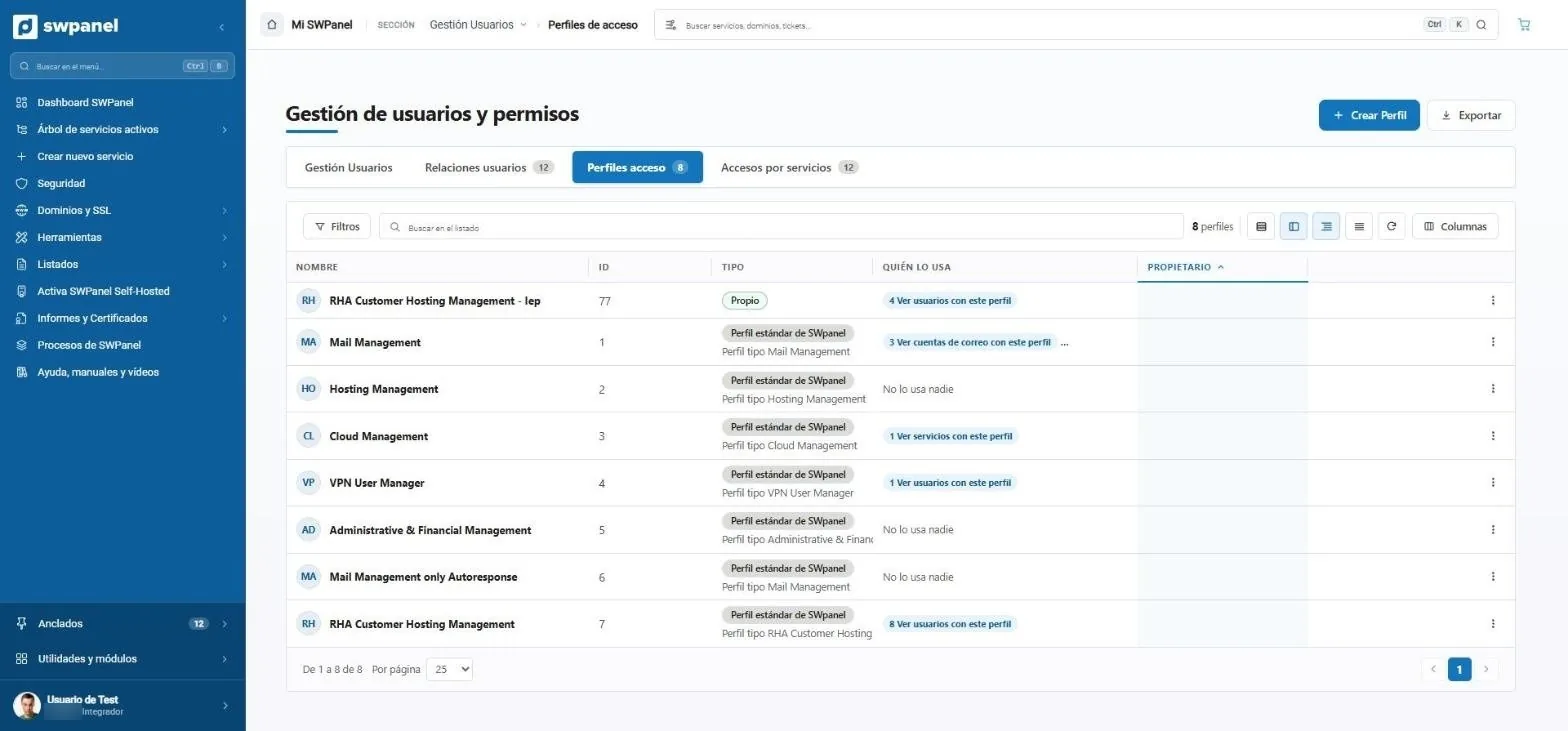
- Users, relationships, profiles and access, in a single management area.
- Create a profile with the exact permissions you need.
- Your profiles, with whatever name you like.
- Custom or SWPanel standard: start from a standard one and adjust it.
- Who uses it: users, email accounts or services with that profile, one click away.
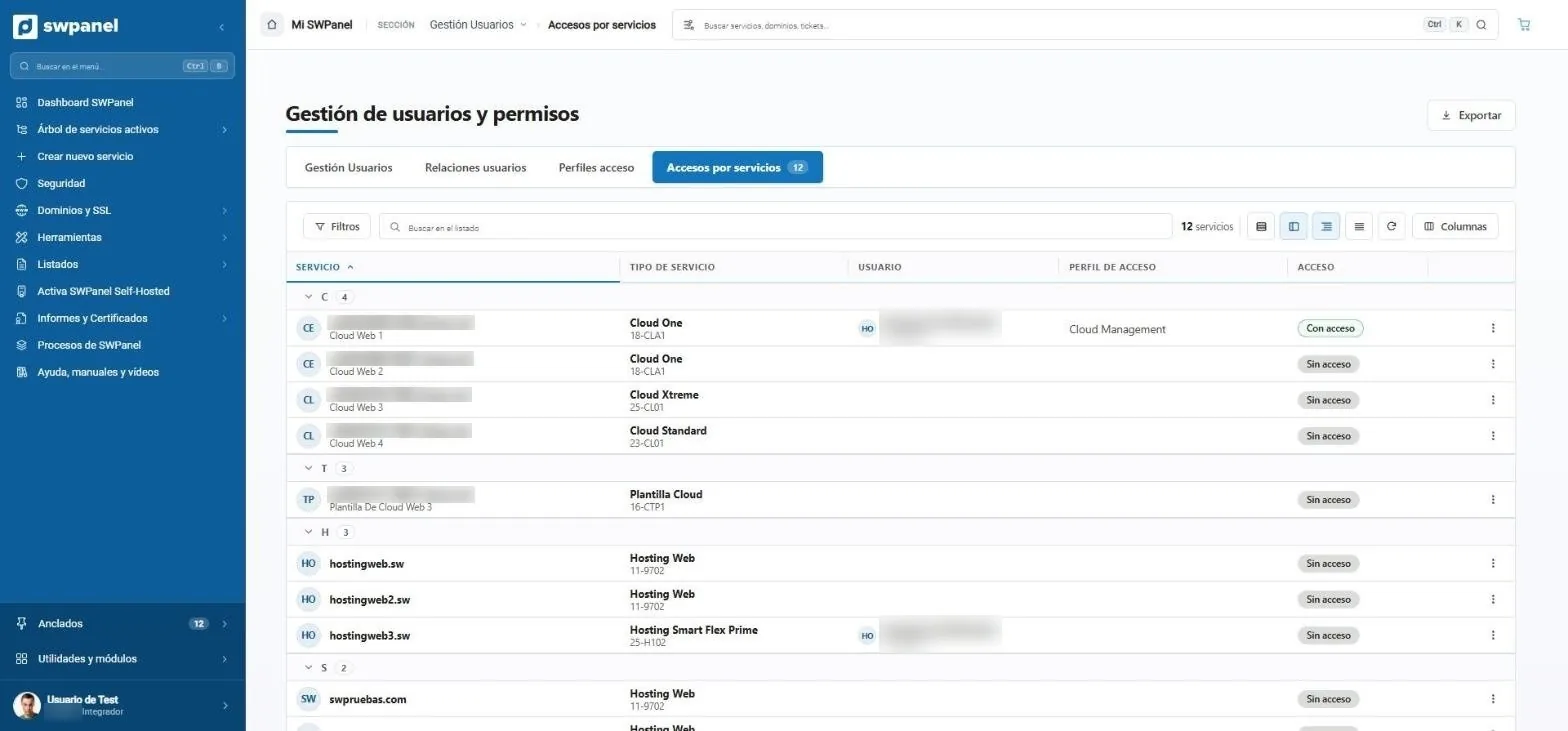
- Access by service: the reverse view, service by service.
- All your services, grouped, with their type and plan.
- Who gets in to each service.
- With which access profile: what they can do inside.
- With or without access, service by service.
Servers and Cloud
Server deployment and scaling
Servers and Cloud
Deploy cloud servers, scale vCores, RAM and disk vertically or on a schedule, and let the tuning consultant measure your Cloud and suggest changes you can apply or undo.
- Vertical and scheduled scaling
- Multicloud
- Tuning consultant with 33 rules
- AI parameter optimization
- Minute-by-minute usage history
Modes and dashboards · New in 2027
Each account sees the SWPanel it needs
The mode decides what appears in the menu, not what can be ordered: a basic customer with a module has the same features as an integrator with the same module.
Basic
A website and its email.
Professional
Agencies and technicians.
Reseller
Sell hosting under your brand.
Integrator
Automate via API and Flows.
11 account blocks
Analysis and reports, Backups and protection, Cloud infrastructure, Business and reselling...
9 service blocks
Before, 123 entries. Now, by use, with Diagnostics, Consoles and Cloning.
12-column dashboards
17 main panels you can arrange, resize and hide, with AI inside.
What used to be hidden is now shown switched off and with the reason: panels that depend on another module appear with a veil and the button to enable it.
Users and access
Everyone sees only their own
Access profiles, hierarchical relationships, access by service and task history. To use a module two things are needed: that it's ordered and that the user has permission.
Profiles and hierarchies
Users, access profiles and hierarchical relationships.
Permissions by module
The account holder orders; profiles distribute access.
Task history
Everything in traceability, with eight years of history.
See moreFinance
Centralized invoicing and payments
Invoices and Form 347, balance, cards, payment methods and administrative tickets. For reselling, RHA with Veri*Factu.
Invoices and Form 347
All your invoices, in one place.
Balance and payment methods
Redsys, PayPal and Stripe.
RHA with Veri*Factu
Invoice your customers under your brand.
See more2027 modules
Extend SWPanel with one click
Security
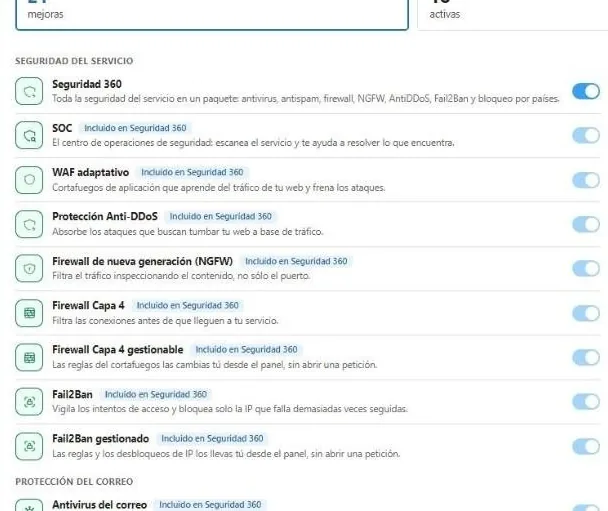
Gives access to Security 360 on any service in the account.
Gateway · accountSEO
Opens the SEO section and a tier on each website: Basic, Pro or Intelligence.
MultiplierAI
AI websites and stores, assistants and consultants for all of SWPanel.
CommunityNewsletter
Contacts, campaigns, measurement and deliverability.
CRMLeads
Forms, records, funnel and automations, with the whole team inside.
BusinessRHA
Sell hosting and domains under your brand: catalog, invoicing and payments.
All this, from SWPanel
Create your free account and connect a server or a hosting plan. No card and nothing to install.