
Security 360 · The layers
Layer by layer, all the way to your service
Like an onion: every request arriving from the Internet goes through the layers from the outside in, and what one stops never reaches the next. At the core, your service: analyzed, protected and monitored every day. Compare how it looks if it lives in our Data Centers or on your own server with Self-Hosted.
- Eight layers, from the outside in
- SWPanel Data Centers or Self-Hosted
- Your service, at the core


SWPanel Data Centers network
-
AntiDDoS Network edge
It watches volume and absorbs massive attacks before they enter the network. Automatic, nothing to configure.
-
Layer 4 firewall SWPanel network
At the perimeter: it looks at IP, port and protocol, and each IP lets through only what its profile allows. Your rules, from SWPanel; your IP blocks are applied on the machine itself.
-
Next-generation firewall SWPanel network
It inspects content by signatures and classifies each threat as critical, high, medium or low. It alerts or drops according to policy.
In front of your server
-
Your provider's network Outside SWPanel
Its DDoS protection and its firewall, whichever your server has contracted.
-
Your server's firewall Your server
The IP blocks you launch from SWPanel are applied on the machine itself.
On your server, with SWPanel
-
Country blocking Your web server
It looks at the IP's country. What you block leaves not a single line in the access log.
-
Bot blocking Your web server
It looks at who each visit claims to be. The robots you don't want get a 403.
-
Adaptive WAF Your web server
It inspects every HTTP request. Its rules are born from your attacks: first they observe, then they block.
-
Fail2Ban Your server
It watches failed logins to SSH and other services, and bans the IP that keeps trying.
Over all of them
-
SOC and AI engine Over all layers
Every day it analyzes what went through all of them, scores your service and tells you what to do, with a button for each thing.
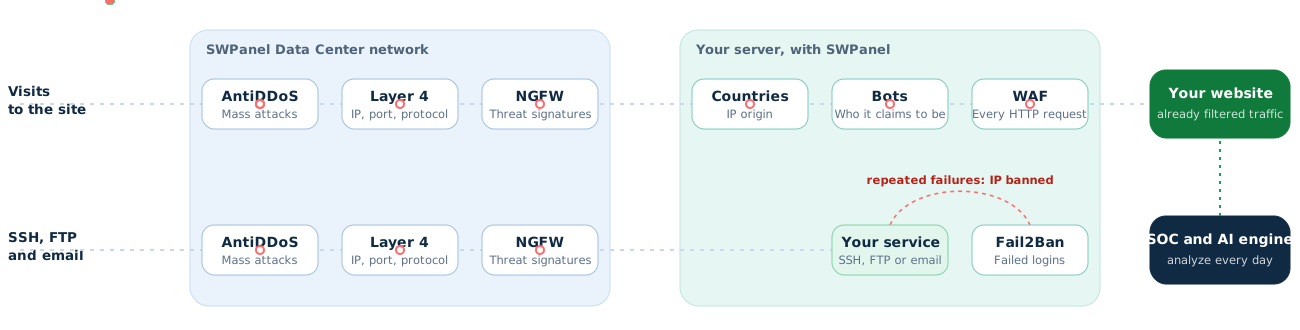
In red, what stops at each layer; in green, what reaches your service.
With Self-Hosted the network is your provider's. What the next-generation firewall used to stop is slowed here by your server's WAF.
A request's path
What stops on the network never reaches your server
Visits to your website go through the six layers of the path. SSH, FTP and email go through the three network ones, and Fail2Ban watches failed logins on your server. The SOC isn't on the path: it reviews everything every day.
Layer by layer, in everyday words
What each layer does and what would happen without it
A technical name says nothing if you don't know what it does. This is what each layer stops, a real example and what would happen to your service if it weren't there.
AntiDDoS
The harbor breakwater. It slows the wave before it reaches the boats: it absorbs avalanches of fake traffic before they enter the network.
Stops at this layer: massive attacks
- What it stops
- Massive attacks aiming to take the service down through saturation.
- An example
- Thousands of infected machines request your website at once for an hour.
The website, email and everything sharing the line stop responding while the attack lasts. Your customers see an error and you lose sales and trust.
Automatic, nothing to configure.
Layer 4 firewall
The building's access control. Depending on where you come from and which door you knock on, you pass or you don't. It checks each connection's IP, port and protocol and lets through only what each IP's profile allows.
Stops at this layer: disallowed traffic
- What it stops
- Connections to ports that shouldn't be open to the world and the IPs you block.
- An example
- Someone tries to connect from outside to the database port or the server's remote access.
Any service opened by mistake is exposed to the entire Internet: databases, remote access, admin tools. That's exactly what the robots crawling the network look for.
Your rules and your IP blocks, from SWPanel.
Next-generation firewall
The luggage scanner. It doesn't just look at who comes in: it looks at what they carry. It compares traffic content with known attack signatures and classifies each threat as critical, high, medium or low.
Stops at this layer: known threats
- What it stops
- Known attacks traveling inside seemingly normal connections.
- An example
- A request carrying a known attack against an old version of a program.
Known attacks reach your server, and your security depends on keeping every program up to date, with no margin for error.
With reports and a threat map.
Country blocking
The shop that opens to its markets. It opens the door only to the countries you care about. It looks at each IP's country, and what you block leaves not a single line in the access log.
Stops at this layer: the countries you choose
- What it stops
- Traffic from the countries you choose: where you have no customers but do have attacks.
- An example
- A shop that only sells in Spain receives thousands of scans from countries where it has no customers at all.
That traffic uses up CPU, fills the logs and multiplies attack attempts without bringing you a single sale.
Free and standalone in hosting. With AI, you know beforehand what you gain and what you lose.
Bot blocking
The doorman who asks for ID. It checks who each visit claims to be. The search engines you want get in; copiers, scanners and robots you haven't authorized get a 403.
Stops at this layer: robots you don't want
- What it stops
- Content and price copiers, vulnerability scanners and AI robots you haven't authorized.
- An example
- A competitor copies your prices every hour and a robot downloads your entire website to feed its model.
Robots eat up the server: the website is slow for your customers, you pay for a machine to serve those who don't buy and your content ends up on other websites.
Catalog of 112 bots and ready-made profiles.
Adaptive WAF
The guard who knows your shop. It checks every request to your website. Its rules are born from the attacks it receives: the AI drafts them, SWPanel validates them, they observe first and only block when they don't bother your customers.
Stops at this layer: application attacks
- What it stops
- Attacks on the application: injections in forms, malicious files and admin paths.
- An example
- Someone tries a vulnerable path of one of your website's plugins thousands of times.
A flaw in your website's code becomes stolen data, a defaced website or malware sending spam. Your IP ends up on blacklists and your email stops arriving.
You choose the autonomy: it recommends, applies with review or without.
Fail2Ban
The lock that jams. Like a lock that locks up after several attempts with the wrong key. It watches failed logins to SSH, FTP, email and other services, and bans the IP that keeps trying.
Stops at this layer: repeated failed logins
- What it stops
- Robots that try passwords again and again.
- An example
- A robot tries thousands of passwords against your server's SSH access in a single night.
Sooner or later a weak password falls, and whoever gets in has the whole server. Meanwhile, the attempts consume resources and fill the logs.
Unblocking, whitelist and blacklist, from SWPanel.
SOC and AI engine
The head of security who reviews the cameras. It isn't on the visitors' path: every day it reviews what went through all the layers, scores your service and tells you what to do, with a button for each thing.
Reviews the seven layers every day
- What it stops
- What no layer sees on its own: patterns, trends and missing protections.
- An example
- It sees the same IP attacking several websites in your Cloud and proposes blocking it, with a prior dry run.
Each layer works alone and nobody looks at the whole: a problem can last weeks without anyone noticing, and you don't know which protection you're missing.
No SOC block without a person confirming it.
When a layer decides
The layers hand work to each other
A layer detects, someone decides and the block ends up where it's useful: on the machine itself or in a WAF rule. This is how a block moves inside Security 360.
Detects
Decides
Applied
And then
- External IP Fail2Ban blacklist
- External IP SOC until the date you set
- External IP Spike plan 7 days
If the attack is on a hosting, the IP is blocked on the Cloud that hosts it.
- Every hour whatever has expired is removed.
- You unblock it from SWPanel whenever you want.
- It's recorded in traceability: who did it, person or AI.
- Observes
- 20 hits
- Blocks
If it hits legitimate traffic, it rolls back.
No block leaves the SOC without a person confirming it. The spike plan is reversible, so the AI applies it without waiting. In the WAF, you decide whether it only recommends, applies with review or applies without review.
SWPanel Data Centers or Self-Hosted
Where each layer is, depending on where your service is
In our Data Centers, your service has the SWPanel network in front of it. In Self-Hosted, the network is your provider's and SWPanel protects your server from the inside.
| Layer | In SWPanel Data Centers | Self-Hosted at another provider |
|---|---|---|
| 1 · AntiDDoS | Included, at the edge of our network | Whatever your provider has |
| 2 · Layer 4 firewall | Included: your rules, at the perimeter; your IP blocks, on your own machine | No SWPanel perimeter: your IP blocks, on your own machine |
| 3 · Next-generation firewall | Included, with reports and a threat map | Your provider's, if it has one; your server's WAF slows attacks on the website |
| 4 · Country blocking | On your server | On your server |
| 5 · Bot blocking | On your server | On your server |
| 6 · Adaptive WAF | On your server | On your server |
| 7 · Fail2Ban | On your server, manageable | On your server, manageable |
| 8 · SOC and AI engine | Every day, over all layers | Every day, over your server's layers |
Versus cPanel, Plesk and DirectAdmin
What are loose pieces in other panels is already built in SWPanel
To get close to this protection with cPanel, Plesk or DirectAdmin you have to build it yourself: license, firewall, WAF rules, a security plugin on each website, a service for bots, another for email and another tool to monitor. And repeat it on every server.
cPanel, Plesk or DirectAdmin
Three servers: three panels, three licenses, three configurations and no overall view.
SWPanel
- Daily SOC
- Adaptive WAF
- Countries and bots
- Antivirus and AntiSpam
- Fail2Ban
- AI engine
- Cloud in SWPanel
- Self-Hosted
- Hosting
One panel, one view and the same security for all your services, wherever they are.
-
No assembling pieces
In other panels, security is assembled from extensions by various vendors, each with its own price, configuration and updates. In SWPanel it's already built in.
-
One panel, not one per server
With cPanel or Plesk, ten servers are ten panels that don't talk to each other. SWPanel sees all your servers, Clouds and hostings at once, whether in our Data Centers or at another provider.
-
Learns from the whole platform
An installed panel only sees its own machine. SWPanel sees the attacks hitting more than 10,000 servers, and what it learns from them protects yours too.
| cPanel | Plesk | DirectAdmin | SWPanel | |
|---|---|---|---|---|
| Panel | One installed on each server | One installed on each server | One installed on each server | One for all your servers, Clouds and hostings |
| License per server | Pro: $53.99 per month (30 accounts) | Web Pro: $28 per month (30 domains) | Standard: $29 per month | Cloud from €3.49; Self-Hosted from €6.99 |
| Server firewall and WAF | Paid Imunify360, or CSF and ModSecurity to configure | Paid Imunify360, or rules to configure | CSF and BFM to configure by hand | Adaptive WAF and manageable Fail2Ban, included |
| AntiDDoS and network firewalls | Depends on the provider | Depends on the provider | Depends on the provider | Included in SWPanel Data Centers |
| Country blocking | With CSF, by hand | With extensions or rules | Manual rules | Free in hosting, with AI consultant |
| Bot blocking | Plugin on each website or external service | Plugin on each website or external service | Plugin on each website or external service | 112 bots, free in hosting |
| SpamAssassin as standard; antivirus and advanced filtering to install | SpamAssassin as standard; antivirus as a paid extension | SpamAssassin and ClamAV, to install | Antivirus and AntiSpam on all mailboxes | |
| Daily analysis with score and proposals | Not included | Not included | Not included | Included |
| Resilience score for each service | Not included | Not included | Not included | Included |
| View of all your servers | Not included | Not included | Not included | Included |
| What is learned from other attacks | Whatever each paid extension brings | Whatever each paid extension brings | Whatever each paid extension brings | Attack patterns from the whole platform |
Prices excluding VAT. cPanel, Plesk and DirectAdmin licenses: official websites, July 2026 (cPanel, Plesk, DirectAdmin). Imunify360, Wordfence and Cloudflare: official websites, October 2026 (Security 360 comparison). BitNinja, from $10 per server: Capterra, October 18, 2026. CSF: ConfigServer shut down on August 31, 2025 and released it as open source (Centmin Mod, September 4, 2025). If you need CDN and caching, SWPanel enables Cloudflare's Free plan on your hosting and you manage it from SWPanel (how).
In SWPanel
Each layer, with its own screen
Real SWPanel 2027 screenshots with a test account.
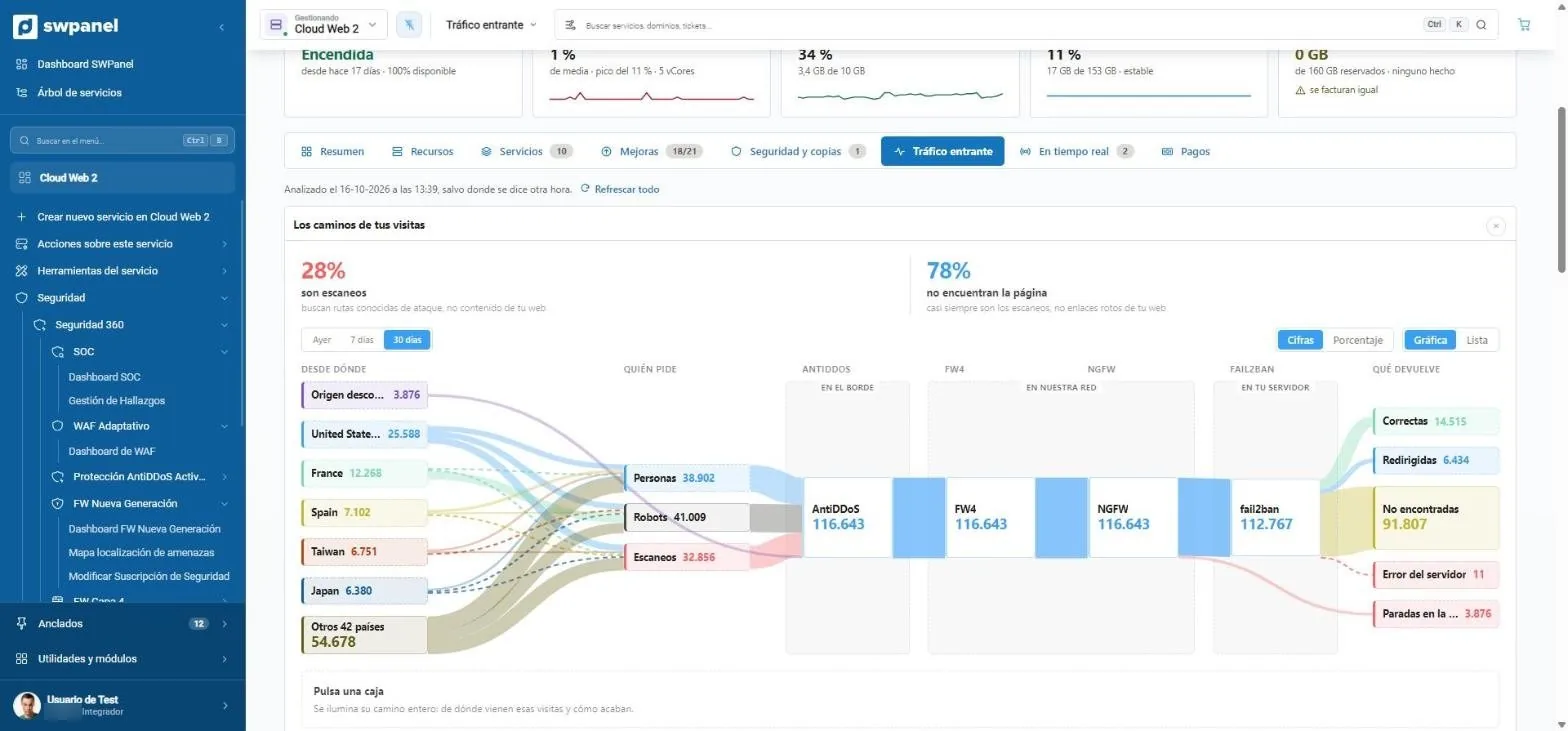
- How much is scanning. Here, 28 % of traffic looks for known attack paths, not your content.
- Which countries visits come from, sorted by volume.
- Who's asking: people, robots or scanners. Each group with its own color.
- The layers each request goes through: AntiDDoS at the edge, FW4 and NGFW in our network and Fail2Ban on your server.
- How each visit ends: successful, redirected, not found, error or stopped at a layer.
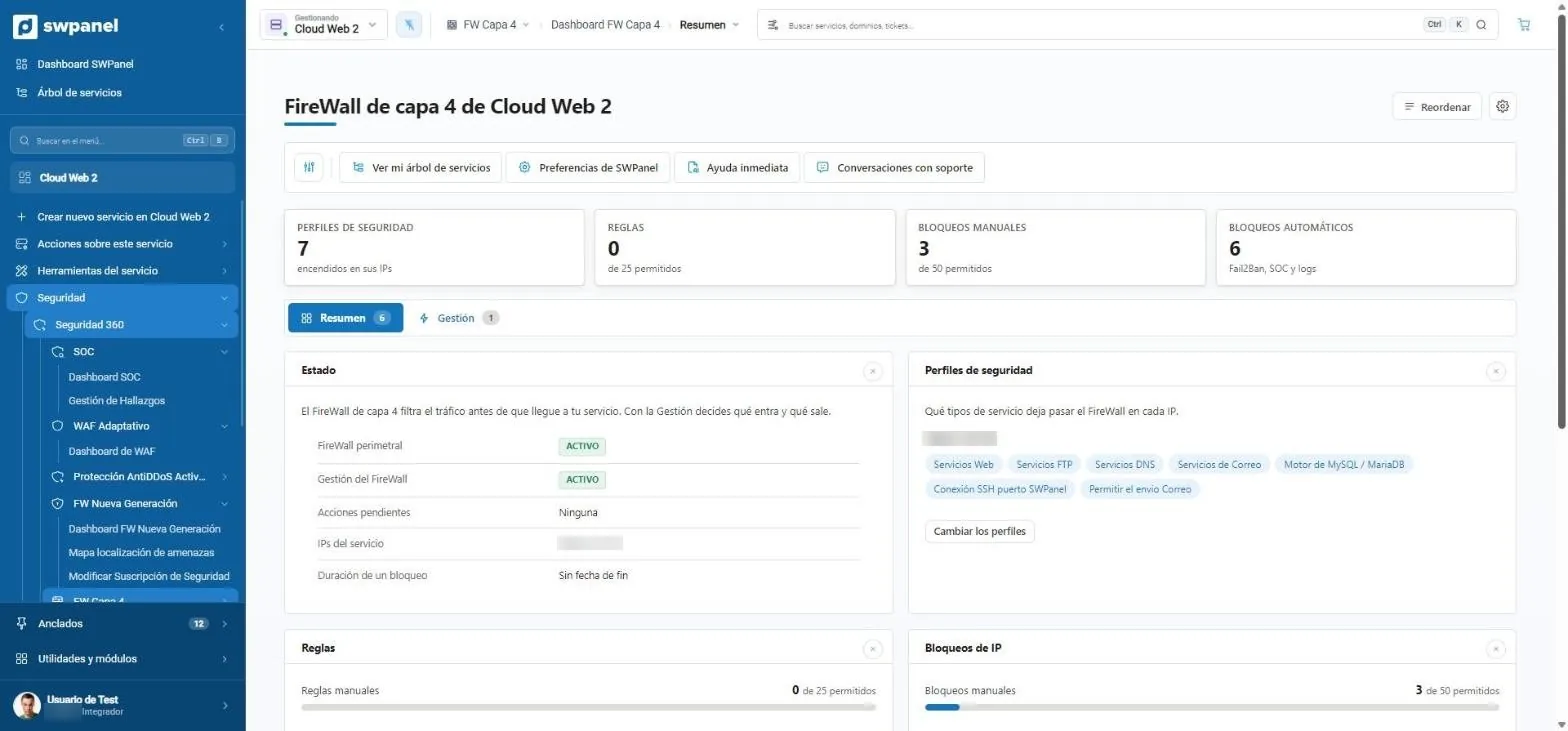
- Profiles, rules and IP blocks, in three tabs.
- Perimeter firewall status, pending actions and block duration.
- What it lets through on each IP: web, FTP, DNS, email, MySQL, SSH...
- Blocks that come from outside: Fail2Ban's blacklist and the ones you confirm from the SOC.
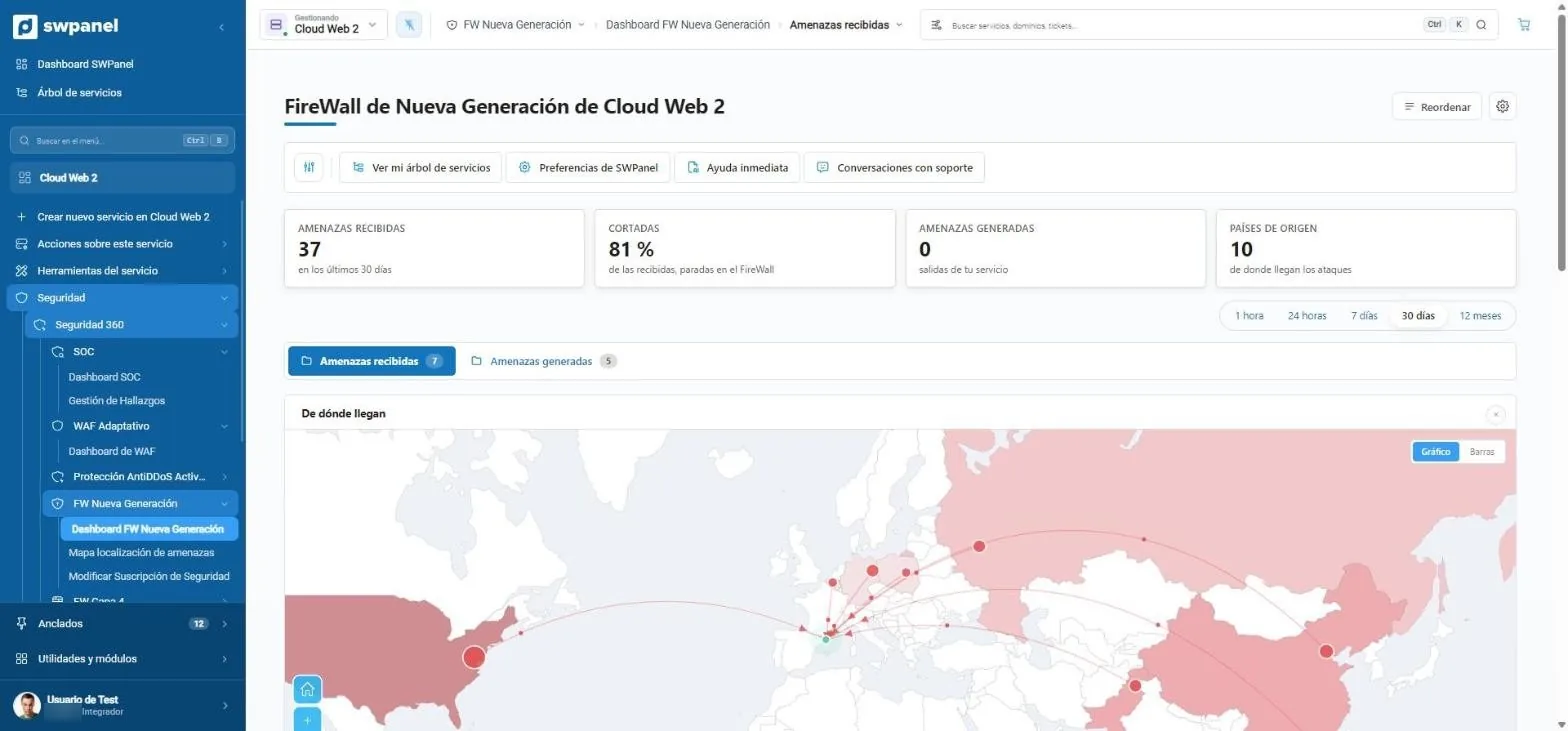
- 37 threats in 30 days; 81 % of those detected, with a block action.
- Period: from one hour to one year, or custom.
- Where they come from: each IP's country, on the map.
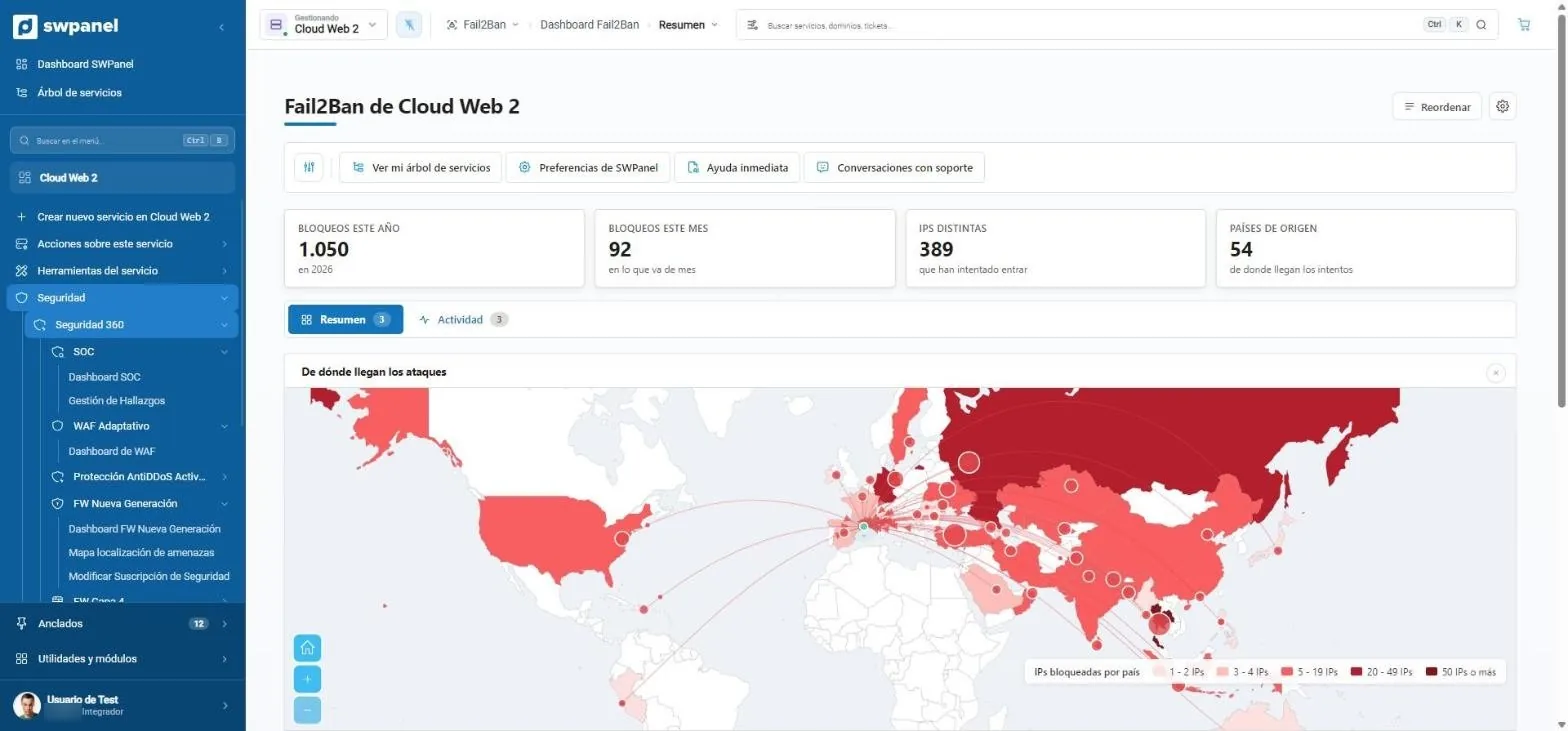
- 1,050 blocks this year, 389 distinct IPs and 54 countries.
- The attack map by number of blocked IPs.
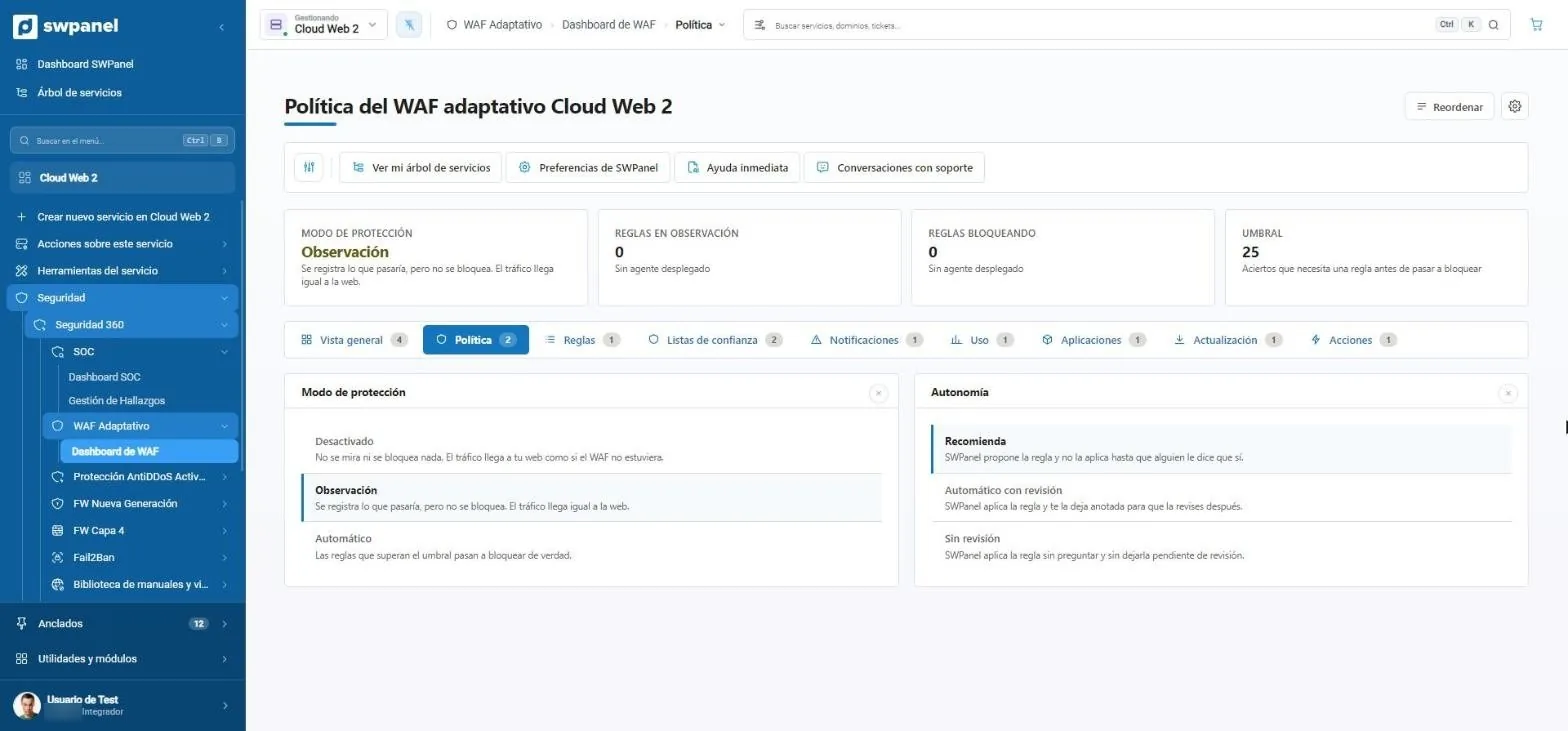
- Protection mode: here, in observation.
- Threshold: the hits a rule needs before blocking.
- Three modes: off, observation or automatic.
- Three levels of autonomy: only recommends, applies with review or applies without review.
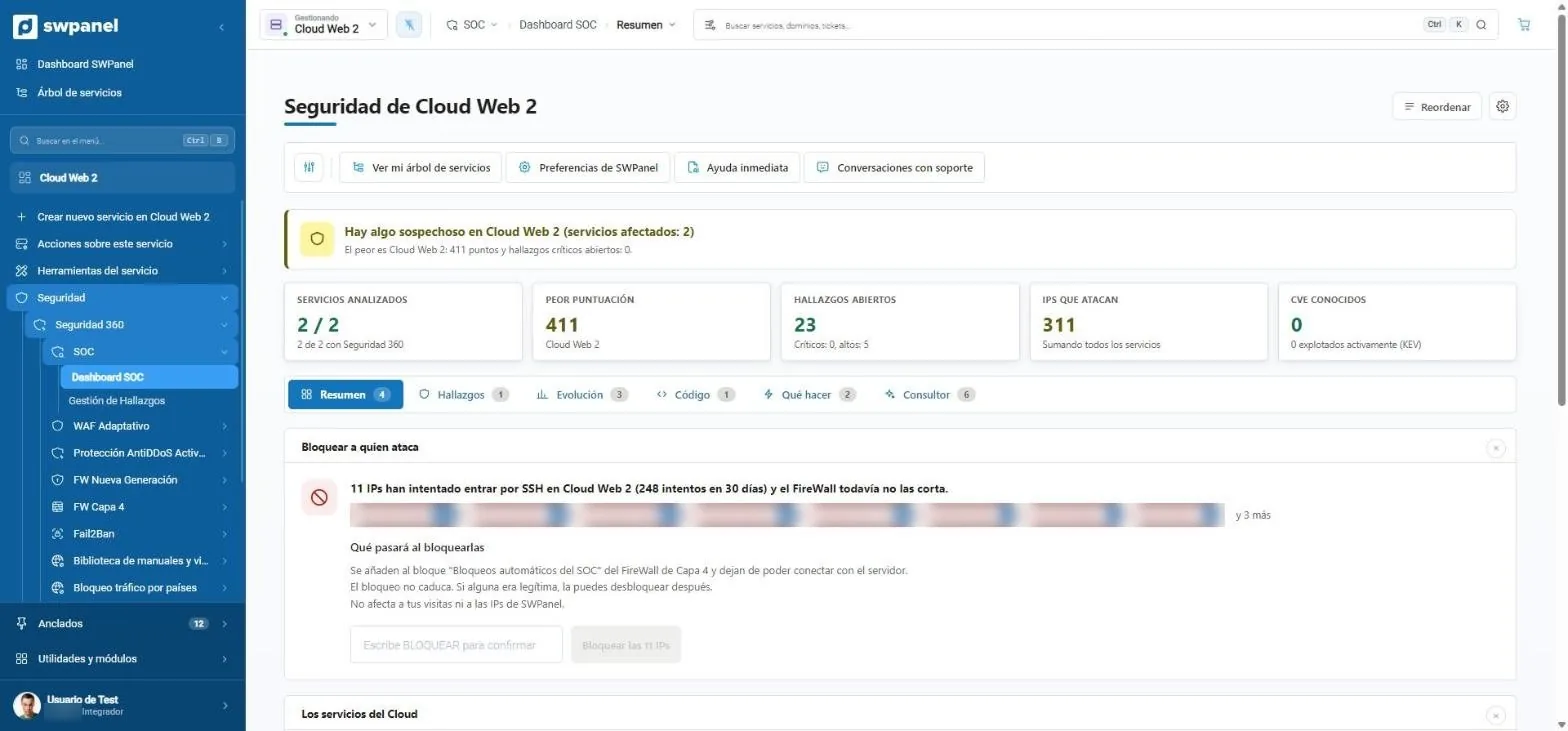
- A notice that summarizes the status: in order, suspicious or compromised.
- Five figures: services analyzed, worst score, findings, attacking IPs and CVEs.
- Six tabs: summary, findings, trends, code, what to do and consultant.
- Block whoever attacks: 11 IPs try to get in via SSH and the SOC proposes cutting them off.
- To act you type BLOCK. Nothing is applied by an absent-minded click.
Resilience
Your services, more resilient every week
SWPanel calculates each service's resilience: what you could recover if something failed. It explains it piece by piece, advises what to raise and you apply it with one click. Little by little, your services get better, more efficient and more resilient.
An example Cloud
It starts with automatic renewal and CPU and RAM headroom, but with no backups, no snapshots, no monitoring and a weak password.
- SWPanel sees it
- Advises you
- You apply it with one click
- The score goes up
-
Access passwords An access password is weak. Change it to a secure one.+7 Proposed
-
Monitoring Nobody warns you if the machine stops responding. Enable monitoring.+5 Proposed
-
Backups There's no daily backup outside the service. Order backups: files and databases, every day.+26 Proposed
-
Snapshots There's no space for snapshots. Reserve space to take them whenever you want.+7 Proposed
-
Next tip 160 GB reserved for snapshots and no snapshot taken. Take the first one: the score keeps rising.Proposed
How the score is calculated
Seven pieces, each with its weight. Only those the service can actually have count, and the total is scaled to 100. The score measures what you could recover if something failed and how much the machine can take a spike, not whether it works today.
- Backups 30
- Snapshots 20
- Automatic renewal 15
- CPU headroom 15
- RAM headroom 15
- Access passwords 15
- Monitoring 5
In SWPanel
Each service's score, with what raises it
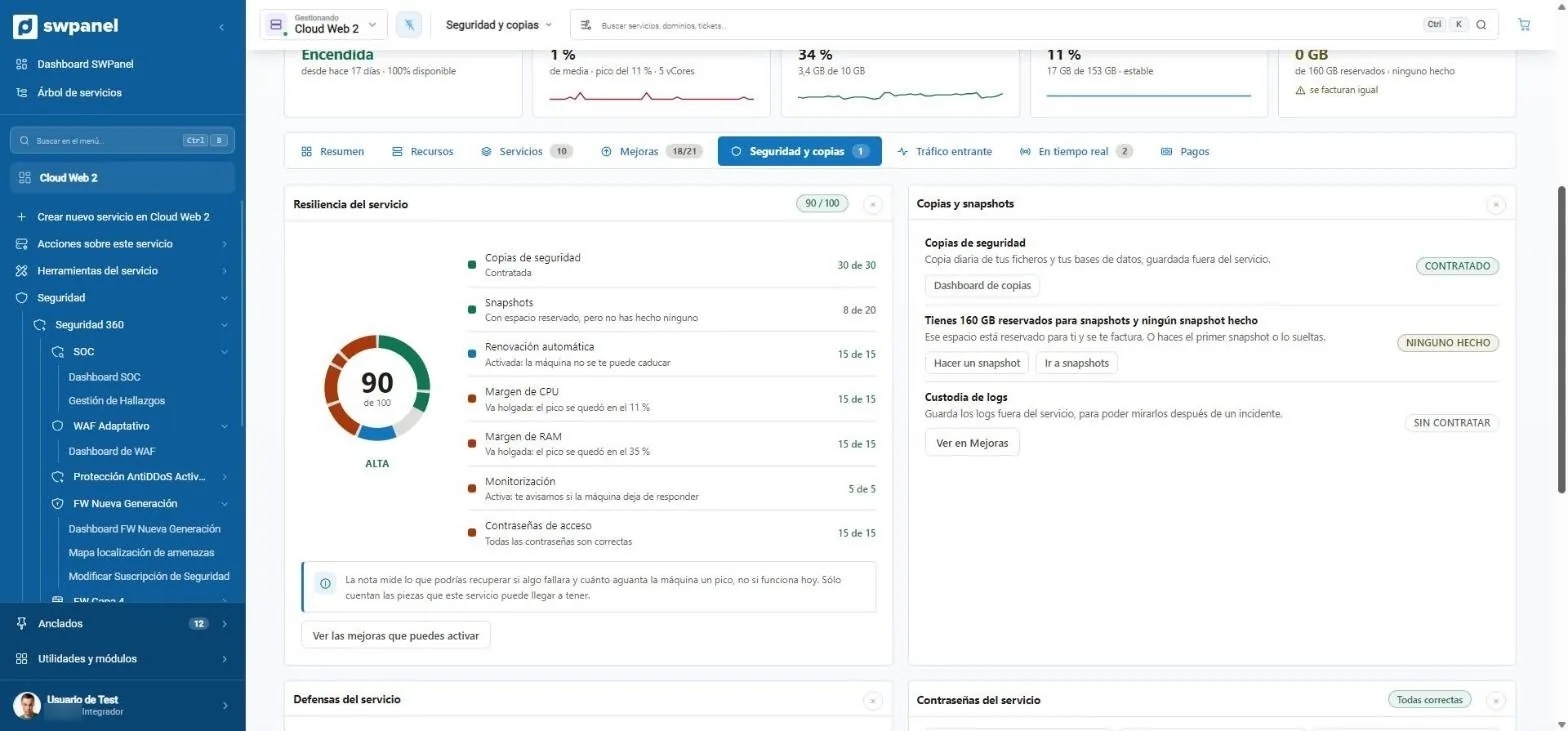
Each Cloud and each server has its resilience card: the score, the pieces that add up and those that are missing, and the improvements that raise it with a button. This screen is real.
- Backups and snapshots with their status
- Log custody, to look at after an incident
- Resilience score out of 100: what you could recover if something failed.
- What adds and what subtracts: backups, snapshots, renewal, CPU and RAM headroom, monitoring and passwords.
- Backups and snapshots with what you've ordered, what's missing and the button to do it.
- The improvements that raise the score, one click away.
Everything in one tool. It's that simple.
The layers, the SOC, the resilience score and the AI engine live inside SWPanel. You enable Security 360 on the service and it starts working; each tip arrives with its button, and each week your services are a little better.
- No plugins
- No tools to integrate
- No programs to install
- One click
Frequently asked questions
Questions about the layers
Your service, at the core
The Security module comes already enabled at no cost in your account. Add Security 360 to each hosting, Cloud or server you want to protect.