
Manuals and help
You're never left without an answer
In SWPanel 2027 knowledge lives inside the platform: a dashboard that knows where you are, an AI that writes the guide for your case, more than 500 manuals and videos that keep growing and an academy with official certification. And, always, people on the other side.
- More than 1500 manuals and videos
- On-the-fly AI guides
- Official certification
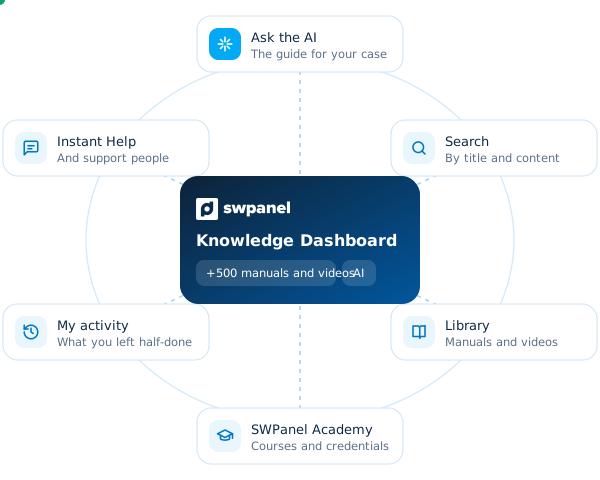
 Knowledge Dashboard
What you've done, what's new and what you're looking for
- +1500 manuals and videos
- AI
- Ask the AI The guide for your case
- Search By title and content
- Library Manuals and videos
- SWPanel Academy Courses and credentials
- My activity What you have in progress
- Instant Help And support people
How it is organized
All the knowledge, in three places in SWPanel
In the SWPanel 2027 help menu there are three entries. Each answers a different question: how is it done?, how do I learn to master it? and where was I?
- Knowledge Dashboard Your starting point: what you've done, what's new and the AI search.
- Ask the AI Write your question and receive a guide made for you, with steps and sources.
- Manuals and Videos Library All the official content, with filters, ratings and what you still have to see.
- A reader designed for following along An index that follows you, text sized to you and a rating at the end.
- SWPanel Academy Five courses, seven credentials and two degrees, with your scholarship applied.
- My activity What you have in progress, your course and your queries, on one screen.
Knowledge Dashboard
Your starting point knows where you are
You open help and the first thing you see is yours: how many manuals and videos there are, how many you have consulted, your searches and what you left half-done. And at the top, the search with the AI.
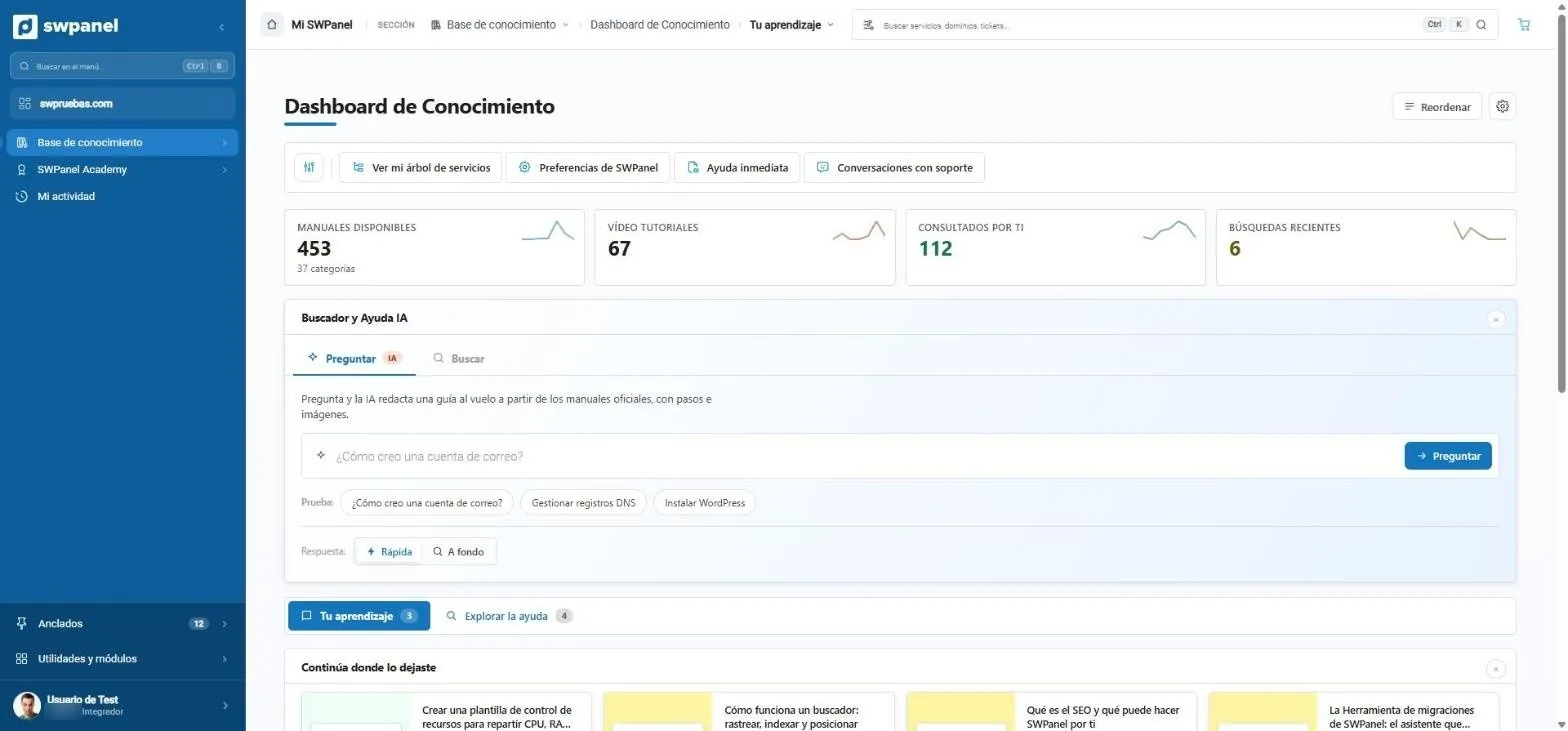
- What exists and what you've done: available manuals and videos, what you have consulted and your searches.
- Ask: the AI writes a guide on the fly from the official manuals.
- Search: across all manuals and videos, by title or by content.
- One click away: your service tree, your preferences, Instant Help and your conversations with support.
- Your learning and Explore help: what you have in progress and the latest from the library.
Ask the AI
A manual written for your question
You don't need to know the manual's name. Ask as you would ask a person and SWPanel's AI reads the official manuals and writes the guide for your case.
Ask. SWPanel writes the guide.
Every answer comes from the official manuals: numbered steps, the help images and, at the end, the sources, so you can open the original manual whenever you want.
- Quick The short answer, to get you out of a jam.
- In depth The complete guide, with the reason for each step and what is worth knowing beforehand.
While it writes it, you can keep working: it notifies you in the message center when it's ready. And what you already asked stays in “You've already asked”.
Answer: Quick In depth
First of all: if you install WordPress with the SWPanel installer, the database and its user are created automatically. 3
- Go into the service and open Database Management. 1
- Name it: SWPanel adds the service code in front, and it can't be changed. 2
- Create its user with full control: WordPress doesn't work read-only. 2
- Leave the daily backup of the database on. 2
- 1 · Your service's databases
- 2 · Create a database, step by step
- 3 · Install WordPress on your hosting
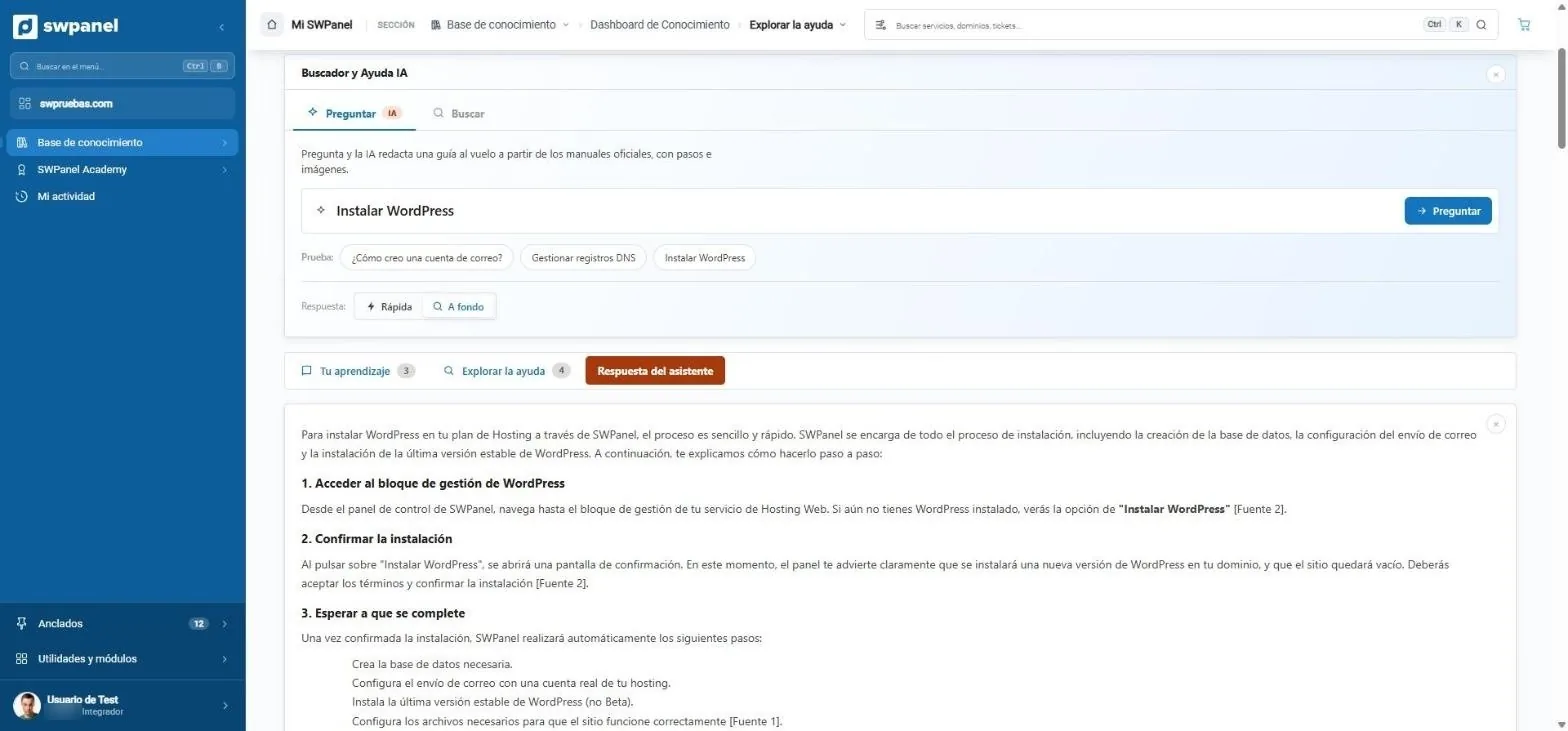
- Quick or in-depth: a short answer or a complete step-by-step guide.
- Assistant's answer: it appears in its own tab. You can keep working and it notifies you when done.
- With steps and sources: each step cites the official manual it comes from.
Search and library
More than 1500 manuals and videos, and what you've seen
The Manuals and Videos Library gathers all the official content: search by title or content, filter by topic or type and sort by what's most useful to you.
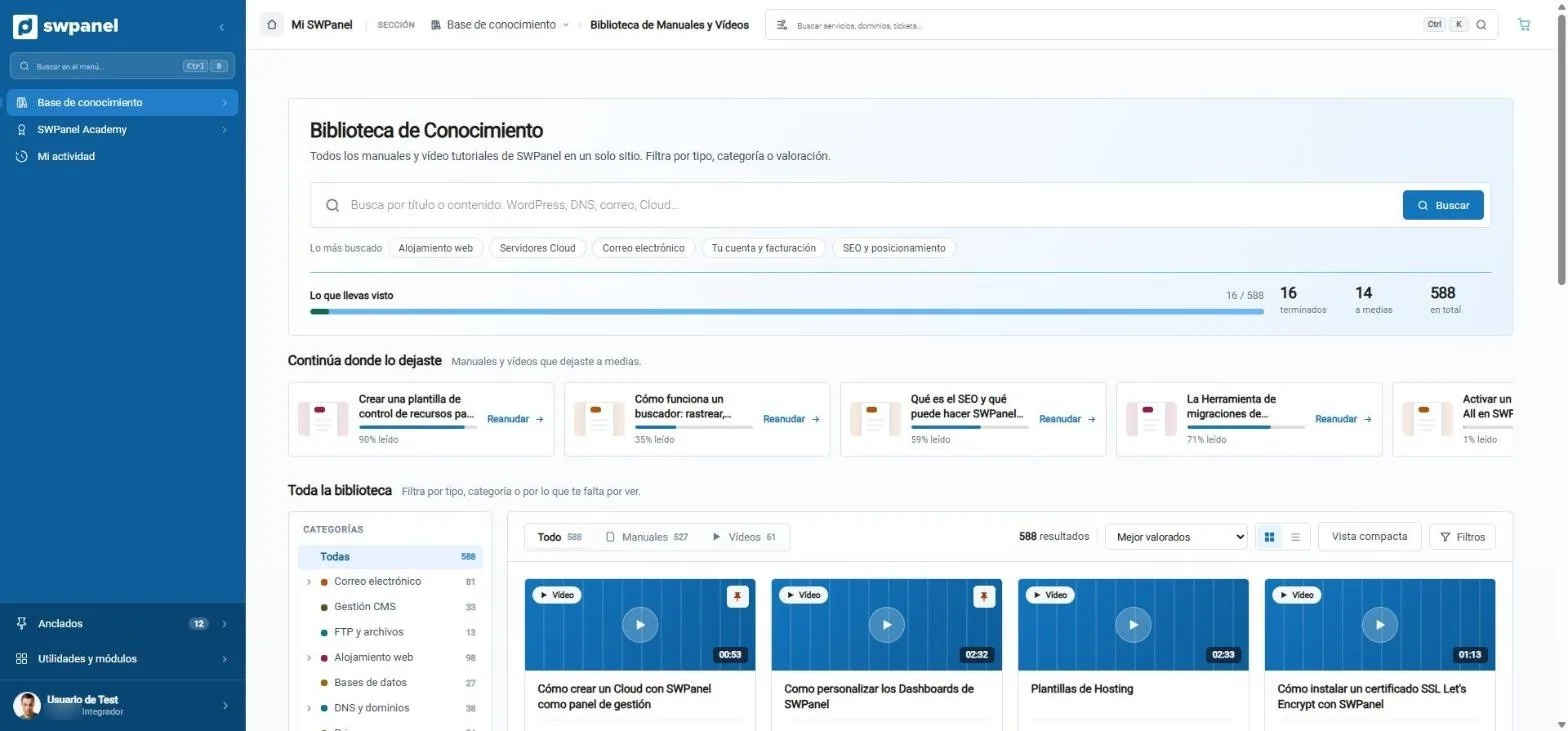
- Search by title or content, or start with the most searched.
- What you've seen: finished, in progress and the library total.
- Continue where you left off, with the percentage read of each.
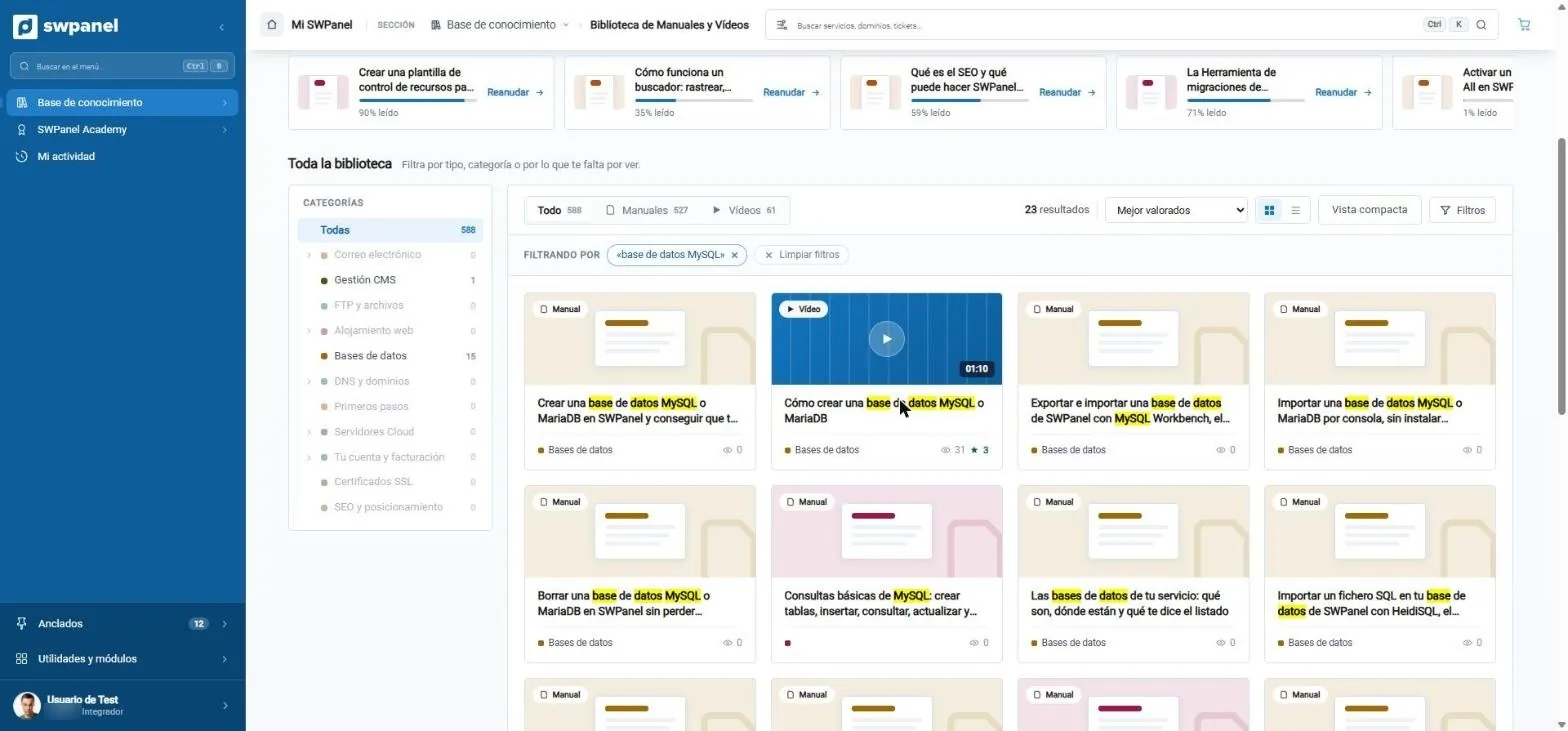
- What you search for, highlighted in each manual and video.
- By topic: how many results there are in each category.
- Manuals or videos, sorted by rating, visits, newness or last update.
- The one-minute video, next to the manual on the same topic.
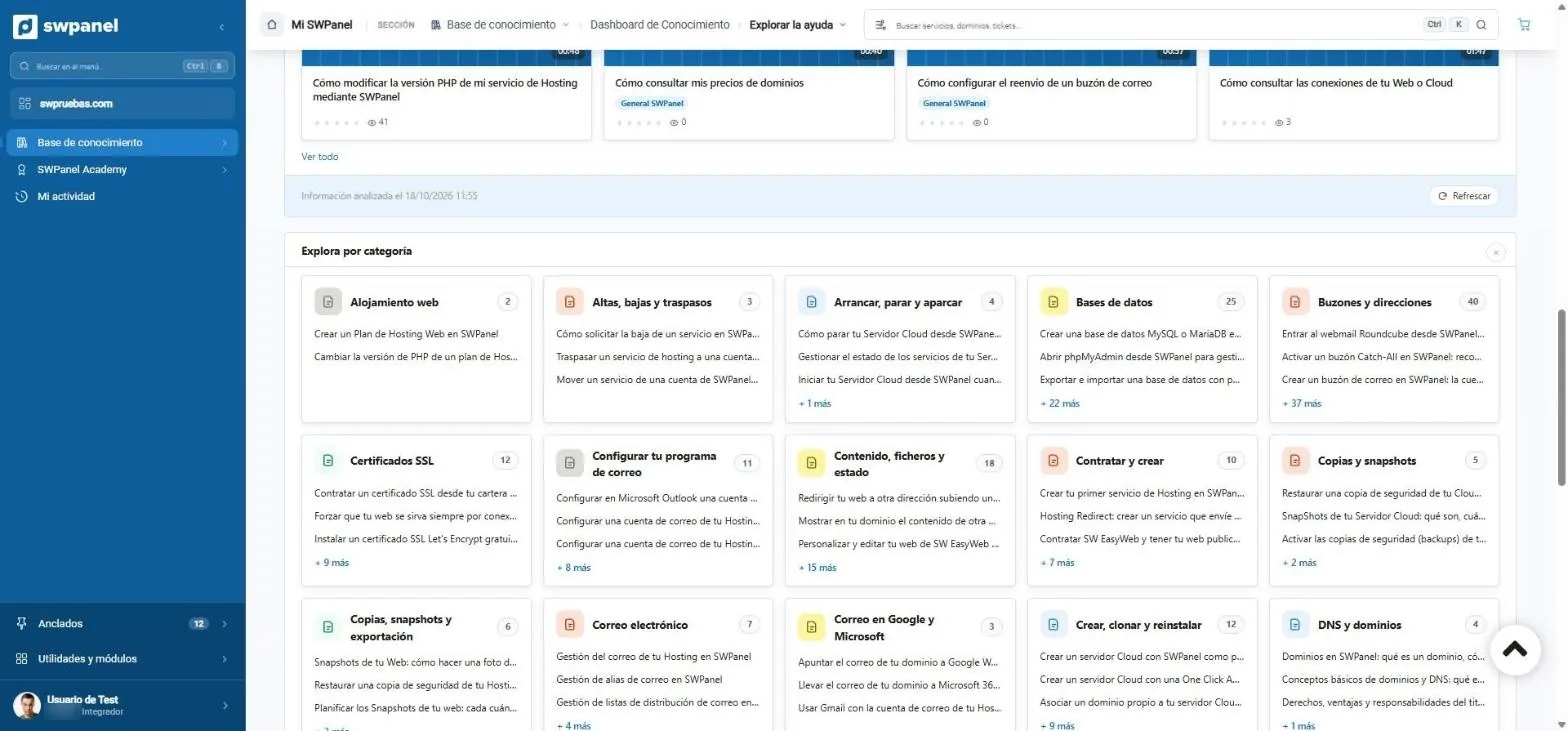
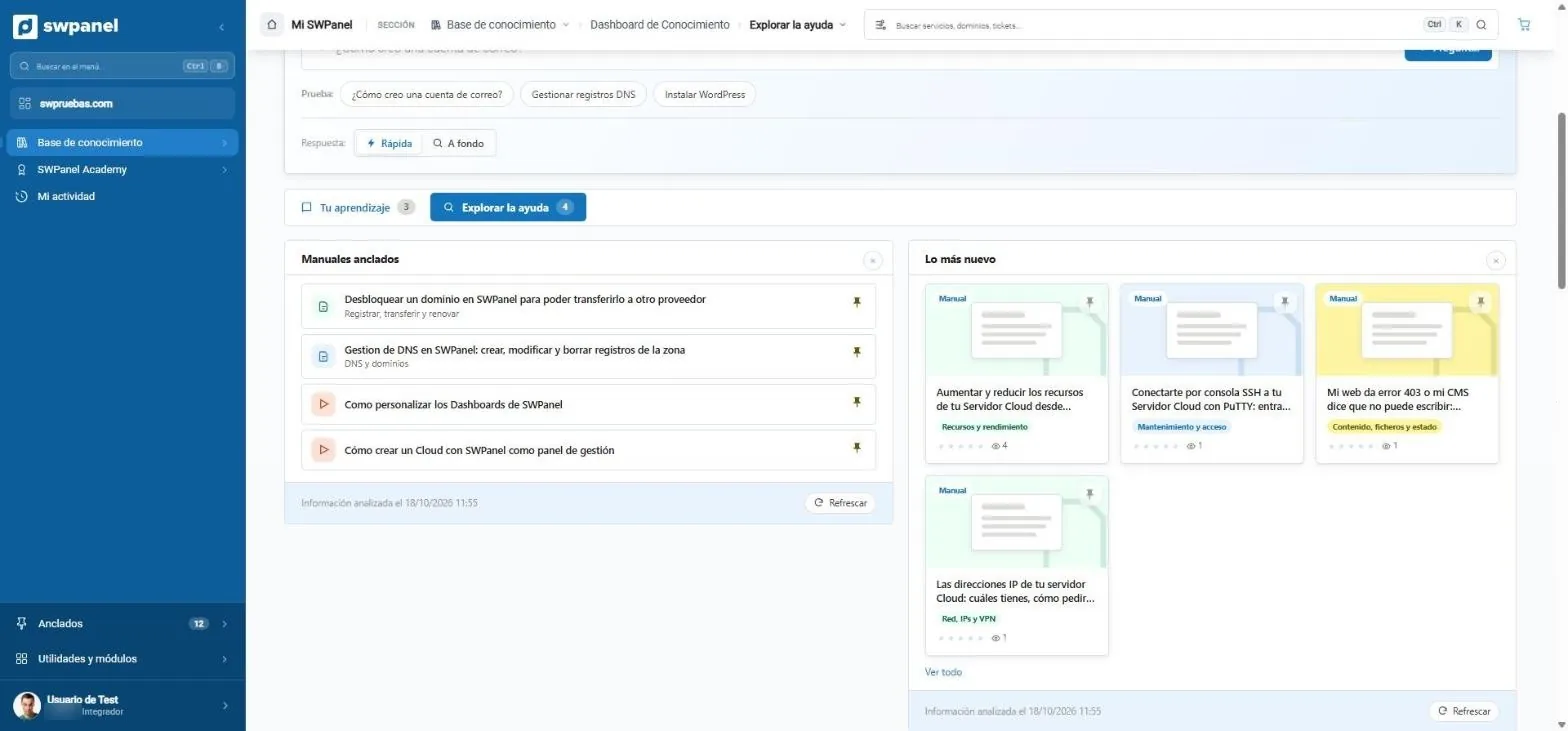
- +500 official manuals and videos, with search by title and by content.
- Always up to date The latest goes into “Newest” on your dashboard, and you can sort by the latest updates.
- 1 to 5 Each manual is rated when finished: that is how we know which ones to improve.
The reader
A manual is read like a good book
Each manual opens in a reader designed to be followed with SWPanel next to it: with its reading time, an index that follows you and the rating at the end.
Manual reader
This is how a manual looks in SWPanel 2027
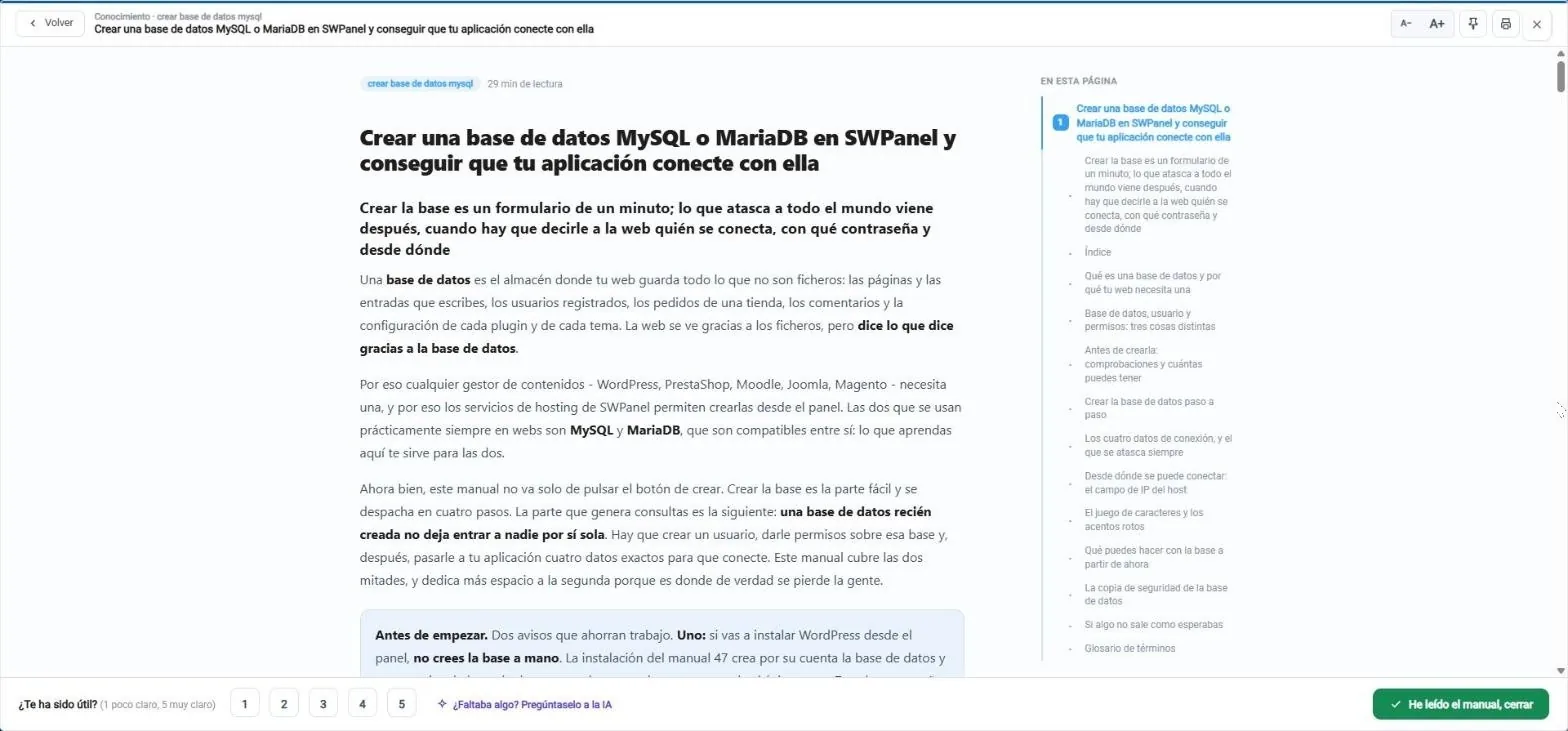
The manual “Create a MySQL or MariaDB database in SWPanel and make your application connect to it”, opened from the library. And so you can see how it will look on the web, you have the same reader on a sample manual.
- Topic and reading time, before you start.
- On this page: the index follows you and shows where you are.
- Larger text, pin or print the manual.
- Was it useful? Rate it from 1 to 5, and if something was missing, ask the AI.
- I've read the manual: it counts in your activity and in what you've seen.
SWPanel Academy
From using SWPanel to mastering it, with certification
Five courses in one path: three core levels in order and two specializations. Each exam passed is an official credential, and by collecting them you earn the degrees.
Operate everyday services with confidence, without needing assistance.
Administer infrastructure, cloud and services with technical and security judgment.
Design, deploy and operate the platform at scale, including on-premise.
Certifying Architect opens the specializations:
Integrate and automate SWPanel from your website, CRM or ERP with the REST API.
Run a digital services business: customers, invoicing, payments and support.
Exam included
One sitting comes with each enrollment, and you take the exam when you're ready: there are no fixed dates.
One-year credential
Valid 12 months from when you pass. We notify you 60 days before through the message center and by email.
Renew without repeating everything
A short “delta re-test” on what has changed on the platform, without paying enrollment again.
Scholarship tailored to you
It is calculated from your services and your billing, and you see it applied before enrolling.
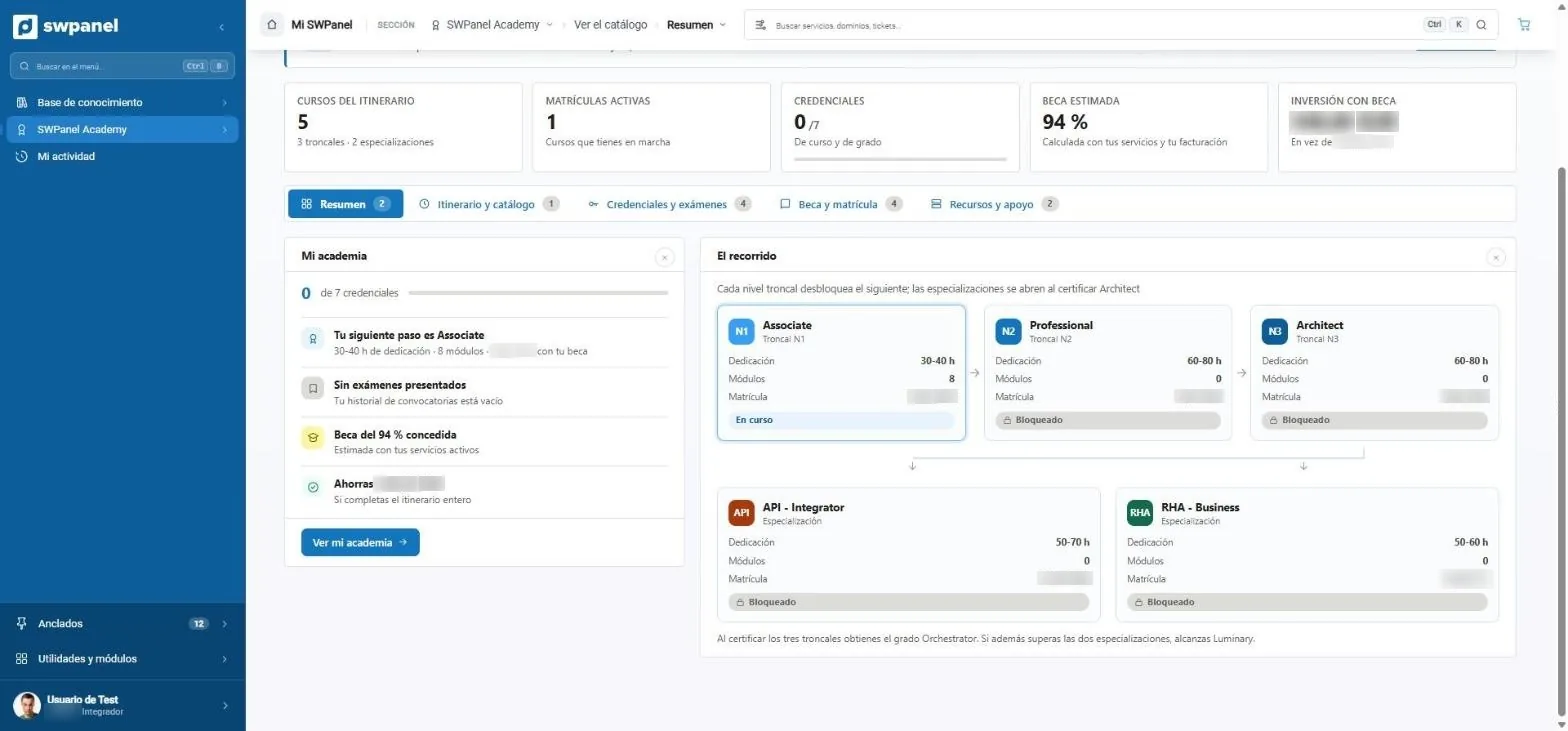
- Three core levels, in order: Associate, Professional and Architect.
- Two specializations once you certify Architect: API · Integrator and RHA · Business.
- Scholarship calculated from your services and your billing.
- Your credentials and your next step, always in view.
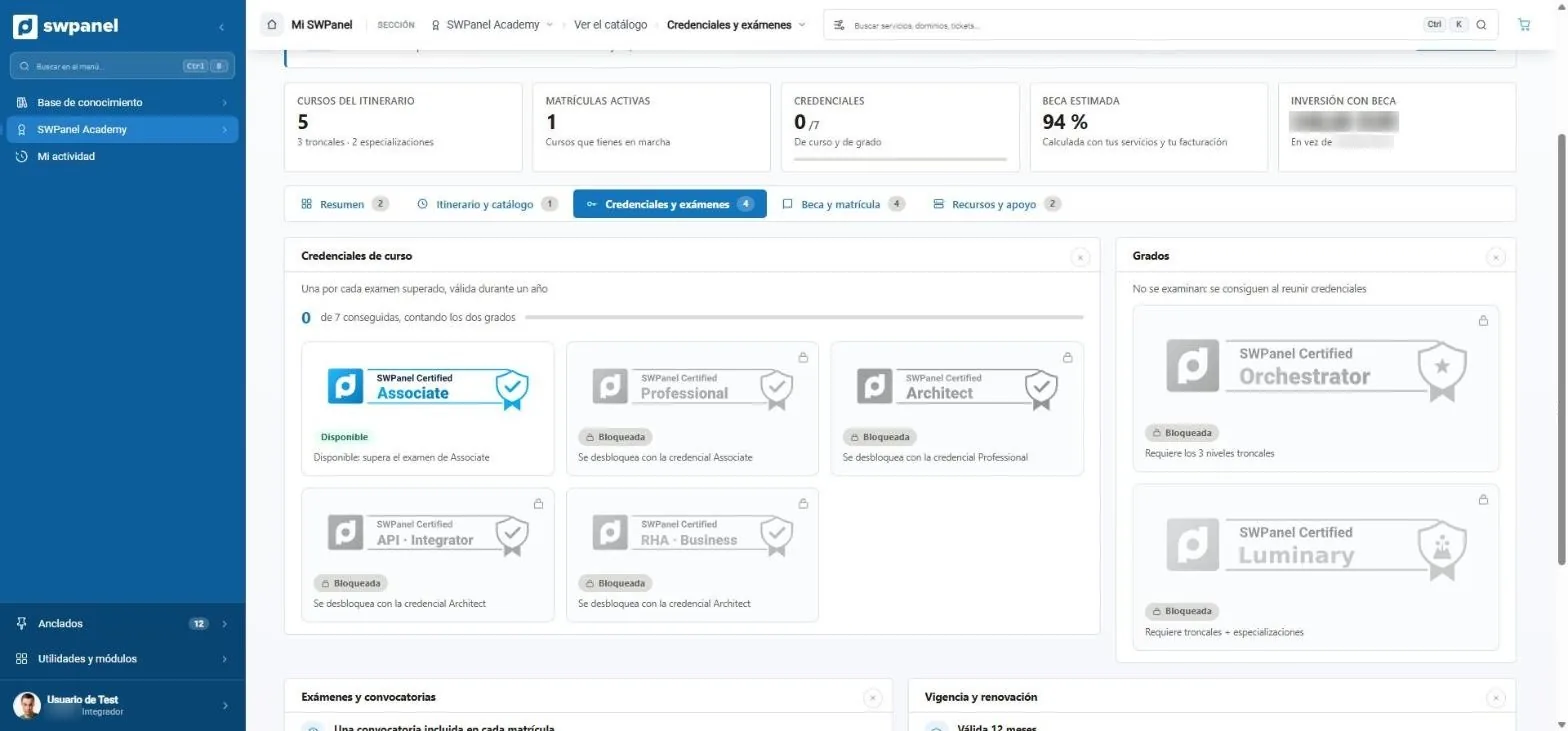
- One credential per exam passed, valid for a year.
- Two degrees: Orchestrator, with the three core ones; Luminary, with core and specializations.
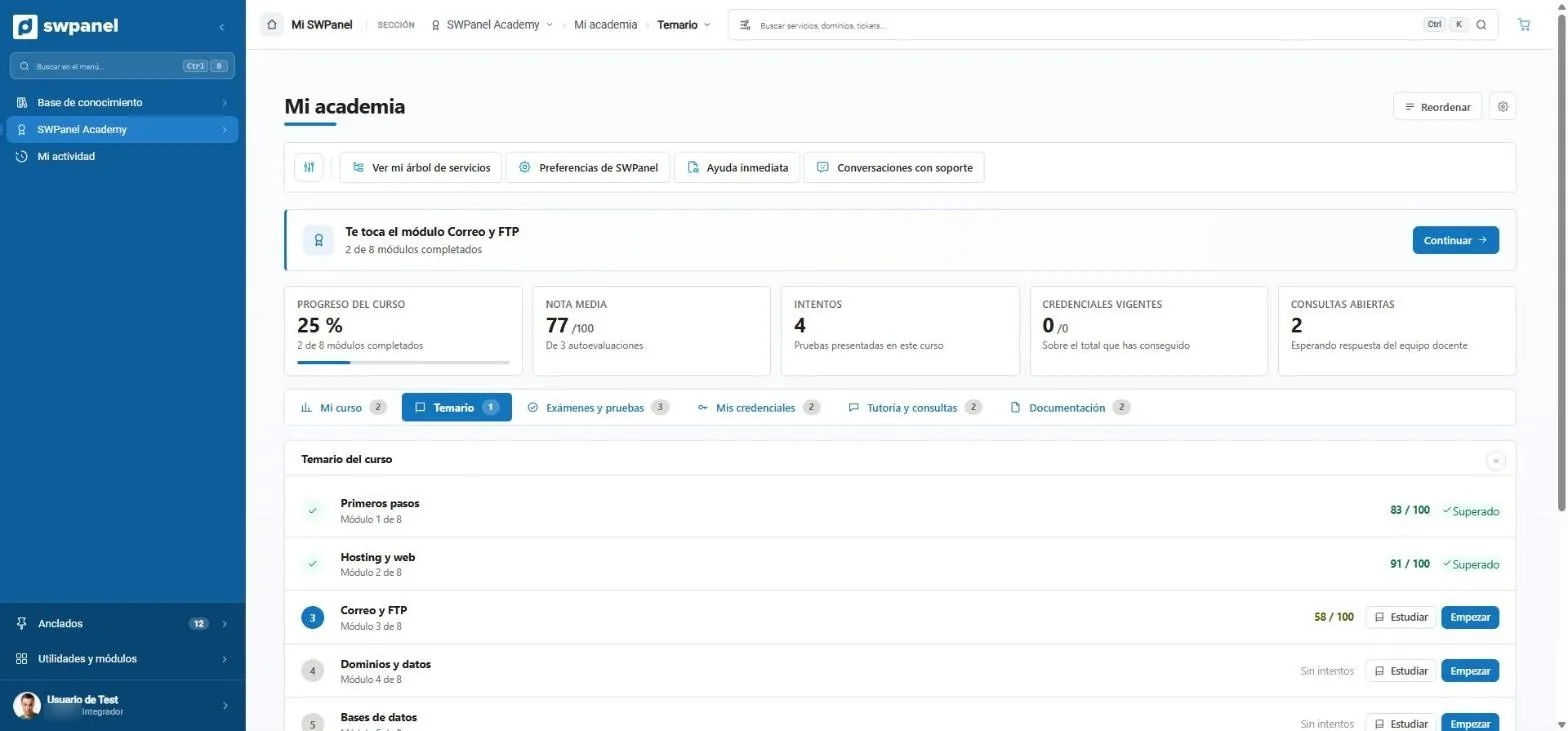
- Eight modules in Associate, each with its self-assessment and its grade.
- Study or take the exam of each module, at your own pace.
- Exams, credentials, tutoring and documentation of the course, in tabs.
The eight Associate modules:
- 1 First steps
- 2 Hosting and web
- 3 Email and FTP
- 4 Domains and data
- 5 Databases
- 6 Operations and support
- 7 WordPress SWPanel ecosystems
- 8 Migrations to SWPanel
My activity
Pick up where you left off
Manuals in progress, your Academy course and your questions to the teaching team, on a single screen. To pick up without searching.
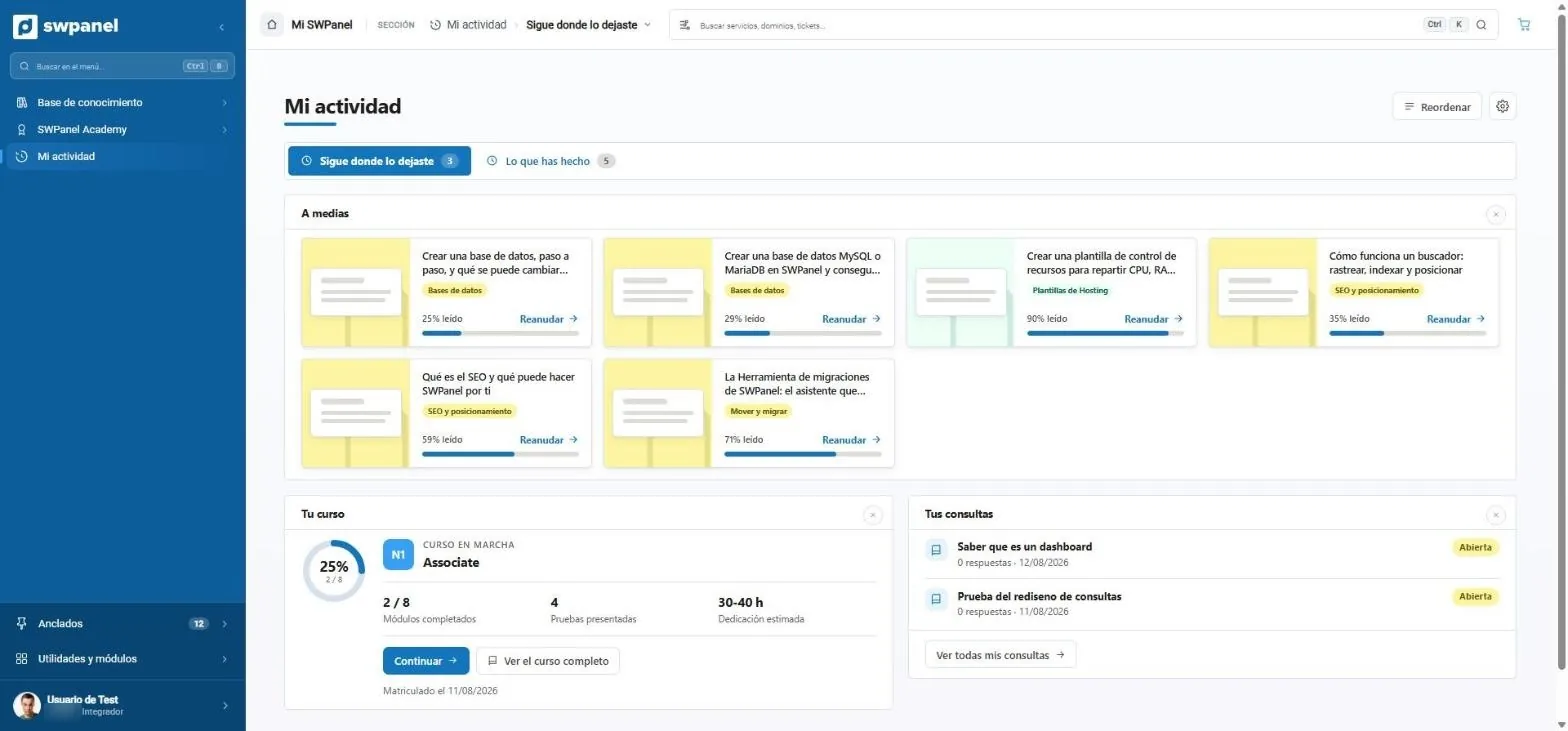
- In progress: everything you started, with what you have left.
- Your course underway, with its progress.
- Your questions to the teaching team and their status.
Never unattended
If something resists, there's always one more step
You start with the quickest and, if needed, climb. At the end of the ladder there is always a person.
- You search for it More than 1500 manuals and videos, by title or content, sorted by what's useful to you.
- You ask the AI It writes the guide for your case, with steps and images from the official manuals and their sources.
- Instant Help It looks at your services, detects issues and acts with your confirmation.
- A specialist technician If the AI can't solve it, it connects you directly with a person. At no cost.
- Your conversations Everything you discuss with support is saved and searchable.
Next event · In person in Girona
Official Presentation of SWPanel 2027
AI works with you. A hands-on day: the main talk on AI in SWPanel, five workshops to choose from and a Data Center tour.
- Friday 27 November · From 10:00 to 17:30
- SW Hosting · Girona Data Center
- Free
- Main talk and demos
- Five 75-minute workshops
- Data Center tour
- Breakfast and lunch included
Frequently asked questions
About manuals, AI and Academy
Your IT, calm, and never alone
Create your free account and open the Knowledge base: more than 1500 manuals and videos, and an AI that writes the guide for your case.