
SEO · New in 2027
Turn SEO data into improvements for your website
Diagnosis, priorities, texts and fixes with AI and reports, inside SWPanel, where your website lives. Choose the level of each website —Basic, Pro or Intelligence— and let SWPanel tell you what to do and do it with you.
- One level per website
- Fixes with undo
- Automatic PDF reports
International shipping: deadlines and costs for your store
Everything you need to know to sell abroad: how long a shipment takes, how much it costs and what paperwork each country requires.
54 characters · reads in full Position 8,2- Measures Google shows it 200,000 times and it gets 3 visits: position 11.7
- Decides It's one step from the first page and its title gets cut off
- Proposes The AI writes a title that fits and asks for the click
- You apply With one click, and always with undo
- Checks After 14 days it checks again whether it worked
SEO Intelligence
It analyzes, advises, writes and fixes. Every week.
SEO Intelligence is the highest level of SWPanel SEO. It crawls your website, measures it, compares it with your competition and listens to Google. Then it decides what should be done and does it with you: the AI writes the texts and fixes the code, and you approve every change.
-
1Analyzes Crawls and measures your website
- Up to 200 pages per review, every week
- Lighthouse on 10 pages and Google PageSpeed
- HTML, JavaScript and static files
- Redirects, SSL, languages and canonicals
-
2Advises Tells you what to do and why
- A work plan with your Google data
- Where you have the most to gain, page by page
- Your competition's searches that you're missing
- Your own pages competing with each other
-
3Writes and fixes The AI does the work, you approve
- Alt texts written by looking at each image
- Content ideas with title and description
- Poorly written, insecure or slow code, fixed
- All with your approval and with undo
-
4Reports and checks Tells you and checks again
- Professional report every week
- Premium every month, written by the AI Engine
- In PDF and by email, without asking for it
- Each task, checked at 7, 14, 21 or 30 days
And it starts over. The analysis repeats every week and, once a month, the complete one with market data. If something gets worse, you see it in the next one.
Screen by screen
Everything it does for a website, just as you'll see it
SWPanel 2027 screenshots with a test website in SEO Intelligence. Each tab is a part of the work.
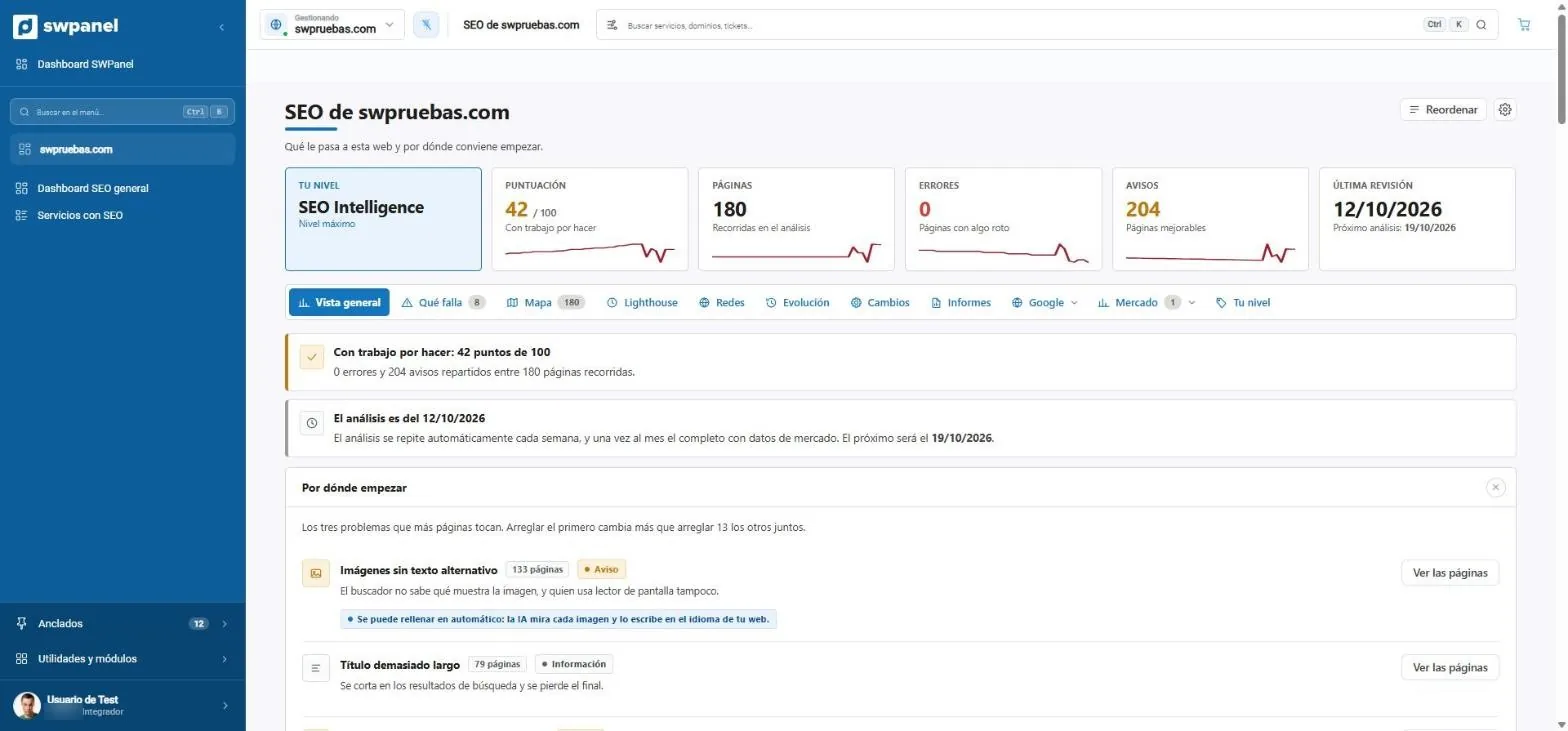
- Your level: SEO Intelligence, the highest.
- Score, pages, errors and warnings, with their evolution.
- An analysis every week and, once a month, the complete one with market data.
- Where to start: the problem that touches the most pages. The AI can fix it automatically.
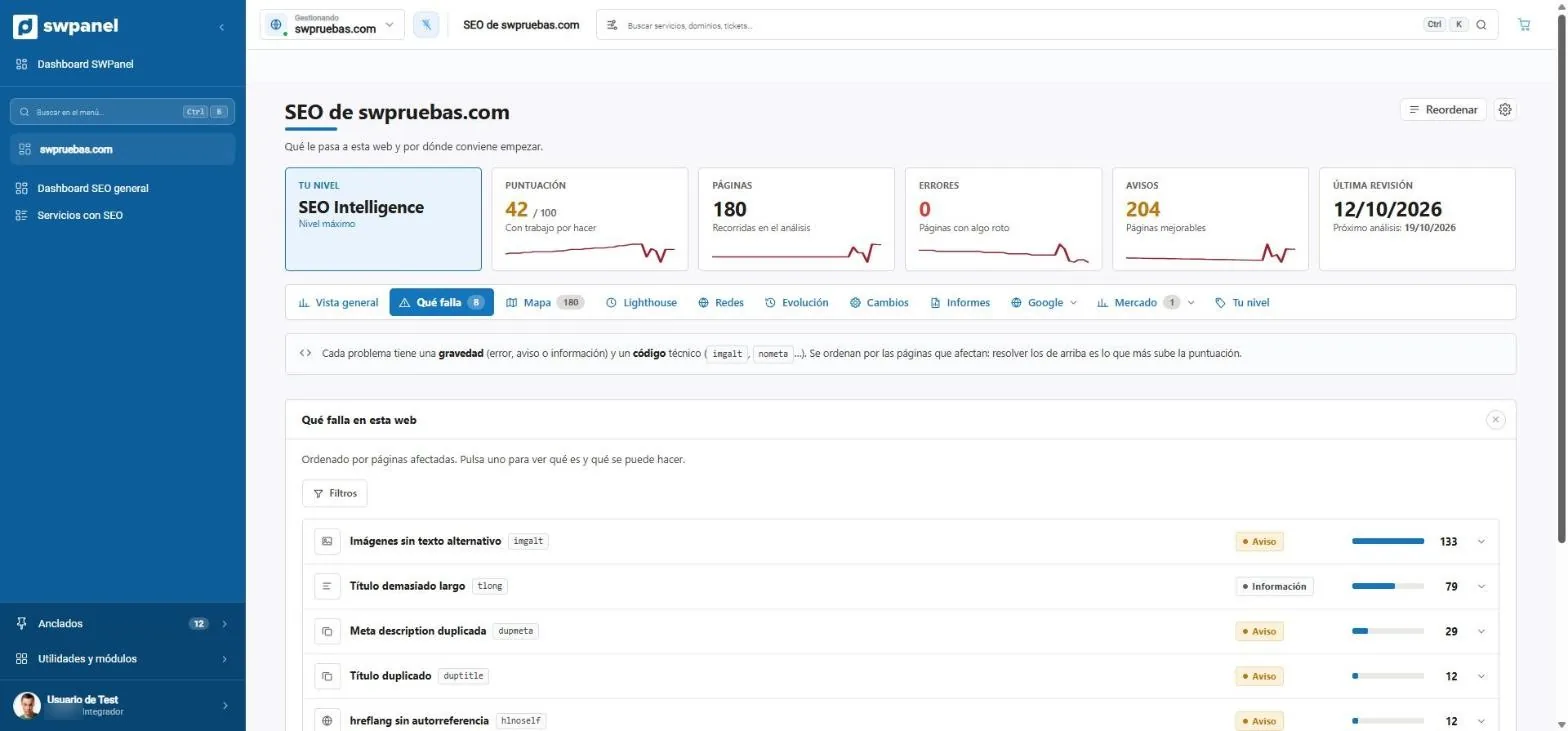
- Each problem with its severity and its technical code.
- Ordered by affected pages: at the top, what raises the score the most.
- How many pages have each problem.
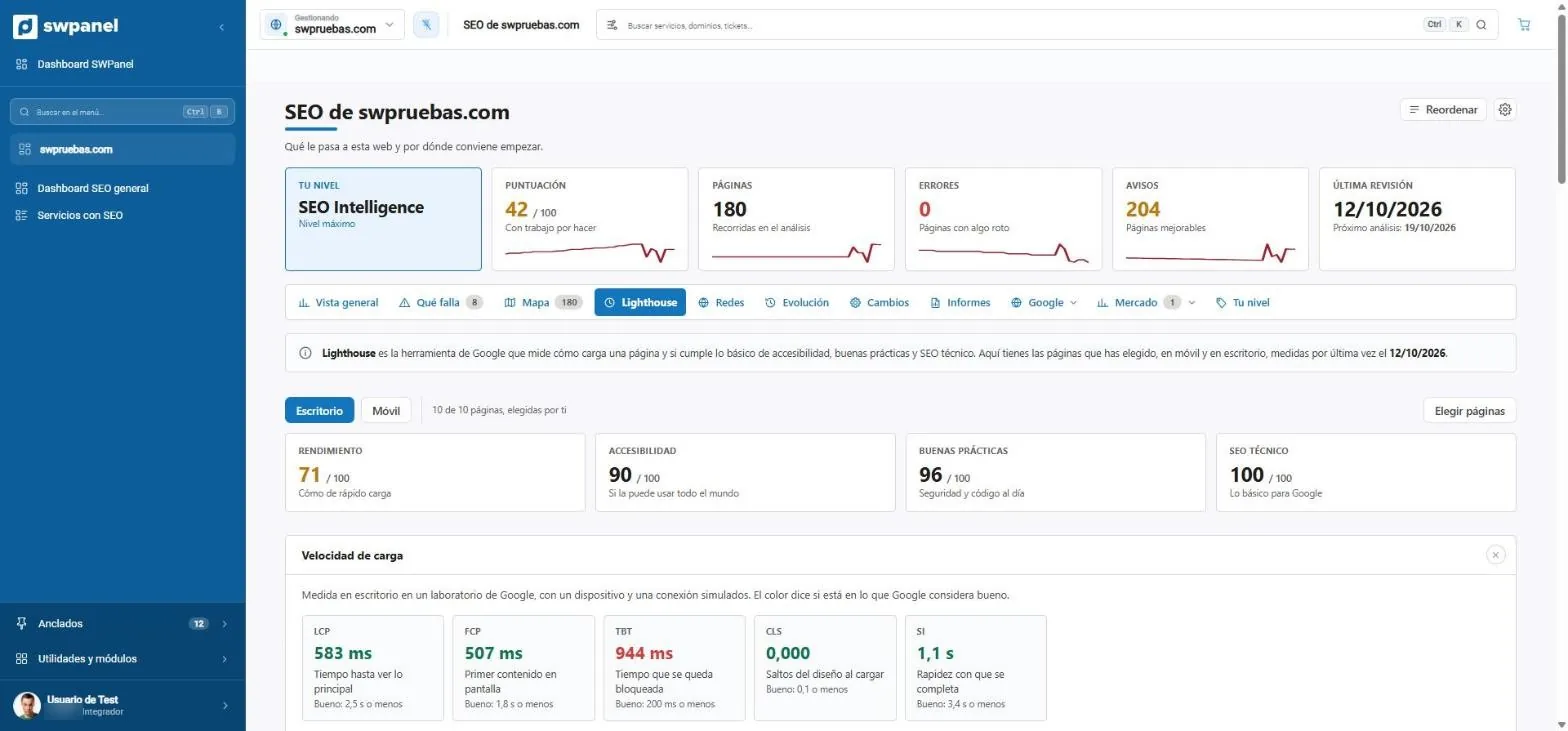
- Desktop and mobile, on the 10 pages you choose.
- Performance, accessibility, best practices and technical SEO.
- Load speed with the reference of what Google considers good.
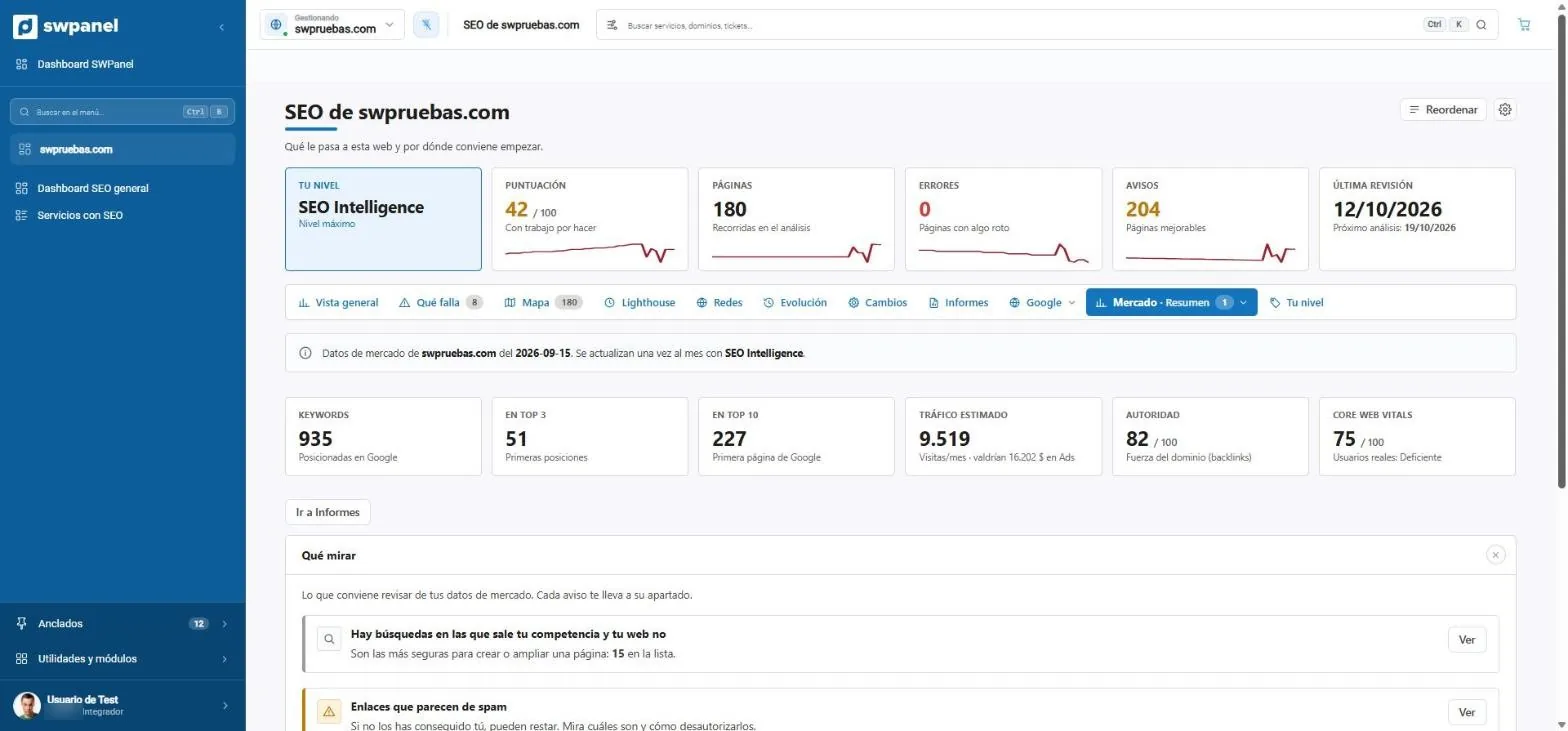
- Market data that is renewed every month.
- Keywords, top 3, top 10, estimated traffic, authority and Core Web Vitals.
- What to look at: searches where your competition appears and your website doesn't.
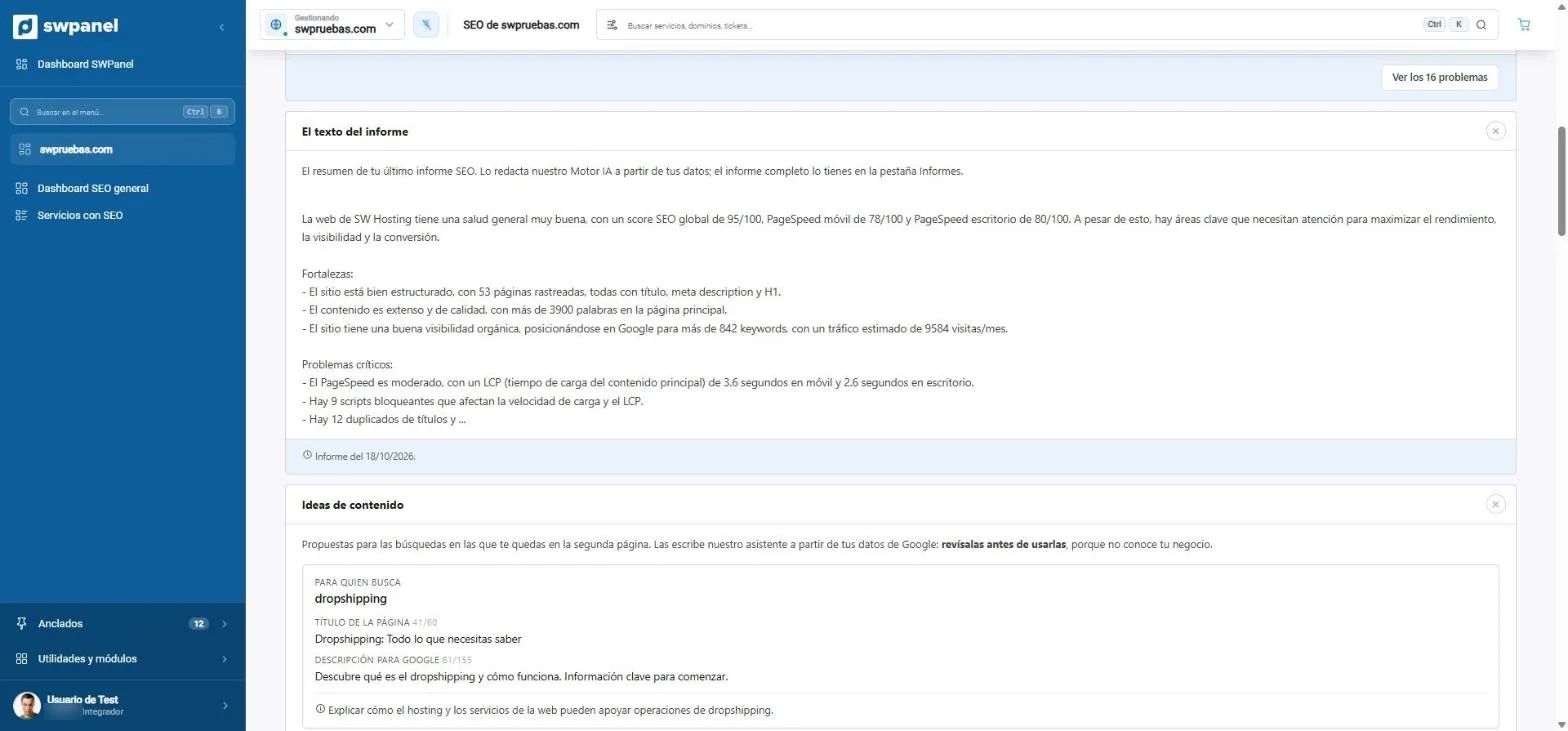
- The report text, written by the AI Engine from your data.
- Strengths and critical problems, in plain language.
- Content ideas for the searches where you stay on the second page.
- Title and description for Google, with characters counted.
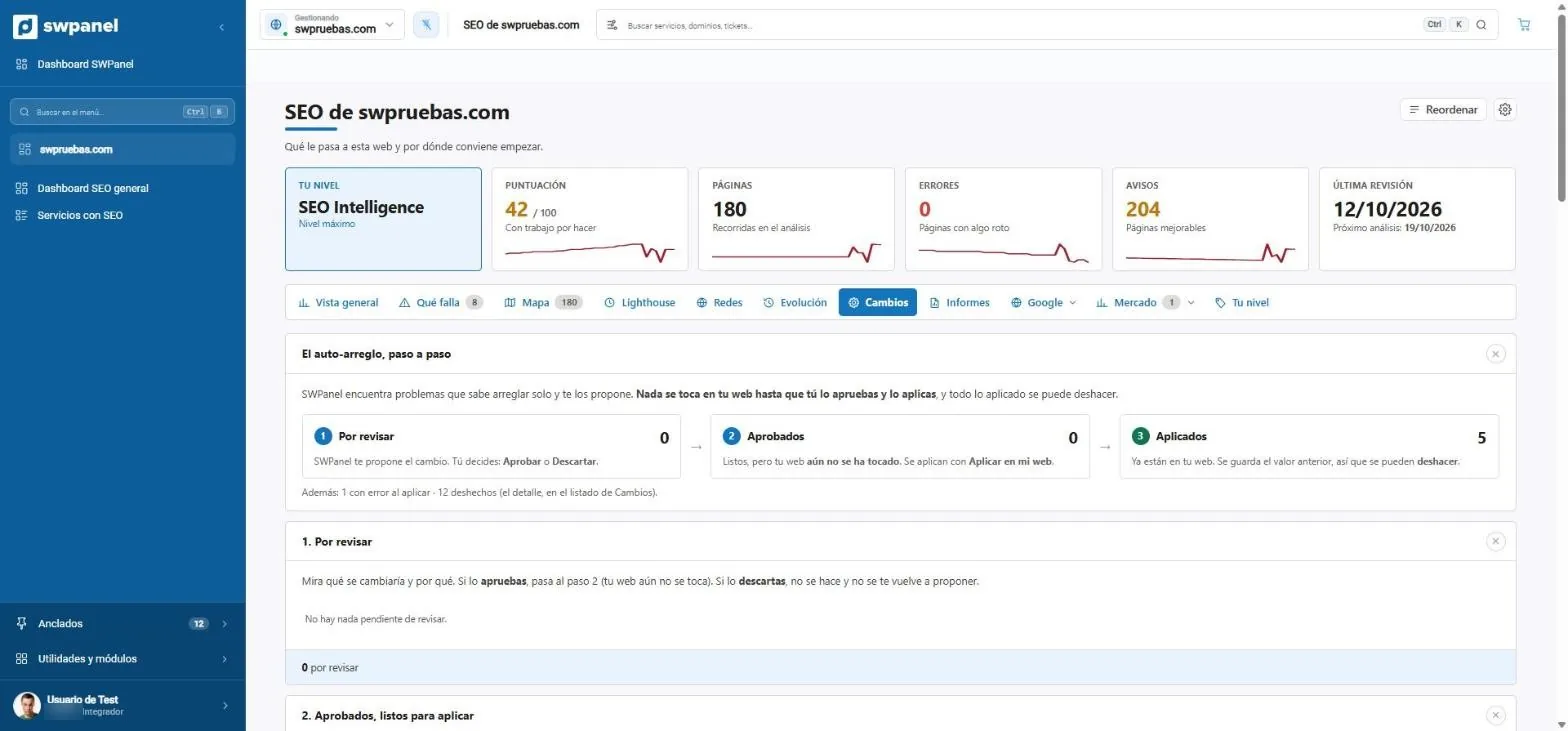
- Auto-fix, step by step. Nothing is touched without your approval.
- To review: you approve or discard.
- Approved: ready, but your website hasn't been touched yet.
- Applied: the previous value is saved so it can be undone.
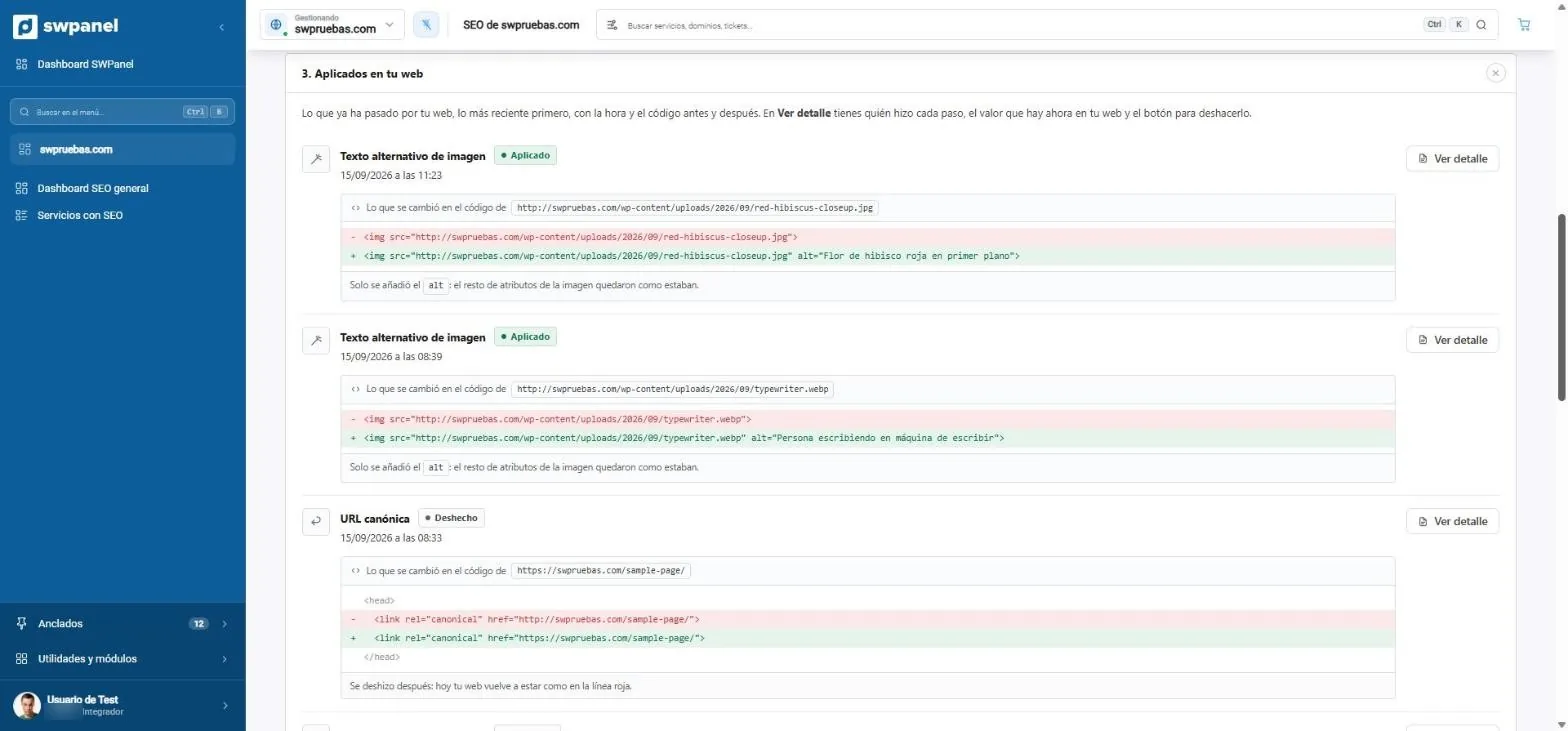
- What was changed and when, most recent first.
- The code before and after: only the alt text written by the AI is added.
- The canonical URL fixed. If undone, the website goes back to how it was.
- View details: who did each step and the undo button.
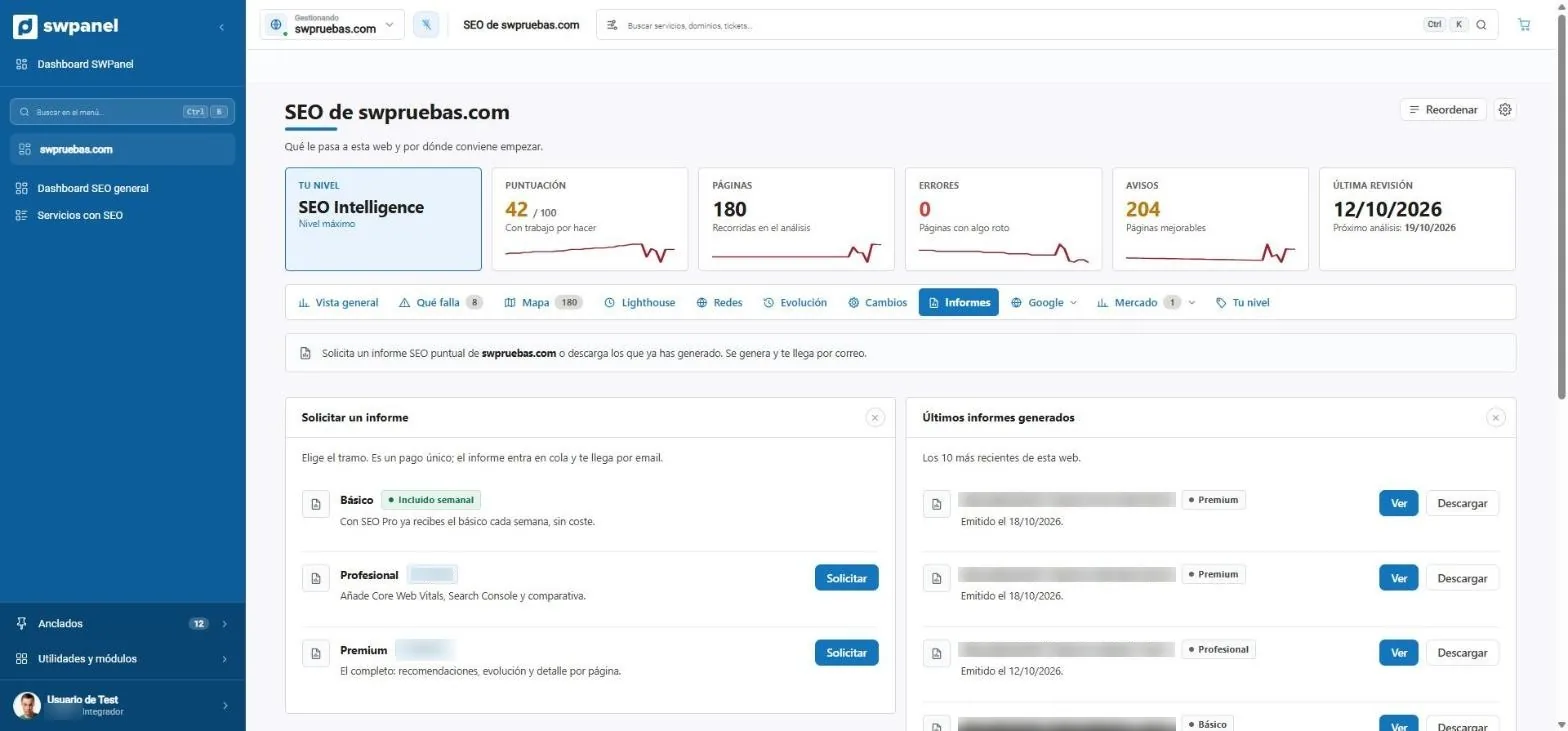
- Order a one-off report whenever you need it.
- The basic one, included every week from SEO Pro.
- The latest reports generated, to view or download.
The AI writes with you
The texts your website needs, written with your data
Writing well for Google takes time: hundreds of alt texts, titles that don't get cut off, descriptions that invite people in. SWPanel's AI writes them from the analysis and your Google data, and you review before publishing.
alt Red hibiscus flower in the foreground
Written by looking at the image, in your website's language.Alt texts
The AI looks at each undescribed image and writes its alt text in the website's language. Google understands the image, and so does anyone using a screen reader.
For those searching error 403
Titles and descriptions
For the searches where you stay on the second page, the assistant proposes the page: who it's for, its title and its description, with characters counted.
Strengths. All pages have a title, description and H1.
What's critical. 9 scripts block loading and delay the main content.
What to do first. Shorten 79 titles that Google cuts off.
Report in PDF · arrives by email
The report, written
Every month, the AI Engine turns the analysis into a report that makes sense: strengths, what's critical and what to do first. For you or for your customer.
Code, understood and fixed
Understands any code and proposes how to fix it
SWPanel reads your website's code, whatever CMS or language it's built with. It understands what it does, learns from each analysis and proposes fixes for poorly written code, insecure code and code not optimized for SEO. Each proposal comes with the before and after and, when applied, the previous value is saved so you can go back.
Poorly written code
- HTML that doesn't validate and badly closed tags
- Programming and runtime errors, with their line
- Redirects that chain hops
Insecure code
- Queries that allow injections
- Forms that accept any file
- Software with known vulnerabilities
Code not optimized for SEO
- Images without alt text
- Canonicals, hreflang, titles and descriptions
- Scripts that block loading and Core Web Vitals
Also in Security 360: the code analysis of each website, every day, and the code audit, file by file.
SEO Image without alt text
- <img src="img/hibisco.jpg">+ <img src="img/hibisco.jpg" alt="Flor de hibisco roja en primer plano">
Security Query open to injections
- $sql = "SELECT * FROM pedidos WHERE id = " . $_GET["id"];+ $stmt = $db->prepare("SELECT * FROM pedidos WHERE id = ?");+ $stmt->execute([$_GET["id"]]);
Speed Script that blocks loading
- <script src="js/slider.js"></script>+ <script src="js/slider.js" defer></script>
You decide: apply, discard or undo.
What you get
More visits, a better website and fewer hours of SEO
SEO Intelligence doesn't give you thousands of data points for you to interpret: it tells you what to do, does it with you and checks whether it worked.
-
Move up to the first page
It points out the searches where you're already one step away and the pages with the most visits at stake.
-
Get chosen on Google
Titles and descriptions that don't get cut off and invite people in.
-
A faster website
What slows loading down, measured on mobile and desktop, with its fix.
-
A website for everyone
Images described for search engines and for those who use a screen reader.
-
Know what your competition does
The searches where they appear and you don't, and their value.
-
A report for your customer
Every week and every month, without you preparing it. With RHA, with your brand.
What it looks like
The SEO of all your websites, with the next task in view
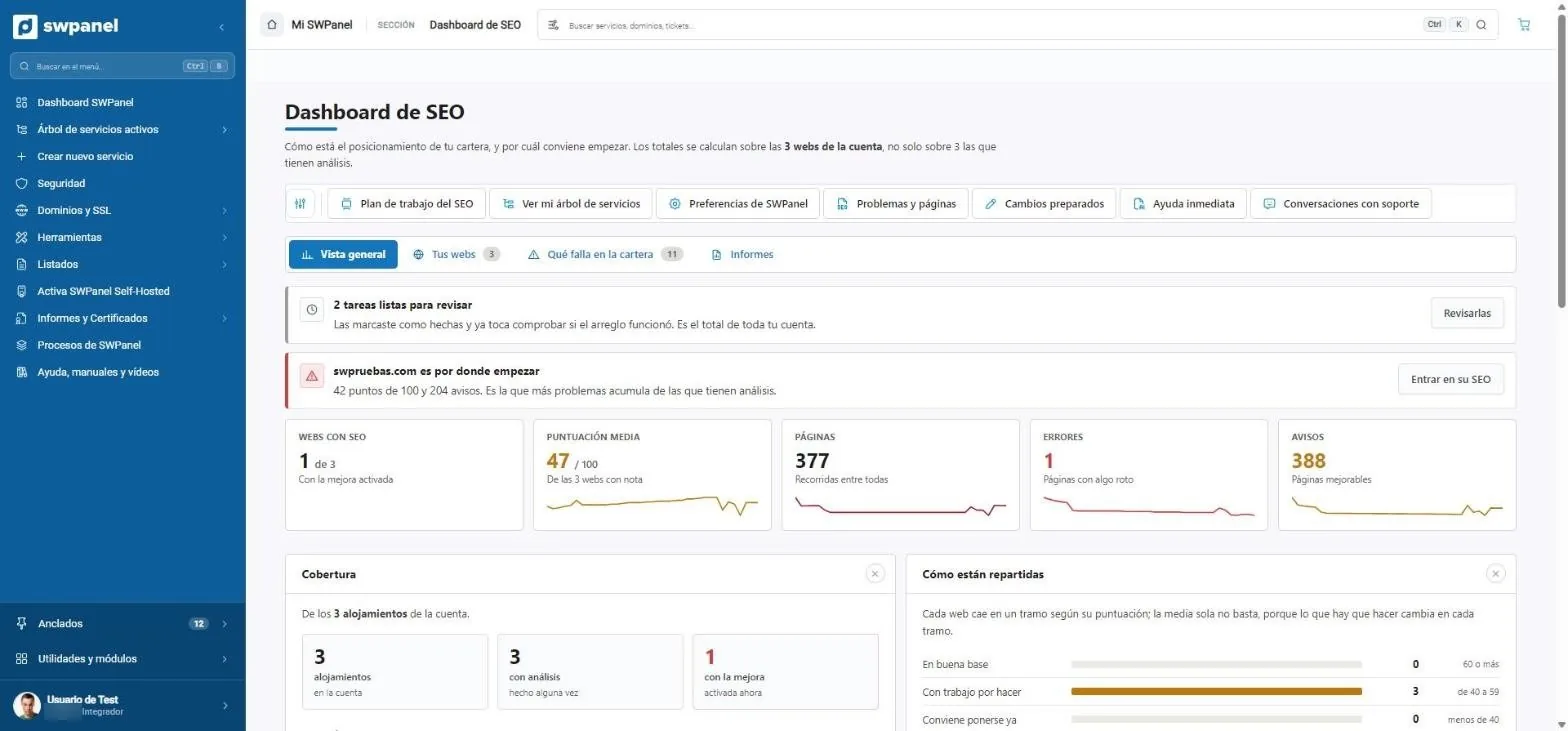
The SEO dashboard isn't a report you read and forget: it tells you which website to start with, what's failing across the whole portfolio and which tasks are pending verification.
Dashboard
Where to start, without thinking
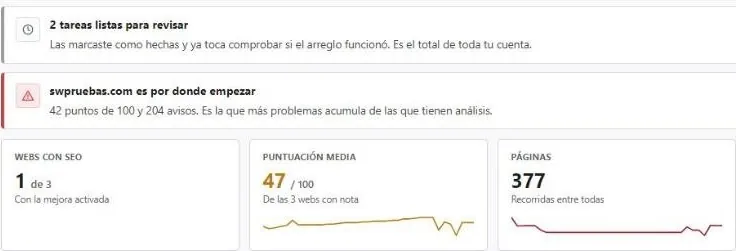
The website with the most problems at the top, the tasks you marked as done to check that they worked and the figures for the whole portfolio: websites with SEO, average score, pages, errors and warnings.
- Coverage: how many hostings have the analysis
- Websites distributed by score range
- Tasks ready to review: you marked the fix and it's time to check whether it worked.
- Where to start: the website with the most problems.
- Websites with SEO, average score, pages, errors and warnings.
- Work plan, problems, prepared changes and Instant help.
- How your websites are distributed by score.
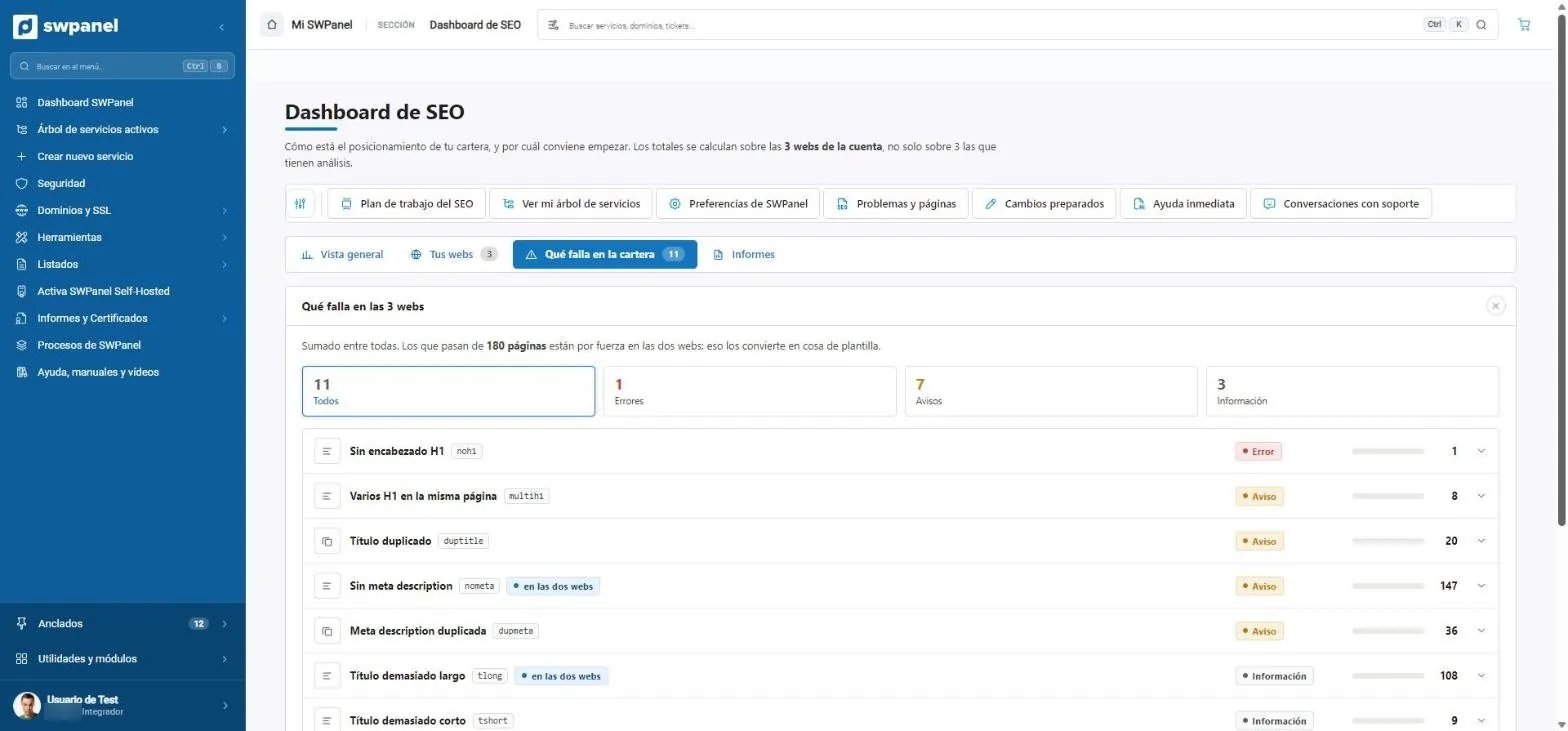
What's failing
The problems of the whole portfolio, added up
No H1, duplicate titles, no meta description... with how many pages have it. If a problem appears on all your websites, it's a template issue, and it flags it for you.
- Errors, warnings and information
- Expandable detail for each problem
- What's failing across the whole portfolio: errors, warnings and information.
- Each problem with its code and whether it repeats across several websites (a template issue).
- How many pages have it.
Work plan
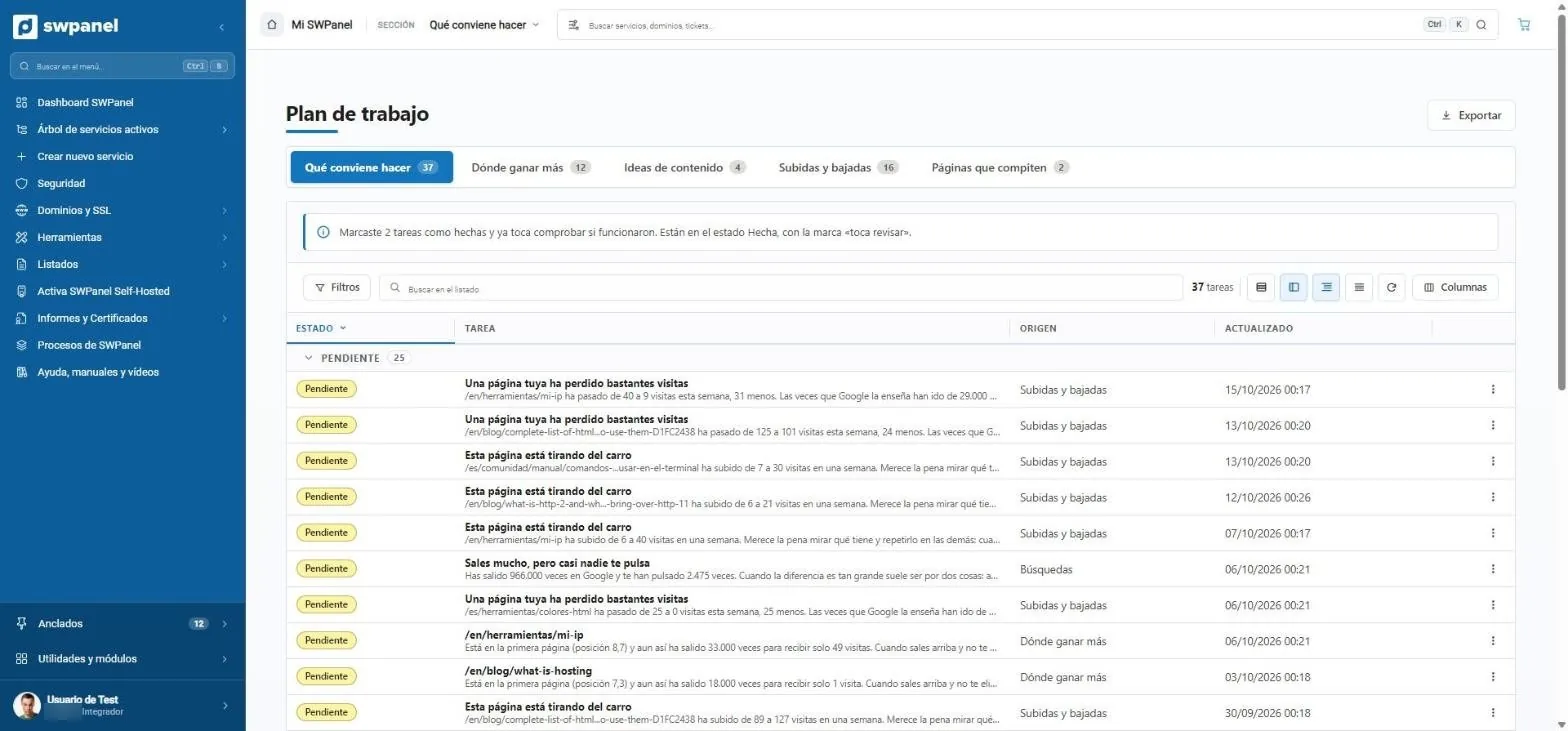
Tasks written the way a consultant would say them
“One of your pages has lost quite a few visits”, “You show up a lot, but almost nobody clicks you”. Each task comes from your Search Console data and the analysis, with the number that justifies it.
- Where to gain the most, content ideas, rises and drops
- Pages competing with each other
- Exportable
- What to do, where to gain the most, content ideas, rises and drops and competing pages.
- Follow-up: what you marked as done comes back to be checked.
- Tasks in plain language: “one of your pages has lost quite a few visits”.
- “You show up a lot, but almost nobody clicks you”: 966,000 impressions and 2,475 clicks.
- Where each task comes from.
Why in SWPanel
SEO suites analyze. SWPanel fixes too.
SEO tools charge per account and give you thousands of data points. SWPanel charges per website and bets on fixing, explaining and delivering the report, without leaving SWPanel, where your websites are.
Diagnoses
Crawling of each page, technical analysis, speed and competition, depending on the level.
- Title, description and heading errors
- Lighthouse and Google PageSpeed
- Comparison with competitors
Fixes
The AI proposes fixes and you approve them. In Intelligence they're applied to the website.
- Poorly written, insecure or slow code
- Alt texts and canonicals
- Always with undo
Guides and measures
A work plan ordered by weight and a follow-up that checks that each task worked.
- What to do
- Where to gain more
- Evolution of each website
Tiers
Basic, Pro and Intelligence: one level per website
The levels don't add up, they replace each other: the higher one covers the lower. Without the account's SEO module none can be activated; with it, activation is free.
| Basic | Pro | Intelligence | |
|---|---|---|---|
| Crawling | |||
| Pages per review | 10 | 100 | 200 |
| Automatic review | Every 30 days | Every 7 days | Every 7 days |
| Queue priority | Normal | High | Highest |
| Pages measured with Lighthouse | 1 | 5 | 10 |
| Google PageSpeed within the crawl | Not included | Not included | Included |
| Advanced analysis mode | Not included | Included | Included |
| Errors on each page: titles, descriptions, headings, thin content, errors and canonicals | Included | Included | Included |
| Technical analysis | |||
| Images without alt text | Not included | Included | Included |
| Multilingual websites | Not included | Included | Included |
| HTML validation | Not included | Included | Included |
| JavaScript and static files | Not included | Included | Included |
| On-page analysis of each page | Not included | Included | Included |
| Redirects and SSL in detail | Not included | Not included | Included |
| Competition and market | |||
| Comparison with competitors | Not included | Up to 10 | Up to 15 |
| Economic value of keywords | Not included | Not included | Included |
| Competitors' keywords that you don't have | Not included | Not included | Included |
| Searches you already appear for | Not included | Not included | Included |
| Links pointing to the website | Not included | Not included | Included |
| Estimated traffic and traffic forecast | Not included | Not included | Included |
| Visibility share against the competition | Not included | Not included | Included |
| Questions Google shows and rich results | Not included | Not included | Included |
| Strategy | |||
| Marketing analysis of the website and SWOT | Not included | Included | Included |
| Customer problems the website can solve | Not included | Included | Included |
| Content refocusing proposal | Not included | Not included | Included |
| Trust signals and priority quadrant | Not included | Not included | Included |
| Landing page proposals and tracking indicators | Not included | Not included | Included |
| Fixes and reports | |||
| View and approve AI fix proposals | Included | Included | Included |
| Apply the fixes to the website | Not included | Not included | Included |
| Automatic PDF report | Basic · monthly | Basic · weekly | Weekly professional + monthly premium |
| Report written by the AI Engine | Not included | Not included | Included |
Activating the SEO module per account is free. The price of each level per website is on the pricing page.
The score
A score that makes sense
Three ranges to read it
Over 60, on a good basis. Between 40 and 59, with work to do. Below 40, it's best to get to work now. Each problem comes ordered by severity and with its fix.
- “Analyze now” at all levels
- Problems by severity
- Evolution of each analysis
The AI proposes, you approve
Alt texts, canonicals and fixes for any code: all levels see and approve the proposals; Intelligence applies them to the website, always with undo. Each applied batch is reported by email.
- Proposals at all levels
- Direct application in Intelligence
- Undo always available
AI proposals 22
- img/sofa-gris.jpg · “Gray three-seat sofa” Approve
- img/mesa.jpg · “Extendable oak table” Approve
- /producto?id=12 · canonical Approve
Competition and market
With Intelligence you see the keywords your competition has and you don't, their economic value, your visibility share and a traffic forecast.
- Up to 15 competitors
- Keywords you're missing
- Traffic forecast
Visibility share Intelligence
- tienda.com 34%
- competidor-a.com 52%
- competidor-b.com 14%
On video
This is how SEO works in SWPanel
Two short videos built with real SWPanel 2027 screenshots. Each step comes with its on-screen explanation, so they make sense without sound.
On video · 34 seconds
The SEO of your whole portfolio
The SEO dashboard with all your websites, what's failing added up across all of them and the work plan with tasks in plain language and their follow-up.
- How it works
- All your websites, at a glance
- Which website to start with
- What's failing in the portfolio
- Template problems
- Work plan tasks
- Where to gain the most and content ideas
- Follow-up of what's been done
On video · 38 seconds
A website in depth, with SEO Intelligence
The overview of a website, what's failing, Lighthouse, market data, the texts the AI Engine writes and auto-fix with its code before and after.
- Overview and where to start
- What's failing, by severity
- Lighthouse and load speed
- Market and competition
- Report and content ideas with AI
- Auto-fix with your approval
- The code before and after
- Reports
For agencies
A monthly SEO maintenance service
Agencies and resellers turn SEO into a recurring service: one level per website of each customer, reports that arrive on their own and, with RHA, everything under their brand.
Reports that sell
Automatic PDFs by level and one-time individual reports to win customers.
See moreWork plan
What to do, where to gain the most and which pages compete with each other.
See moreWith the AI module
Summary of the latest report and content ideas for searches on the second page.
See moreFrequently asked questions
Questions about SWPanel SEO
Improve your websites' SEO from SWPanel
Activate the SEO module at no cost and choose the level of each website.