
AI Systems Administrator
Your systems engineer, on duty 24 hours, 365 days
It's artificial intelligence and works inside SWPanel: it doesn't rest, doesn't tire and doesn't miss a detail. It reads the logs and settings of the whole server, measures how it performs, explains what's happening and proposes what to change. It acts when you approve, and everything can be undone.
- 24 hours, 365 days
- It proposes, you decide
- Everything can be undone
- Reads the logs of the whole server
- Measures MariaDB: 28% of temporary tables go to disk
- Reviews 65 parameters and 31 configuration files
- Sees 11 PHP versions running: 788 MB unused
- Proposes 4 adjustments, each with its numbers
On duty
It doesn't rest. It doesn't tire. It doesn't miss a detail.
Having someone from systems watching your servers around the clock takes shifts of several people. A year has 8,760 hours; a full-time person covers around a fifth of them. The AI Systems Administrator covers them all.
-
Doesn't rest
By day, by night, on weekends and holidays: 24 hours, 365 days a year. No shifts, no vacations, no Monday with a backlog of email.
-
Doesn't tire
It reads the day's last log with the same attention as the first and measures memory, CPU, processes and traffic again every time, with no shortcuts.
-
Doesn't miss a detail
In a single Cloud there are 65 parameters for PHP, Apache, Nginx, MariaDB and email, and 31 configuration files. It reviews them all, not a sample.
-
Analyzes everything
It cross-references logs, settings and real usage. That's how it finds what doesn't fit, like a 128-byte MariaDB buffer that looks like a units error.
-
Advises you
Explains what's happening on your server and what's advisable, in plain language.
-
Proposes to you
Each change with the current value, the proposed one and what will happen when applied.
-
Acts under your supervision
Applies when you approve. Everything is recorded and can be undone.
Tuning consultant
The best settings for what you have active
It reads the configuration of each program on the server, measures how it's really used and tells you what to change so it performs better. Each piece of advice comes with its numbers, warns you of what will happen when applied and can be undone.
-
Measures
Free memory, cores and load, 7-day CPU, PHP-FPM, InnoDB and the traffic peak.
-
Explains
An AI summary in plain language: what's urgent and what can wait.
-
Proposes
Each setting with its current value and the proposed one: from 16 MB to 64 MB.
-
You apply
Apply or discard. Beforehand it tells you if the program reloads or restarts.
-
It can be undone
Each change stays in the change log, with who and when, and can be reverted.
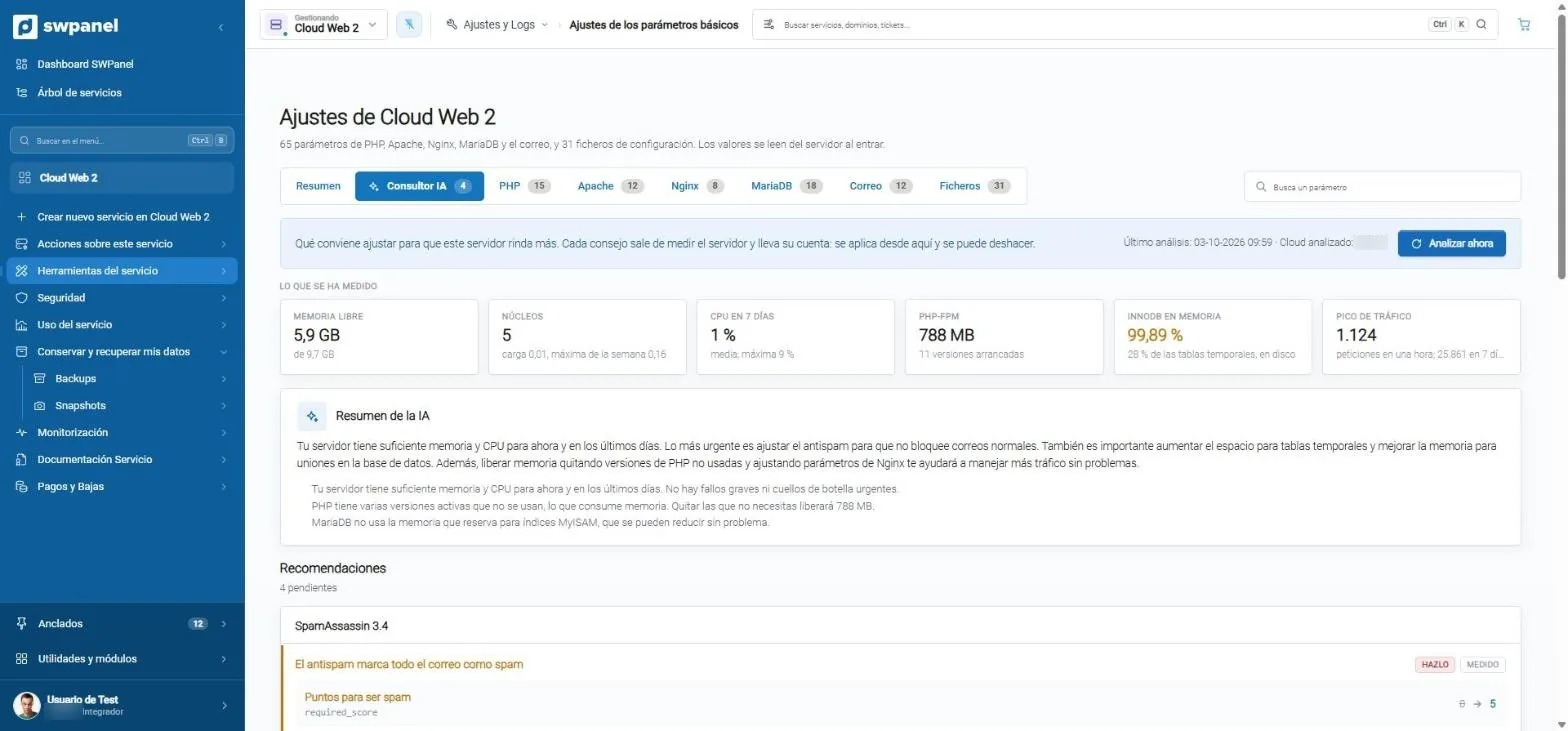
- What to adjust so the server performs better. Each piece of advice comes from measuring.
- What it measured: free memory, cores, 7-day CPU, PHP-FPM, InnoDB and the traffic peak.
- The AI summary, in plain language: what's urgent and what can wait.
- Analyze now, whenever you want, in addition to the periodic analysis.
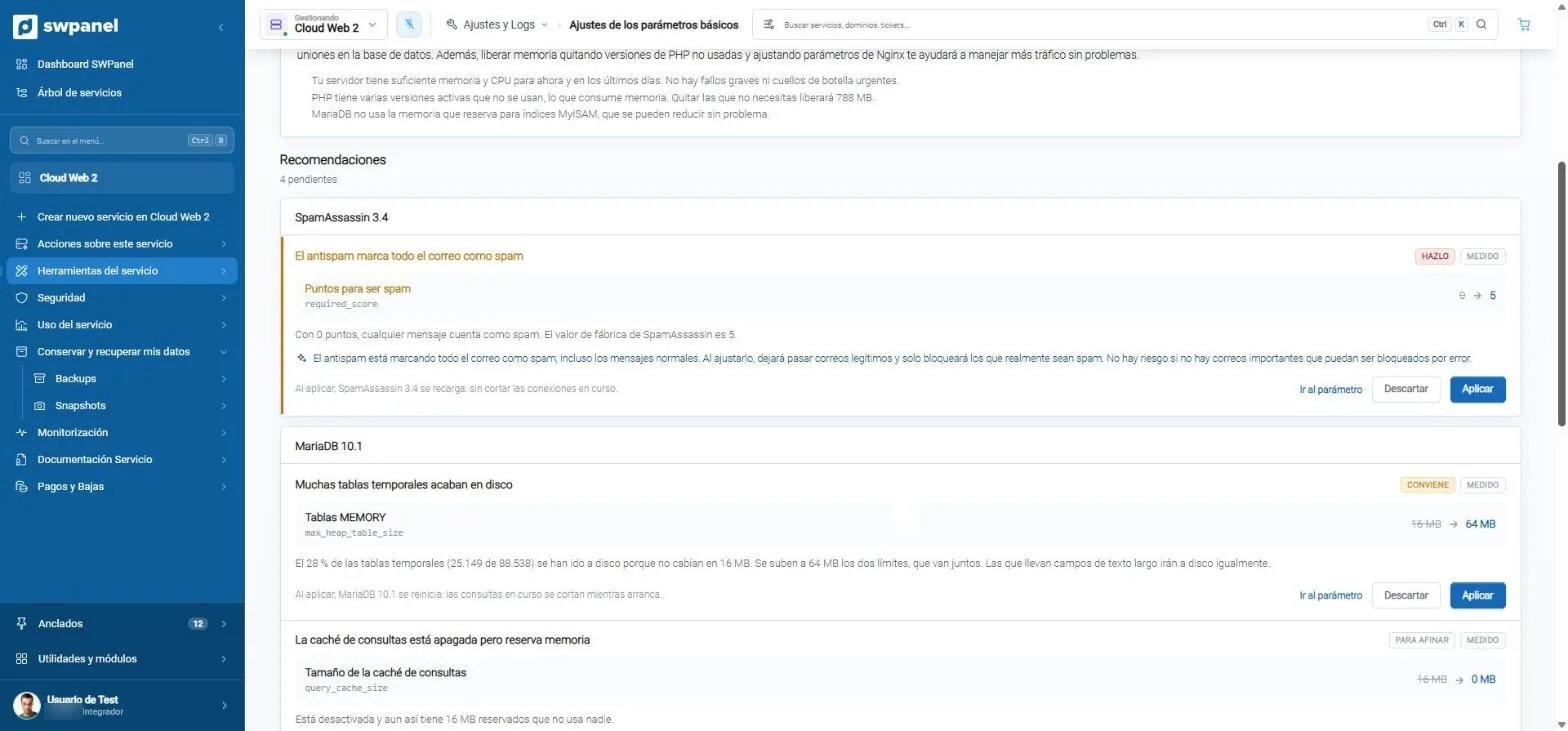
- Priority: do it, advisable or fine-tuning. And always “measured”.
- The current value and the proposed one: antispam goes from 0 to 5 points.
- Why, in plain language, with the risk explained.
- What will happen when applied: here, SpamAssassin reloads without cutting connections.
- Apply or discard. You decide.
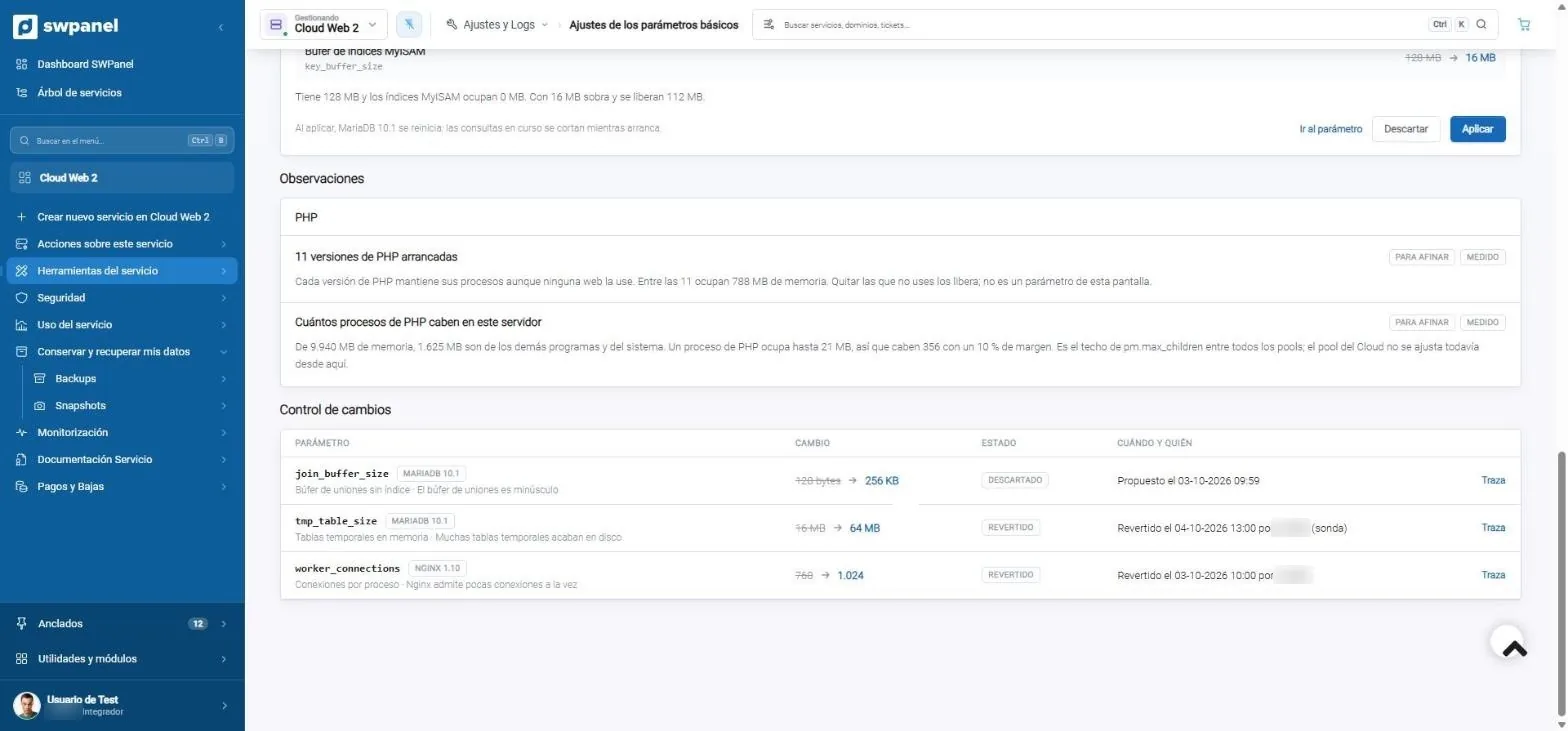
- Observations: 11 running PHP versions take up 788 MB.
- How many PHP processes fit on the machine, with the numbers worked out.
- Change log: proposed, applied, reverted or discarded.
- When and who made each change.
- The trail of each change, to go back.
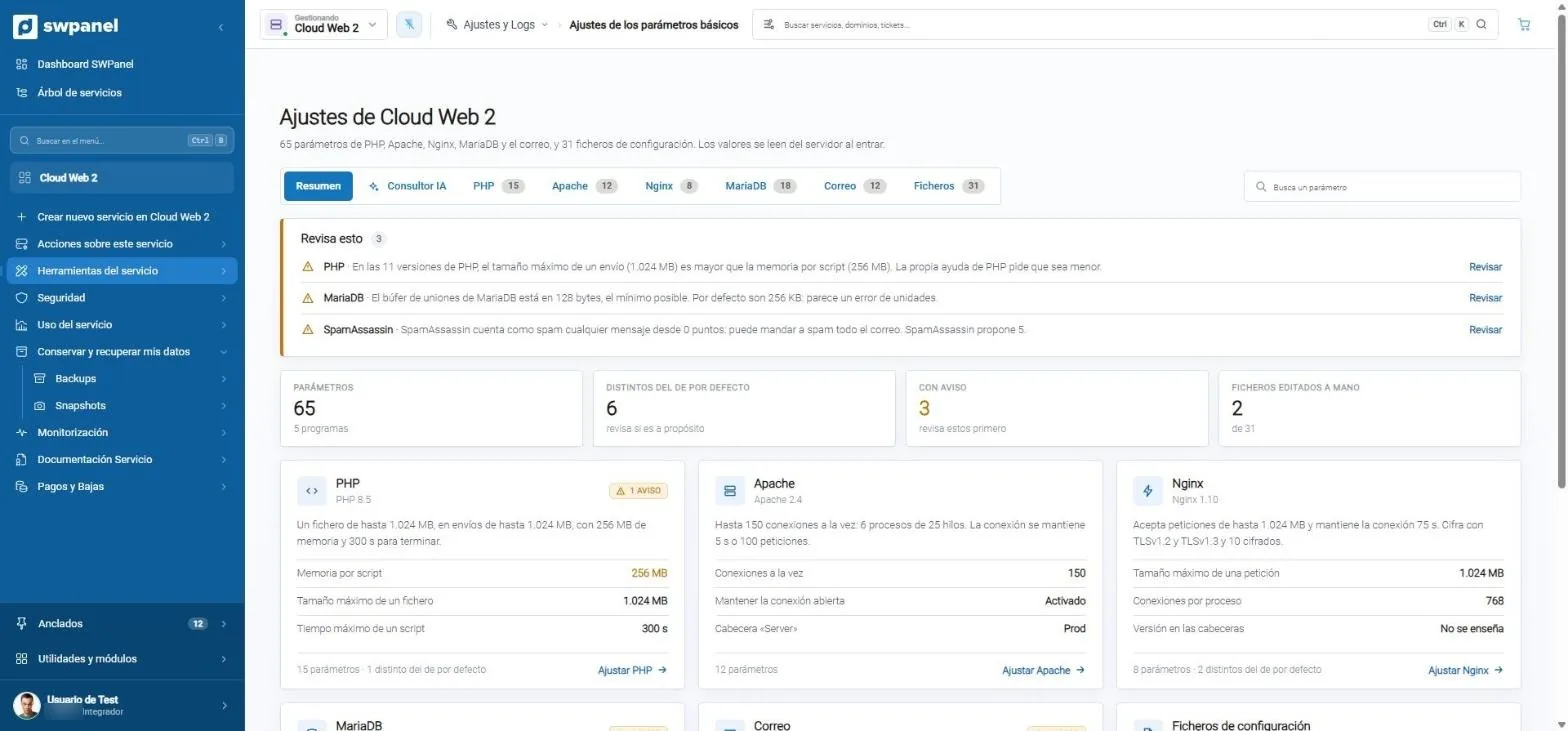
- Check this: values that look like an error, such as a 128-byte buffer.
- 65 parameters, 6 different from the default and 3 with a warning.
- Each program, in one sentence: what it supports and how much it can take.
- Tune PHP, Apache or Nginx from the same screen.
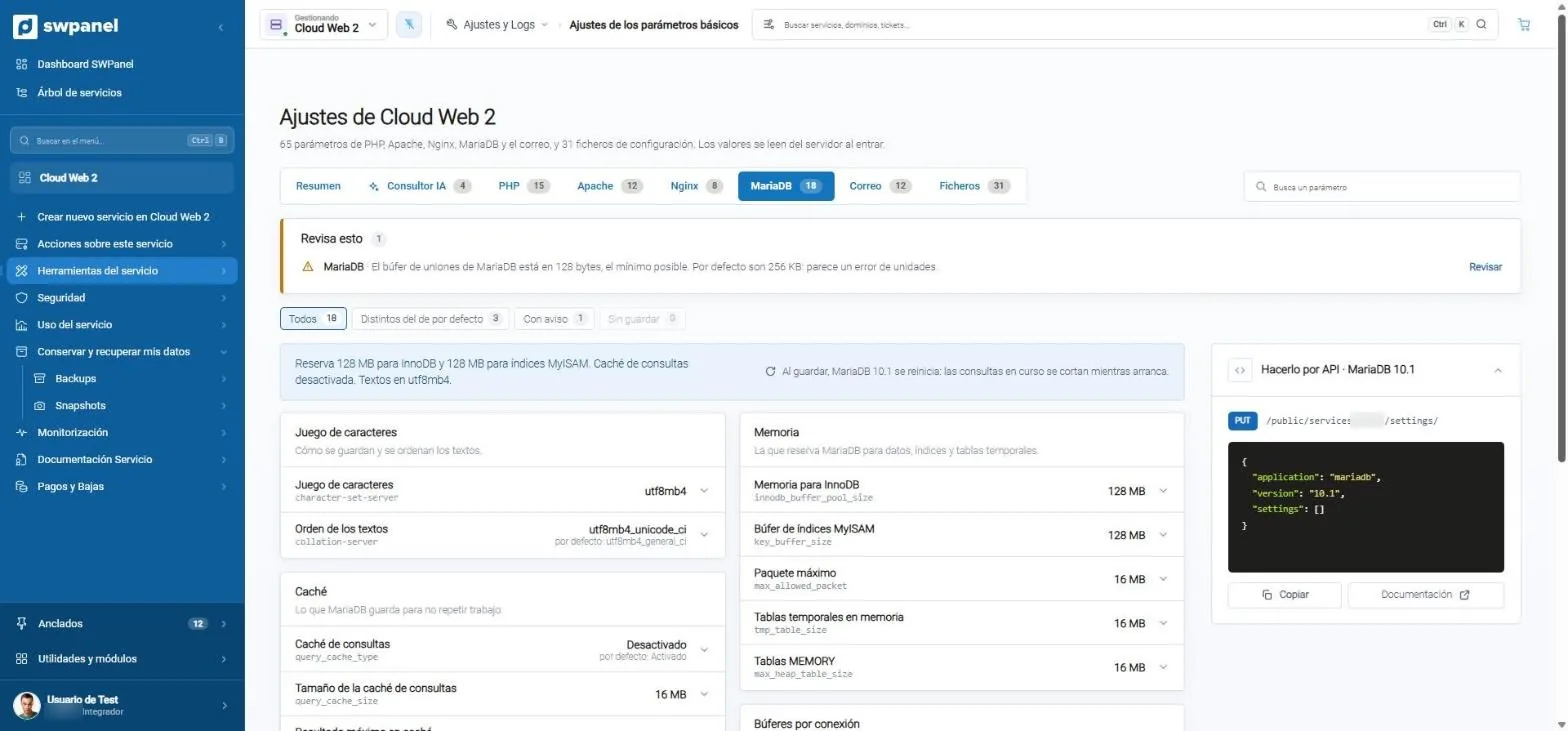
- 18 MariaDB parameters, grouped by what they do.
- The configuration, in one sentence, and what happens on save.
- Each parameter with its technical name, its value and the default.
- Do it via API: the same call for your integration.
What it reviews on Cloud Web 2
65 parameters and 31 configuration files. Values are read from the server every time you open it.
Something is wrong and should be fixed now.
The antispam marks all email as spam: it's at 0 points and the factory value is 5.
A clear improvement, backed by data.
28% of temporary tables (25,149 of 88,538) end up on disk because they don't fit in 16 MB.
Reserved memory nobody uses.
The MyISAM index buffer has 128 MB and the indexes take up 0 MB: 16 MB is plenty and 112 MB are freed.
Nothing comes from a template.
All advice comes from measuring your server: if there's no data to justify it, there's no recommendation.
Under your supervision
It proposes and acts, always with your approval
A good systems technician doesn't touch a production server without warning. Neither does the AI Systems Administrator: it shows you what it would change, why and what will happen, and waits for you to decide.
-
Nothing is applied without your click
Each recommendation has “Apply” and “Discard”. If you discard it, it's recorded as discarded.
-
You know what will happen
“On applying, MariaDB restarts: running queries are cut while it starts.” You read it before deciding.
-
Everything is recorded
Proposed, applied, reverted or discarded: with the date, who did it and the trail of each change.
-
And everything can be undone
If a setting doesn't convince you, you revert it from the change log and the server goes back to how it was.
Beyond settings
It watches the whole fleet and each machine
The AI Systems Administrator builds on what SWPanel 2027 already analyzes on each Cloud: resources, spikes, available upgrades and resilience. These screens are real.
All your Clouds
Warnings that matter, for the whole fleet
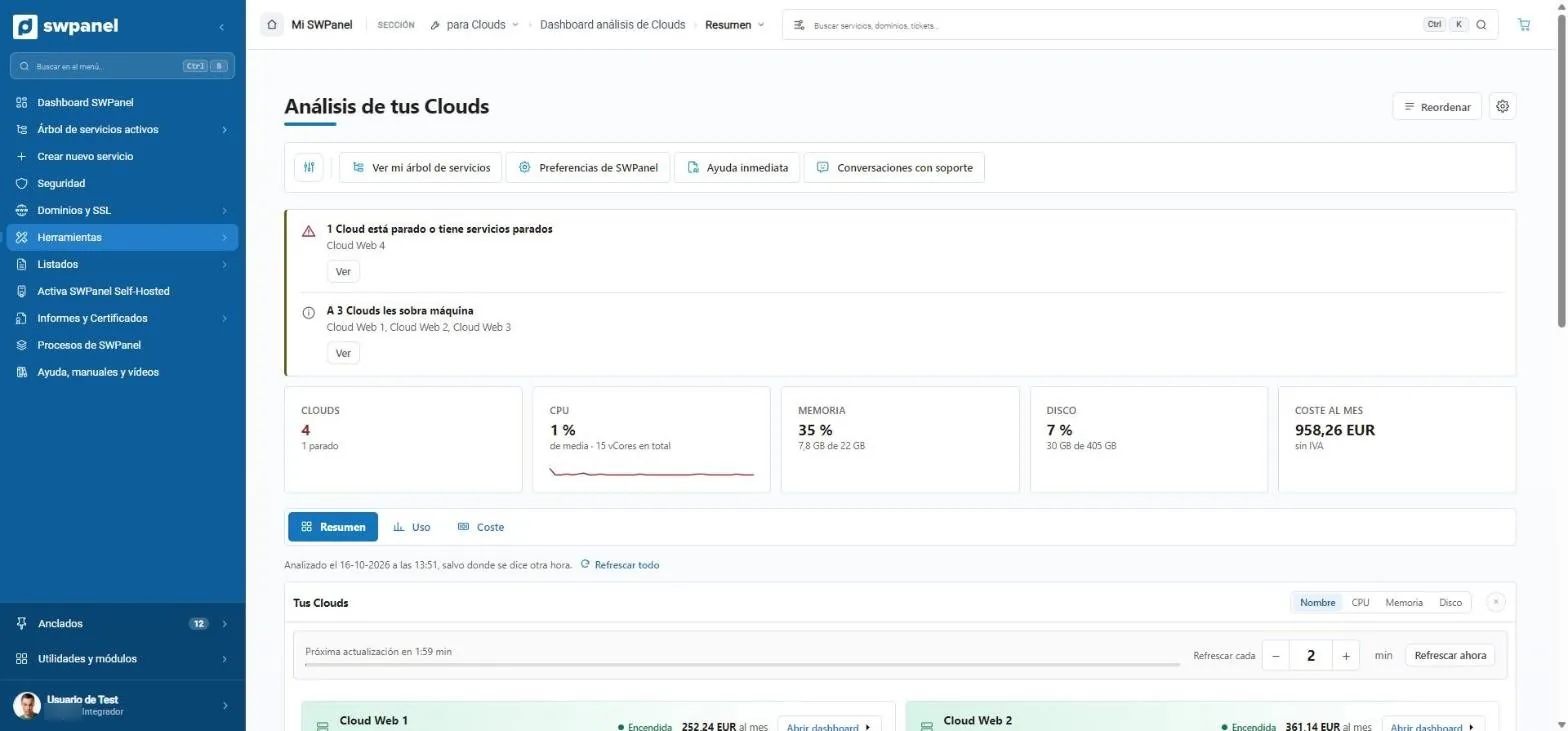
One stopped Cloud, three with spare capacity: the Clouds analysis tells you where to look and what each costs.
- CPU, memory and disk of all of them
- Monthly cost
- Notices that matter: one stopped Cloud and three with more machine than they need.
- CPU, memory and disk of all your Clouds.
- What they cost per month, excluding VAT.
Resource usage
What it uses versus what's contracted
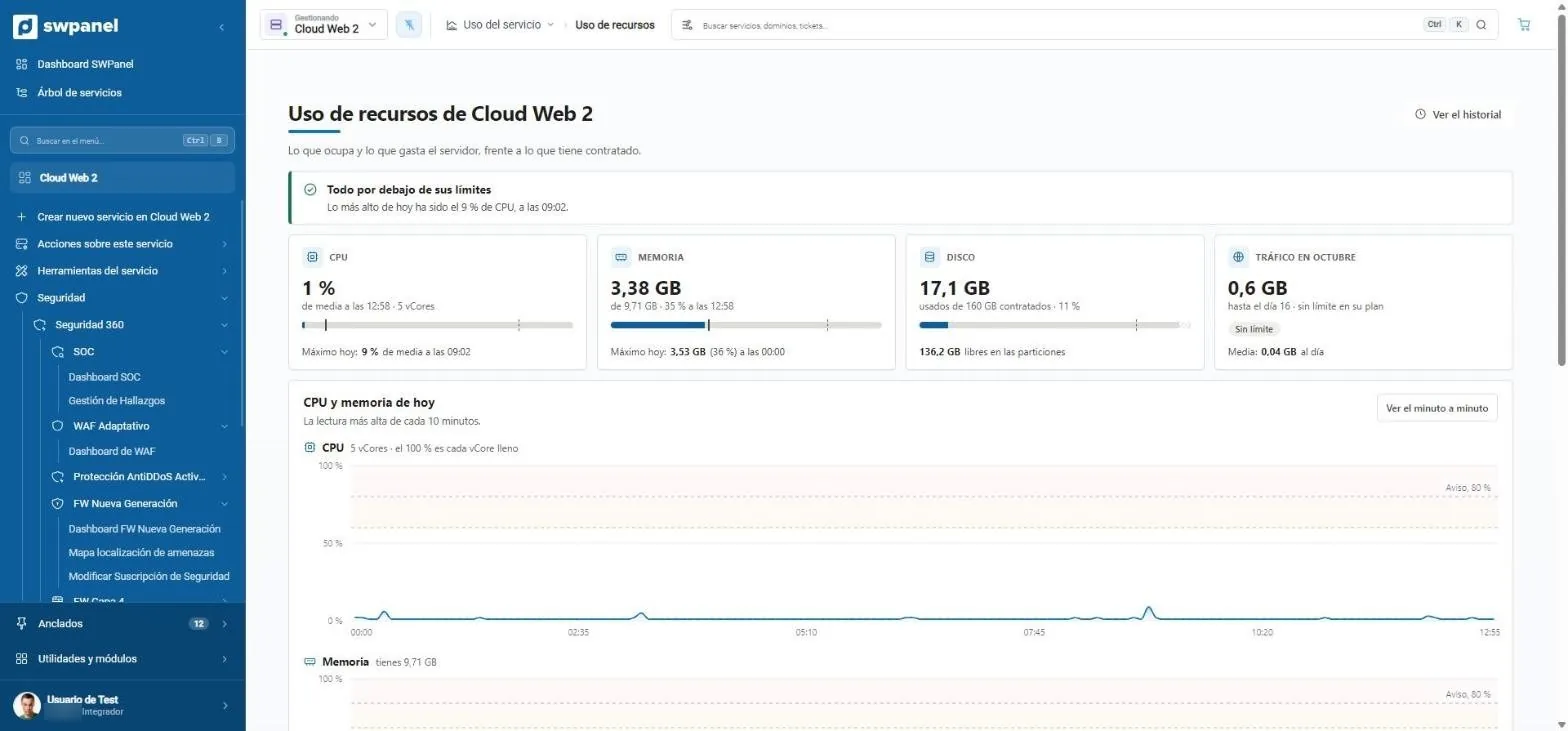
CPU, memory, disk and traffic, with the sentence that summarizes it and the minute-by-minute chart with its warning lines.
- Historic
- Threshold warnings
- Everything below its limits, said in one sentence.
- CPU, memory, disk and traffic against what you've purchased.
- Minute by minute, with the warning lines.
Diagnosis
Why the CPU spiked
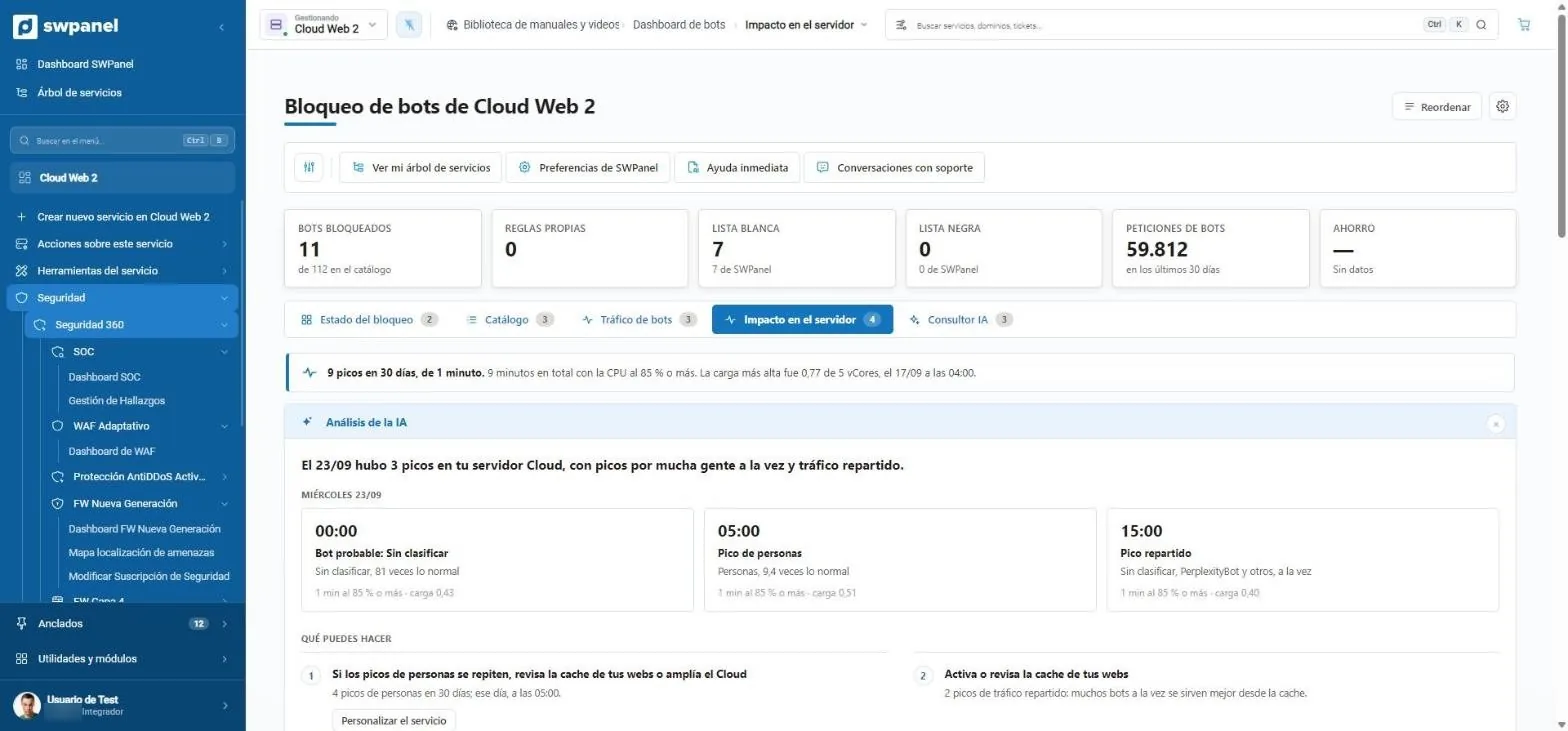
The AI cross-references each spike with the traffic at that moment and proposes what to do. It's the kind of diagnosis the AI Systems Administrator brings to all the server's logs.
- Time, probable cause and load
- Suggested actions with their button
- 9 spikes in 30 days and how long they lasted.
- The AI explains each spike: time, probable cause and load.
- What you can do, with the button to do it.
Improvements
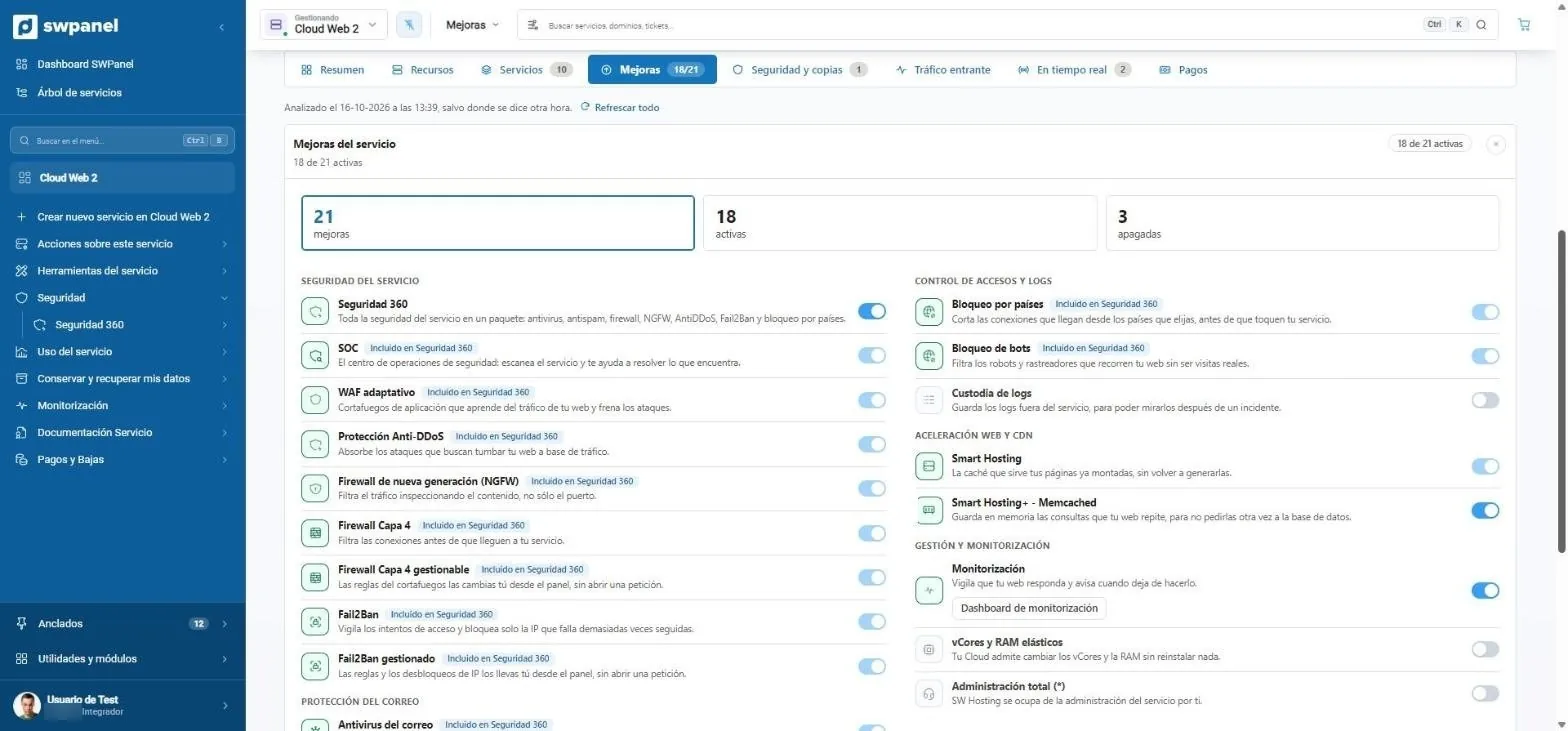
21 upgrades with a switch
Security, email, web acceleration, CDN and monitoring. What Security 360 includes, checked; what's missing, one click away.
- 18 of 21 active on this Cloud
- 21 upgrades: 18 active and 3 off.
- What Security 360 includes, checked.
- Enabled with a switch.
- Web acceleration, CDN and monitoring in the same list.
How it works
Watch, measure, diagnose and propose
-
Watches
The logs of the whole server and of each service, at all hours.
-
Measures
Memory, CPU, processes, database and traffic, with their history.
-
Diagnoses
Finds the cause of each incident, like a level 2 and 3 technician.
-
Proposes
What to do and in what order, with each adjustment ready to apply or discard.
Compared with the log analyst
Two tools, two scopes
| Log analyst (AI module) | AI Systems Administrator | |
|---|---|---|
| Scope | The logs of one service | The whole server and its services |
| Opening hours | When you open the chat | 24 hours, 365 days |
| How it works | A chat that helps read the logs | Watches, measures and interprets like a systems administrator |
| Server tuning | Doesn't touch them | Proposes the best ones for what you have active; you apply or undo |
| What for | Finding the cause of a specific problem | Level 2 and 3 diagnosis and professional review of the service |
The numbers
Less than an hour of a technician
A freelance systems technician in Spain charges about €50 per hour; one on staff, between €30,000 and €35,000 per year, and covers their working day. The AI Systems Administrator is on duty every hour of the year across all your services.
| Reference | |
|---|---|
| IT freelancer (average rate on Malt) | ≈ €50/hour |
| Support hours pack | ≈ €57/hour |
| In-house systems administrator | €30,000 – €35,000/year |
| AI Systems Administrator | Included with the AI module the first year, as a launch promotion |
References consulted on October 7, 2026 (Malt, PcComponentes, Indeed Spain).

Frequently asked questions
Questions about the AI Systems Administrator
Your systems engineer, on duty all year
Try it on your servers: compare its diagnosis and settings with yours.