
SWPanel vs cPanel and Plesk
Ten differences you can see on screen
Comparing panels with checkbox tables falls short. Here are ten things SWPanel does and a classic panel doesn't, each with its real SWPanel 2027 screenshot.
- Real screenshots, no mockups
- Assisted migration from cPanel, Plesk and DirectAdmin
- Detailed comparisons per panel
Before the ten
It's not just another control panel. It's an ecosystem.
cPanel and Plesk manage the server they live on. SWPanel manages your infrastructure, your processes and your business, from outside your servers and with modules that talk to each other.
A way to manage infrastructure
Servers from any provider, your own data center, hostings, domains and email in one tree and one map. No panel per machine and no load on your servers.
Self-HostedA way to work
Users and access profiles, traceability of every change, flows that react on their own and an API behind every screen. Your processes, inside SWPanel.
FlowsAdvice and support
Consultants that tell you every night what's urgent and what to do, an Instant Help that answers with your data, support and training for your team.
AI in SWPanelContinuous improvement
The SOC analyzes every service daily, the 360 Security comes back to check each fix and the resilience score tells you what to raise. A little better every day.
Security 360A way to do business
Sell under your brand, with a catalog, invoices and payments, and turn modules into services your customers pay for every month. Doing business stops being the problem.
Business linesLower costs, more productivity
One platform instead of ten tools, up to 90 % fewer resources on your servers and an AI that saves you hours of diagnosis.
- Infrastructure 11
- Security 360 10
- Artificial intelligence 4
- Customers and visibility 4
- Platform 5
- Your IT business 4
The ten
In short
- Lives outside your servers and works with any provider
- Shows you every request, layer by layer
- Tells you what is urgent and what to do
- Blocks countries knowing what you lose
- Does SEO for your whole portfolio, inside SWPanel
- You ask and it answers with your data
- Comes with a CRM and a newsletter built in
- Every screen shows you its API call
- Reacts on its own when something happens
- It's your IT business, under your brand
Lives outside your servers and works with any provider
SWPanel manages your services as an external layer, or you install it on your own infrastructure with Self-Hosted. Your servers can be at SW Hosting, DigitalOcean, Vultr or wherever you want, and you see them all in the same tree and the same map.
What is usual in a classic panel
- A panel installed inside each server, consuming its resources
- One panel per machine: ten servers, ten panels
- Moving a website between providers is a project
In SWPanel
- External layer or Self-Hosted on Debian 12
- All your servers and providers in one tree
- Migration between servers and providers from SWPanel
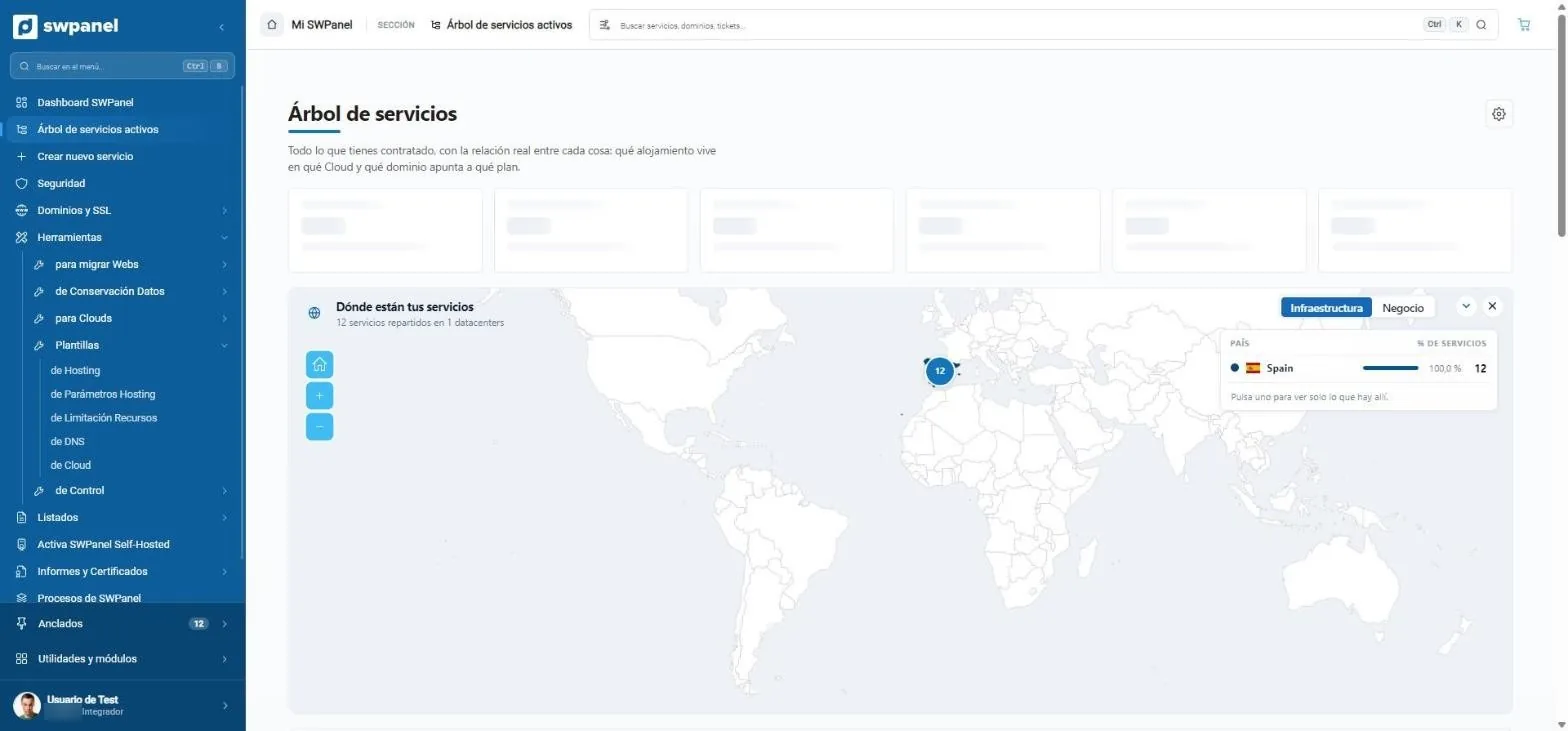
- Where your services are, by country and data center.
- Infrastructure or business: changes what the map shows.
Shows you every request, layer by layer
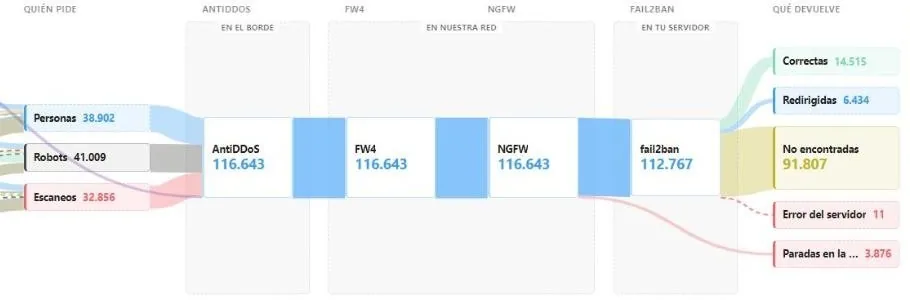
The “Incoming traffic” tab of each Cloud with Security 360 draws the path of all visits: country, visitor type, the four layers they pass through and how they end. At a glance you know that 28% of your traffic is scans.
What is usual in a classic panel
- Each protection on its own screen and in its own language
- Raw logs to understand what is happening
- Anything advanced, as another vendor's extension with a separate license
In SWPanel
- All layers in one package per service
- A diagram with people, bots and scanners
- Built by us, inside SWPanel
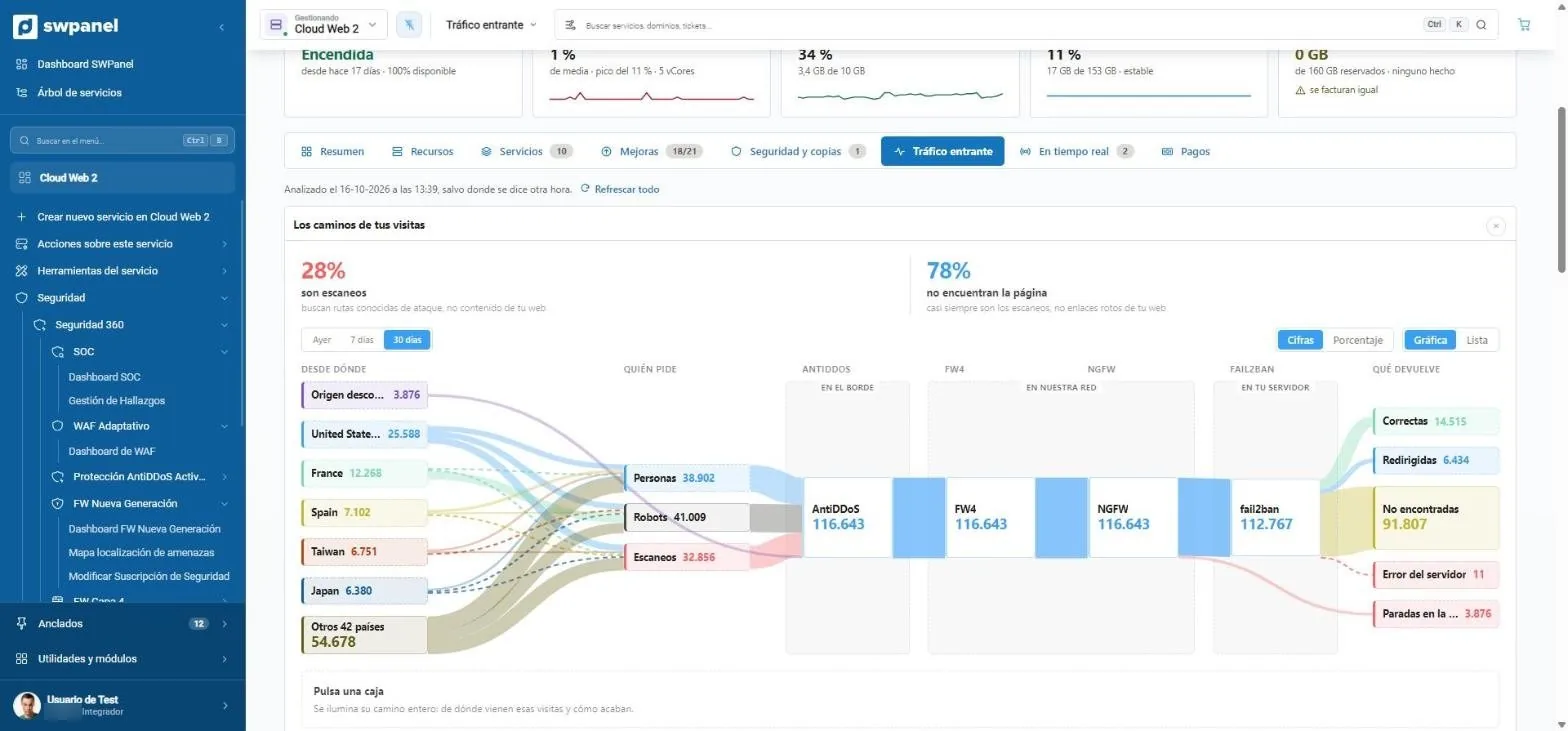
- How much is scanning. Here, 28 % of traffic looks for known attack paths, not your content.
- Which countries visits come from, sorted by volume.
- Who's asking: people, robots or scanners. Each group with its own color.
- The layers each request goes through: AntiDDoS at the edge, FW4 and NGFW in our network and Fail2Ban on your server.
- How each visit ends: successful, redirected, not found, error or stopped at a layer.
Tells you what is urgent and what to do
The SOC analyzes each service daily and the AI consultant summarizes it every night: what is urgent, the missing protections, what costs you performance and what has changed. Every point, with the button that solves it.
What is usual in a classic panel
- Isolated alerts you have to interpret
- Non-technical people don't know where to start
In SWPanel
- A plain-language report every night
- A step-by-step plan, in priority order
- The AI only acts on its own on what's reversible
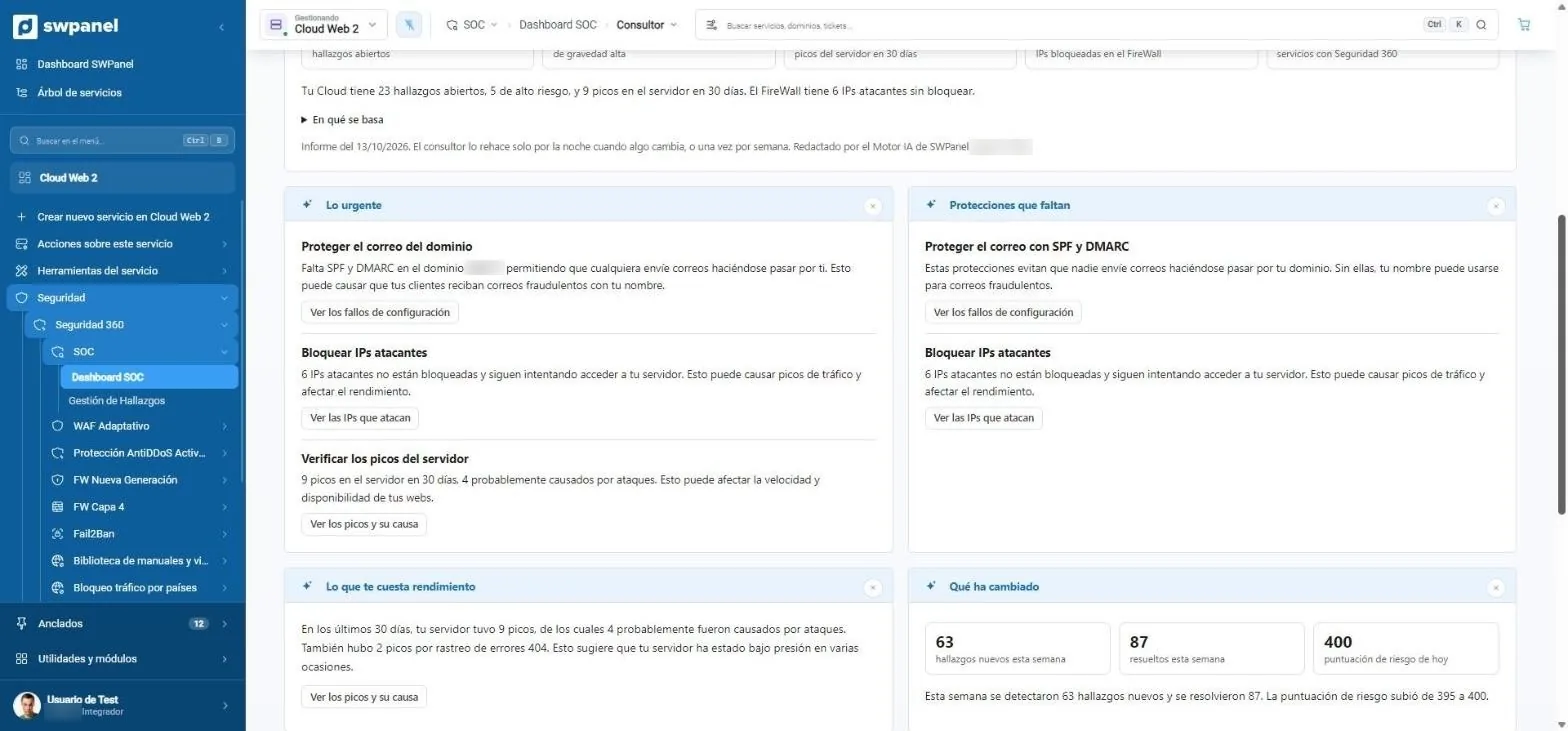
- What's urgent: what's happening, why it matters and what happens if it isn't fixed.
- Missing protections in your services.
- Each item with its button to go straight to fixing it.
- What costs you performance: server spikes caused by attacks.
- What has changed since the last report.
Blocks countries knowing what you lose
Before blocking, the country consultant analyzes 30 days of real traffic, asks whether you have customers or suppliers in a country and proposes three scenarios with the percentage of people and scanners you would remove.
What is usual in a classic panel
- Blocking a country means ticking a box, blindly
- You find out you lost customers when they stop arriving
In SWPanel
- Scenarios with their cost in visits
- Questions about your business, remembered
- Apply and undo with one click
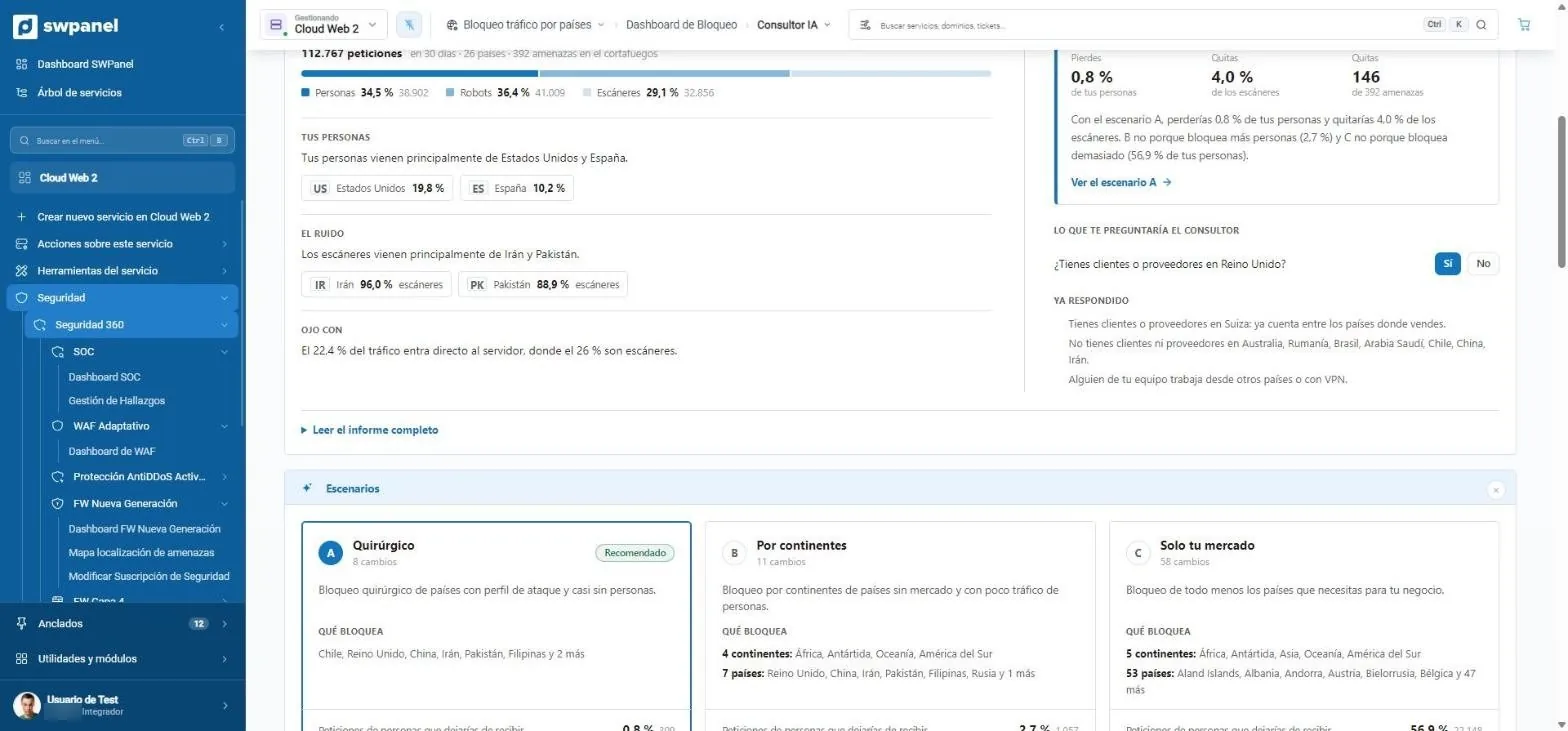
- It asks what it can't know: do you have customers or suppliers in the United Kingdom?
- It remembers what you already answered and takes it into account.
- Scenario A, surgical: only countries with an attack profile.
- Scenario B, by continent.
- Scenario C, only your market.
Does SEO for your whole portfolio, inside SWPanel
The SEO dashboard tells you which website to start with and the work plan turns Search Console and analysis data into tasks that make sense: “you appear a lot, but almost nobody clicks you”.
What is usual in a classic panel
- SEO, in external tools or paid extensions
- Reports that are read and forgotten
In SWPanel
- Basic, Pro or Intelligence on each website
- Tasks with follow-up: they come back to check the fix
- Problems totaled across the whole portfolio
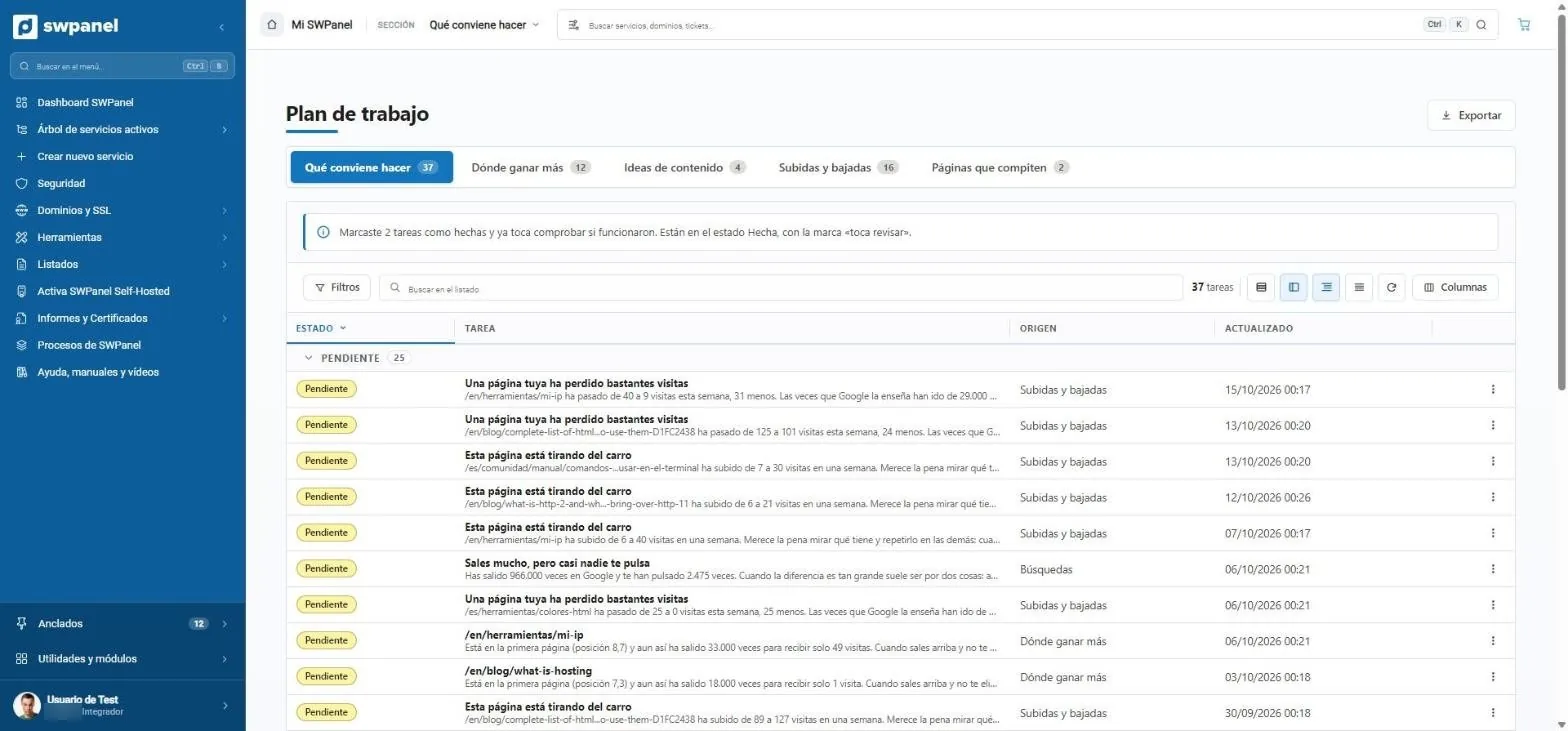
- What to do, where to gain the most, content ideas, rises and drops and competing pages.
- Follow-up: what you marked as done comes back to be checked.
- Tasks in plain language: “one of your pages has lost quite a few visits”.
- “You show up a lot, but almost nobody clicks you”: 966,000 impressions and 2,475 clicks.
- Where each task comes from.
You ask and it answers with your data
Instant Help doesn't search an article base: it looks at the state of your services and answers about them. SWPanel's AI engine runs on our infrastructure.
What is usual in a classic panel
- Search the documentation or open a ticket
- Generic answers that don't know your setup
In SWPanel
- Answers based on your service's real configuration
- Visible reasoning if you want it
- On every screen
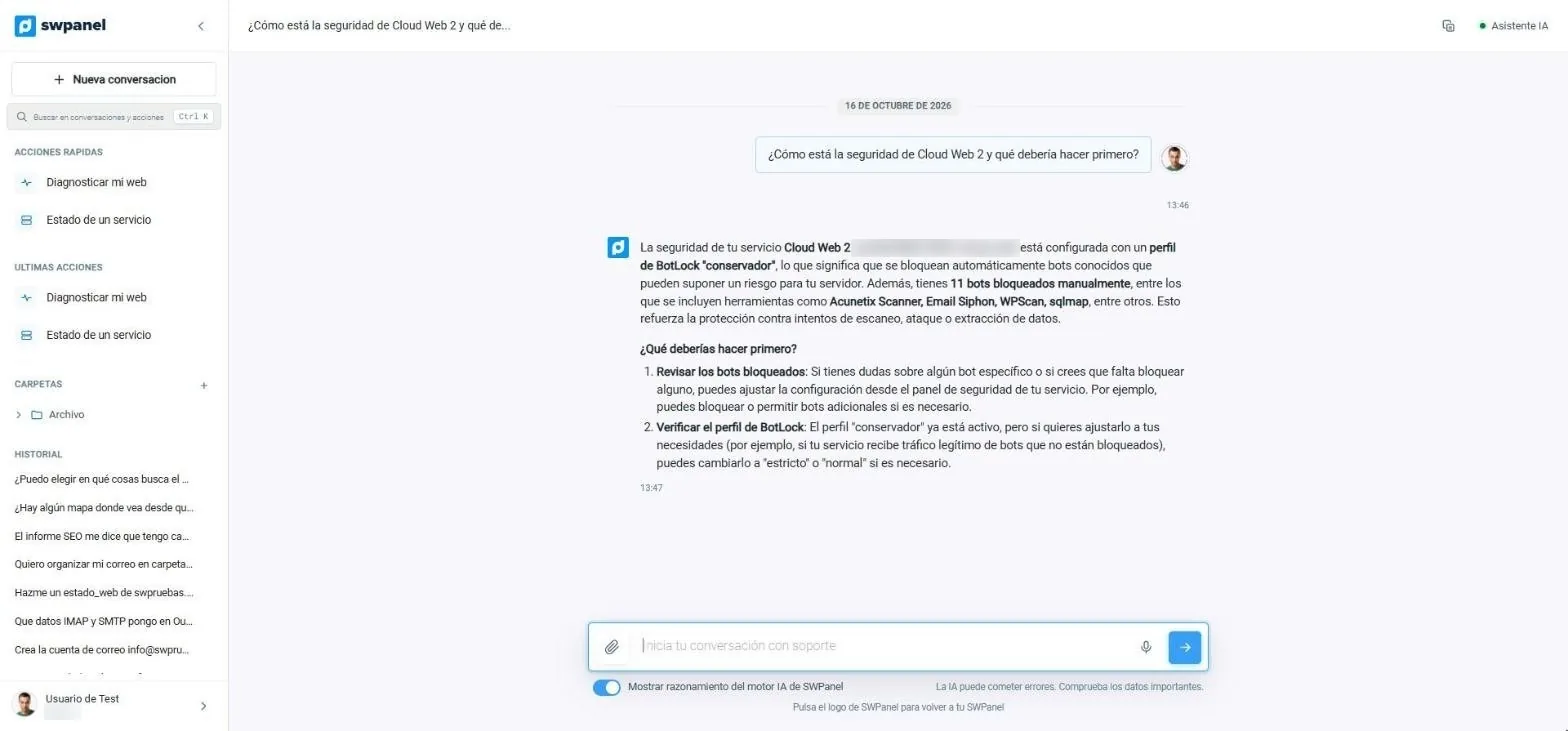
- The side menu: quick actions, latest actions, folders and conversation history.
- The question, in your own words.
- The answer uses your service's real data: blocking profile and blocked bots.
- What to do first, in steps.
- You can see the reasoning of the SWPanel AI engine.
Comes with a CRM and a newsletter built in
SWPanel Leads collects the contacts from your websites and moves them through your funnel; Newsletter writes to them and tells you who really opens. With unlimited users.
What is usual in a classic panel
- The panel ends at the server: customers live in another tool
- Paying for a CRM per user
In SWPanel
- Leads with unlimited users
- Forms from your websites connected
- Newsletter with real opens
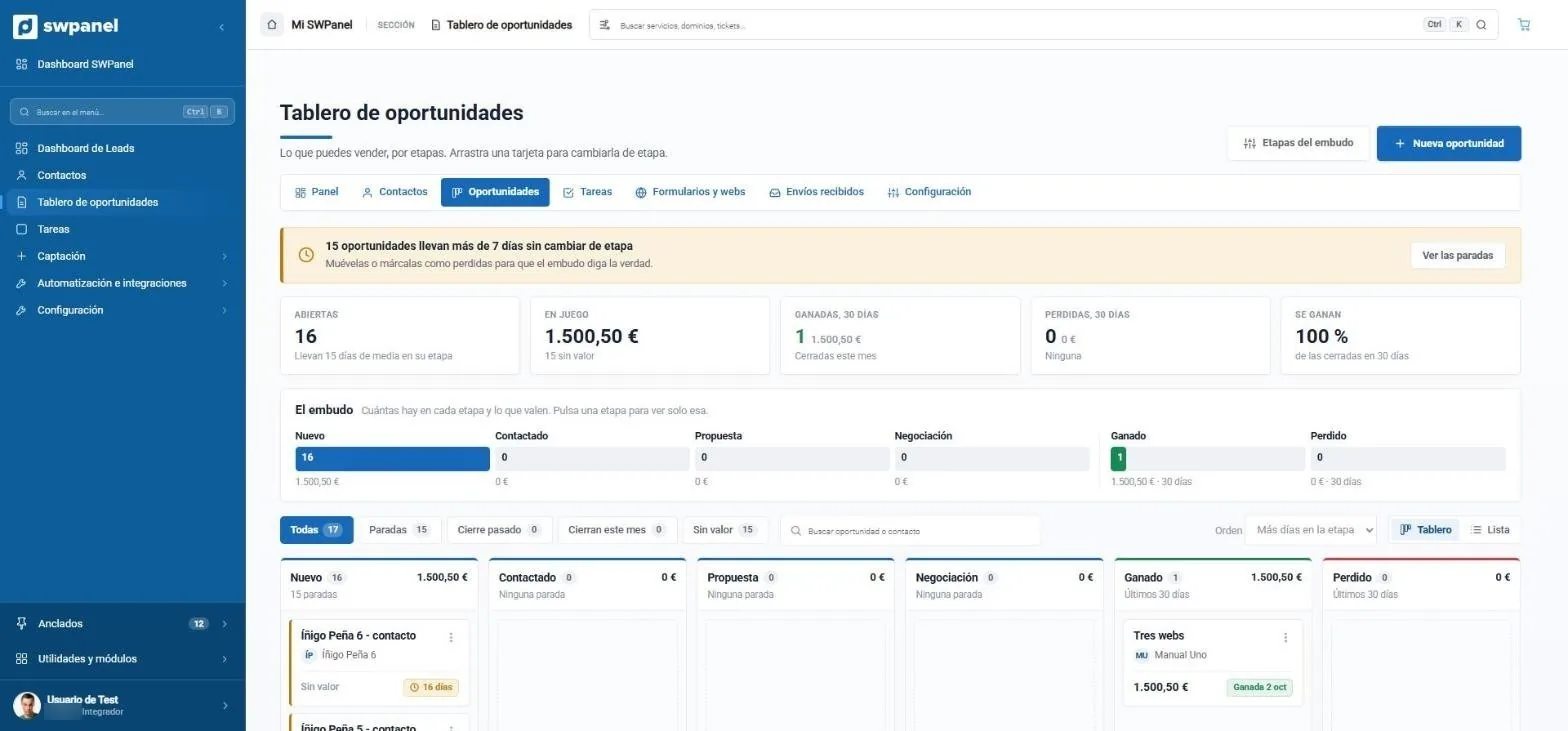
- What has stalled: 15 opportunities have been more than 7 days without changing stage.
- Open, in play, won and lost in 30 days and what share is won.
- The funnel at a glance: how many there are in each stage and what they're worth. Click one to see only that one.
- Funnel stages you can edit.
- New opportunity in one click.
- How long each one has been in its stage. Drag the card to change it.
Every screen shows you its API call
When you buy a service or build a flow, SWPanel writes the equivalent API call while you choose. And the integrator dashboard shows how your API is used: endpoints, errors and keys.
What is usual in a classic panel
- A powerful API, but separate from the interface
- Every call, to look up in the documentation
In SWPanel
- Equivalent call within SWPanel itself
- Usage dashboard for your API
- Traceability of every action via API
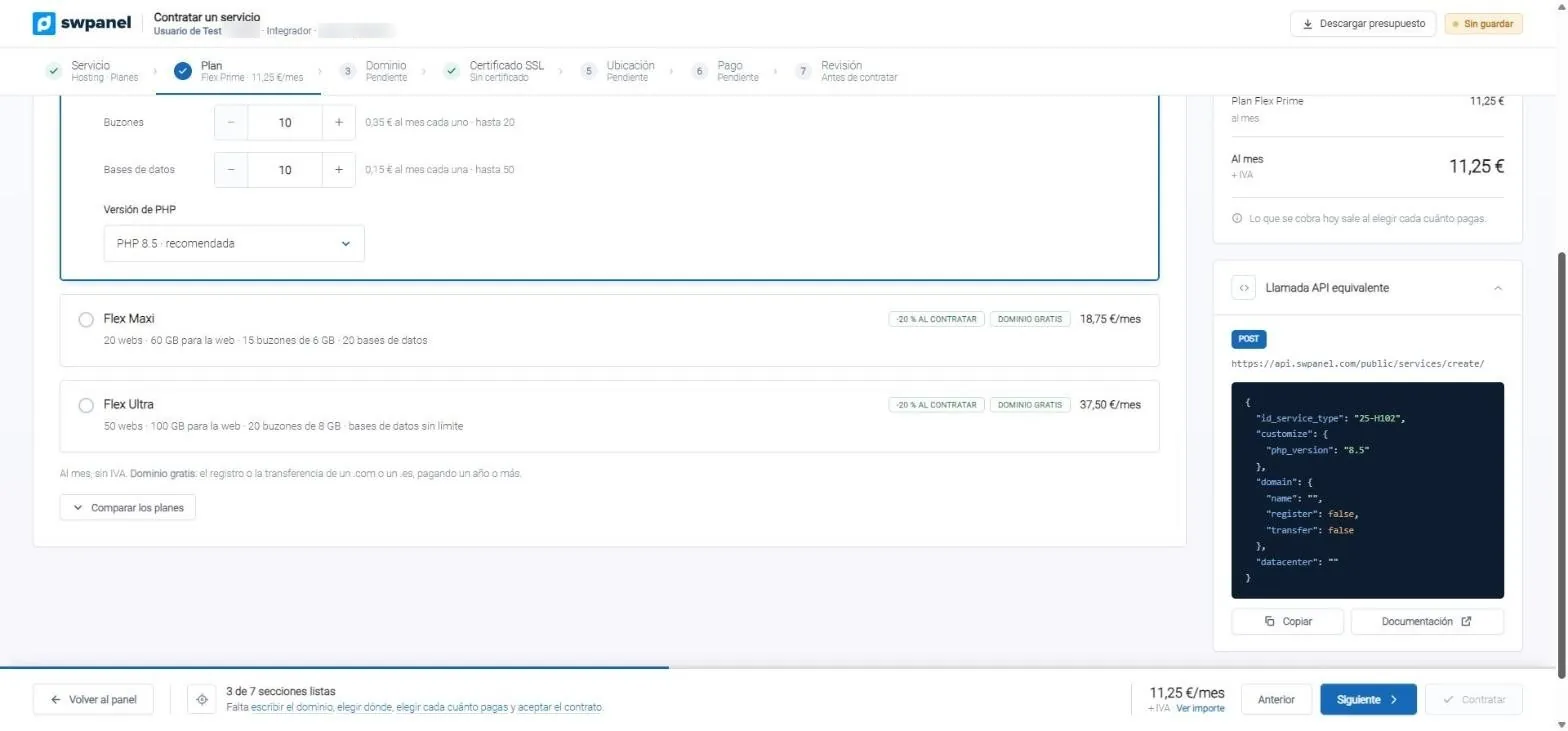
- Seven steps, with completed ones in green.
- The plans with what each one includes.
- The exact JSON to do the same from your code.
Reacts on its own when something happens
With flows, any SWPanel action (creating a mailbox, a DNS record, a database) can notify your CRM by webhook, send an email or a Telegram message, or check that everything works. No code.
What is usual in a classic panel
- Custom scripts on the server to hook into events
- Errors that fail silently
In SWPanel
- More than 160 events and five step types
- Branches before, on success and on failure
- Test before activating
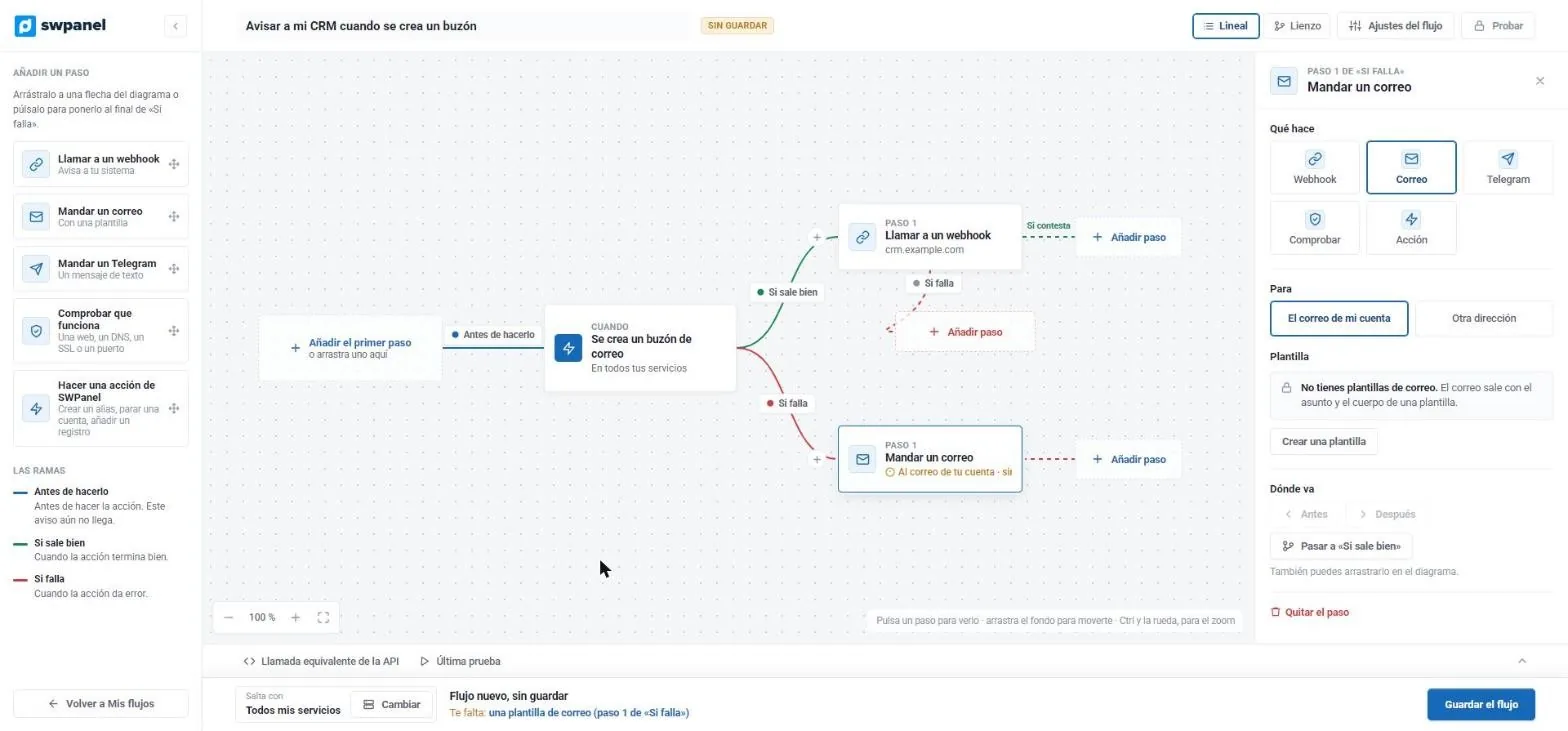
- The event that triggers it: a mailbox is created.
- If it succeeds, it calls your CRM's webhook.
- If it fails, it sends you an email.
- Each step is configured here: recipient, template, order.
- It warns you of what's missing before saving.
It's your IT business, under your brand
With RHA you sell hosting under your brand: catalog, customers, invoices and payments, with the Veri*Factu certificate inside the setup. And traceability records everything each person, the API or the AI does.
What is usual in a classic panel
- Billing in another tool, with its own license
- Logs scattered across each server
In SWPanel
- Catalog, customers, invoices and payments
- Veri*Factu in the setup journey
- Ten exportable traceability logs
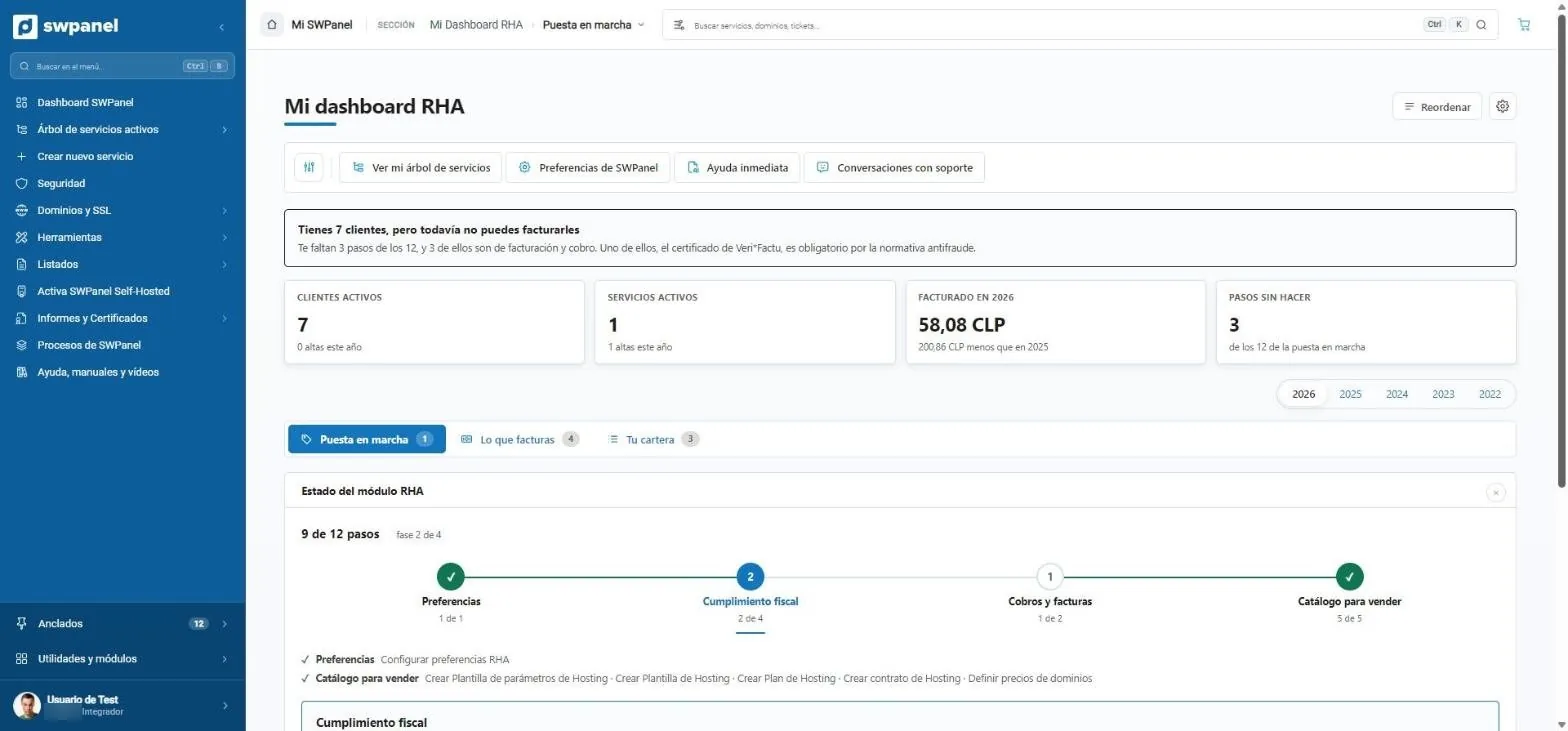
- What's left to invoice, including the Veri*Factu certificate.
- Customers, services, invoicing and pending steps.
- Setup, what you invoice and your portfolio.
- 12 steps in four phases: preferences, tax compliance, payments and catalog.
- Two groups: a single website or a whole server, with Plesk, cPanel or DirectAdmin.
- Before choosing: what you need, what comes across and how long it takes.
- Not sure which to choose? Four hints to pick the right path.
And three more
Three new differences in day-to-day work
cPanel and Plesk ship Roundcube and phpMyAdmin installed on your server, and neither fixes the code of your websites. SWPanel 2027 does all three from SWPanel.
-
 Webmail
Several accounts, without using up your server
It works from SWPanel, brings together mailboxes from any provider and opens without a password with InstantPass. -
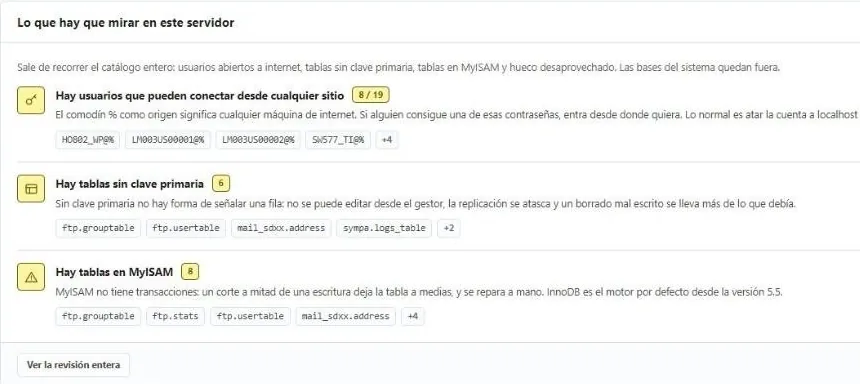 Database manager
MySQL and MariaDB, reviewed
Open users, tables without a primary key or in MyISAM, with the why. Read-only until you decide. -
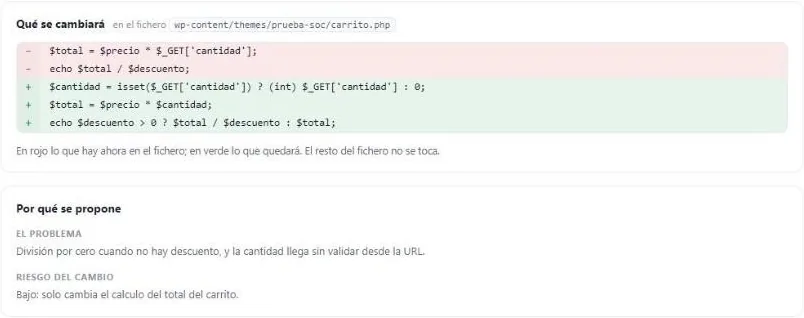 Security 360
Your websites' code, fixed
Every night, file by file. It prepares the exact change, you approve it and you can undo it.
When you want to switch
Your websites, from cPanel or Plesk in a wizard
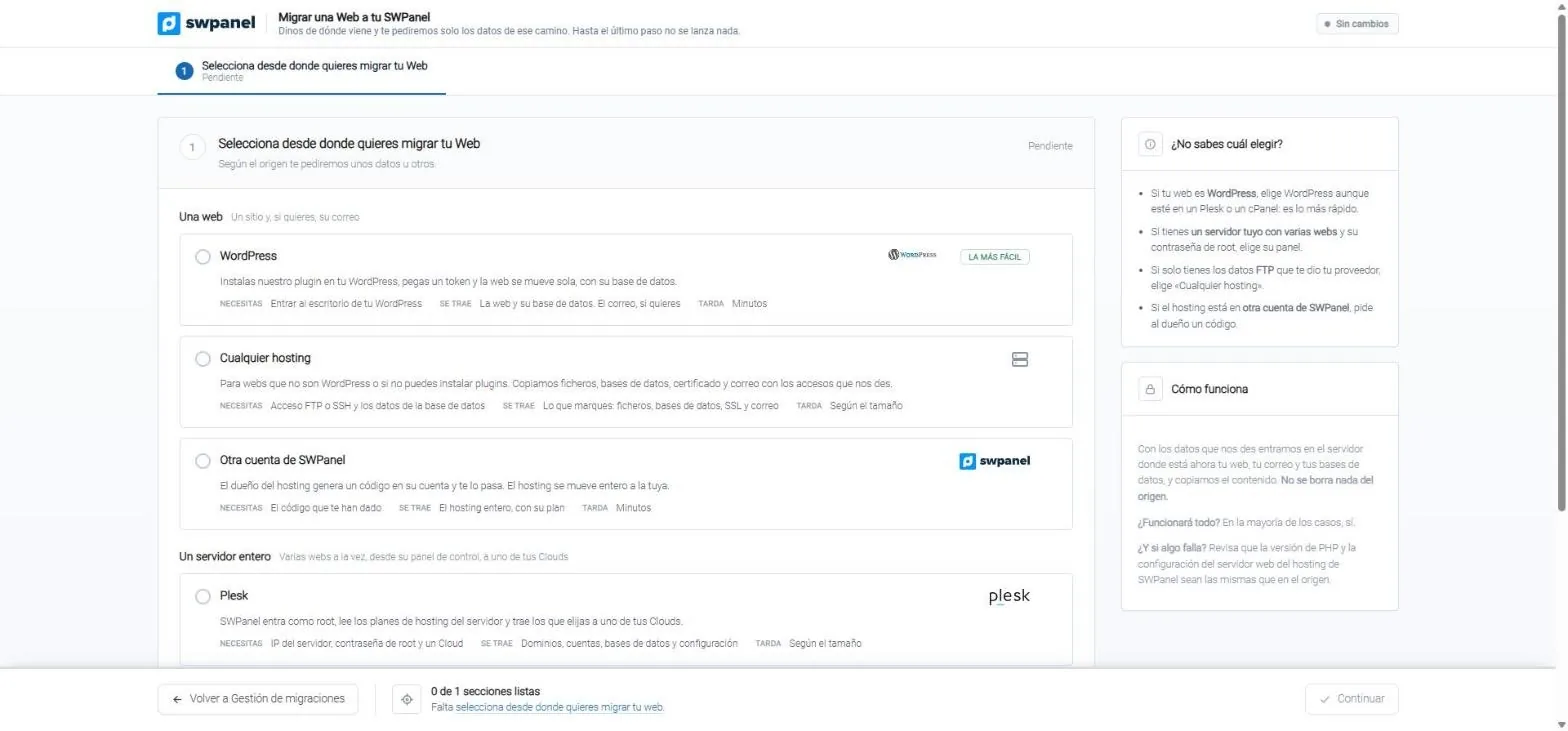
You choose where the website comes from and SWPanel asks only for the details of that path. With root access, it migrates domains, accounts, databases and configuration.
Migration
Six sources, one wizard
WordPress, Plesk, cPanel, DirectAdmin, any hosting via FTP or SSH, or another SWPanel account with a migration code.
- No manual intervention with root access
- Tells you what to do if something doesn't work
- Two groups: a single website or a whole server, with Plesk, cPanel or DirectAdmin.
- Before choosing: what you need, what comes across and how long it takes.
- Not sure which to choose? Four hints to pick the right path.
Frequently asked questions
About this comparison
The differences on this page describe how people usually work with a classic panel installed on the server. Detailed comparisons, feature by feature and with sources, are on each panel's comparison page.
Yes. SWPanel doesn't require you to uninstall anything to get started: you connect a server or a hosting and, whenever you want, migrate websites from cPanel, Plesk or DirectAdmin with the migration wizard.
They're from SWPanel 2027 in pre-production, with a test account, taken in October 2026. The final version is presented on November 27 and may have minor changes.
SWPanel plans remain a fixed price per server. Prices for the new 2027 modules will be announced at the official presentation.
Check it with your own services
Create your free account and connect a server. If you come from cPanel or Plesk, the migration wizard does the rest.