Developers · Recipes for your CI
Your CI, deploying to SWPanel
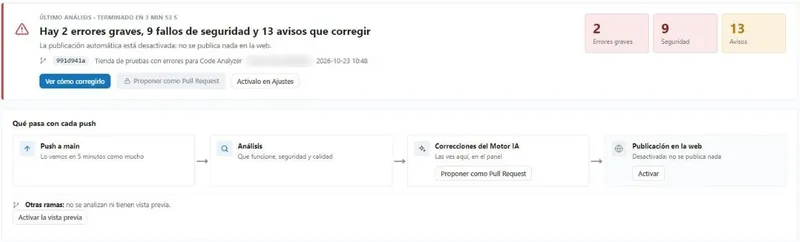
Copy your tool's recipe, store your token as a secret and push. SWPanel receives the package, validates it, analyzes it and publishes it to your hosting or Cloud, with a copy of what was there.
- GitHub Actions, GitLab CI, Bitbucket and Jenkins
- Test mode for pull requests
- Rollback in one call
~/mi-web npm run build && tar -czf web.tgz -C dist .~/mi-web curl -X POST …/services/$SERVICIO/deployment/ \ -H "Authorization: Bearer $SWPANEL_TOKEN" -F "[email protected]"Package received in full ok SHA-256Validated ok paths, size and filesAnalyzed ok no serious errorsCopy of what was there, saved okPublished on your website ok
Before you start
Three things and you can deploy
-
Create a token in SWPanel
Best one for deployment only, limited to the service where you'll publish, with expiry and your IPs.
-
Store it as a secret
In your CI, named
SWPANEL_TOKEN. Never in the repository. -
Point to the service
The identifier of the hosting or Cloud where your website lives, in the
SERVICIOvariable.
Recipes
Choose your tool, copy and paste
They all do the same: they build the website as usual, package it and upload it with an API call.
on:
  push:
    branches: [main]
jobs:
  desplegar:
    runs-on: ubuntu-latest
    steps:
      - uses: actions/checkout@v4
      - run: npm ci && npm run build && tar -czf web.tgz -C dist .
      - run: |
          curl -X POST \
            https://api.swpanel.com/public/services/$SERVICIO/deployment/ \
            -H "Authorization: Bearer ${{ secrets.SWPANEL_TOKEN }}" \
            -F "[email protected]"
# Runs on every push to main
desplegar:
  stage: deploy
  image: node:20
  rules:
    - if: $CI_COMMIT_BRANCH == "main"
  script:
    - npm ci && npm run build && tar -czf web.tgz -C dist .
    - >
      curl -X POST
      "https://api.swpanel.com/public/services/$SERVICIO/deployment/"
      -H "Authorization: Bearer $SWPANEL_TOKEN"
      -F "[email protected]"
# Runs on every push to main
image: node:20
pipelines:
  branches:
    main:
      - step:
          name: Desplegar en SWPanel
          script:
            - npm ci && npm run build && tar -czf web.tgz -C dist .
            - curl -X POST "https://api.swpanel.com/public/services/$SERVICIO/deployment/"
              -H "Authorization: Bearer $SWPANEL_TOKEN"
              -F "[email protected]"
# Runs on every push to main
pipeline {
  agent any
  environment { SWPANEL_TOKEN = credentials('swpanel-token') }
  stages {
    stage('Construir') {
      steps { sh 'npm ci && npm run build && tar -czf web.tgz -C dist .' }
    }
    stage('Desplegar') {
      when { branch 'main' }
      steps {
        sh 'curl -X POST "https://api.swpanel.com/public/services/$SERVICIO/deployment/" -H "Authorization: Bearer $SWPANEL_TOKEN" -F "[email protected]"'
      }
    }
  }
}
// The token, stored as a Jenkins credential
tar -czf web.tgz -C dist .
curl -X POST "https://api.swpanel.com/public/services/$SERVICIO/deployment/" \
  -H "Authorization: Bearer $SWPANEL_TOKEN" \
  -F "[email protected]"
# From your terminal or any script
composer install --no-dev
tar -czf tema.tgz -C wp-content/themes/mi-tema .
curl -X POST "https://api.swpanel.com/public/services/$SERVICIO/deployment/" \
  -H "Authorization: Bearer $SWPANEL_TOKEN" \
  -F "[email protected]"
# Your theme, from the repository, without touching wp-config.php or the uploads
Sample recipes. All the call options (test mode, branch, commit and protected files) are in the API documentation.
Pull requests
Try it before merging
With test mode, SWPanel validates and analyzes each pull request's package and tells you what would happen, without publishing anything. That way, what reaches main has already passed the filter.
- The same analysis as in production: errors, security and dependencies
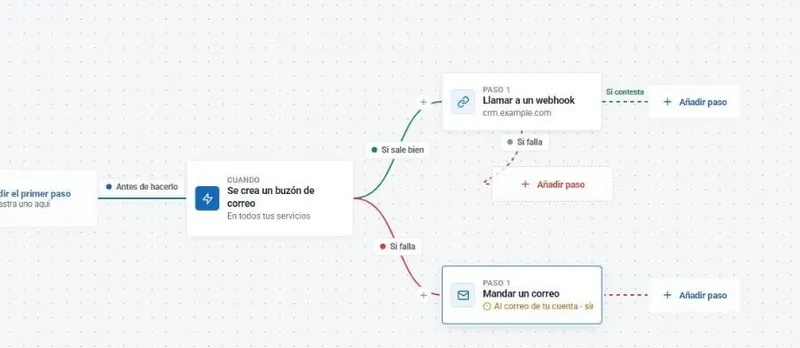
- Your rules also apply: a Flow can veto the deployment
- Not a single line of the website changes
on: pull_request
jobs:
  probar:
    runs-on: ubuntu-latest
    steps:
      - uses: actions/checkout@v4
      - run: npm ci && npm run build && tar -czf web.tgz -C dist .
      - run: |
          curl -X POST \
            https://api.swpanel.com/public/services/$SERVICIO/deployment/ \
            -H "Authorization: Bearer ${{ secrets.SWPANEL_TOKEN }}" \
            -F "[email protected]" \
            -F "dry_run=true"
# On each pull request: validates and analyzes, without publishing
What happens next
From the call to the website
What SWPanel does with each package, before touching your website.
-
Receives it
In full: until it arrives complete and its fingerprint (SHA-256) matches, it isn't used.
-
Validates it
Paths, size (up to 50 MB by default) and forbidden files.
-
Analyzes it
Errors, vulnerabilities and dependencies with known flaws.
-
Applies your rules
Your Flows can stop a deployment, and production can ask for approval from SWPanel or Telegram.
-
Publishes it
With a copy of the previous version and without touching your protected files. You and your team get the notification.
No secrets
Deploy without storing any key
With OIDC, GitHub Actions and GitLab CI prove to SWPanel which repository and branch they're deploying. There's no key in the CI that can leak.
Rollback
If something goes wrong, one click
Every deployment is recorded in the history: who, when, which commit and what changed. You go back to the previous version with one click in SWPanel or with an API call, and atomic deployments switch the website in one go, with no half-way states.
Frequently asked questions
Questions about deployments
Your next push, already on the website
Create your token, copy the recipe and push.