SWPanel for developers
Your code, your workflow, your hosting. No FTP.
Connect your GitHub, GitLab, Gitea or Bitbucket repository and every push reaches your SWPanel hosting or Cloud analyzed, with a prior backup to undo. And from the CI you already use, with an API call.
- Analyzed before publishing
- Backup to undo
- Works with your tools
~/mi-web git push origin mainSWPanel received the push · webhookok It works php -l and PHPStanok Security no serious flaws2 Advisories with its AI Engine fixok Passes the filterno serious or security errorsok Copy of what was there, savedok Published on your website
- git push To the branch you choose
- Analysis That it works, security and quality
- Publishing With a backup to undo
- Status in your Git The commit, in green or red
Everything for developers
Your workflow, end to end
Deploying, integrating and the day to day: what you do with your code, with the place where it lives in SWPanel.
Recipes for your CI
GitHub Actions, GitLab CI, Bitbucket, Jenkins or curl: copy and paste.
See moreCode Analyzer
Every push reviewed, with the AI Engine fix and Pull Request.
See moreAPI REST
More than 200 routes, with interactive documentation.
See moreWebhooks and Flows
React to what happens on your account, or stop it beforehand.
See moreYour tools
SSH, PHP, databases, logs, cron, cache and backups.
See moreDatabases
MariaDB with SQL console, read-only by default.
See moreWhy
SWPanel is no longer just where your website lives. It's part of your workflow.
A platform that integrates with your tools: documented REST API, webhooks, continuous deployments and code analysis, all in a secure, certified environment.
-
No more uploading files by hand
You run
git pushand your website updates. No FTP clients or passwords shared with every freelancer. -
Secure by design
Nothing reaches your website without going through code analysis. No loose files, no commands, no backdoors.
-
You can always go back
Before publishing, SWPanel saves a copy of what was there, outside the website, so it can be undone.
-
Works with what you already use
GitHub Actions, GitLab CI, Bitbucket Pipelines, Jenkins or a simple
curl: your CI deploys with an API call.
How it works
From push to website, in five steps
Your CI packages, SWPanel reviews and publishes. You just push.
-
Connect
Connect your repository or create an API token in SWPanel.
-
Package
Your CI builds the website as usual:
npm run build,composer install, whatever it is. -
Deploy
An API call uploads the package.
-
SWPanel reviews it
Before touching your website:
- Validates paths, size and forbidden files
- Analyzes errors, vulnerabilities and dependencies
- Applies your rules: you can veto a deployment with your Flows
-
Publishes
If everything is fine, it's published to your hosting or Cloud with a copy of the previous version, and your team gets the notification.
From your CI
Five lines in your workflow and your website deploys
The workflow packages the website and uploads it with a call to POST /public/services/{servicio}/deployment/. SWPanel validates it, analyzes it and publishes it with a prior backup.
-
GitHub Actions, GitLab CI, Bitbucket Pipelines, Jenkins or
curl - Test mode for pull requests: analyzes without publishing
- History of each deployment and rollback in one call
on:
  push:
    branches: [main]
jobs:
  desplegar:
    runs-on: ubuntu-latest
    steps:
      - uses: actions/checkout@v4
      - run: npm ci && npm run build && tar -czf web.tgz -C dist .
      - run: |
          curl -X POST \
            https://api.swpanel.com/public/services/$SERVICIO/deployment/ \
            -H "Authorization: Bearer ${{ secrets.SWPANEL_TOKEN }}" \
            -F "[email protected]"
Sample recipe. The full one, with all options, is in the API documentation.
What it includes
Everything you need to deploy with peace of mind
From the first push to the rollback, with code analysis, the API and control over who deploys what.
Code analysis on every push
Every push, reviewed before reaching the website
Connect GitHub, GitLab, Gitea or Bitbucket with signed webhooks. Every push is analyzed and, if it passes your filter, it's published on its own to your website.
- Errors, best practices, PHPStan and AI review
-
Vulnerable dependencies:
composer.lockandpackage-lock.json, cross-checked with public vulnerability databases (OSV); plugins and JS libraries, with SWPanel's vulnerability database - Automatic publishing with filter and prior backup
- Previews per branch
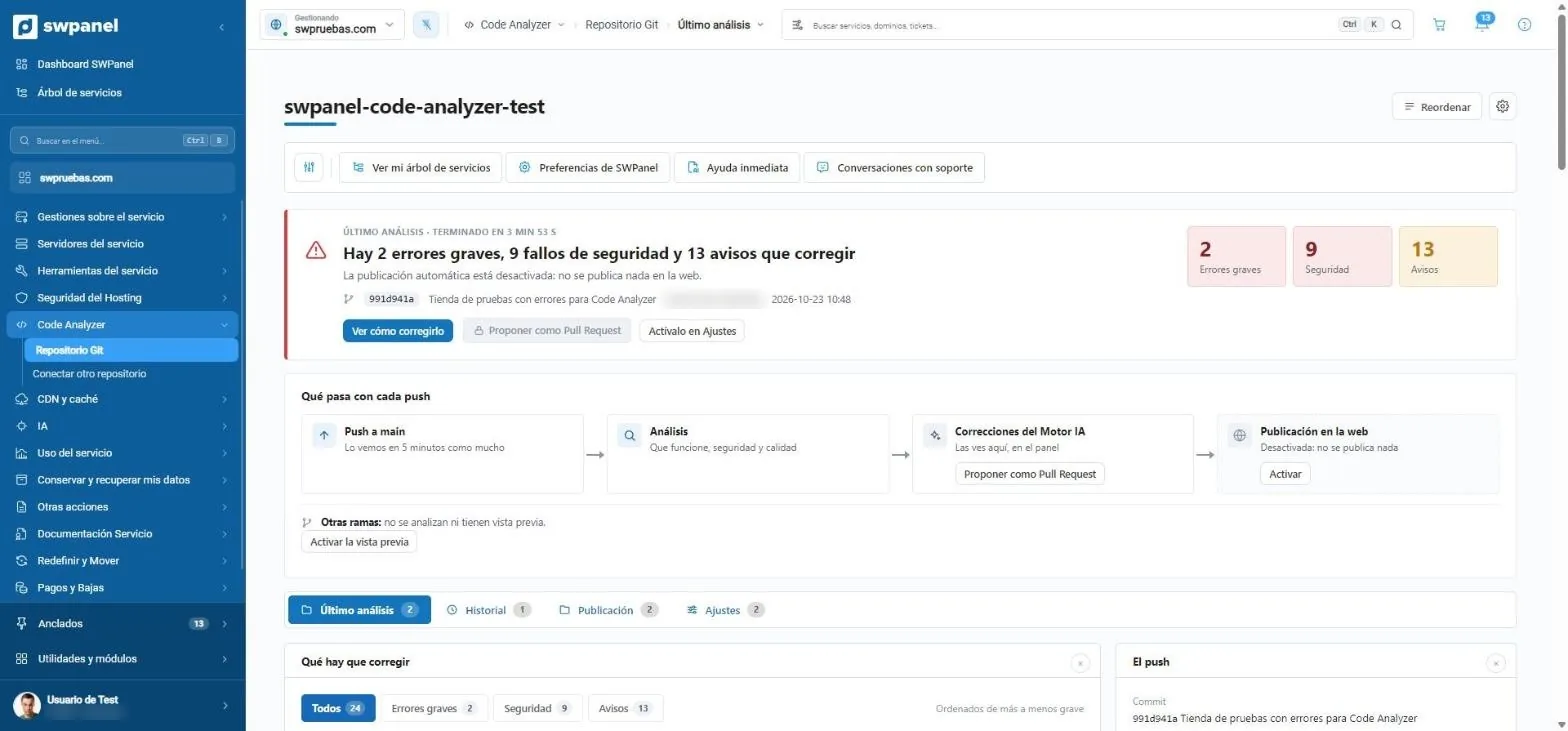
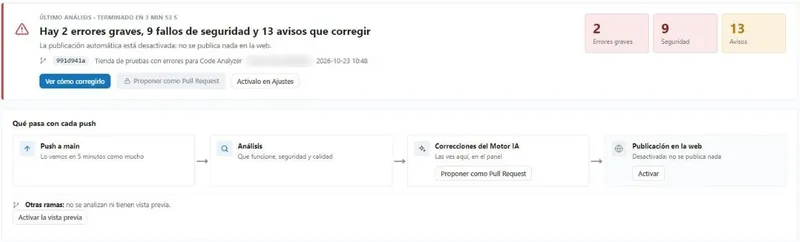
- 2 serious errors, 9 security flaws and 13 warnings.
- The analyzed commit.
- See how to fix it.
- Push to main: it sees it within 5 minutes at most.
- AI Engine fixes.
- Publishing to the website: if you enable it.
- Preview of the other branches.
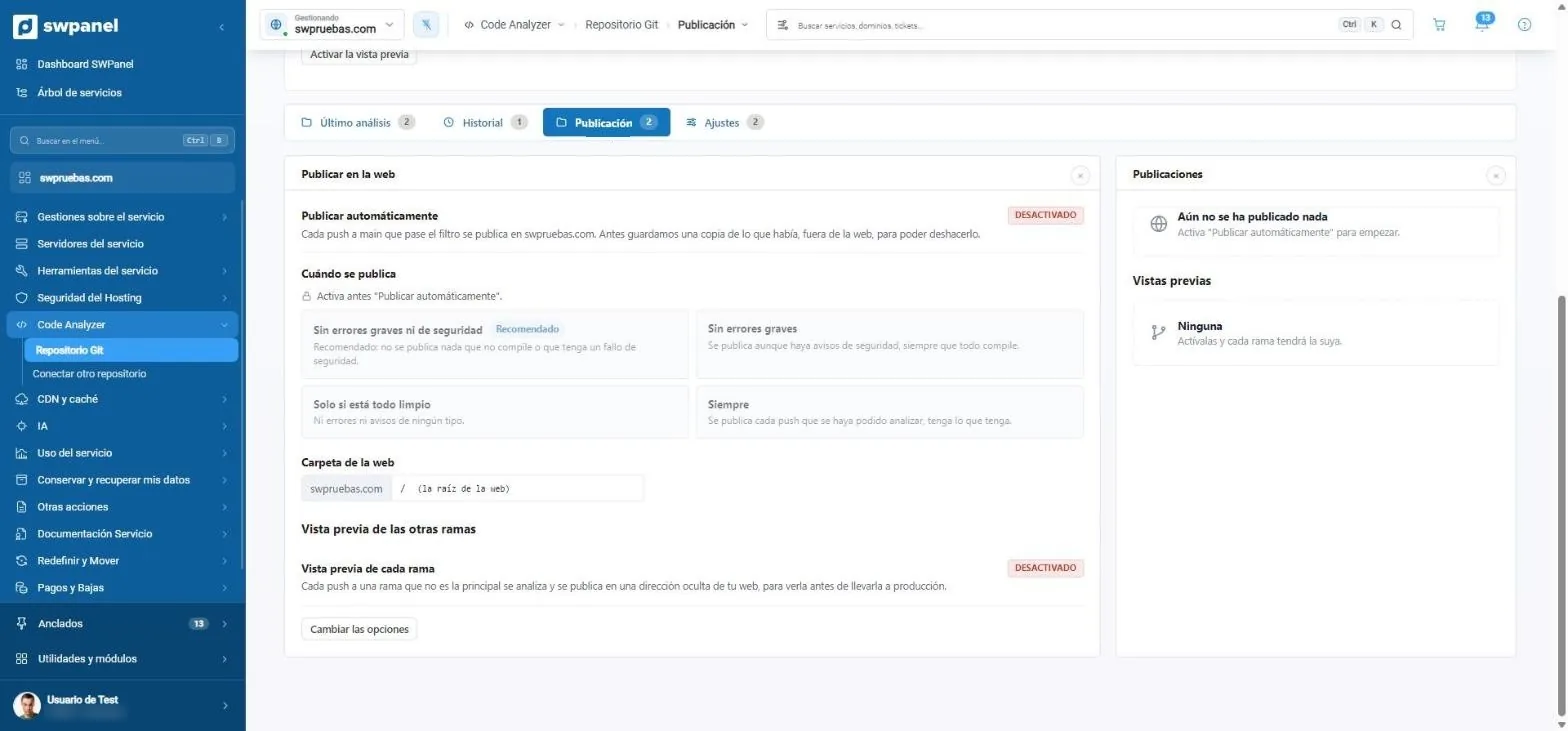
- Publish automatically every push that passes the filter.
- No serious or security errors: the recommended one.
- Or always, or only if everything is clean.
- The folder of the website.
- Preview of each branch, at a hidden address.
- What's published, with its backup to undo.
An API designed to integrate
More than 200 REST routes, documented and traced
Services, email, DNS, SSL, databases, cron, backups, security (FireWall, BotLock and country blocking), domains and templates, with interactive documentation in Scalar.
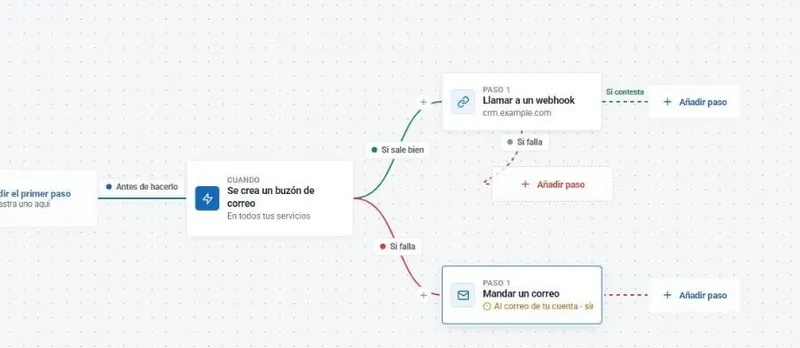
- Webhooks and Flows: react to what happens on your account, or stop an action before it happens
- Clear errors: each error says which field failed and what values it accepts
- Read-only tokens, with expiry and IP list
- Every SWPanel screen shows the equivalent API call
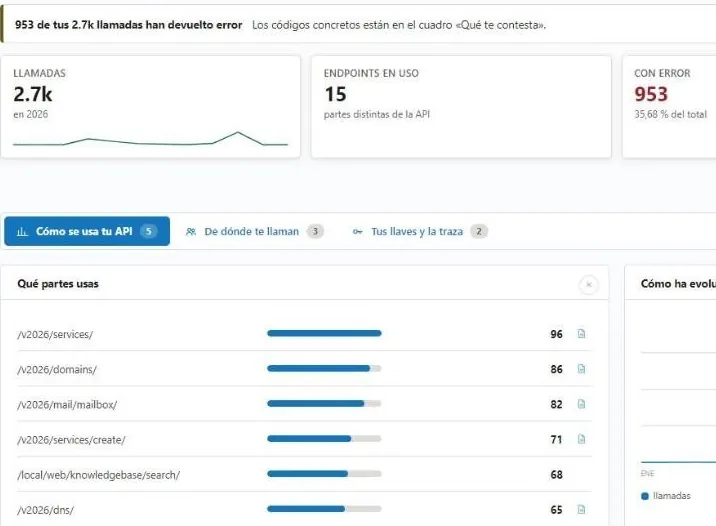
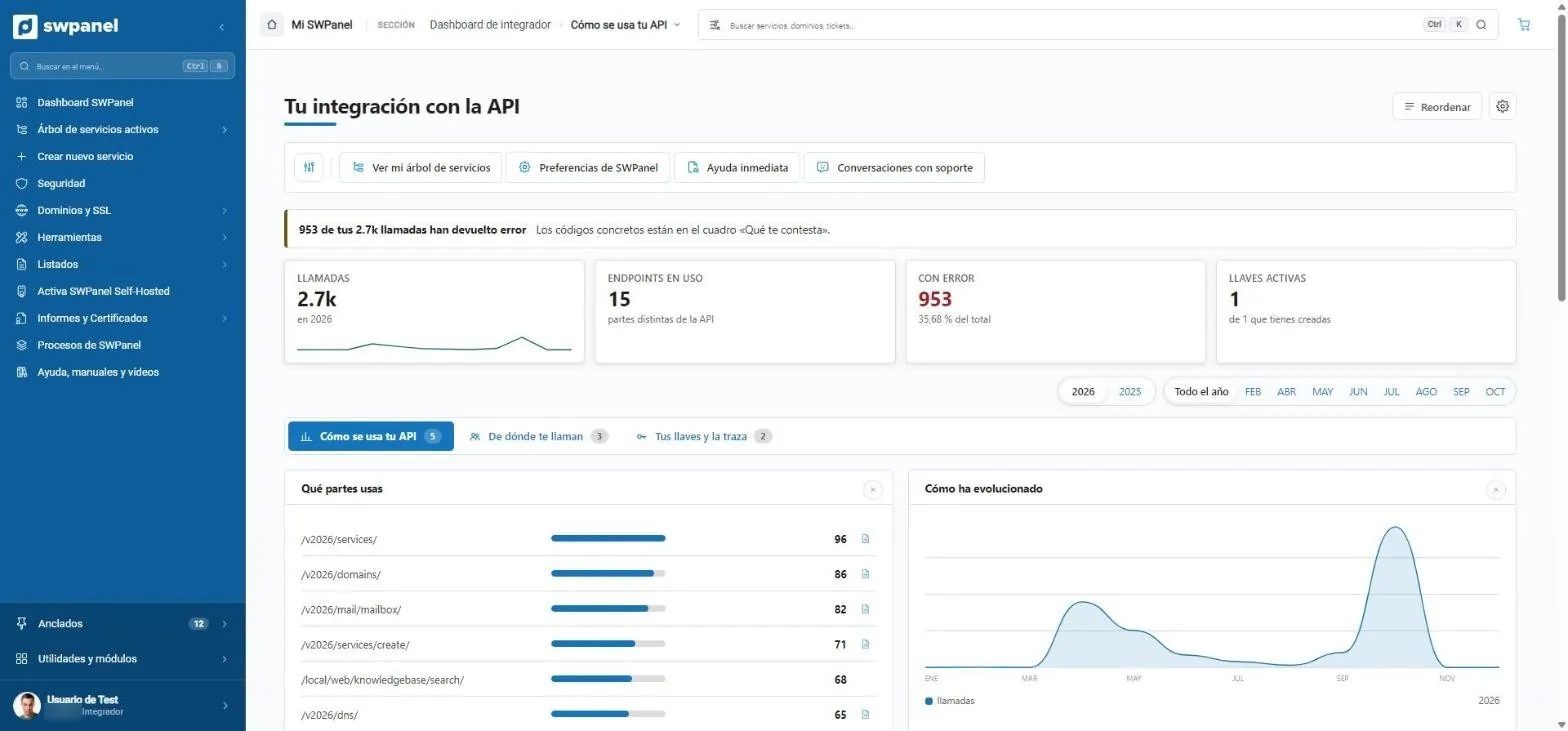
- The errors of your calls, with their code.
- Active calls, routes, errors and keys.
- Which parts of the API you use.
- How your usage has evolved.
Continuous deployments
- Package deployment via API from any CI.
-
Test mode (
dry_run): validates and analyzes without publishing, ideal for pull requests. - History of each deployment: who, when, which commit and what changed.
- Rollback in one call.
-
Protected files: your
wp-config.php, your.envor your uploads are never overwritten.
Security and control
- Tokens for deployment only, limited to a service.
- No secrets: OIDC authentication from GitHub Actions and GitLab CI. The CI proves which repository and branch it is, and there's no key that can leak.
- Mandatory approval for production, from SWPanel or from Telegram.
- Atomic deployments: the website switches from one version to another in one go, and rollback to any version is instant.
- Disable FTP on a service when you only deploy via API.
Who it's for
For those who live in the repository
Agencies and freelancers
Each customer on their own hosting, each project in its own repository and deployments without sharing passwords.
Development teams
Code review and deployment, in the same pull request flow.
Resellers (RHA) and integrators
Automate the setup of your customers' websites with the API.
See moreStart in 5 minutes
Three steps and you're in
-
Activate the API on your account
Integrator mode organizes SWPanel around automation.
-
Create a token
Read-only if you only query, with expiry and your IPs.
-
Connect your repository
Or copy the GitHub Actions recipe from the documentation.
Frequently asked questions
Developer questions
Push and forget about FTP
Connect your repository and see what SWPanel finds on the next push.