
Resource control
Every plan, with its own resources
With resource control templates you assign each hosting plan its CPU, memory, disk and network, fixed and guaranteed. A spike on one website stays within its plan and doesn't slow the other websites on the server.
- Guaranteed resources per plan
- No noisy neighbors
- Reusable on any server


Illustration. Names and figures are examples.
- Guaranteed resources CPU, memory, disk and network fixed and guaranteed, plan by plan.
- No overuse that spreads A plan that spikes stays at its limit and doesn't take resources from the others.
- Divide with numbers Calculate here how many plans fit on each server.
Two different things
What a plan has and what it uses
Hosting templates combine both.
Parameters
How much the plan can have.
- Disk space
- Traffic
- Mailboxes
- Databases
- FTP accounts
- DNS records
- Crons
- Inodes
- Websites
Resources
How much server it can use at once.
- CPU
- RAM
- Disk IOPS
- Bandwidth
The four limits
CPU, memory, disk and network
Each one is enabled separately. What you don't enable stays unlimited.
CPU
From 0.25 to 10 vCores
How many cores the plan can use. It prevents one from consuming so much CPU that it slows the other plans on the server, or the server itself.
RAM
From 256 MB to 4 GB in one click
The MB the plan can use. It prevents a plan from taking the memory and bringing the server down. You can also type another value.
Disk
Quick presets from 1,000 to 25,000 IOPS
Read and write operations per second. It shares the disk among all plans so a single one can't saturate it.
Network
From 1 to 100% of the bandwidth
The share of the server's bandwidth the plan can use. Only on servers with Debian 13 or higher.
How many fit
Divide the server with numbers
Choose a server and a resource template and see how many plans fit with their guaranteed resources.
plans with guaranteed resources
How it is applied
From the template to the server
- You create the template Or use one of SWPanel's predefined ones. It isn't tied to any server.
- You assign it to a plan In the hosting template, in the resource limitation block.
- Every hosting is born with its limit All plans that come from the template carry the same resources.
- The agent applies it The SWPanel agent on the server applies it with Linux cgroups v2.
In SWPanel
This is how it is created and assigned
Real SWPanel 2027 screenshots with a test account.
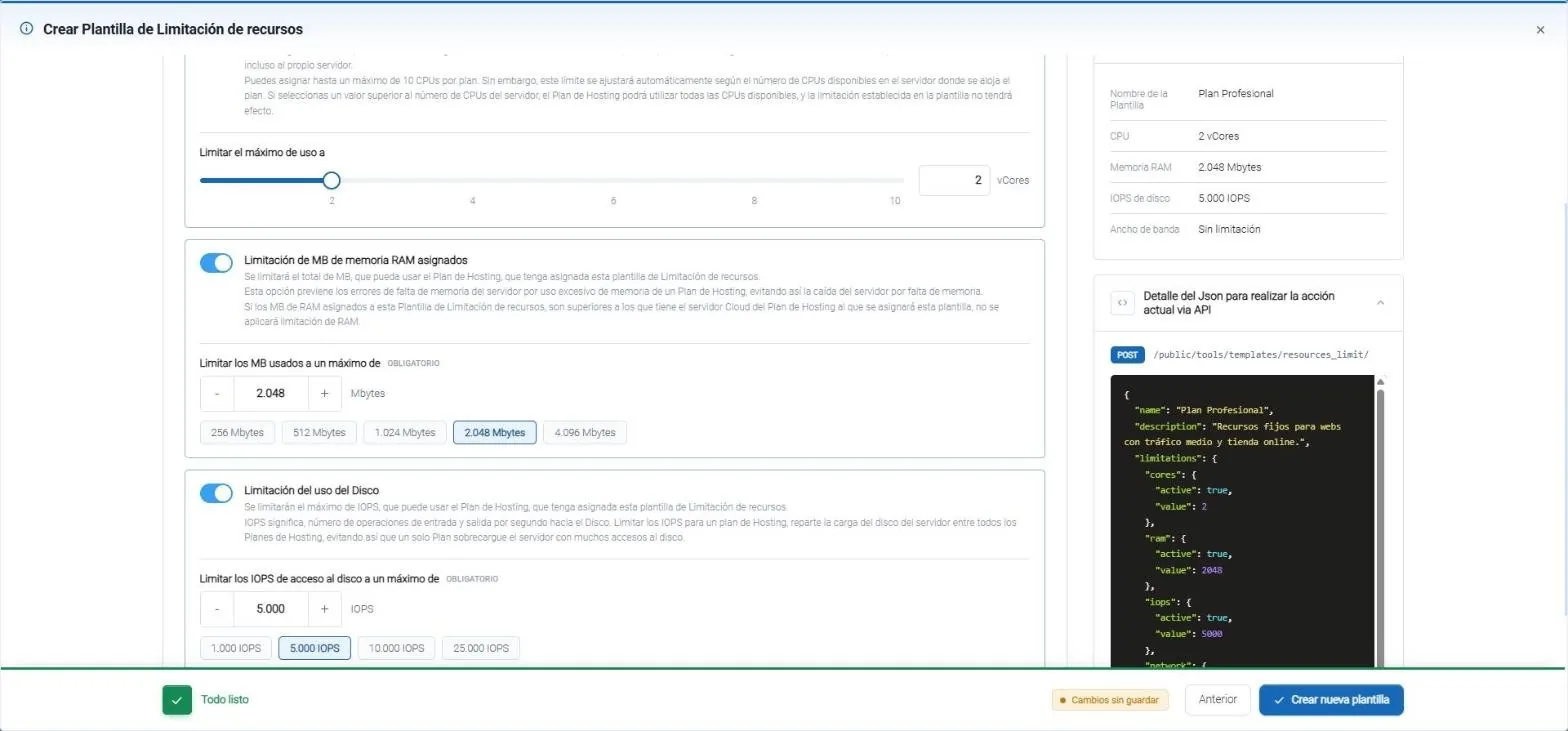
- CPU: up to 10 vCores per plan.
- RAM: quick presets from 256 MB to 4 GB, or any value you want.
- Disk: operations per second, from 1,000 to 25,000 in one click.
- The summary, in view: 2 vCores, 2,048 MB and 5,000 IOPS.
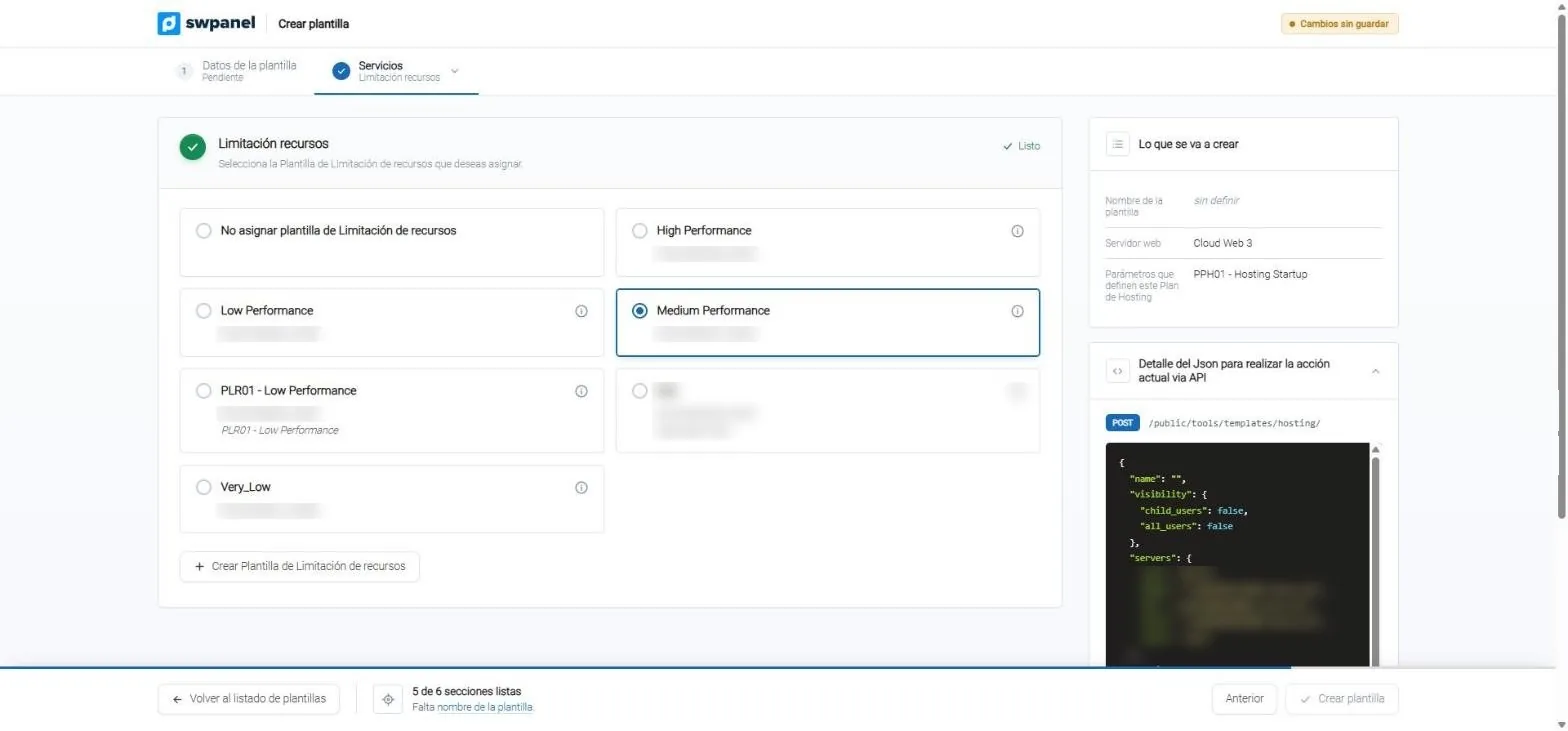
- The resource template that limits each plan.
- Or none, if the plan can use the whole server.
- Create it without leaving the hosting template.
If the whole server falls short
Limits protect the plans. Alerts protect the server.
Overuse alerts
If the Cloud runs short of CPU, memory or disk, overuse alerts notify you by email in tiers.
What caused it
When the server reports overuse, SWPanel instantly analyzes which processes caused it and saves it in the service history, so you can decide with data.
Scale wisely
You enlarge the server or move plans to another with <a href="../arrastra-y-migra/index.html">drag and migrate</a>, without touching their limits.
Frequently asked questions
Questions about resource control
Every plan, in its place and with what's its own
Create your free account, define your resource templates and assign them to your hosting plans.