
SWPanel 2027
All your IT infrastructure, calm
SWPanel is much more than a control panel: it's an ecosystem that manages the servers hosting websites, email and domains, and adds security, SEO, your customers and your business, all from a single tool. Manage your servers with SWPanel Self-Hosted, hosted at any provider; it monitors them every day, explains what's happening and fixes it with you.
- No credit card
- Any provider
- In our cloud or on your server
 Core
API REST
Flows
Integrations
Traceability
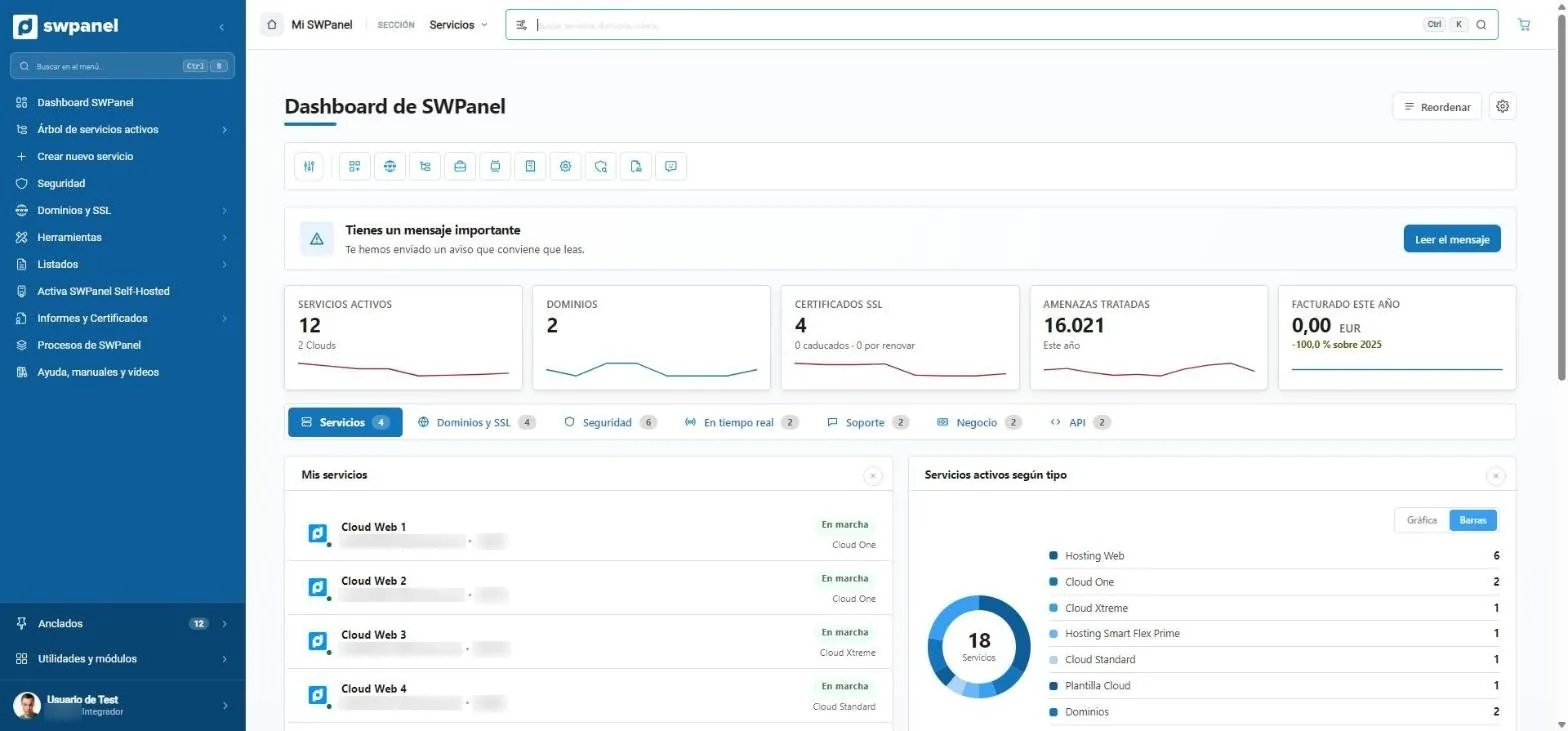
Real SWPanel 2027 screenshot on a test account. Around it, the ecosystem pieces that connect to it.
- Watches over it Security 360 analyzes every service daily. In this test account, 16,021 threats handled this year.
- Explains it to you What matters, on top and in your language: what happened, what's urgent and what to do.
- Fixes it with you What can be undone, it applies; what costs money or can't be reversed, it proposes to you.
At any provider
Install it where you already have your servers. Manage them all from SWPanel.
SWPanel Self-Hosted installs on any Cloud, VPS or dedicated server running Linux Debian 12 or higher, from any provider or in your own data center. And they all show up in SWPanel, in the same service tree and on the same map.
-

-
 DigitalOcean
-

-

-
 Google Cloud
-
 Azure
-
 Hetzner
-
 OVHcloud
-

-
 Contabo
-
 Hostinger
- And many other providers with SWPanel Self-Hosted installed. See where
One click away in their marketplace
On DigitalOcean and Vultr, SWPanel is in the provider's marketplace: you create the server with SWPanel already installed and activate it with its Token ID.
DigitalOcean MarketplaceSWPanel 1-Click App on Debian 12.
Vultr MarketplaceSWPanel app for servers running Debian 12 or higher.
Try it on yours
Request a free 30-day trial license, install it on your server and see how your services show up in SWPanel.
Provider names and logos are trademarks of their respective owners. They are shown only to indicate where SWPanel can be installed and do not imply sponsorship, endorsement or any business relationship, except for those listed in a marketplace, which are indicated.
The real SWPanel, not a mockup
What you'll use, screen by screen
All images on this site are screenshots of SWPanel 2027 with a test account. We have only blurred IPs and machine names. Click any of them to see it larger.
- What matters, on top: a message worth reading.
- Services, domains, SSL, threats handled and billing for the year.
- Tabs by topic: services, domains, security, real time, support, business and API.
- Your services by type.
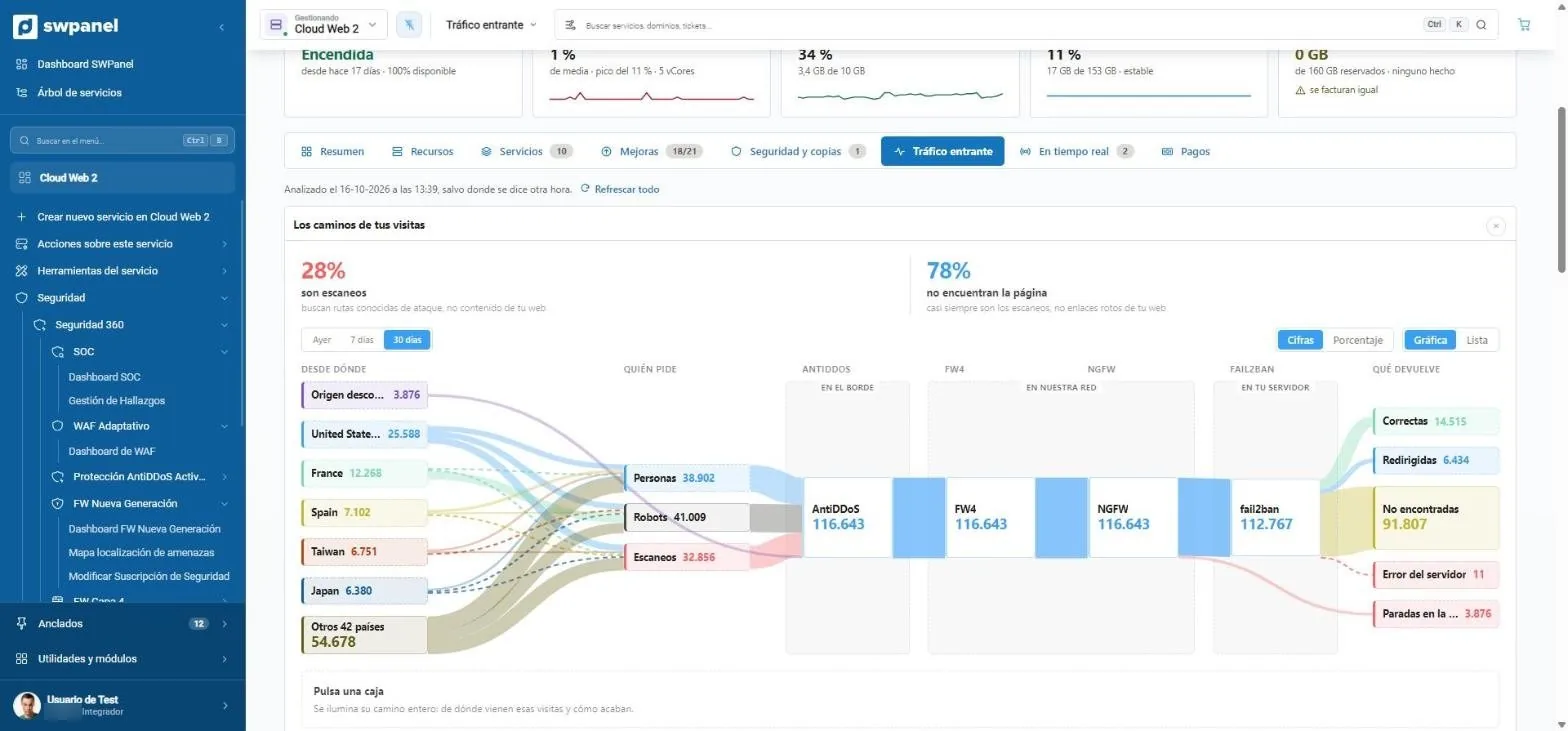
- How much is scanning. Here, 28 % of traffic looks for known attack paths, not your content.
- Which countries visits come from, sorted by volume.
- Who's asking: people, robots or scanners. Each group with its own color.
- The layers each request goes through: AntiDDoS at the edge, FW4 and NGFW in our network and Fail2Ban on your server.
- How each visit ends: successful, redirected, not found, error or stopped at a layer.
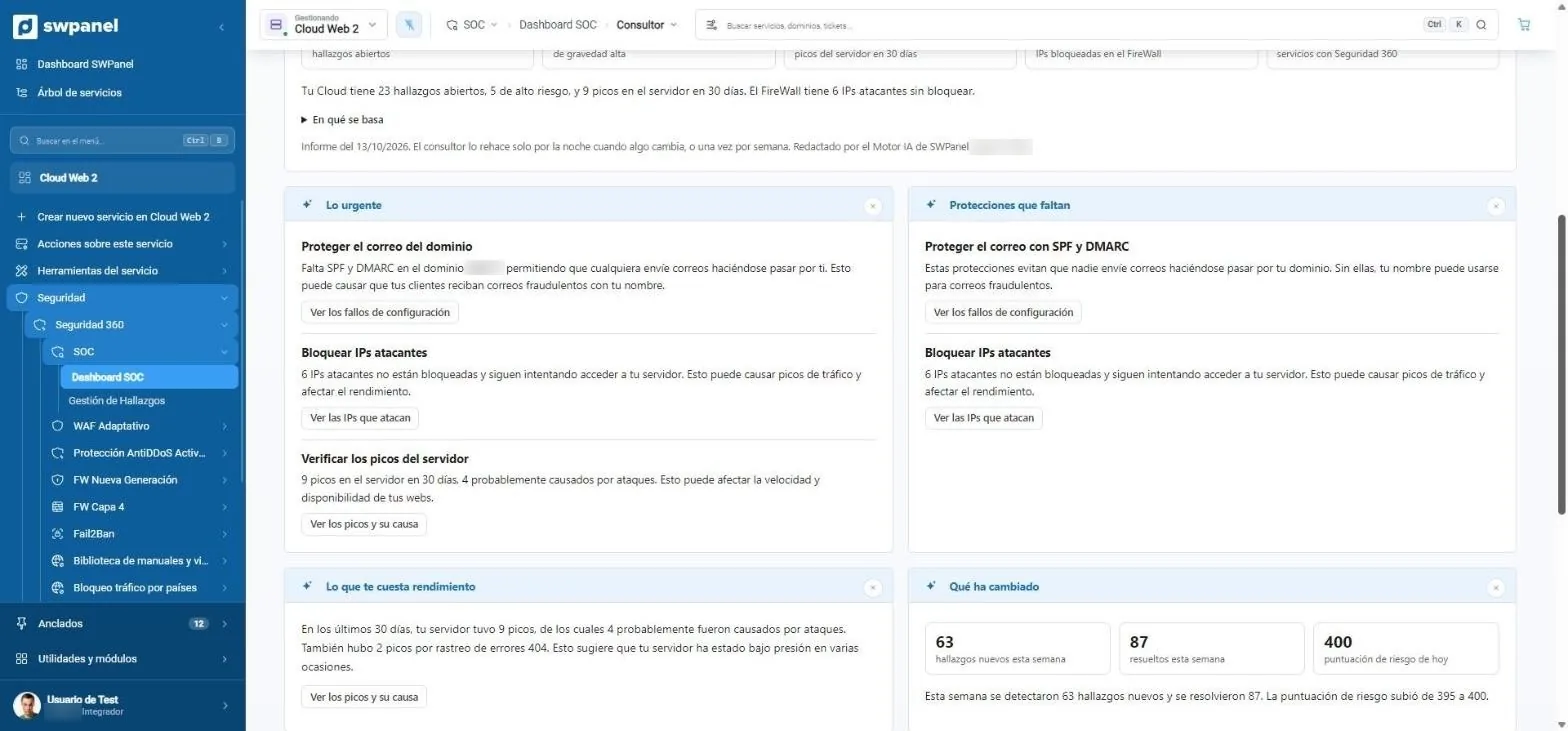
- What's urgent: what's happening, why it matters and what happens if it isn't fixed.
- Missing protections in your services.
- Each item with its button to go straight to fixing it.
- What costs you performance: server spikes caused by attacks.
- What has changed since the last report.
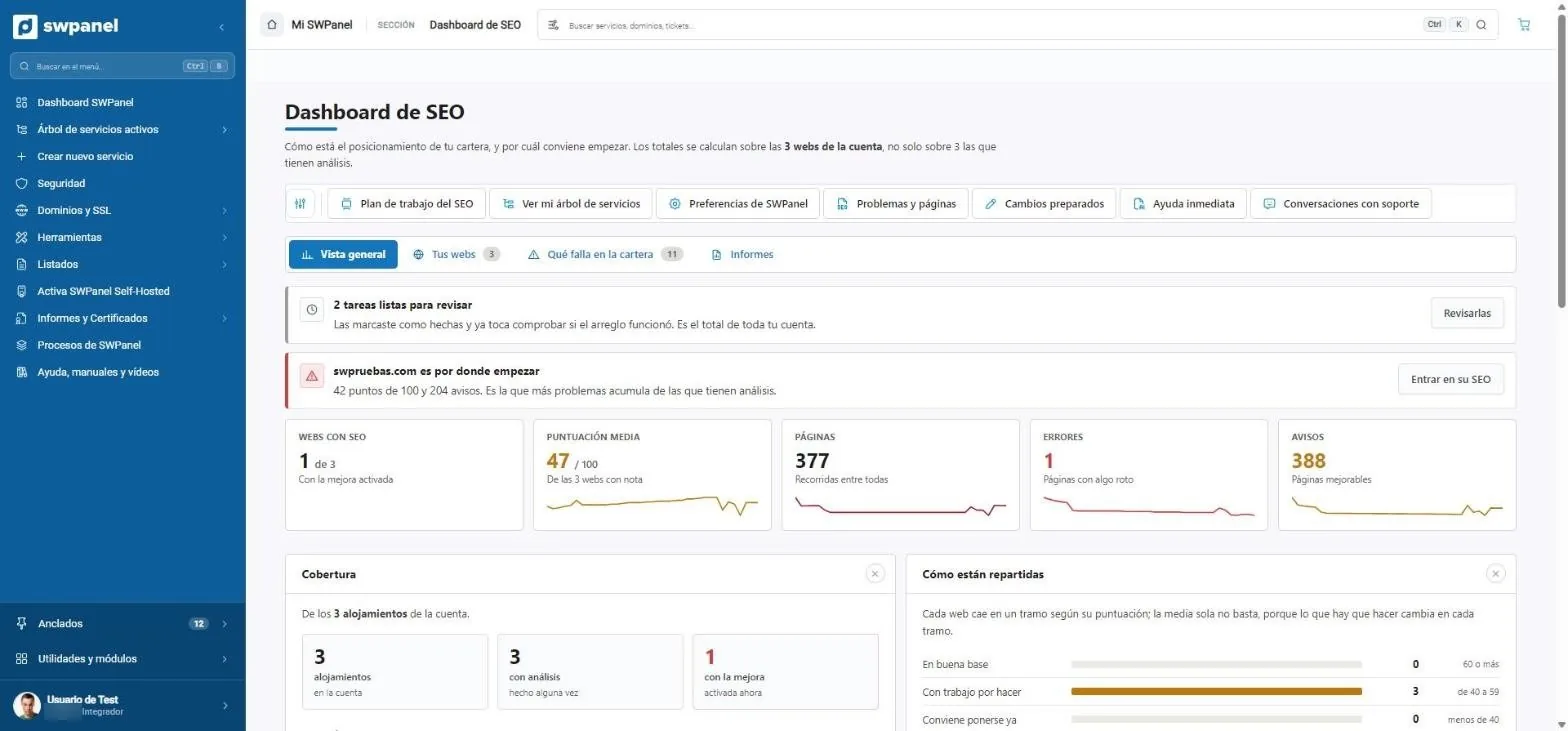
- Tasks ready to review: you marked the fix and it's time to check whether it worked.
- Where to start: the website with the most problems.
- Websites with SEO, average score, pages, errors and warnings.
- Work plan, problems, prepared changes and Instant help.
- How your websites are distributed by score.
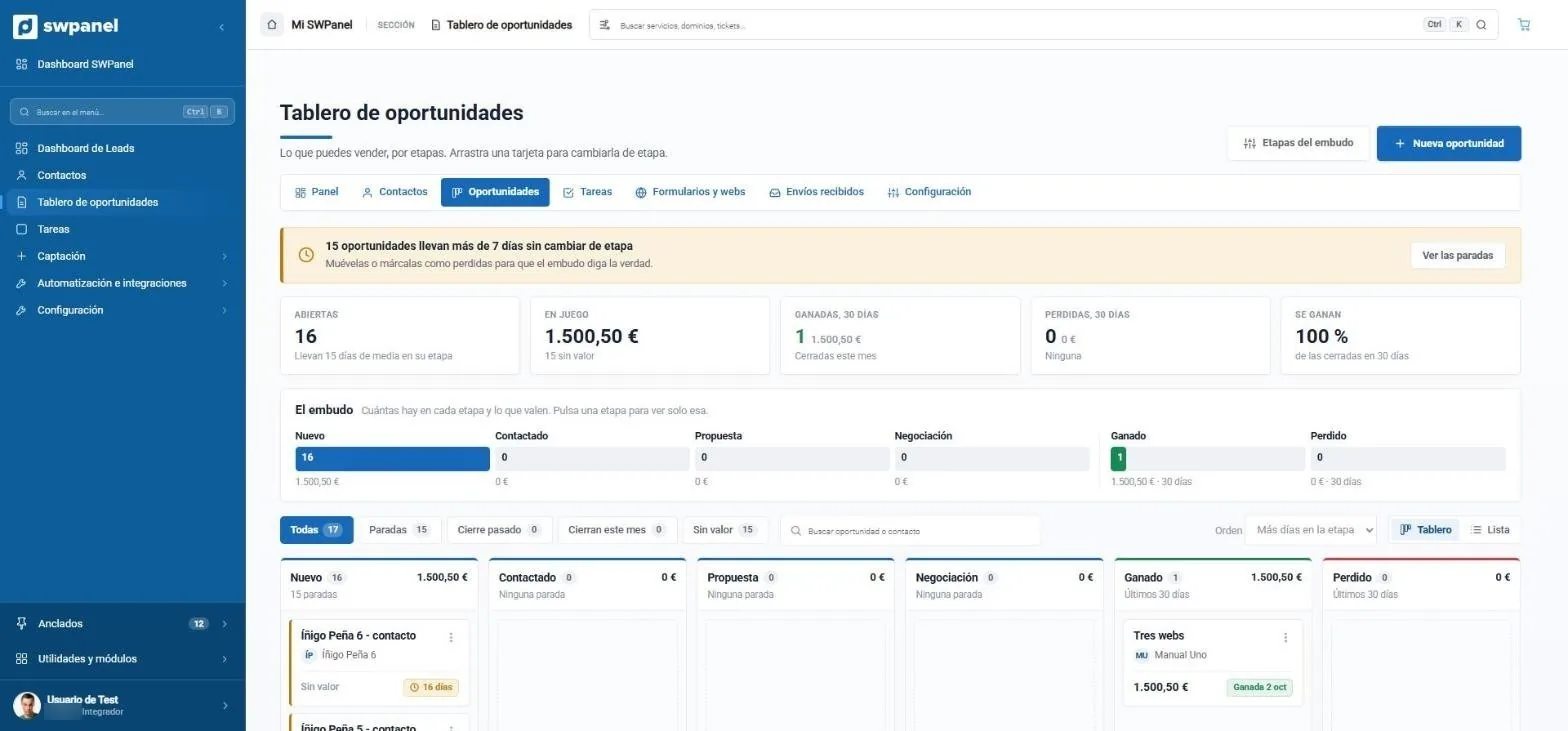
- What has stalled: 15 opportunities have been more than 7 days without changing stage.
- Open, in play, won and lost in 30 days and what share is won.
- The funnel at a glance: how many there are in each stage and what they're worth. Click one to see only that one.
- Funnel stages you can edit.
- New opportunity in one click.
- How long each one has been in its stage. Drag the card to change it.
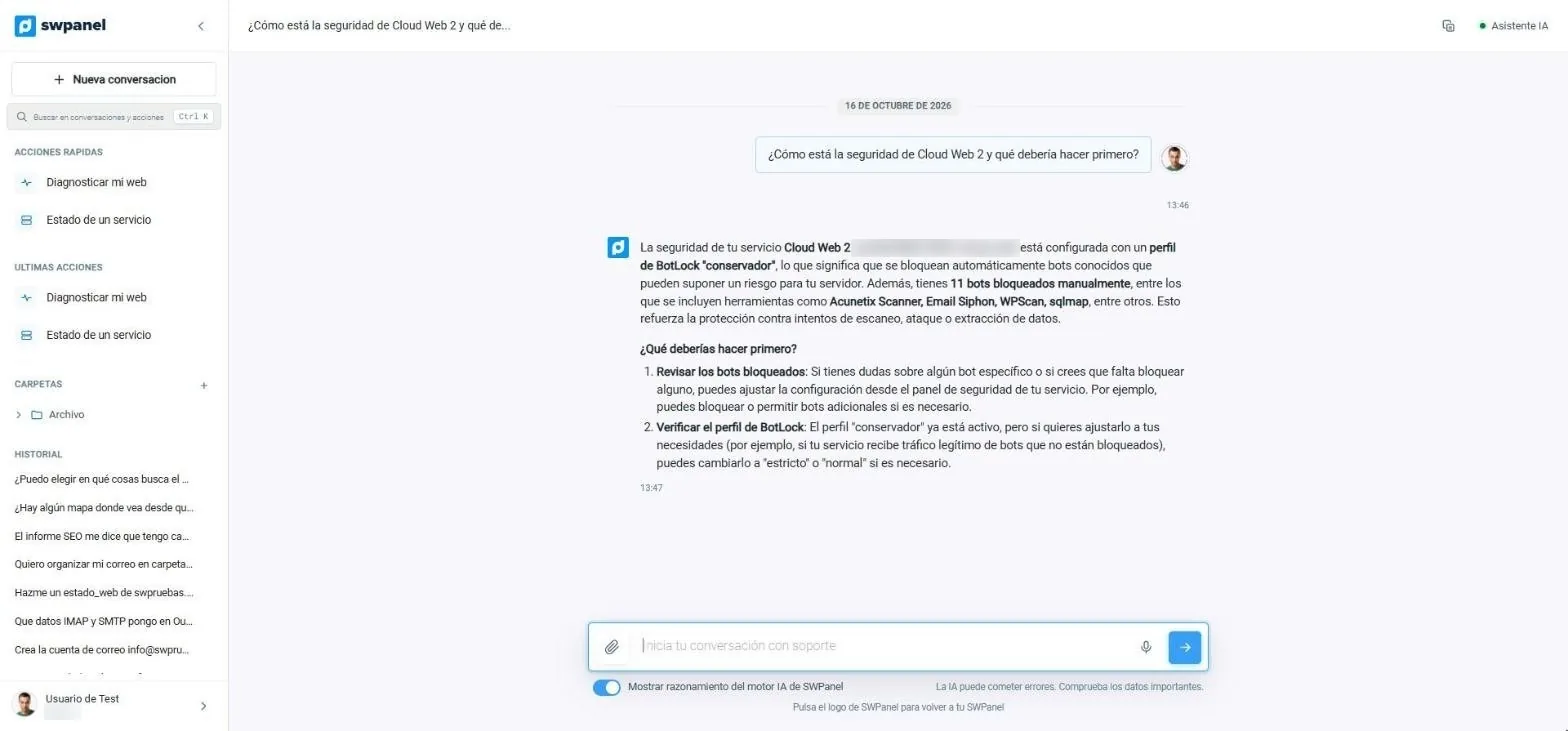
- The side menu: quick actions, latest actions, folders and conversation history.
- The question, in your own words.
- The answer uses your service's real data: blocking profile and blocked bots.
- What to do first, in steps.
- You can see the reasoning of the SWPanel AI engine.
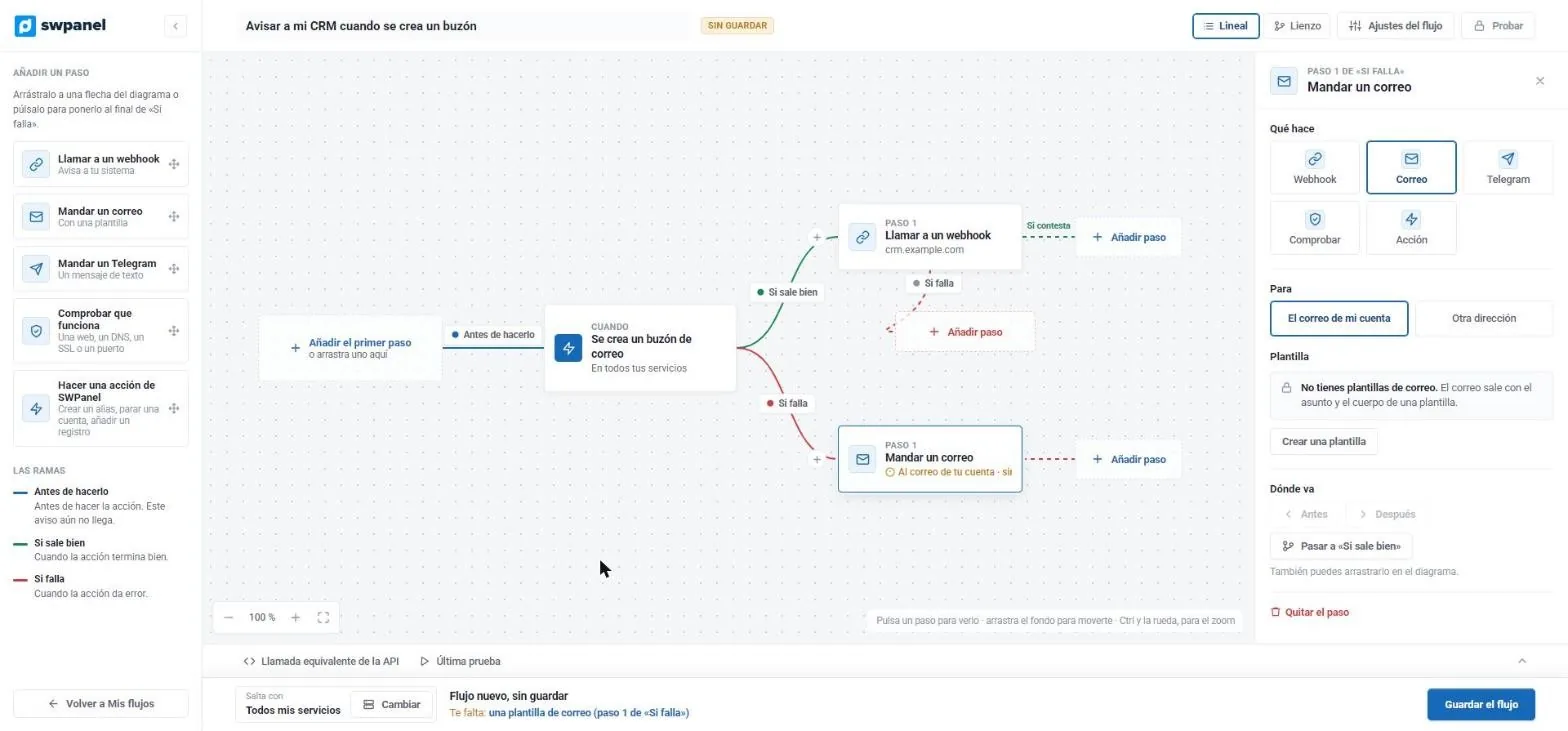
- The event that triggers it: a mailbox is created.
- If it succeeds, it calls your CRM's webhook.
- If it fails, it sends you an email.
- Each step is configured here: recipient, template, order.
- It warns you of what's missing before saving.
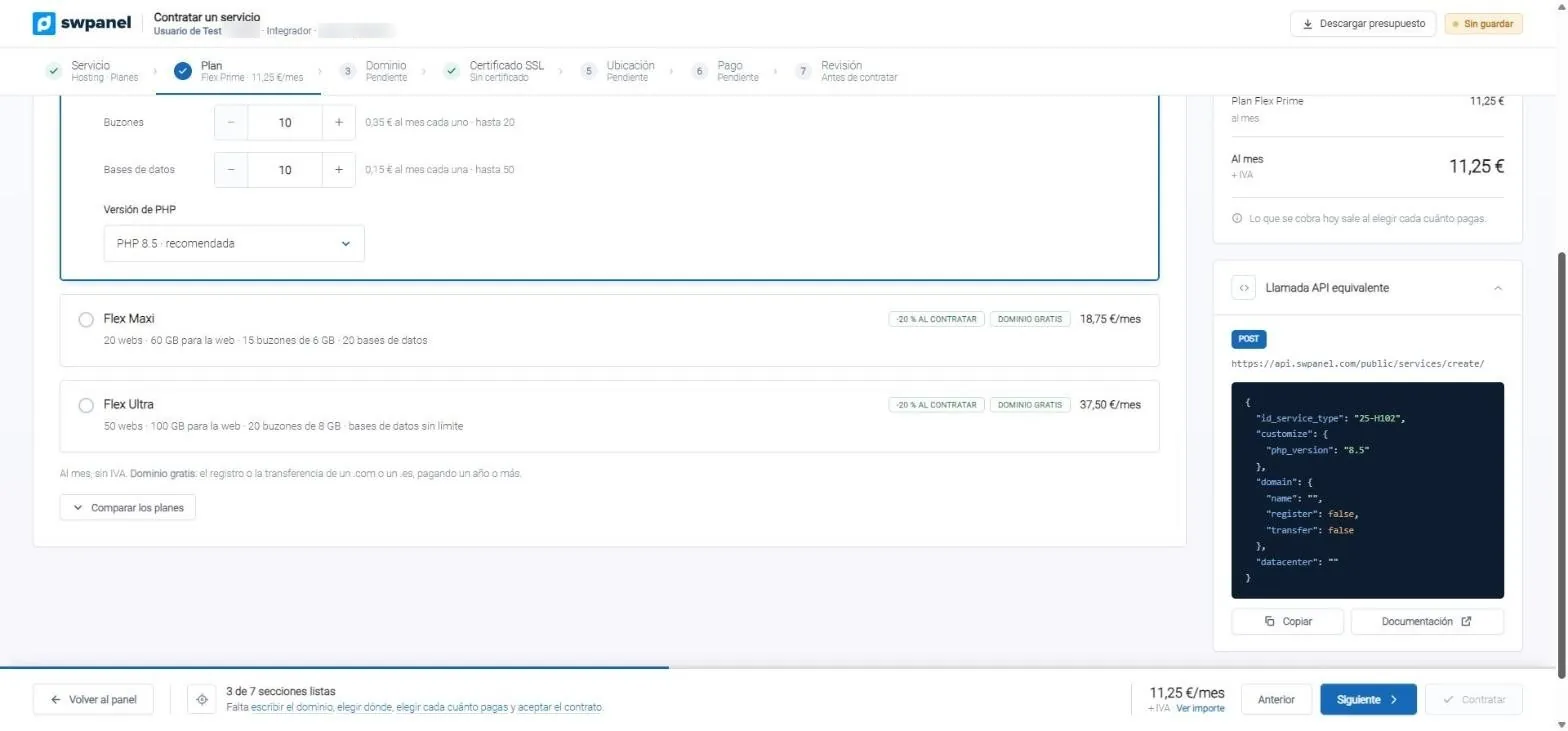
- Seven steps, with completed ones in green.
- The plans with what each one includes.
- The exact JSON to do the same from your code.
SWPanel ecosystem
It is much more than a control panel. It is an ecosystem.
A way to manage any infrastructure, to work and to do business. Its modules talk to each other and improve every day.
A way to manage infrastructure
Servers from any provider, your own data center, hostings, domains and email in one tree and one map. No panel per machine and no load on your servers.
Self-HostedA way to work
Users and access profiles, traceability of every change, flows that react on their own and an API behind every screen. Your processes, inside SWPanel.
FlowsAdvice and support
Consultants that tell you every night what's urgent and what to do, an Instant Help that answers with your data, support and training for your team.
AI in SWPanelContinuous improvement
The SOC analyzes every service daily, the 360 Security comes back to check each fix and the resilience score tells you what to raise. A little better every day.
Security 360A way to do business
Sell under your brand, with a catalog, invoices and payments, and turn modules into services your customers pay for every month. Doing business stops being the problem.
Business linesLower costs, more productivity
One platform instead of ten tools, up to 90 % fewer resources on your servers and an AI that saves you hours of diagnosis.
Why SWPanel- Infrastructure 11
- Security 360 10
- Artificial intelligence 4
- Customers and visibility 4
- Platform 5
- Your IT business 4
By and for IT solution integrators, with a 360 view: to improve, protect and optimize your processes, your services, your business, your customers and your resources.
How it works
All your infrastructure, without loading your servers
A lightweight agent lives on each server. The heavy lifting is done by SWPanel Core, the brain of the SaaS platform, with its add-ons: that's why you manage servers from any provider from one place and use up to 90 % fewer resources than with a panel that lives inside the server.
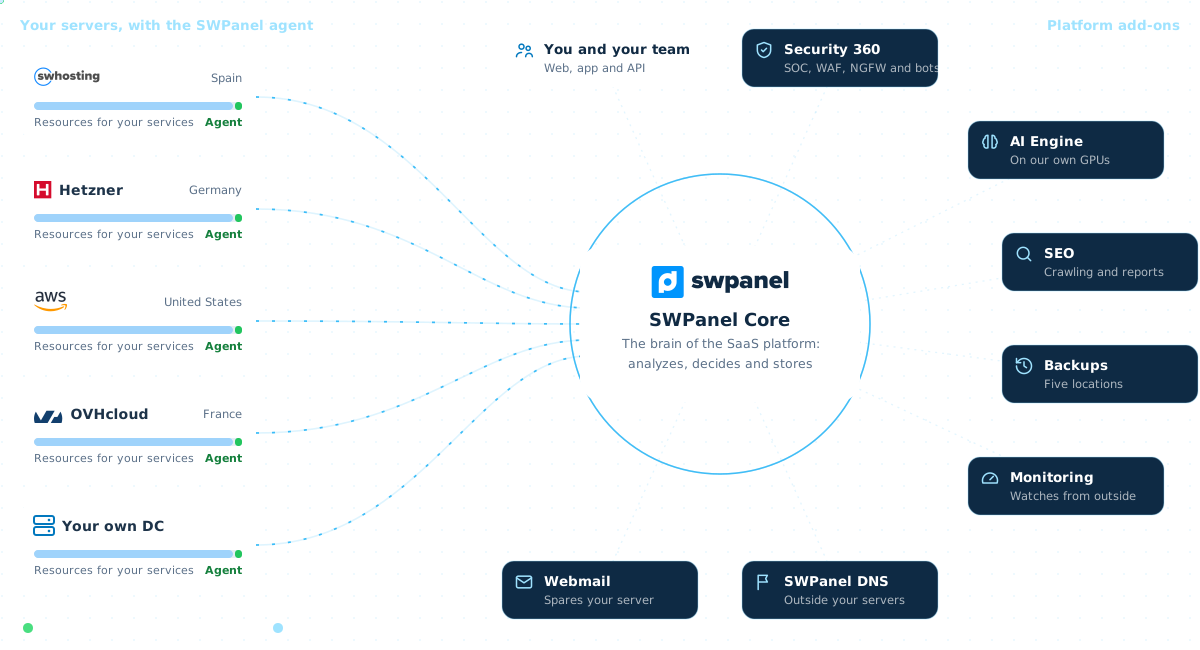
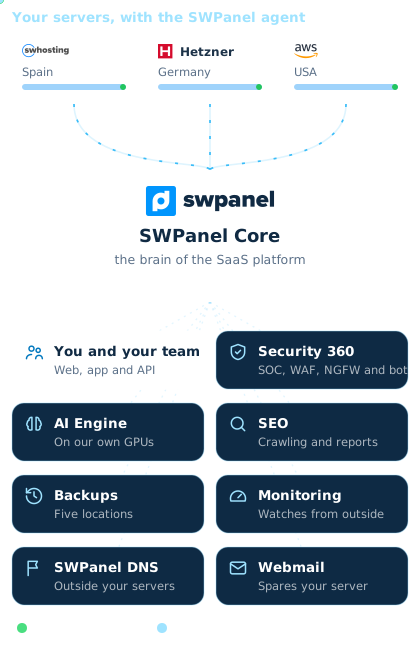
Illustration. The providers are examples.
-
A lightweight agent on every server It reads the logs little by little and only sends what matters. It doesn't run AI or build rules: it observes and proposes.
-
Sends up just enough Anomalies, a daily summary and a heartbeat. Normal visits and your websites' files don't travel.
-
SWPanel Core decides The platform's brain cross-checks the data with threat intelligence, the SOC and the AI engine. The heavy lifting happens here, not on your servers.
-
Sends down signed orders Block an IP, a new rule or a configuration change. Rules go through observation first and, if something fails, roll back.
How it's built
Modules per service and per account, and AI multiplies them
Security 360, Code Analyzer and SEO are paid for on each hosting, Cloud or website where you use them. Newsletter, Leads and RHA, once for the whole account. And the AI module adds its consultant to almost all of them. Without paying twice for the same thing.
- AI module One activation multiplies the rest
- Per service Paid on each hosting, Cloud or website where you use it
-
Security 360 Per hosting or CloudThe SOC for every service Eight layers, WAF, countries, bots, email and the code of every nightSecurity, country and bot consultants
-
Code Analyzer Per hosting or Cloud NewYour repository, reviewed on every push GitHub, GitLab, Gitea or Bitbucket, publishing and code auditAlready included: the AI Engine prepares the fix for every error, also as a Pull Request
-
SEO Per websiteOne level on each website Basic, Pro or Intelligence, and reportsReport summary and content ideas
- Per account Once for the whole account and your whole team
-
Newsletter Per accountCommunity and campaigns Contacts, sending, measurement and deliverabilityList analysis and improvement plan
-
Leads From EssentialLead capture and sales CRM Forms, funnel, tasks and rulesRecord assistant and next step
-
RHA Per licenseYour reseller business Your sales website, customers, catalog, invoices and payments
- And on its own: AI websites and stores and the AI Systems Administrator.
- The module and what it does
- What the AI module adds
- Nothing is paid twice
Security 360
Eight layers, with your service at the core
Like an onion: each request goes through the layers from the outside in, and what one stops never reaches the next. At the center, your service, analyzed and monitored every day by the SOC and the AI engine. Compare how it looks in our Data Centers or with Self-Hosted.


SWPanel Data Centers network
-
AntiDDoS Network edge
It watches volume and absorbs massive attacks before they enter the network. Automatic, nothing to configure.
-
Layer 4 firewall SWPanel network
At the perimeter: it looks at IP, port and protocol, and each IP lets through only what its profile allows. Your rules, from SWPanel; your IP blocks are applied on the machine itself.
-
Next-generation firewall SWPanel network
It inspects content by signatures and classifies each threat as critical, high, medium or low. It alerts or drops according to policy.
In front of your server
-
Your provider's network Outside SWPanel
Its DDoS protection and its firewall, whichever your server has contracted.
-
Your server's firewall Your server
The IP blocks you launch from SWPanel are applied on the machine itself.
On your server, with SWPanel
-
Country blocking Your web server
It looks at the IP's country. What you block leaves not a single line in the access log.
-
Bot blocking Your web server
It looks at who each visit claims to be. The robots you don't want get a 403.
-
Adaptive WAF Your web server
It inspects every HTTP request. Its rules are born from your attacks: first they observe, then they block.
-
Fail2Ban Your server
It watches failed logins to SSH and other services, and bans the IP that keeps trying.
Over all of them
-
SOC and AI engine Over all layers
Every day it analyzes what went through all of them, scores your service and tells you what to do, with a button for each thing.
In red, what stops at each layer; in green, what reaches your service.
With Self-Hosted the network is your provider's. What the next-generation firewall used to stop is slowed here by your server's WAF.
The layers, one by one- +10,000 servers managed from SWPanel
- -90% fewer resources compared with panels that live on the server
- 8 years of traceability person or AI, on every change
- 342,000 vulnerabilities scored in our threat intelligence
SWPanel Stories
Told by those who already use it
Real companies, with names and surnames, that manage their infrastructure with SWPanel.
Idiomatic
Linguistic services and international sworn translationWith SWPanel we guarantee the 24/7 availability of our translation platform and manage confidential documentation under strict GDPR compliance on European servers. A complete change in our daily efficiencyDaniel Creus Director · Idiomatic Read the full story -50% at the time of deployment 100% GDPR compliance. 99,9% guaranteed uptime. Collaboration Story
Teinor, s.a.
Generation of e-commerce pages.We have used this environment since February 2020 with a very satisfying experience: we moved our websites to dedicated servers fully managed by their technical team, with advanced security (firewalls, antivirus, anti-DDoS, backups and snapshots). We especially value the control panel, comprehensive, white-label and hosted outside the servers, and the 24x7 support, also by phone. We now run 9 servers hosting 120+ ecommerce sites and 24 Windows Servers. A true technology partner.Josep Serra CEO · Teinor, s.a. Read the full story Collaboration Story
SIL Informatica Arenys
IT equipment repair and maintenance, and web designWith SWPanel, we've gone from doing everything manually to managing almost everything from a single panel. I now save a lot of time and can meet my clients' needs quickly and easily. On top of that, I've always had a close, trusting relationship with the SW Hosting team.Josep Pérez Manager · SIL Informatica Arenys Read the full story
Business
Sell hosting and Cloud with your website or the one RHA builds for you
Put the “Order” button on the website you already have or launch a new one with RHA Web. Your customer signs up in three steps and pays with one of the 17 payment systems. The invoice is issued with Veri*Factu and you provide support from SWPanel. Under your brand.
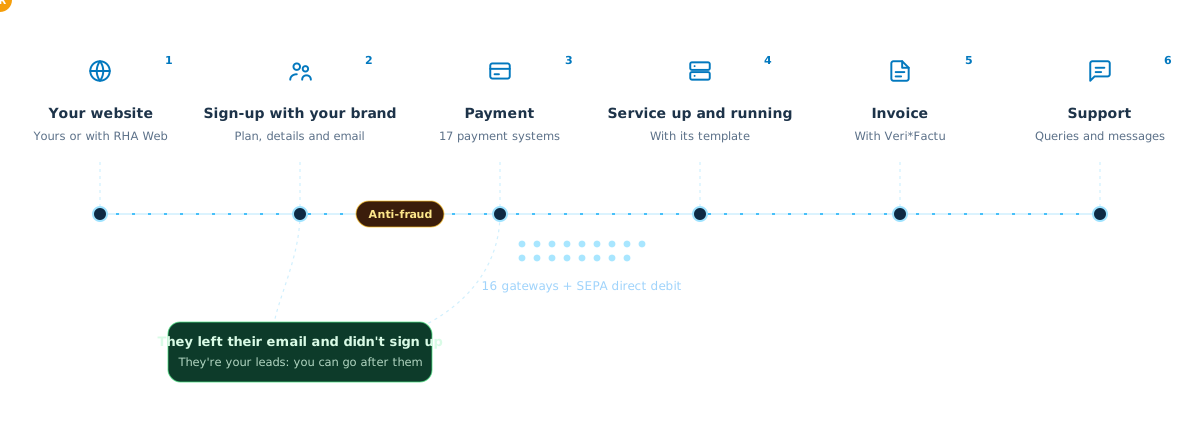
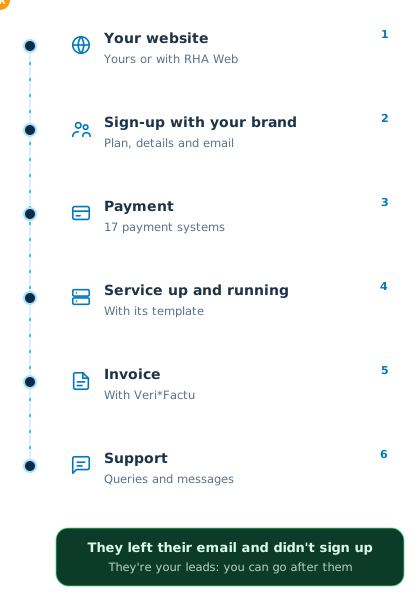
- Sell from your website, or from a new one Put each plan's link on the “Order” button of your website. Don't have one? RHA Web creates one for you, with your plans and your brand.
- Get paid however your customer wants 16 payment gateways, SEPA direct debit and bank transfer, with each one's currencies in view.
- Track every sale You know how many come in, how many leave their email and how many order, and who to follow up with.
RHA Web
No website to sell from? RHA builds it for you
You pick a template, add your brand and SWPanel builds your company website with your hosting and Cloud plans, your domains, your prices and your payments. What it sells goes into your RHA like any other sale.
- 20 templates: hosting provider, ways of selling and classics
- Your hosting and Cloud plans, domains, prices and payments, kept up to date from RHA
- Legal texts written with your company details
- Edited on the website itself and published on your hosting, with your domain
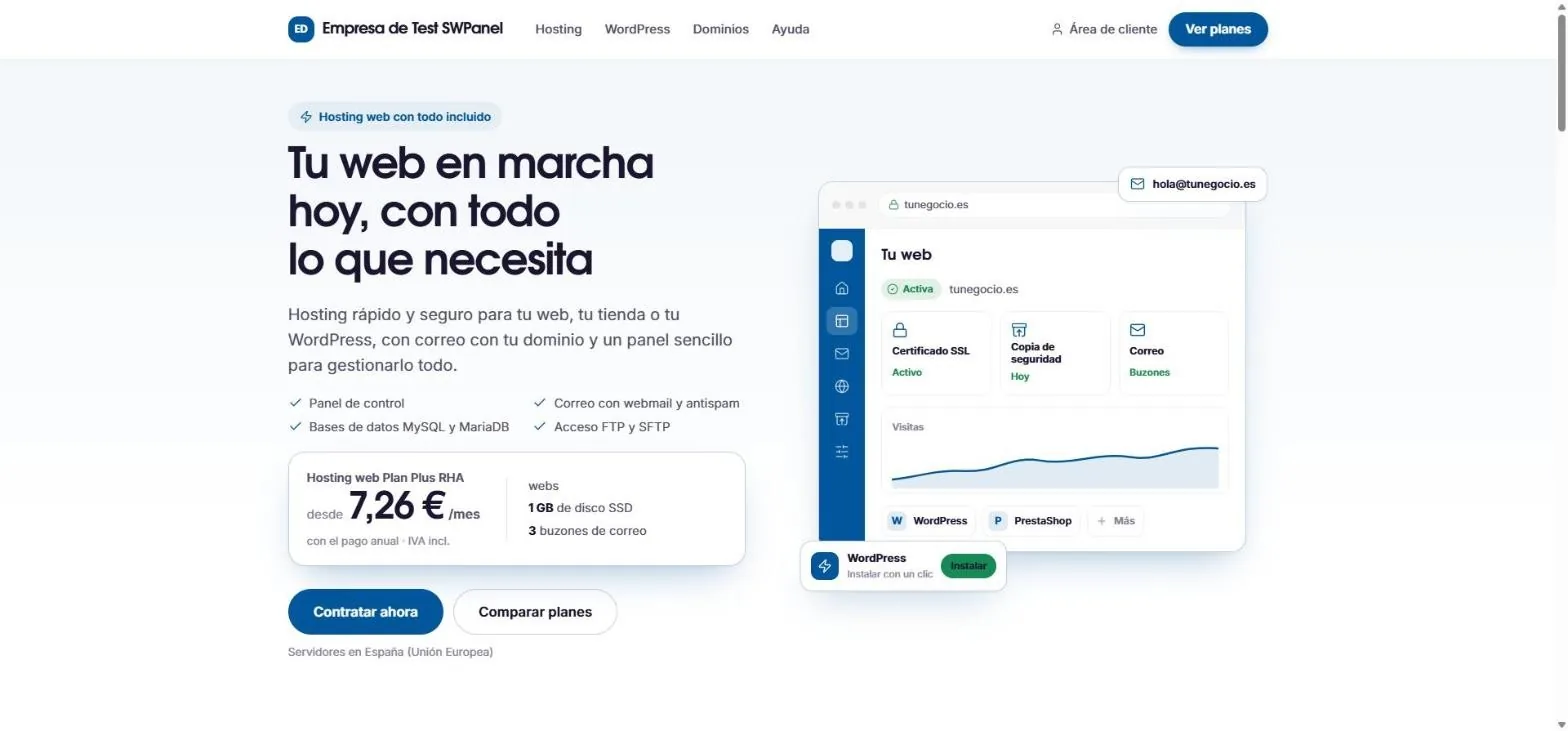
A test website made with RHA Web, using the Cloud template as it is.
Next event · In person in Girona
Official Presentation of SWPanel 2027
AI works with you. A hands-on day: the main talk on AI in SWPanel, five workshops to choose from and a Data Center tour.
- Friday 27 November · From 10:00 to 17:30
- SW Hosting · Girona Data Center
- Free
- Main talk and demos
- Five 75-minute workshops
- Data Center tour
- Breakfast and lunch included
Frequently asked questions
Six answers before you start
Your IT, calm
Create your account, connect a server or a hosting plan and see what SWPanel finds. No card and nothing to install.